I'm going to be completely honest with you—I never thought I'd become one of those people obsessed with their health data. But here I am, checking my sleep scores every morning like some kind of wellness-obsessed robot. The thing is, once you start tracking, you can't stop. It's addictive in the best possible way.
The question I get asked more than any other these days is this: "Should I get an Oura Ring or an Apple Watch?" And honestly? It's a great question with a complicated answer. These two devices look nothing alike, function completely differently, and yet they're constantly compared to each other. Why? Because they both promise to help you understand your health better—they just take wildly different approaches to doing it.
I've been wearing both the Oura Ring 4 and the Apple Watch Series 10 simultaneously for most of 2025. Yes, I look a little ridiculous with a smart ring on one hand and a smartwatch on my wrist, but I wanted to really understand the differences. After hundreds of nights of sleep data, countless workouts, and more hours staring at health metrics than I care to admit, I finally feel qualified to give you the real breakdown.
So grab a coffee (or don't, if your Oura Ring is telling you your body is already stressed), and let me walk you through everything you need to know about these two wearables.
The Fundamental Difference: What Are You Actually Buying?
Before we dive into the specifics, I think it's crucial to understand something: the Oura Ring and Apple Watch are not trying to be the same thing. Comparing them directly is a bit like comparing a sports car to an SUV—they both get you from point A to point B, but they're designed for completely different purposes.
The Apple Watch is, at its core, a tiny computer strapped to your wrist. It happens to have excellent health tracking features, but it also makes phone calls, sends texts, plays music, gives you directions, controls your smart home, pays for your coffee, and probably does your taxes if you ask nicely. It's the Swiss Army knife of wearables—there's almost nothing it can't do.
The Oura Ring, on the other hand, is laser-focused on one thing: helping you understand your body's recovery, sleep, and overall readiness. It doesn't try to be your phone, your music player, or your personal assistant. It just sits on your finger, quietly collecting data, and then gives you insights when you open the app. That's it. That's the entire value proposition.
This philosophical difference shapes everything about how these devices work, and it's the first thing you need to understand before making a decision.
Design and Comfort
Oura Ring 4
Let me tell you something that surprised me: I forget I'm wearing the Oura Ring all the time. Like, completely forget. It looks like a regular ring—a slightly chunky wedding band, maybe—and it feels like one too. Unless someone knows what to look for, they'd never guess I'm wearing a piece of health technology on my finger.
The Oura Ring 4 is the best-looking and most comfortable version Oura has ever made. It's constructed entirely of titanium, comes in six finishes (Silver, Black, Brushed Silver, Stealth, Gold, and Rose Gold), and is available in sizes 4 through 15. The previous generation had three bumpy sensors on the inside that some people found uncomfortable, but Oura has completely redesigned this. The Ring 4 is basically smooth all around, inside and out, with recessed sensors that you barely notice.
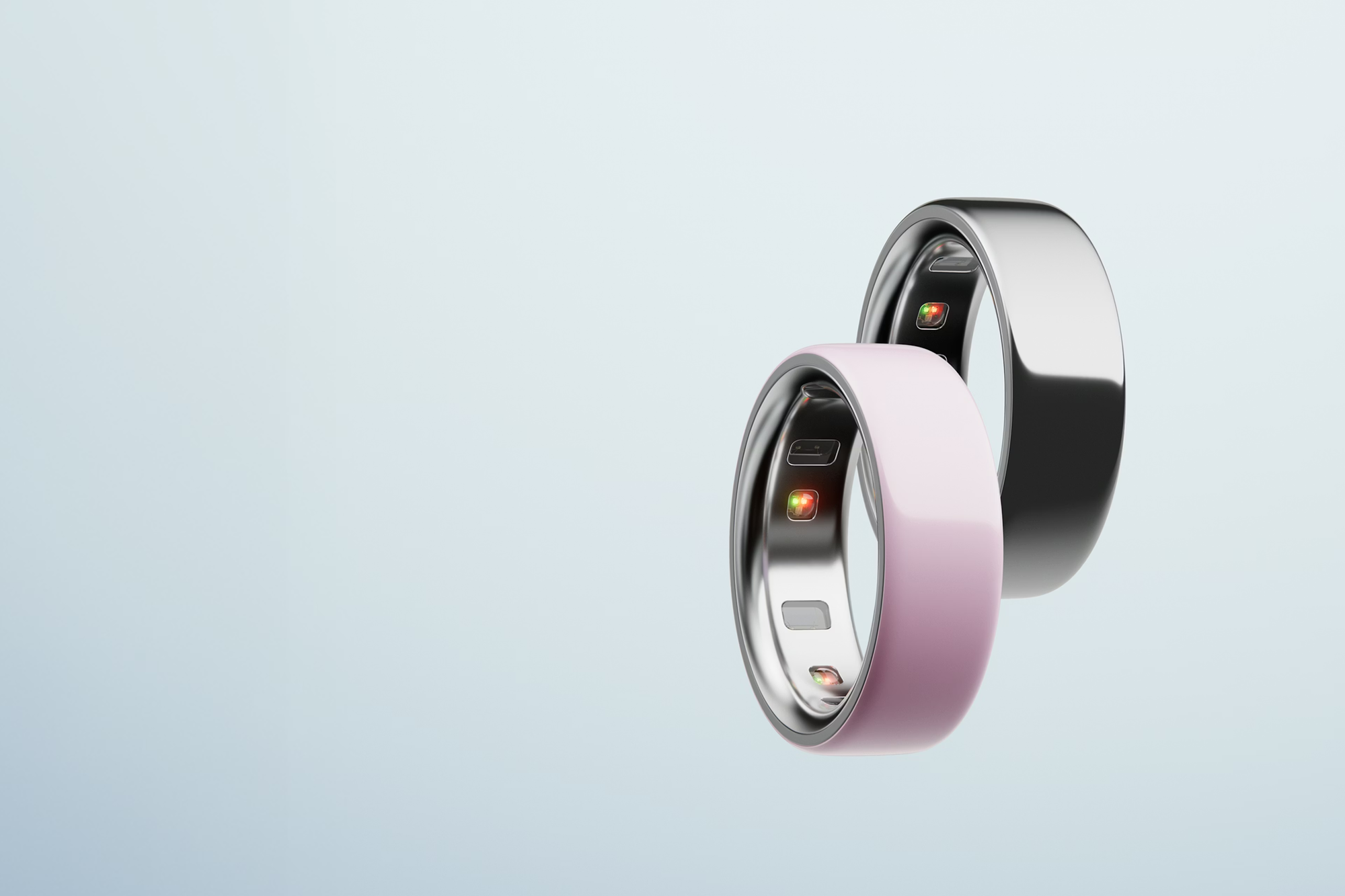
At 7.9mm wide and 2.8mm thick, weighing between 3.3 and 5.2 grams depending on your size, it's not quite as slim as a regular ring, but it's close. After a few days of wearing it, the slight extra bulk becomes invisible to you. I wear mine on my ring finger, but you can wear it on any finger—the sensors work the same regardless.
The aesthetic flexibility is a real selling point. You can wear the Oura Ring to a business meeting, to the gym, to a wedding, or to bed, and it never looks out of place. It's genuinely designed as jewelry first and technology second.
Apple Watch Series 10
The Apple Watch takes the opposite approach. It's unmistakably technology—a little computer on your wrist with a bright screen and various buttons. That said, the Series 10 is the most comfortable Apple Watch ever made. It's noticeably thinner than previous generations, with a larger display and a more refined design.
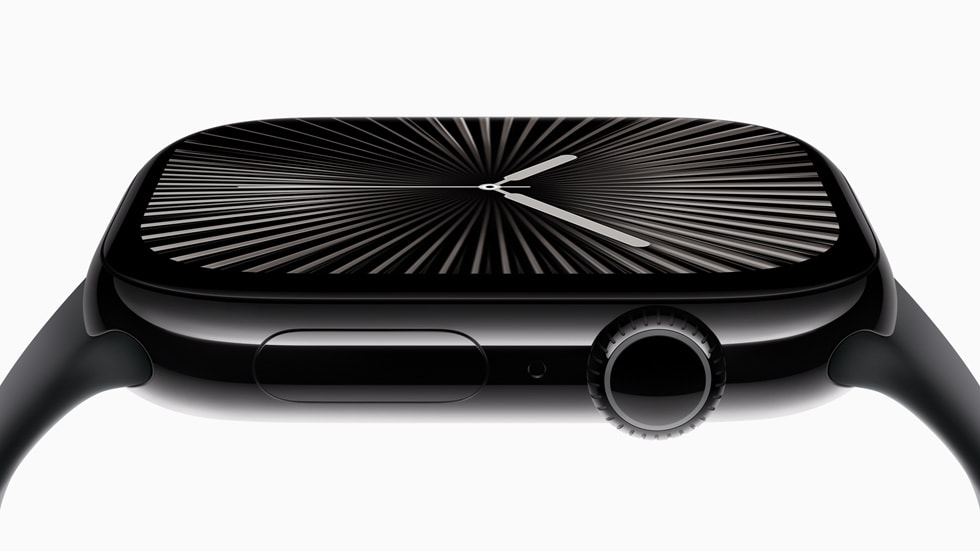
The Series 10 comes in two sizes (42mm and 46mm) and multiple finishes, including aluminum and titanium options. There's an almost infinite variety of bands available, from sporty silicone to elegant leather to high-end metal links. You can customize it to match virtually any style or occasion.
But let's be real: an Apple Watch is always going to look like a smartwatch. Some people love that—they want the world to know they're tracking their health and staying connected. Others find it too techy or conspicuous for certain situations.
The Comfort Question
Here's where things get interesting. Both devices are comfortable enough to wear 24/7, but they feel completely different.
The Apple Watch is there. You're always aware of it. It buzzes with notifications, lights up when you raise your wrist, and occasionally reminds you to stand up. Some people love this constant connection. Others find it exhausting.
The Oura Ring is invisible. No notifications (by design), no screen lighting up, no haptic buzzes. You put it on, forget about it, and check your data when you want to—not when the device demands your attention.
For sleep specifically, the Oura Ring wins by a mile. Wearing a watch to bed feels weird at first and never really stops feeling weird. Wearing a ring to bed? Totally natural. If sleep tracking is your primary goal, this difference alone might sway your decision.
Sleep Tracking
Let's talk about sleep, because this is where the Oura Ring absolutely dominates the conversation.
Oura's Sleep Tracking Excellence
Sleep tracking is Oura's bread and butter. When you wake up in the morning and check the app, you get a comprehensive breakdown of your night that goes far beyond "you slept 7 hours."
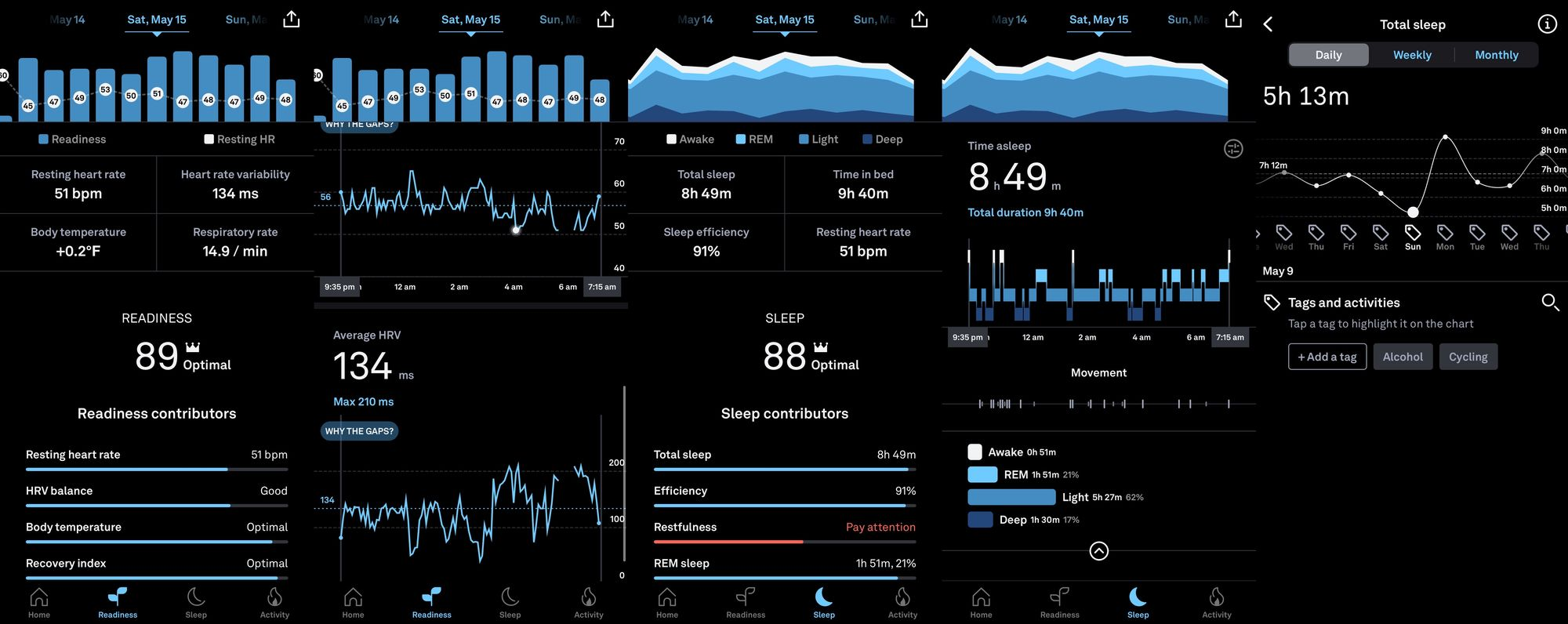
Oura tracks your time in each sleep stage—REM, light (core), and deep sleep—and presents it in an easy-to-understand format. It monitors your resting heart rate throughout the night, your heart rate variability (HRV), your respiratory rate, and your body temperature. From all of this data, it calculates your Sleep Score, a number from 0 to 100 that tells you how restorative your sleep was.
But here's what makes Oura special: it doesn't just give you numbers. It gives you context. If your sleep score is lower than usual, the app will tell you why. Maybe you ate too late. Maybe you had alcohol. Maybe you've been training too hard. This contextualization turns raw data into actionable insights.
In a peer-reviewed study published in 2024 comparing sleep-tracking accuracy across devices, the Oura Ring outperformed both Fitbit and Apple Watch in sleep stage detection sensitivity and precision. That's not marketing speak—that's actual scientific validation.
The Ring also learns your patterns over time. The more you wear it, the more personalized your insights become. After a few weeks, it can predict when you're about to get sick (often before you feel symptoms) based on subtle changes in your vital signs.
Apple Watch Sleep Tracking
The Apple Watch has significantly improved its sleep tracking over the years, and with Series 10, it's genuinely useful. It now tracks sleep stages (REM, Core, and Deep), monitors heart rate and respiratory rate during sleep, and provides a Sleep Score from 0 to 100 based on duration, consistency, and interruptions.
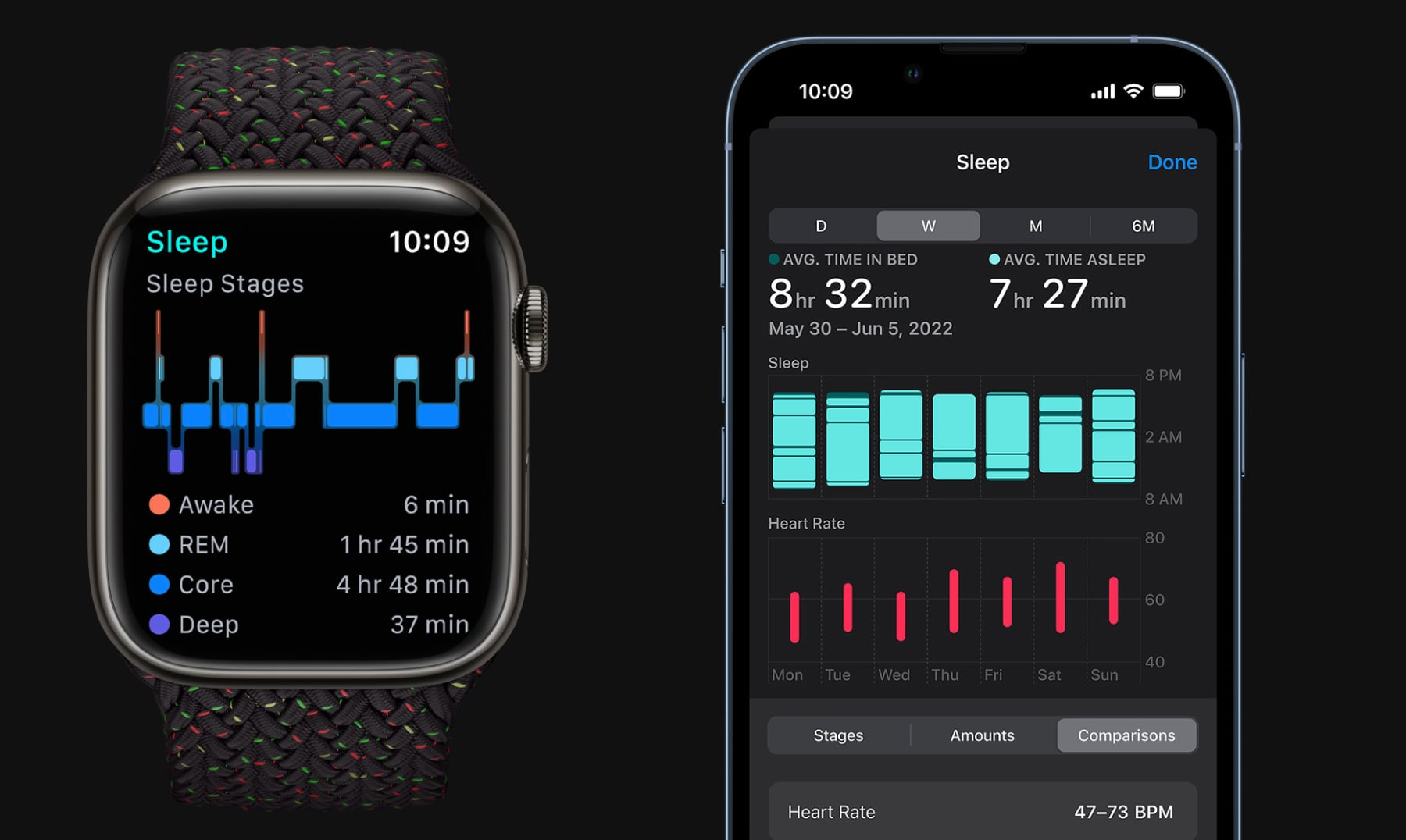
One genuinely impressive feature is the new sleep apnea detection. Using the accelerometer to monitor breathing patterns, the Apple Watch can identify signs of moderate to severe sleep apnea and alert you to discuss it with your doctor. This is an FDA-cleared feature that could legitimately save lives, given that most people with sleep apnea go undiagnosed.
The Vitals app on Apple Watch also shows your overnight health metrics at a glance—heart rate, respiratory rate, wrist temperature, and sleep duration—which is helpful for identifying when something's off.
But here's the honest truth: Apple Watch sleep tracking feels like an afterthought compared to Oura. The data is surface-level, the insights are minimal, and the experience of wearing a watch to bed is less pleasant than wearing a ring. If deep sleep insights are your priority, Oura is the clear winner.
The Battery Problem
There's also a practical issue with Apple Watch sleep tracking: battery life. The Apple Watch Series 10 lasts about 18-26 hours on a single charge in typical use. If you want to track your sleep, you need to find time during the day to charge it, which means you're either charging it in the evening (missing data before you fall asleep) or in the morning (missing data when you might still be in bed).
The Oura Ring 4 lasts up to 8 days on a single charge. Eight days! You charge it for 30 minutes once a week and forget about it. For sleep tracking specifically, this battery difference is huge.
Fitness and Workout Tracking
If sleep is where Oura dominates, fitness tracking is where Apple Watch shines.
Apple Watch as a Fitness Powerhouse
The Apple Watch is, frankly, one of the best fitness trackers ever made. It can track over 80 different types of workouts—running, cycling, swimming, strength training, yoga, HIIT, rowing, elliptical, and dozens more. It automatically detects when you start many common activities and begins logging data without you having to do anything.
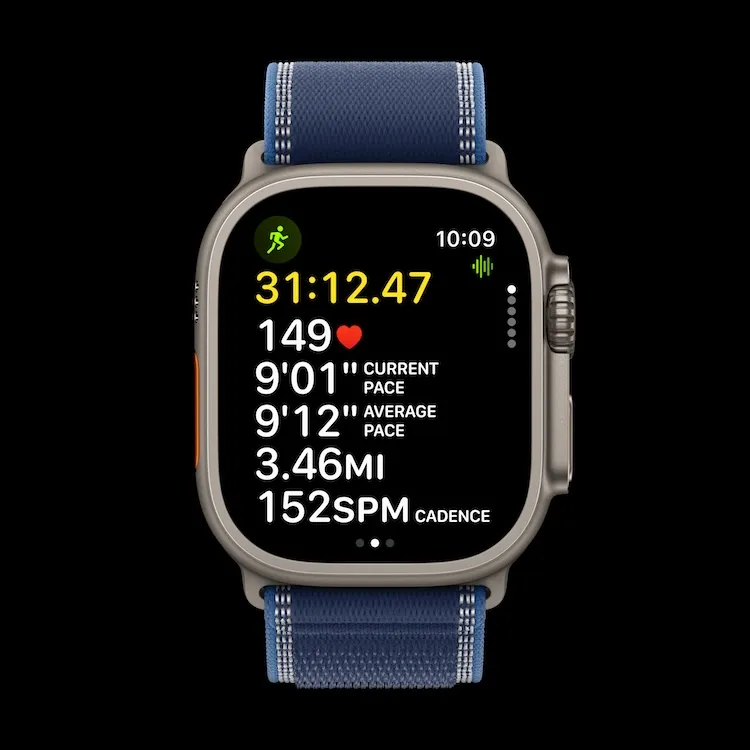
The built-in GPS means you can leave your phone at home for runs and still get accurate pace, distance, and route data. The heart rate monitoring during exercise is excellent, and the new Training Load feature helps you understand how your workouts are affecting your body over time.
Then there are the Activity Rings—those three circles (Move, Exercise, Stand) that gamify your daily activity and make closing them oddly satisfying. There's a reason people become obsessed with their rings. The psychology of streak maintenance is powerful, and Apple leverages it brilliantly.
The Series 10 also brings features for specific activities. There's a new Tides app for beach lovers, expanded Oceanic+ snorkeling features, and improved swimming metrics. If you're an athlete or serious about fitness, the Apple Watch gives you everything you could possibly want.
Oura's Fitness Approach
The Oura Ring takes a fundamentally different approach to fitness. It tracks your daily activity—steps, calories burned, and basic movement patterns—but it doesn't position itself as a workout device. You can't glance at your finger mid-run to check your pace because there's no screen.
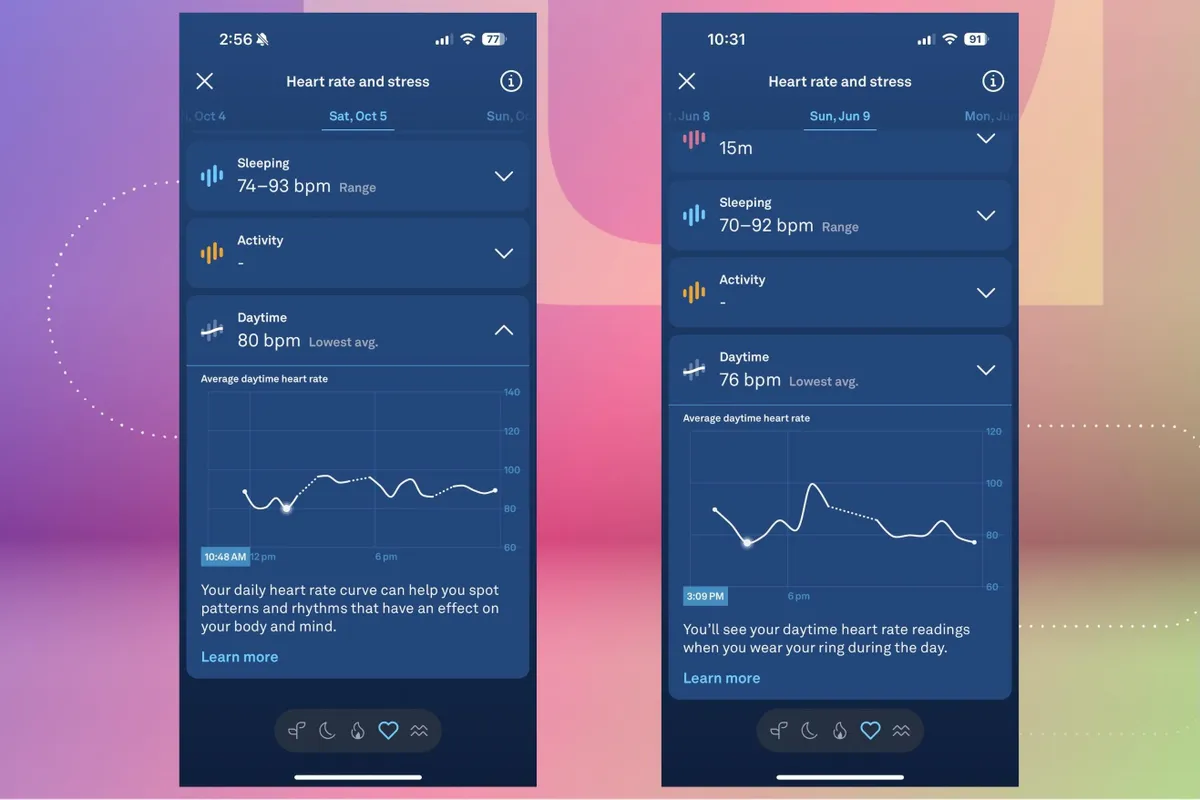
Oura does offer automatic activity detection for about 40 different activities, including walking, running, cycling, and more. The app will recognize when you've exercised and log it, but the data is basic compared to what the Apple Watch provides. You get duration, heart rate, and calories, but not the detailed split times, GPS routes, or workout-specific metrics that athletes crave.
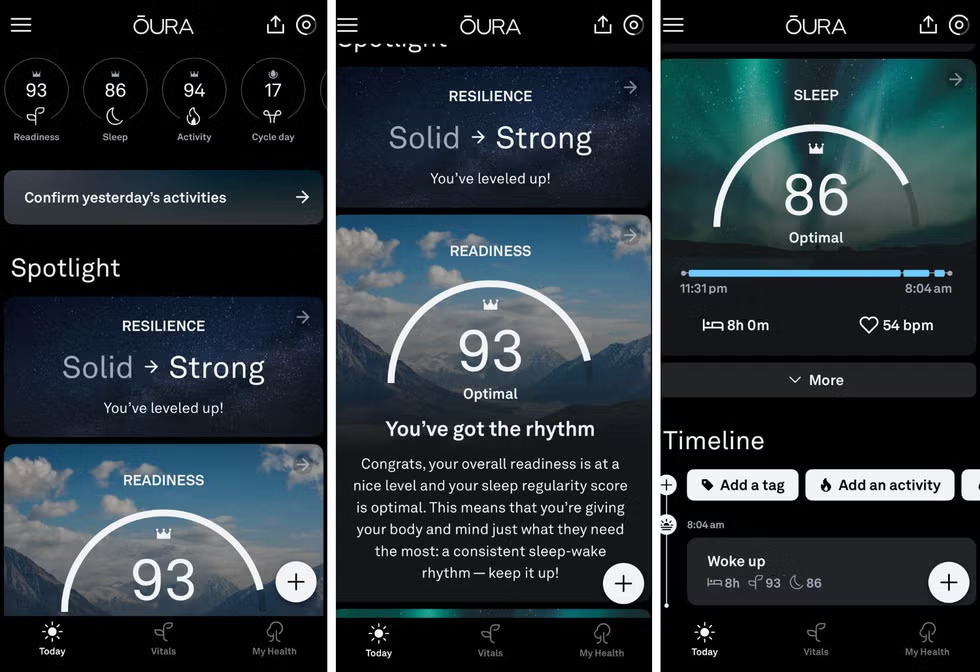
Where Oura shines in the fitness category is recovery. Rather than pushing you to work out harder, Oura tells you when you're ready to push and when you need to rest. The Readiness Score takes into account your recent sleep, HRV, body temperature, and activity levels to give you a number from 0 to 100 representing how prepared your body is for strain.
If your Readiness is high, go ahead and crush that workout. If it's low, maybe take a rest day instead of pushing through and risking injury or illness. This recovery-focused approach is incredibly valuable for avoiding overtraining, but it's very different from the "close your rings every day" mentality of the Apple Watch.
Can They Work Together?
Here's an interesting option: some people use both. They wear the Oura Ring for sleep and recovery insights, and the Apple Watch for workout tracking during the day. Oura integrates with Apple Health, so your data from both devices can live in the same ecosystem.
Is this overkill for most people? Probably. But if you're serious about both fitness performance and recovery optimization, there's an argument for the combination.
Health Features
Both devices offer extensive health monitoring beyond sleep and fitness. Let's break down what each can do.
Oura Ring Health Features
The Oura Ring 4 tracks over 50 health metrics, including:
Heart rate (24/7 resting heart rate monitoring). Heart rate variability (HRV), which is one of the best indicators of overall stress and recovery. Body temperature trends, which can indicate illness before you feel symptoms. Blood oxygen levels (SpO2). Respiratory rate during sleep. The Readiness Score, combining multiple metrics into one actionable number. Daytime Stress monitoring, showing how your body responds to stress throughout the day. Cycle tracking and period prediction for women, with ovulation estimates based on temperature changes.
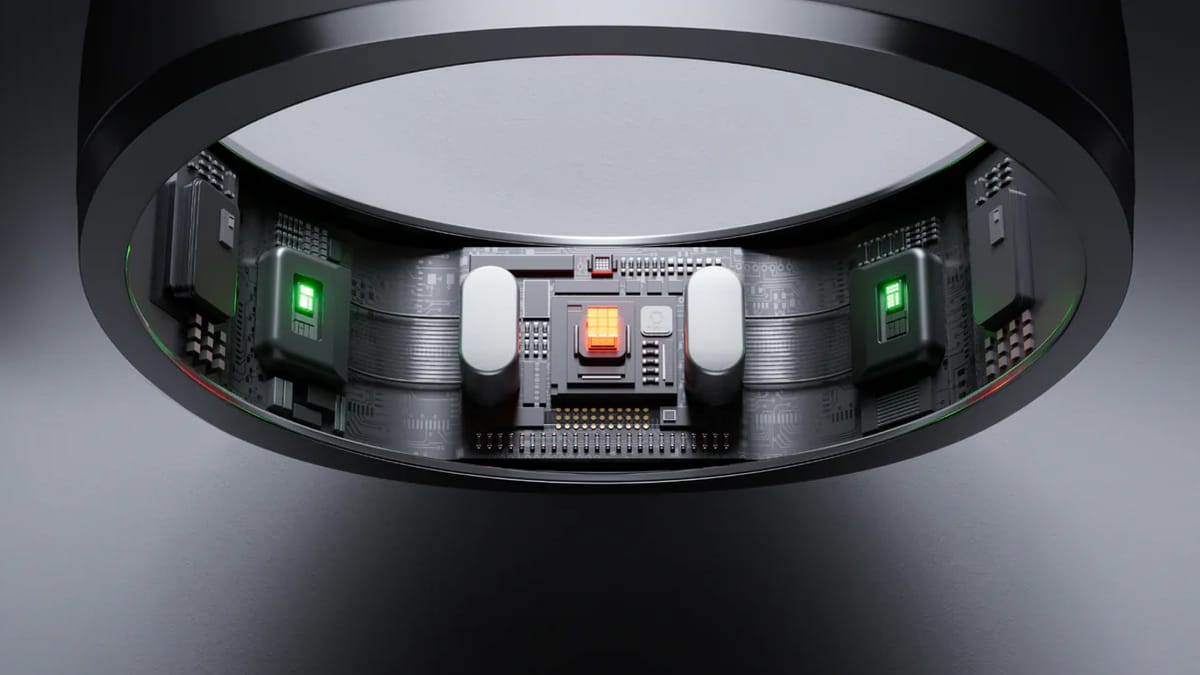
The new "Smart Sensing" technology in the Ring 4 uses an 18-path multi-wavelength sensor system that adapts to your unique physiology over time, improving accuracy as it learns your body.
One feature I particularly love is the Symptom Radar. Multiple users report that Oura detected their body was under stress or fighting something off days before they actually felt sick. When your temperature rises slightly and your HRV drops, Oura puts you in "Rest Mode" and adjusts your daily goals to prioritize recovery.
Apple Watch Health Features
The Apple Watch offers an impressive array of health features:
Heart rate monitoring (continuous and exercise-specific). Heart rate variability (HRV). Blood oxygen monitoring (SpO2) — though this was temporarily unavailable in the US due to a patent dispute and has recently been redesigned. ECG (electrocardiogram) capability to detect irregular heart rhythms like atrial fibrillation. This is an FDA-cleared feature that has legitimately saved lives. Sleep apnea detection, new with Series 10. Fall detection, which can automatically call emergency services if you take a hard fall. Crash detection for car accidents. Cycle tracking with ovulation estimates based on wrist temperature. The Vitals app for overnight health metrics. Hearing health monitoring when paired with AirPods.
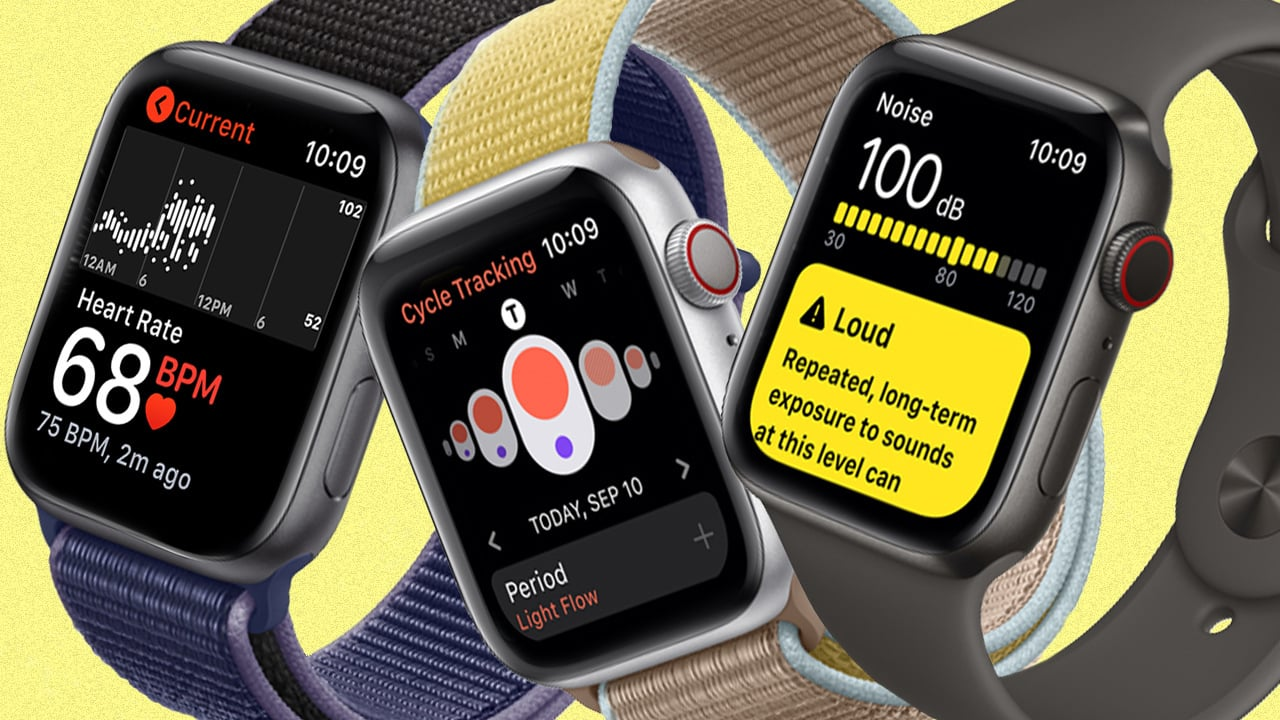
The Apple Watch also has emergency features that the Oura Ring simply can't match. The ability to call emergency services, detect falls and car crashes, and even contact help via satellite (on Ultra models) makes it a genuine safety device, not just a health tracker.
The Medical-Grade Question
Neither device is a medical device, and both companies are careful to say their products aren't meant to diagnose medical conditions. However, both have received FDA clearance for specific features—Oura for its sleep staging algorithm, Apple for its ECG and sleep apnea detection.
In terms of raw accuracy for passive health monitoring, multiple studies suggest the Oura Ring may have an edge due to its position on the finger (where blood vessels are closer to the skin) compared to the wrist. Doctors often measure vital signs at the finger rather than the wrist for this reason. That said, both devices are accurate enough for consumer wellness purposes.
Smart Features
This is the category where comparison almost feels unfair. The Apple Watch is a full-featured smartwatch. The Oura Ring is not.
What Apple Watch Can Do
Take and make phone calls (even without your iPhone nearby on cellular models). Send and receive texts. Stream music from Apple Music, Spotify, and other services. Make contactless payments with Apple Pay. Get turn-by-turn navigation. Control your smart home devices. Access thousands of third-party apps. Use Siri for voice commands. Track your phone if you lose it. Show notifications from any app on your phone.
The Apple Watch is essentially an iPhone on your wrist. For people who want to stay connected without constantly pulling out their phone, it's invaluable.
What Oura Ring Can Do
Sync with your phone to display data in the app. That's... basically it.
The Oura Ring has no screen, no speaker, no microphone, no apps, and no notifications. This is by design. Oura believes that constant connectivity is part of the problem with modern health—it contributes to stress and distraction. The ring's purpose is to help you understand your health when you choose to look at it, not to demand your attention throughout the day.
Some people find this philosophy refreshing. Others find it limiting. Your preference depends entirely on what you want from a wearable.
Battery Life
Battery life is one of the starkest differences between these devices.
Oura Ring 4 Battery Life
Up to 8 days on a single charge. In my testing, I consistently got 6-7 days of actual use, which still means I only charge it once a week. A 30-minute charge gets you to about 80% battery.
The charger itself is elegant—you slip the ring onto a small stand that looks like a jewelry holder. It's unobtrusive and actually quite nice-looking on a nightstand.
Apple Watch Series 10 Battery Life
About 18-26 hours depending on usage, with Apple officially claiming 18 hours. The Series 10 is the fastest-charging Apple Watch ever—you can get 8 hours of sleep tracking from just 8 minutes of charging, and 80% battery in about 30 minutes.
But the reality is that you need to charge your Apple Watch daily. For most people, this means either charging in the morning while you get ready or in the evening before bed. Either way, you're missing some potential tracking time, and you're adding one more device to your daily charging routine.
Why This Matters
Battery life isn't just about convenience—it affects the quality of your data. The Oura Ring is always on your finger, always tracking. The Apple Watch has gaps whenever it's on the charger. Over time, these gaps can add up to missing important health insights.
Pricing and Ongoing Costs
Let's talk money, because there are some important differences in how these devices are priced.
Oura Ring 4 Pricing
The Oura Ring 4 starts at $349 for Silver or Black finishes, $399 for Brushed Silver or Stealth, and $499 for Gold or Rose Gold.
But here's the catch: Oura requires a monthly subscription to access most features. The Oura Membership costs $5.99 per month or $69.99 per year. Without the subscription, you only get basic daily scores for Sleep, Activity, and Readiness—none of the detailed insights, trends, or features that make the ring valuable.
Over two years, the total cost of ownership for a Silver Oura Ring 4 is roughly $349 + $140 (subscription) = $489.
Apple Watch Series 10 Pricing
The Apple Watch Series 10 starts at $399 for the aluminum model and goes up from there for titanium and cellular options. There's no subscription required—all health features are included in the purchase price.
Apple does offer Fitness+, a subscription workout service ($10/month or $80/year), but it's entirely optional and not required for any health tracking features.
Which Is More Expensive?
In the short term, the Oura Ring is slightly cheaper upfront for the base model. In the long term, the subscription adds up significantly. After three years, you've paid over $200 in subscription fees on top of the ring purchase.
The Apple Watch has no ongoing costs but typically has a shorter useful lifespan due to software updates and technology advancement. Most people upgrade their Apple Watch every 3-5 years.
It's worth noting that competitors like the Samsung Galaxy Ring ($399) don't require subscriptions, which makes Oura's subscription feel like a harder pill to swallow. The data is yours—you generated it by wearing the ring—and paying forever to access it rubs some people the wrong way.
App Experience
The Oura App
The Oura app has gotten significantly better with recent redesigns. It now adapts throughout the day, surfacing different information depending on when you open it. In the morning, you see your sleep data. During the day, you see activity progress. The most relevant insights float to the top automatically.
The interface is dark-themed and visually appealing, though some users with vision issues find it a bit hard to read. The data presentation is excellent—you get your three main scores (Sleep, Readiness, Activity) at a glance, with the ability to drill down into incredible detail if you want it.
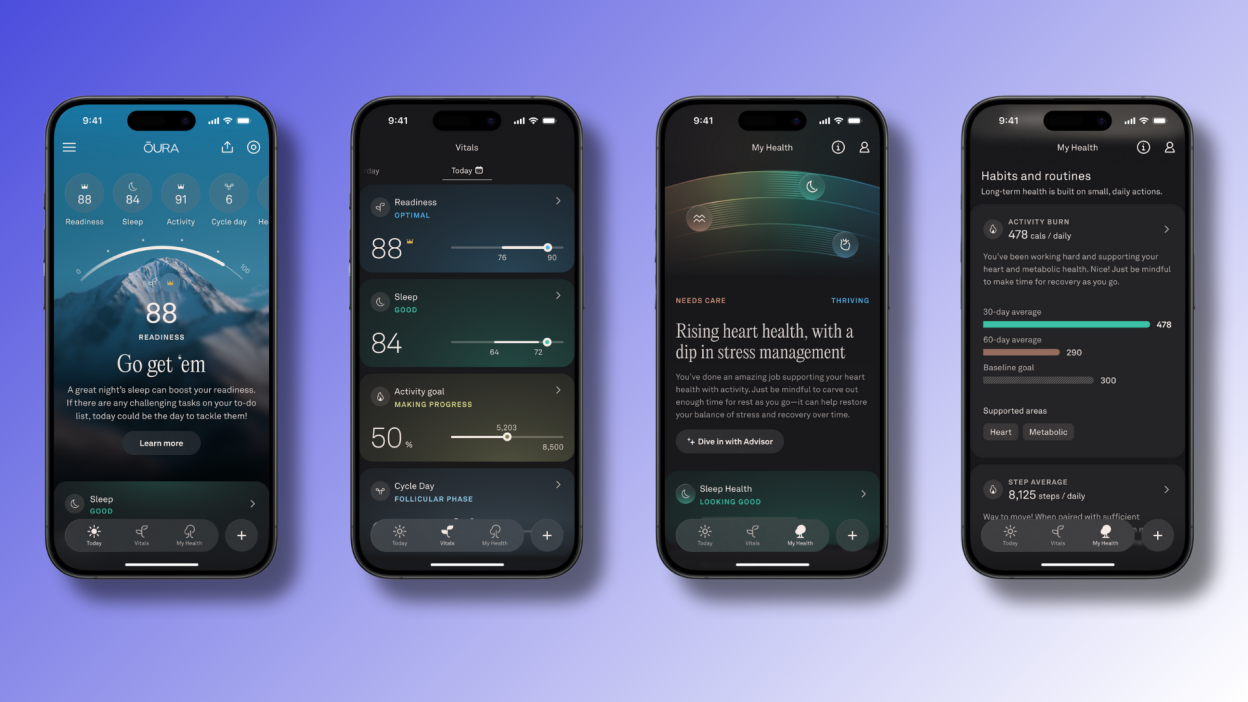
What I appreciate most is the context Oura provides. It doesn't just show you numbers; it explains what they mean and what might have caused changes. If your HRV dropped overnight, the app suggests reasons and offers guidance. It feels like having a personal health coach in your pocket.
The app also includes over 80 guided meditation, breathwork, and sleep audio sessions, with post-session insights showing how your body responded. It integrates with over 40 other apps including Apple Health, Strava, Natural Cycles, and more.
The Apple Health/Apple Watch Experience
Apple takes a different approach. Your health data lives in the Health app on your iPhone, which aggregates information from the Apple Watch and any other connected devices or apps. The Watch itself has a Fitness app for workout tracking and a Sleep app for sleep-related settings.
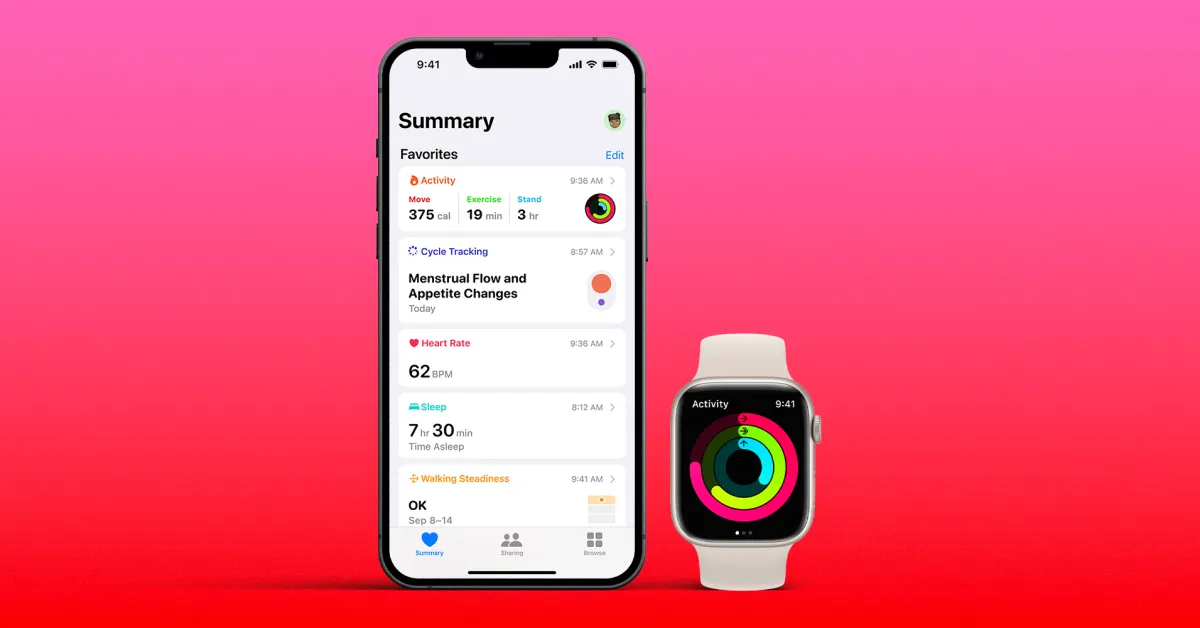
The Apple ecosystem is incredibly comprehensive. You can see trends over time, compare different metrics, and even share specific data with your doctor. The integration with the broader Apple ecosystem means everything works seamlessly if you're already an iPhone user.
However, Apple's approach is less prescriptive than Oura's. Apple gives you the data and lets you figure out what to do with it. Oura tells you what the data means and what actions to take. Neither approach is wrong—they just serve different user preferences.
Who Should Buy the Oura Ring?
After months of testing, I've developed a clear picture of who the Oura Ring is perfect for.
You should choose Oura if you prioritize sleep tracking and want the most detailed insights available in a consumer device. If you're curious about how your lifestyle choices affect your recovery—how that glass of wine or late-night snack impacts your sleep—Oura will show you with remarkable clarity.
Oura is also ideal if you want a subtle, jewelry-like wearable that doesn't scream "technology." If you work in an environment where a smartwatch would feel out of place, or you simply prefer a more discreet approach to health tracking, the ring format is perfect.
People who are tired of notification overload will appreciate Oura's philosophy. There's no screen demanding attention, no buzzes interrupting your day. You engage with your health data on your terms.
Finally, if recovery optimization is your goal—understanding when to push hard and when to rest—Oura's Readiness Score is genuinely valuable. Athletes, fitness enthusiasts, and anyone dealing with stress or burnout can benefit from this recovery-focused approach.
Who Should Buy the Apple Watch?
The Apple Watch makes sense for a completely different set of priorities.
Choose Apple Watch if you want a comprehensive fitness tracker with detailed workout metrics, GPS tracking, and gamified motivation. The Activity Rings system is surprisingly effective at keeping people moving, and the depth of workout data satisfies even serious athletes.
Apple Watch is the right choice if you value connectivity and convenience. Taking calls from your wrist, paying with a tap, controlling your music, getting navigation directions—these features genuinely improve daily life if you embrace them.
The safety features alone might justify the purchase for some people. Fall detection, crash detection, and emergency SOS (including satellite capabilities on Ultra models) can literally save your life. If you're older, live alone, or engage in potentially dangerous activities, these features provide meaningful peace of mind.
And of course, if you're already deep in the Apple ecosystem with an iPhone, AirPods, Mac, and other Apple devices, the Watch integrates seamlessly. Everything just works together in that way Apple products do.
Can You Use Both?
I've been asked this question a lot, and the answer is: yes, you can, and some people do.
The combination of Oura Ring for sleep and recovery tracking plus Apple Watch for fitness and daily smartwatch features gives you the best of both worlds. Oura's sleep tracking is superior, while Apple Watch's workout tracking is more comprehensive. Using both covers all your bases.
The data syncs through Apple Health, so you can see everything in one place. Oura sends its sleep and activity data to Apple Health, which aggregates it with your Apple Watch workout data and any other connected services.
Is this overkill for most people? Probably. The combined cost is substantial (around $750+ plus Oura's ongoing subscription), and there's significant overlap in what they track. But if you're serious about both performance optimization and daily connectivity, it's a legitimate option.
Frequently Asked Questions
Is Oura Ring better than Apple Watch for sleep tracking?
Yes, the Oura Ring provides more accurate and detailed sleep tracking than the Apple Watch. In peer-reviewed studies, Oura outperformed Apple Watch in sleep stage detection sensitivity and precision. Oura also provides more contextualized insights about what factors affected your sleep quality and offers personalized recommendations based on your patterns. Additionally, wearing a ring to bed is more comfortable than wearing a watch, which matters for sleep tracking.
Do I need an iPhone to use Oura Ring?
No. The Oura Ring works with both iOS and Android devices. You'll need a smartphone to view your data since the ring has no screen, but you're not locked into the Apple ecosystem. The Apple Watch, on the other hand, requires an iPhone and doesn't work with Android phones at all.
Is the Oura Ring subscription worth it?
This depends on your perspective. Without the $5.99/month subscription, the Oura Ring only provides basic daily scores with no detailed insights, trends, or advanced features. Most of what makes Oura valuable—the contextualized recommendations, the detailed breakdowns, the guided content—requires the membership. If you're buying an Oura Ring, you should budget for the subscription as part of the cost. Whether that's "worth it" depends on how much you value the detailed health insights.
Can Apple Watch detect sleep apnea?
Yes. The Apple Watch Series 9, Series 10, and Ultra 2 can detect signs of moderate to severe sleep apnea using the accelerometer to monitor breathing patterns during sleep. This FDA-cleared feature tracks "breathing disturbances" and notifies you if your data consistently shows signs of sleep apnea. The notification includes educational materials and a PDF with three months of data to share with your doctor.
How accurate is the Oura Ring for heart rate?
The Oura Ring is highly accurate for resting heart rate, which is what it primarily tracks. Because it's worn on the finger where blood vessels are closer to the surface of the skin, some experts believe it may provide more accurate readings than wrist-based devices. However, for active heart rate during intense exercise, the Apple Watch is generally more accurate and responsive. Oura's strength is in passive, 24/7 monitoring rather than real-time workout tracking.
Does Oura Ring work for fitness tracking?
The Oura Ring tracks basic fitness metrics including steps, calories burned, and activity detection for about 40 different exercise types. However, it lacks GPS, doesn't provide real-time feedback during workouts, and offers less detailed workout data than the Apple Watch. Oura's fitness approach focuses on overall daily movement and recovery rather than specific workout performance. If detailed workout tracking is your priority, the Apple Watch is the better choice.
Which has better battery life: Oura Ring or Apple Watch?
The Oura Ring 4 has significantly better battery life, lasting up to 8 days on a single charge compared to the Apple Watch's 18-26 hours. This means you charge the Oura Ring once a week versus daily charging for the Apple Watch. For sleep tracking specifically, this is a major advantage—the Oura Ring is always on your finger, while the Apple Watch needs to be charged at some point during your day.
Can you swim with Oura Ring and Apple Watch?
Yes, both are water-resistant and suitable for swimming. The Oura Ring 4 is water-resistant up to 100 meters (330 feet), while the Apple Watch Series 10 is water-resistant to 50 meters. Both can be worn in pools, the ocean, and while showering. The Apple Watch, however, provides detailed swim metrics (stroke detection, lap counting, etc.) while the Oura Ring simply tracks heart rate and duration during water activities.
What's the difference between Oura Ring 4 and the previous generation?
The Oura Ring 4 features several improvements over the Gen 3: a fully titanium construction (Gen 3 was partially plastic), recessed sensors for improved comfort, up to 8 days of battery life (up from 7), a wider size range (4-15 vs 6-13), and the new Smart Sensing technology that adapts to your unique physiology for improved accuracy. The app has also been significantly redesigned with better data visualization and more personalized insights.
Is Apple Watch good for stress tracking?
The Apple Watch tracks heart rate variability (HRV) and includes the Mindfulness app for guided breathing exercises, but it doesn't have a dedicated stress tracking feature comparable to Oura's Daytime Stress metric. Oura provides a continuous stress score throughout the day with insights about what triggered stress responses. If detailed stress tracking is a priority, Oura offers more in this area.
Which Should You Choose?
After months of wearing both devices, here's my honest conclusion.
If I had to pick just one device and sleep quality was my top priority, I'd choose the Oura Ring. Its sleep tracking is genuinely superior, the recovery insights are valuable, and the discreet form factor fits my lifestyle. The subscription is annoying, but the data is good enough that I'd pay it.
If I wanted a comprehensive smartwatch that happens to track health, I'd choose the Apple Watch. It does more things, integrates better with daily life, and the safety features provide real value. Sleep tracking is good enough for most purposes, even if it's not best-in-class.
The truth is, these devices serve different purposes for different people. The Oura Ring is for those who want to go deep on understanding their body's signals without the distraction of a screen. The Apple Watch is for those who want health tracking as part of a broader connected lifestyle.
Neither choice is wrong. They're just different tools for different needs. The question isn't which device is better—it's which device is better for you.
Related Articles
 Dani
Dani
 Dani
Dani