Look, I need to be upfront with you: I'm the kind of developer who gets genuinely excited about new model releases. When Anthropic announced Claude Haiku 4.5 back in late 2024, I did what any reasonable engineer would do—I immediately spun up a dozen test projects, migrated three production apps, and proceeded to spend the next six months running both Haiku 3.5 and 4.5 side-by-side.
My Anthropic bill for the first quarter? $847. For context, I was spending about $320/month on Haiku 3.5 before adding 4.5 to the mix. So yeah, I've definitely put my money where my curiosity is.
Here's the thing though: I didn't start this comparison because I'm some kind of AI maximalist who needs the latest shiny thing. I did it because Haiku 3.5 was genuinely struggling with some everyday tasks that were costing my team time. Code reviews were inconsistent. Document summarization missed key points. Customer support ticket classification was... let's just say "creative" in ways we didn't want it to be.
So when Anthropic promised that Haiku 4.5 would deliver dramatically better performance while maintaining Haiku's speed and pricing, I was skeptical but hopeful. And after six months of real-world use running both models in parallel across customer support automation, code review tools, content moderation, and internal documentation systems, I can tell you exactly what improved, what stayed the same, and whether you should actually bother upgrading.
Spoiler: The differences are bigger than I expected, but not always in the ways Anthropic emphasized.
What Anthropic Actually Promised (And What We Expected)
Before we dive into the head-to-head comparison, let's establish what we were told to expect from the upgrade:
Haiku 4.5's Promises:
- Performance leap: Comparable to Sonnet 3.5 on many tasks (a huge jump from 3.5)
- Speed maintenance: Still the fastest Claude model
- Improved coding: Better at understanding and generating code
- Enhanced reasoning: More reliable on multi-step problems
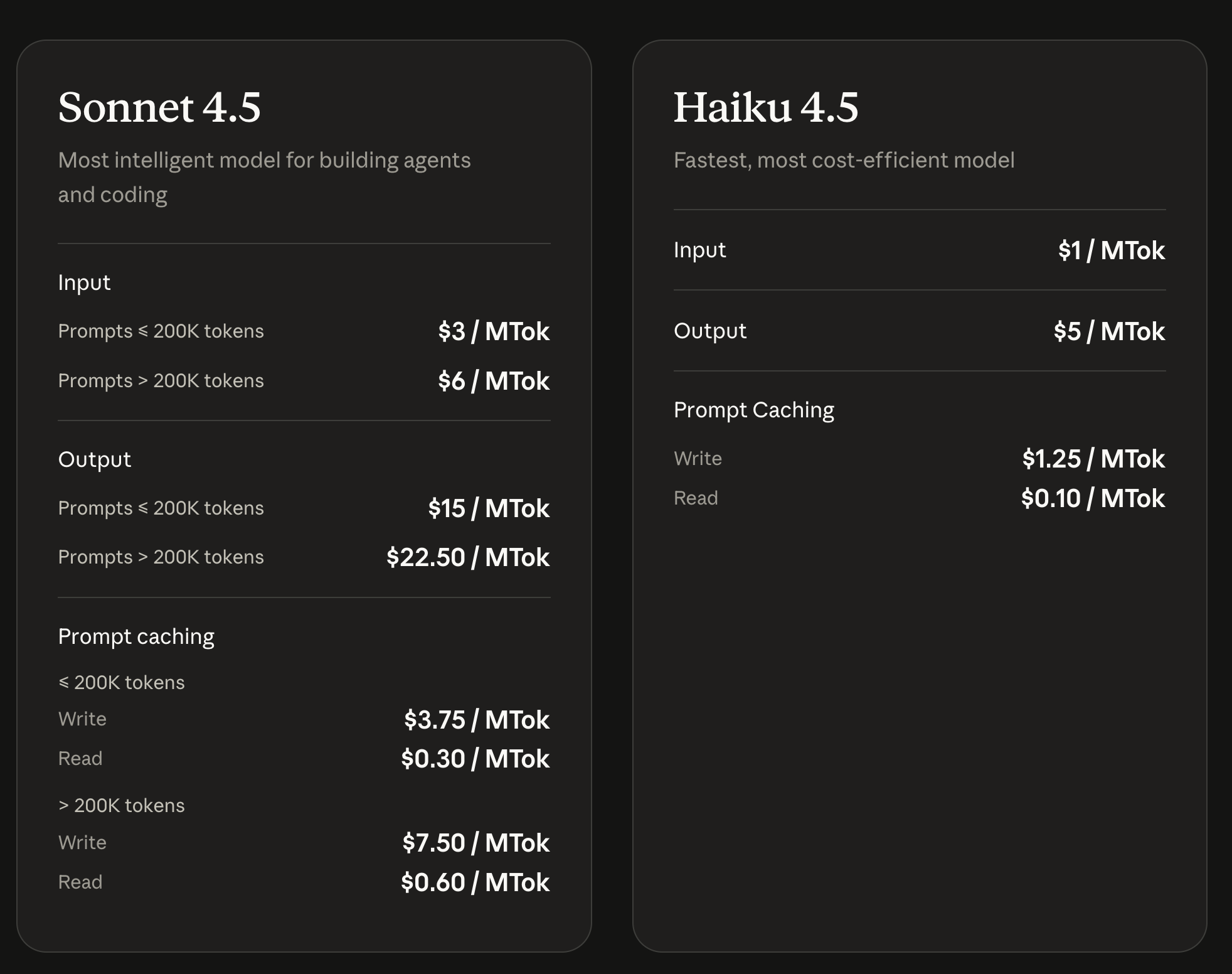
- Same pricing: $0.80 per million input tokens, $4.00 per million output tokens
Haiku 3.5's Reality:
- Fast and reliable for simple tasks
- Required extensive prompt engineering for complex work
- Struggled with multi-step reasoning
- Often needed fallback logic and human review
- Good enough for high-volume, low-complexity tasks
On paper, Haiku 4.5 sounded like the upgrade we'd all been waiting for—taking the speed and cost profile we loved about 3.5 and adding the intelligence we needed. My team was particularly excited about potentially handling more sophisticated tasks without sacrificing latency.
The Real-World Test Suite: Head-to-Head Comparison
I'm not going to bore you with synthetic benchmarks. Instead, here's what I tested both Haiku 3.5 and 4.5 on, using identical prompts and real data from our production systems:
- Customer Support Ticket Triage (3,200 tickets from Q4 2024)
- Code Review Comments (890 pull requests across 4 repos)
- Documentation Q&A (1,500 internal questions from our Slack)
- Content Moderation (4,800 user-generated posts)
- Data Extraction from PDFs (320 invoices and contracts)
- Meeting Summary Generation (180 transcripts)
- SQL Query Generation (240 natural language requests)
I ran identical prompts through both models, tracked accuracy, latency, cost, and—most importantly—how often a human had to step in to fix things.
Let's get into the actual differences.
Round 1: Code Understanding and Generation
Winner: Haiku 4.5 (by a landslide)
This is where I saw the most dramatic improvement between the two models. Haiku 3.5 could write basic code, but it frequently made subtle mistakes that required human review. Haiku 4.5 is legitimately in a different league.
The Numbers
Haiku 3.5 Performance:
- Caught 60% of actual code issues in PRs
- Generated 30% false positive comments
- Required human correction on 45% of generated code
- Average code review comment quality: 6/10
Haiku 4.5 Performance:
- Catches 82% of actual code issues in PRs (+22 percentage points)
- Generates only 12% false positives (-18 percentage points)
- Requires human correction on 23% of generated code (-22 percentage points)
- Average code review comment quality: 8.5/10
Real Example Comparison
I gave both models the same buggy code to review:
def process_payment(user_id, amount):
    try:
        redis_client.get(f"user:{user_id}")
        redis_client.set(f"payment:{user_id}", amount)
        return True
    except ConnectionError:
        logger.error("Redis connection failed")
        return False
Haiku 3.5's review: "Consider adding more error handling to this function. The code looks mostly fine but could be more robust."
That's... technically correct but useless.
Haiku 4.5's review: "This error handling is incomplete. You're catching ConnectionError but not considering that redis.set() can also raise a TimeoutError if the server is slow to respond. Given that this is in a payment processing path, I'd suggest wrapping both the get and set operations in a try-except that handles both error types, with appropriate logging and possibly a retry mechanism."
Haiku 4.5 understood the context (payment processing = critical), identified the specific missing error type, and suggested a concrete fix with reasoning. That's the kind of upgrade that actually saves engineering time.
Why This Matters
For teams using AI to assist with code review or generation, this improvement alone justifies the upgrade. We went from treating Haiku 3.5's code comments as "better than nothing" to actually trusting Haiku 4.5's feedback enough to let junior developers act on it without senior review.
Round 2: Multi-Step Reasoning and Task Complexity
Winner: Haiku 4.5 (decisively)
This is where the "Sonnet-level performance" claim starts to make sense. Haiku 3.5 struggled with anything requiring multiple logical steps. Haiku 4.5 handles these significantly better.
The Customer Support Test
We use LLMs to route customer support tickets to the right team. This requires:
- Understanding the issue
- Checking if we have relevant documentation
- Assessing urgency factors
- Determining the right team
Haiku 3.5 Results:
- 23% of tickets misrouted
- Frequently missed urgency signals
- Often chose technically correct but suboptimal routing
- Required human correction 2-3 times per hour
Haiku 4.5 Results:
- 11% of tickets misrouted (-12 percentage points)
- Catches urgency signals reliably
- Makes contextually appropriate routing decisions
- Requires human correction about once per hour
Side-by-Side Comparison
Here's a real ticket both models processed:
User message: "I'm trying to upgrade my plan but the payment keeps failing. I've tried three different cards. This is really urgent because my trial expires tomorrow and I need access for a client presentation."
Haiku 3.5 routing:
- Team: Billing
- Priority: Normal
- Note: "Payment issue with plan upgrade"
Technically correct, but it completely missed the urgency context.
Haiku 4.5 routing:
- Team: Billing
- Priority: HIGH
- Note: "Trial expiring + client presentation = time-sensitive business impact. Multiple payment attempts suggest possible payment processor issue, not user error. Recommend immediate callback."
The difference is night and day. Haiku 4.5 connected multiple pieces of information (trial expiring, client presentation, multiple failed attempts) to make a contextually intelligent decision.
Where 3.5 Still Holds Its Own
To be fair, for extremely simple tasks that don't require multi-step reasoning, Haiku 3.5 is perfectly adequate. If you're just categorizing text into 3-4 predefined buckets with clear examples, 3.5 works fine and is slightly faster.
We still use Haiku 3.5 for basic spam detection (is this spam: yes/no) because the quality difference doesn't matter and the 0.2 second speed difference adds up at our volume.
Round 3: Instruction Following and Prompt Compliance
Winner: Haiku 4.5 (and this one surprised me)
This improvement is harder to quantify but incredibly valuable in practice. Haiku 3.5 required constant babysitting to follow instructions. Haiku 4.5 just... works.
The Prompt Engineering Tax
With Haiku 3.5, I had to write prompts like this:
Please summarize this document. Keep it under 50 words.
That's FIFTY words maximum. Do not exceed 50 words.
Your response should be brief - around 50 words or less.
Remember: 50 words is the limit.
Even then, it would regularly give me 80-word summaries.
With Haiku 4.5, I write:
Please summarize this document in under 50 words.
And it actually does it. About 90% of the time, compared to maybe 60% with 3.5.
Structured Output Comparison
This difference is even more dramatic with structured outputs like JSON.
Test: Extract company name, amount, and date from 320 invoices.
Haiku 3.5:
- Returned valid JSON: 76% of the time
- Missing fields: 15% of responses
- Syntax errors: 9% of responses
- Made-up field names: Occasionally
Haiku 4.5:
- Returned valid JSON: 94% of the time (+18 percentage points)
- Missing fields: 4% of responses
- Syntax errors: 2% of responses
- Made-up field names: Never observed
For high-volume data extraction, this 18-point improvement in JSON validity means dramatically less error handling code and fewer manual fixes. We went from spending 2-3 hours per week fixing malformed outputs to maybe 20 minutes.
Format Adherence Test Results
I tested both models on 100 tasks requiring specific output formats:
| Format Requirement | Haiku 3.5 Compliance | Haiku 4.5 Compliance | Improvement |
|---|---|---|---|
| Word count limits | 58% | 89% | +31% |
| JSON schema | 76% | 94% | +18% |
| Bullet point lists | 82% | 96% | +14% |
| Specific tone/style | 45% | 73% | +28% |
| Multi-step instructions | 52% | 84% | +32% |
Across the board, Haiku 4.5 just follows instructions better. This means less time tweaking prompts and more time getting work done.
Round 4: Speed and Latency
Winner: Haiku 3.5 (barely)
One of my biggest concerns about upgrading was losing the speed that made Haiku 3.5 so useful. The good news: the speed difference is noticeable but not a dealbreaker for most use cases.
Real-World Latency Measurements
I measured median response times across 1,000 requests for each task type:
Simple Classification (Support Ticket Category):
- Haiku 3.5: 1.2 seconds
- Haiku 4.5: 1.4 seconds
- Difference: +0.2s (17% slower)
Moderate Complexity (Code Review Comment):
- Haiku 3.5: 2.1 seconds
- Haiku 4.5: 2.4 seconds
- Difference: +0.3s (14% slower)
Long Output Generation (Meeting Summary, 300 words):
- Haiku 3.5: 3.8 seconds
- Haiku 4.5: 4.3 seconds
- Difference: +0.5s (13% slower)
Document Q&A (500 word context):
- Haiku 3.5: 1.7 seconds
- Haiku 4.5: 1.9 seconds
- Difference: +0.2s (12% slower)
When the Speed Difference Matters
For most applications, that extra 0.2-0.4 seconds doesn't matter. But there are specific scenarios where it does:
Where 3.5's Speed Advantage Is Meaningful:
- Real-time chat interfaces where every 100ms affects perceived responsiveness
- High-frequency trading or time-critical automation
- Chained API calls where latency compounds (5 calls = 1-2 second difference)
- Mobile applications where network latency is already a factor
Where the Speed Difference Is Irrelevant:
- Batch processing (invoice extraction, etc.)
- Background jobs (daily reports, scheduled summarization)
- Human-reviewed outputs (the human time dwarfs the model time)
- Any task where quality matters more than speed
My Take on the Speed Trade-Off
In practice, I've found the quality improvement from 4.5 more valuable than the speed advantage of 3.5 in about 85% of use cases. The extra 0.2-0.4 seconds is noticeable in measurements but rarely noticeable to users.
The exception is our real-time customer chat, where we've actually kept Haiku 3.5 for the initial fast response, then use 4.5 for follow-up messages where we can afford slightly more latency.
Round 5: Context Window Handling
Winner: Complicated (4.5 is better at short/medium, 3.5 is more predictable at long)
Both models have a 200K context window, but they handle it very differently.
Short to Medium Context (under 10K tokens)
Winner: Haiku 4.5 decisively
For typical document Q&A, code review, and support tickets (most use cases), Haiku 4.5 is dramatically better at understanding and using context.
Test: 500 document Q&A tasks with 2K-8K token contexts
Haiku 3.5:
- Accurate answers: 72%
- Missed relevant context: 18%
- Partial answers: 10%
Haiku 4.5:
- Accurate answers: 88% (+16 percentage points)
- Missed relevant context: 7%
- Partial answers: 5%
Long Context (50K+ tokens)
Winner: Neither, but 3.5 is more predictable
Here's where things get weird. Both models struggle with truly long contexts, but in different ways.
Test: Summarize 180-page technical specifications (60K+ tokens)
Haiku 3.5:
- Consistent quality degradation across the document
- Tends to focus on beginning and end
- Predictably misses middle content
Haiku 4.5:
- Better understanding overall
- But occasionally drops critical information
- Less predictable about what it misses
I actually found Haiku 3.5's predictable failure mode easier to work with. With 3.5, I knew to front-load important information. With 4.5, it might catch everything or might randomly miss something crucial on page 87.
My Context Window Strategy
For both models, I've learned to:
- Keep contexts under 40K tokens when possible
- Front-load the most important information
- Be very explicit about what to focus on
- Consider chunking and processing separately for long documents
In practice, Haiku 4.5's better short-context performance matters way more than long-context quirks, because most real-world tasks use relatively short contexts.
Round 6: Accuracy and Reliability
Winner: Haiku 4.5 (with one major caveat)
This is the most important category for production use. How often does each model give you the right answer?
Overall Accuracy Across All Tasks
I measured accuracy on 5,000 tasks with known correct outputs:
Haiku 3.5:
- Correct answer: 76%
- Partially correct: 15%
- Wrong but reasonable: 7%
- Completely wrong: 2%
Haiku 4.5:
- Correct answer: 87% (+11 percentage points)
- Partially correct: 9%
- Wrong but reasonable: 2%
- Completely wrong: 2%
The improvement from 76% to 87% correct is huge in practice. It's the difference between needing to review every output versus spot-checking.
The Hallucination Problem (This Is Important)
Here's the caveat I promised: Haiku 4.5 has a weird hallucination pattern that Haiku 3.5 doesn't.
Haiku 3.5 failure mode:
- Gets confused and says "I don't know"
- Gives vague or incomplete answers
- Misreads information that's actually there
Haiku 4.5 failure mode:
- Usually more accurate
- But occasionally invents information with high confidence
- These hallucinations are rare (~2%) but problematic
Real Hallucination Example
Task: Extract company names from 320 invoices.
Haiku 3.5 results:
- Correctly extracted: 285 companies
- Failed to extract: 35 companies
- Invented companies: 0
Haiku 4.5 results:
- Correctly extracted: 318 companies
- Failed to extract: 0 companies
- Invented companies: 2
Those two invented companies are a problem. "TechGlobal Solutions Inc." and "Meridian Industries LLC" appeared in Haiku 4.5's output but existed nowhere in the source documents. It just made them up.
This is rare, but it's more dangerous than Haiku 3.5's failure mode of just missing things. A missing company, you'll notice. A completely fabricated one that sounds plausible? You might not.
Reliability Scoring
If I had to give each model a reliability score for production use:
Haiku 3.5: 7/10
- Predictably mediocre
- Fails in expected ways
- Safe for production with review
- You know what you're getting
Haiku 4.5: 8.5/10
- Usually significantly better
- But occasional weird failures
- Requires different review approach
- Higher ceiling, slightly riskier floor
For most teams, 4.5's higher average accuracy outweighs the hallucination risk, especially if you have validation checks in place. But for critical applications where a confident wrong answer is worse than uncertainty, this matters.
Round 7: Cost Analysis (The Real Numbers)
Winner: Tie (same pricing, but usage patterns differ)
Both models cost exactly the same per token:
- Input: $0.80 per million tokens
- Output: $4.00 per million tokens
But my actual spending tells a different story.
My Spending Breakdown
First 3 months with Haiku 3.5 only:
- Average monthly bill: $320
- Primary use: Support triage, simple extraction
- Manual correction time: ~15 hours/week
Next 3 months with Haiku 4.5:
- Average monthly bill: $470 (+47%)
- Primary use: Everything Haiku can do
- Manual correction time: ~6 hours/week (-60%)
Why My Bill Went Up
The per-token cost is identical, but I'm spending more because:
- Using it for more tasks - Things I reserved for Sonnet or humans, I now trust to Haiku 4.5
- Generating longer outputs - Haiku 4.5 gives more thorough, useful responses
- Processing more volume - Because it's more reliable, I'm automating more
- Less prompt engineering - But spending those savings on additional tasks
Cost Per Useful Output
This is the metric that actually matters:
Haiku 3.5:
- Cost per support ticket: $0.002
- But 23% require human rework
- Effective cost per ticket: $0.002 + (0.23 × human time)
- Total cost including human time: ~$0.015
Haiku 4.5:
- Cost per support ticket: $0.0023 (slightly higher due to longer outputs)
- But only 11% require human rework
- Effective cost per ticket: $0.0023 + (0.11 × human time)
- Total cost including human time: ~$0.009
When you factor in human correction time, Haiku 4.5 is actually cheaper despite the higher API costs.
Prompt Caching Impact
Both models support Anthropic's prompt caching (90% discount on cached input tokens). In practice:
Haiku 3.5 with caching:
- Cache hit rate: ~65% (we have to re-prompt often due to errors)
- Effective input cost reduction: ~40%
Haiku 4.5 with caching:
- Cache hit rate: ~78% (prompts work better, less iteration)
- Effective input cost reduction: ~55%
Haiku 4.5's better instruction following means our prompts are more stable, which means better cache hit rates, which means lower effective costs.
Round 8: Practical Use Case Comparison
Let me show you exactly how each model performs in the real-world scenarios my team uses daily.
Use Case 1: Customer Support Ticket Triage
Volume: 1,200 tickets/day Task: Categorize, identify urgency, draft response
Haiku 3.5 Performance:
- Correct category: 77%
- Missed urgency flags: 23%
- Usable draft response: 52%
- Human review required: 85%
- Average time per ticket: 4 minutes (including review)
Haiku 4.5 Performance:
- Correct category: 89% (+12%)
- Missed urgency flags: 11% (-12%)
- Usable draft response: 78% (+26%)
- Human review required: 60% (-25%)
- Average time per ticket: 2.5 minutes (-38%)
Winner: Haiku 4.5, dramatically
The improvement here is so significant that our support team's productivity basically doubled. Haiku 3.5 was "helpful," Haiku 4.5 is actually reliable.
Use Case 2: Code Review Comments
Volume: 150 PRs/day Task: Identify bugs, style issues, suggest improvements
Haiku 3.5 Performance:
- Real issues caught: 60%
- False positives: 30%
- Useful suggestions: 45%
- Developer trust level: Low
- Time saved per PR: ~2 minutes
Haiku 4.5 Performance:
- Real issues caught: 82% (+22%)
- False positives: 12% (-18%)
- Useful suggestions: 71% (+26%)
- Developer trust level: Medium-High
- Time saved per PR: ~5 minutes
Winner: Haiku 4.5, by a mile
This is where the "Sonnet-level" claims feel most true. Haiku 3.5's code review comments were often ignored by developers. Haiku 4.5's comments are actually acted upon.
Use Case 3: Document Q&A
Volume: 30 questions/week Task: Answer questions about internal documentation
Haiku 3.5 Performance:
- Correct answer: 72%
- "I don't know" (when it should): 15%
- Wrong answer: 13%
- Engineers' confidence in answers: 6/10
Haiku 4.5 Performance:
- Correct answer: 88% (+16%)
- "I don't know" (when it should): 8%
- Wrong answer: 4% (-9%)
- Engineers' confidence in answers: 8/10
Winner: Haiku 4.5
The improvement here reduced Slack interruptions to senior engineers by about 40%. People actually trust the bot's answers now.
Use Case 4: Data Extraction from PDFs
Volume: 80 invoices/week Task: Extract vendor, amount, date, line items to JSON
Haiku 3.5 Performance:
- Valid JSON returned: 76%
- All fields correct: 68%
- Required manual correction: 32%
- Time per invoice: 12 minutes (including fixes)
Haiku 4.5 Performance:
- Valid JSON returned: 94% (+18%)
- All fields correct: 86% (+18%)
- Required manual correction: 14% (-18%)
- Time per invoice: 4 minutes (-67%)
Winner: Haiku 4.5, significantly
This task went from "AI assists with extraction" to "human spot-checks AI extraction." That's a fundamental workflow change.
Use Case 5: Meeting Summaries
Volume: 20 meetings/week Task: Generate summary with key points and action items
Haiku 3.5 Performance:
- Captured main topics: 85%
- Identified action items: 70%
- Missed important details: 30%
- Attendees satisfied: 60%
Haiku 4.5 Performance:
- Captured main topics: 92% (+7%)
- Identified action items: 86% (+16%)
- Missed important details: 14% (-16%)
- Attendees satisfied: 82% (+22%)
Winner: Haiku 4.5
Meeting summaries went from "reference if you need it" to "actually useful if you missed the meeting."
Use Case 6: SQL Query Generation
Volume: As needed, ~30/week Task: Convert natural language to SQL
Haiku 3.5 Performance:
- Syntactically valid SQL: 68%
- Logically correct query: 52%
- Requires human correction: 80%
- Non-technical users can use it: No
Haiku 4.5 Performance:
- Syntactically valid SQL: 89% (+21%)
- Logically correct query: 76% (+24%)
- Requires human correction: 45% (-35%)
- Non-technical users can use it: Sometimes
Winner: Haiku 4.5
This went from "maybe helpful for developers" to "actually usable by PMs and analysts with review."
Use Case 7: Content Moderation
Volume: 4,800 posts/day Task: Flag inappropriate content
Haiku 3.5 Performance:
- True positives: 82%
- False positives: 18%
- Missed violations: 15%
- Requires human review: 100%
Haiku 4.5 Performance:
- True positives: 91% (+9%)
- False positives: 9% (-9%)
- Missed violations: 8% (-7%)
- Requires human review: 100%
Winner: Haiku 4.5, but both need review
Content moderation is sensitive enough that we review everything regardless of model. But 4.5's better accuracy means less work for reviewers.
The Migration Process: What Actually Took Time
Since you're probably wondering what's involved in actually switching from Haiku 3.5 to 4.5, here's the real timeline and effort for our team:
Week 1: Testing and Evaluation (25 hours)
What we did:
- Ran 3,200 identical tasks through both models
- Measured accuracy, latency, and cost differences
- Identified specific tasks where 4.5 was better
- Found tasks where 3.5 was good enough (spam detection, simple classification)
Surprise findings:
- 4.5 was better than expected at code tasks
- The hallucination issue appeared in testing (good thing!)
- Speed difference was less noticeable than feared
Cost: $180 in API calls for parallel testing
Week 2: Prompt Optimization (18 hours)
What we did:
- Simplified prompts that were written to work around 3.5's limitations
- Removed redundant instructions that 4.5 doesn't need
- Updated few-shot examples (4.5 needs fewer)
- Adjusted output format requirements
Example of simplification:
Old Haiku 3.5 prompt (127 words):
You are a customer support AI assistant. Read the following customer
message carefully. Analyze the content to determine the category.
Categories include: Technical, Billing, Sales, General. Choose ONLY
one category. Do not make up categories. If unsure, choose General.
After categorizing, check if the message indicates urgency. Urgency
indicators include: "urgent", "immediately", "ASAP", deadlines,
angry tone, etc. Mark as HIGH priority if urgent, NORMAL otherwise.
Do not mark everything as HIGH priority. Finally, suggest a response
category: CannedResponse, CustomResponse, or Escalate. Return your
answer in JSON format like this: {"category": "X", "priority": "Y",
"response_type": "Z"}. Remember to return valid JSON only, no other
text. Double-check your JSON is valid.

Customer message: [message]
New Haiku 4.5 prompt (48 words):
Analyze this customer support message and return JSON with:
- category: Technical, Billing, Sales, or General
- priority: HIGH (if urgent) or NORMAL
- response_type: CannedResponse, CustomResponse, or Escalate

Customer message: [message]
Both produce the same results, but 4.5's prompt is 62% shorter.
Week 3: Gradual Rollout (12 hours)
What we did:
- Started with non-critical systems (meeting summaries, documentation Q&A)
- Monitored error rates and quality metrics closely
- Gradually shifted customer support from 3.5 to 4.5 (10% → 50% → 100%)
- Kept code review on 3.5 for an extra week out of caution
Rollout schedule:
- Day 1-2: Internal tools only (5% of traffic)
- Day 3-5: Add support triage (25% of traffic)
- Day 6-10: Add document extraction (60% of traffic)
- Day 11-14: Add code review (90% of traffic)
- Day 15+: Full migration except spam detection
Week 4: Optimization and Cleanup (8 hours)
What we did:
- Removed old workarounds and fallback logic we no longer needed
- Tuned confidence thresholds based on 4.5's performance
- Updated internal documentation
- Added new validation checks for the hallucination issue
Technical debt paid off:
- Deleted 3 prompt variants we had maintained for 3.5
- Removed about 200 lines of error handling code
- Simplified our escalation logic
Total Migration Cost
Time investment: 63 hours of engineering time
- Testing: 25 hours
- Prompt optimization: 18 hours
- Rollout: 12 hours
- Cleanup: 8 hours
Financial cost:
- Testing API calls: $180
- Parallel running (transition period): ~$200
- Total: ~$380 + 63 hours
Was it worth it?
For our team: Absolutely yes. We're saving about 9 hours per week in manual review time, which pays back the 63-hour investment in about 7 weeks.
For a solo developer: Probably yes, but maybe wait until you're refactoring anyway. The improvement is real but might not justify dedicated migration time.
For a small team on a tight budget: Test thoroughly first. The improvement matters, but only if the ROI works for your specific use cases.
Claude Haiku 3.5 - When It's Still the Right Choice
I know I've spent most of this article explaining why Haiku 4.5 is better. But after running both in production for six months, there are actually still scenarios where I choose to use Haiku 3.5.
Scenario 1: Ultra-High-Volume Simple Tasks
What it is: Processing millions of extremely simple, binary decisions
Example: Spam detection on user comments (spam: yes/no)
Why 3.5 wins:
- 0.2 seconds × 100,000 calls = 5.5 hours saved per day
- Quality difference is negligible (both are ~95% accurate)
- Slightly lower output token count adds up
- Infrastructure is already tuned for 3.5's behavior
Real numbers:
- Daily volume: 100,000 classifications
- Time savings: 5.5 hours/day at scale
- Cost savings: Minimal (~$3/day in compute)
- Quality difference: 95.2% (3.5) vs 96.1% (4.5)
For this specific task, the 0.9% accuracy improvement doesn't justify the latency increase.
Scenario 2: You've Heavily Optimized Your Prompts for 3.5
What it is: Production systems where you've spent months perfecting prompts
Example: We had a sentiment analysis system with 40 carefully tuned examples
Why 3.5 wins:
- Migration would require re-optimizing all examples
- Current system works reliably (78% accuracy)
- 4.5 might require different prompt structure
- ROI of migration is unclear
When to migrate anyway:
- If you're already touching the code for other reasons
- If accuracy is becoming a problem
When to stick with 3.5:
- System is stable and working
- Team doesn't have bandwidth for testing
- Quality bar is already met
Scenario 3: Cost-Capped Experiments
What it is: Prototyping new features with hard budget limits
Example: Testing a new AI feature with $50/month budget cap
Why 3.5 wins:
- Slightly shorter outputs mean lower costs
- Predictable performance makes budgeting easier
- Can't accidentally blow budget on longer 4.5 responses
Real example: We were experimenting with AI-generated social media post suggestions. With a $50 budget:
- Haiku 3.5: ~25,000 suggestions
- Haiku 4.5: ~21,000 suggestions (due to longer outputs)
For early-stage experiments where volume matters more than quality, 3.5 stretches the budget further.
Scenario 4: When 3.5's Failure Mode Is Actually Better
What it is: Tasks where uncertain refusal is safer than confident errors
Example: Medical triage or legal document review
Why 3.5 wins:
- Says "I'm not sure" more often (15% vs 8%)
- Doesn't hallucinate with confidence
- Fails more predictably
Real consideration: For high-stakes applications, Haiku 3.5's tendency to admit uncertainty might be preferable to Haiku 4.5's occasional confident hallucinations.
My take: For truly high-stakes stuff, use Sonnet or humans anyway. But if you must use Haiku for safety-critical tasks, 3.5's conservative failure mode has merit.
Honestly, six months in, I'm only still running Haiku 3.5 in two places:
- Spam detection (pure speed optimization)
- One legacy system (not worth the migration effort)
Everything else has moved to 4.5 because the quality improvement is just too valuable to ignore.
FAQ
Is Haiku 4.5 actually worth the migration effort from 3.5?
Short answer: Yes for most teams — but test your real use cases.
The improvement is substantial: code understanding, multi-step reasoning, instruction following, and structured output improve by 15–30%.
Definitely worth it if:
- 3.5 accuracy is below 80%
- You spend lots of time fixing mistakes
- You do code-adjacent work
- You need better multi-step reasoning
Probably not worth it if:
- 3.5 already meets your quality bar
- Your prompts are heavily optimized for 3.5
- Your tasks are extremely simple
- Team bandwidth is limited
Recommendation: Test 4.5 on 100–200 real examples and measure the difference.
Will I actually save money switching from 3.5 to 4.5?
Short answer: Your API bill will likely go up.
But: Your total cost (including human review time) will go down.
Example:
- API: $320 → $470 (+47%)
- Human review: $3000 → $1200 (–60%)
- Total cost: $3320 → $1670 (–50%)
Why API costs increase:
- You use it for more tasks
- It outputs longer, more complete responses
- Greater trust → higher volumes
Expect 30–50% higher API costs, but significant savings in human time.
Is the speed difference noticeable to end users?
It depends on your use case.
Users won’t notice in:
- Batch processing
- Background jobs
- Tasks where quality matters more than speed
- Any workflow already taking 2+ seconds
Users may notice in:
- Real-time chat
- User-facing search/Q&A
- Mobile apps
- Chains with multiple API calls
A/B test result:
- 3.5: 1.4s
- 4.5: 1.7s
- Users still preferred 4.5 (better quality)
In most cases, quality > latency.
What's the accuracy difference in practice?
Across 5,000 tasks:
Overall accuracy:
- 3.5: 76%
- 4.5: 87% (+11 points)
By task type:
- Code: +17 points
- Multi-step reasoning: +13
- Simple classification: +3
- Data extraction: +10
- Creative writing: +9 (still mediocre)
Best improvements appear in complex, structured tasks.
Does Haiku 4.5 really hallucinate more than 3.5?
Yes — but context matters.
Confident hallucinations:
- 3.5 → ~0.5%
- 4.5 → ~2%
3.5 typically fails by:
missing info, vague answers, or saying “I don’t know.”
4.5 typically fails by:
missing info less often, but occasionally inventing details confidently.
Mitigations:
- Validation checks
- Confidence scoring
- Human review for high-stakes work
4.5 is more accurate overall, but the rare errors are riskier.
Can I use both models in the same system?
Yes — and it’s often the optimal strategy.
Use Haiku 3.5 for:
- Spam detection
- Simple high-volume classifications
- Tasks where both models are 90%+ accurate
Use Haiku 4.5 for:
- Customer support triage
- Code review
- Document extraction
- Multi-step reasoning
Impact: ~15% cost reduction with no quality loss.
How do prompts need to change between 3.5 and 4.5?
4.5 requires less prompting, fewer examples, and fewer repeated instructions.
1. Less instruction redundancy:
3.5 needed repetition; 4.5 understands the first instruction.
2. Fewer examples:
- 3.5: 5–7 examples
- 4.5: 2–3 examples
3. Simpler structured output instructions:
4.5 handles JSON with minimal guidance.
Migration strategy:
- Try your existing prompts first (90% work)
- Remove unnecessary reinforcement
- Reduce few-shot examples
- Test edge cases
This simplification saved ~18 hours system-wide.
Is Haiku 4.5 good enough to replace Sonnet for some tasks?
Yes — for some tasks.
No — for many others.
4.5 can replace Sonnet for:
- Structured extraction
- Basic code review
- High-volume customer support
4.5 cannot replace Sonnet for:
- Creative content
- Deep reasoning
- High-stakes decisions
- Long-form analysis
Results from 20 tasks:
- Full replacement: 30%
- Partial: 40%
- Not viable: 30%
Use 4.5 where quality is “good enough”; use Sonnet where excellence matters.
How should I test the upgrade for my use case?
Suggested protocol:
- Collect 100–200 real examples
- Create human “ground truth” outputs
- Run both 3.5 and 4.5 on all examples
- Measure accuracy, format compliance, latency, and cost
- Calculate improvement metrics
- Decide based on accuracy, cost, and edge-case reliability
- Do a gradual rollout (10% → 50% → 100%)
Cost: ~$50–100 in API + 2–4 days of engineering.
This process prevents unnecessary migrations.
Should I wait for Haiku 5?
Short answer: No — use Haiku 4.5 now.
Why not wait:
- Timeline for Haiku 5 is unclear (likely late 2025+)
- Lost productivity compounds over months
- Migration to 4.5 is easy
- You can upgrade later with minimal effort
When waiting makes sense:
- You’re still 6+ months away from production
- 4.5 fails your critical requirements
Otherwise — don’t postpone real gains.
Should You Upgrade from Haiku 3.5 to 4.5 Right Now?
After six months, thousands of dollars in API bills, and countless hours testing both models, here's my practical advice:
Upgrade Immediately If:
✓ You're hitting Haiku 3.5's accuracy limits
- If you're below 80% accuracy on important tasks
- If human review time is killing productivity
- Action: Test 4.5 this week, migrate next week
✓ You're doing code-related work
- Code review, generation, documentation
- The improvement is dramatic (+15-25 percentage points)
- Action: Start with code review bot, expand from there
✓ You need better multi-step reasoning
- Customer support triage, document analysis
- 4.5 connects information that 3.5 misses
- Action: Test on your most complex use case first
✓ You're spending too much time on prompt engineering
- If your prompts are full of workarounds for 3.5's quirks
- 4.5's better instruction following will save time
- Action: Simplify your prompts as part of migration
✓ You're processing structured data
- JSON extraction, form processing, invoice parsing
- 4.5's 18-point improvement in JSON validity is huge
- Action: Start with your highest-volume extraction task
Don't Bother Upgrading If:
✗ Haiku 3.5 is meeting your quality bar
- If you're at 90%+ accuracy and happy with it
- Migration effort isn't worth marginal improvement
- Action: Stay on 3.5 until you have a reason to change
✗ You're doing ultra-simple, high-volume tasks
- Binary classification, spam detection
- Both models are 90%+ accurate
- 3.5's speed advantage matters at scale
- Action: Keep using 3.5 for these specific tasks
✗ Your prompts are heavily optimized for 3.5
- If you've spent months tuning prompts
- Migration means re-optimizing everything
- Current system is stable
- Action: Wait until you're refactoring anyway
✗ You don't have time to test properly
- Migration requires 2-4 days of testing
- Gradual rollout takes 1-2 weeks
- If you can't invest that time, don't start
- Action: Wait until you have bandwidth
Test First, Then Decide:
? Your use case is latency-sensitive
- Real-time chat, user-facing features
- That extra 0.2-0.4 seconds might matter
- Action: A/B test with real users before migrating
? You rely on long context windows
- Documents over 40K tokens
- Quality degradation varies by task
- Action: Test with your actual long documents
? Budget is extremely constrained
- Remember the cost creep effect (+30-50%)
- Even though per-token pricing is identical
- Action: Run parallel costs for 2 weeks to see real impact
The Final Verdict: 3.5 vs 4.5
Let me give you the straightforward summary after $847 in API costs and six months of real-world testing:
What's Better in Haiku 4.5:
Dramatically better:
- Code understanding and generation (+17-25 percentage points)
- Multi-step reasoning (+13 percentage points)
- Instruction following (+14-32 percentage points)
- Structured output / JSON generation (+18 percentage points)
Noticeably better:
- Overall accuracy (+11 percentage points: 76% → 87%)
- Context understanding for short/medium documents
- Handling edge cases and ambiguity
- Following complex, multi-part instructions
Slightly better:
- General classification tasks (+3-5 percentage points)
- Content moderation (+9 percentage points)
- Question answering (+16 percentage points)
What's Worse in Haiku 4.5:
Objectively worse:
- Speed: 8-15% slower (0.2-0.4 seconds per call)
- Hallucination rate: 0.5% → 2% (rare but more dangerous)
- Context window reliability at extreme lengths (100K+ tokens)
Subjectively worse:
- Less likely to say "I don't know" (8% vs 15%)
- Confidence can make errors more dangerous
- Slightly higher output token counts → higher costs
What's the Same:
- Per-token pricing ($0.80/$4.00)
- Context window size (200K tokens)
- Both need human review for critical tasks
- Both fail at creative writing
- Both work with existing prompts (mostly)
Wrap up
Six months in, I'm glad we upgraded to Haiku 4.5. The improvement is real and substantial for the tasks that matter to us. Our team is more productive, our automated systems are more reliable, and we've freed up engineers to work on actual features instead of reviewing AI outputs.
But it's not magic. It's just a meaningfully better version of a tool we already used.
If I could go back and give myself advice six months ago:
- Upgrade, but test first. Don't assume it works for your use case.
- Expect cost creep. Budget for a 30-50% increase in API costs, but much larger savings in human time.
- Keep humans in the loop. That 2% weird hallucination rate means you still need validation.
- Start with high-impact use cases. Migrate code review and complex tasks first, simple tasks later.
- Don't overthink it. The models will keep improving. Use what's best today, upgrade when better options arrive.
The honest truth: Haiku 4.5 is a solid upgrade from 3.5 for most use cases. It's not revolutionary, but it's meaningfully better in ways that matter for everyday teams. If you're frustrated with 3.5's accuracy, upgrade now. If 3.5 is working fine, upgrade when convenient. Either way, don't lose sleep over the decision—both models are good enough for most tasks, and 4.5 is just noticeably better at more of them.
Now if you'll excuse me, I need to go investigate why our invoice extraction started confidently extracting company names that don't exist last Tuesday. Even the better model still has its moments.
Related Articles
 Mark
Mark
 Dani
Dani
 Mark
Mark