Every developer has done it. You have a messy JSON blob, a Base64-encoded string you need to decode, or a regex you want to test. You open a browser tab, paste the content into one of those familiar free utilities, and get your answer in seconds. It is frictionless, it is fast, and it feels completely harmless.
Two separate investigations published in the past few months suggest it is anything but.
The first is a privacy audit in which a developer systematically monitored every network request made by five of the most popular online developer tools while using them with test data. The second is a security study by watchTowr Labs in which researchers extracted over 80,000 saved submissions from two of those same tools, recovering thousands of real credentials, API keys, and sensitive configuration data that developers and IT administrators had pasted into them, in some cases years ago, without any idea the content was publicly accessible.
Together, these two investigations paint a picture of a category of tools that the developer community has absorbed into its daily workflow without examining what those tools are actually doing in the background.
The Audit: What Actually Happens When You Open These Sites
The privacy audit tested five tools that occupy the highest slots in search results for their respective tasks: jsonformatter.org, diffchecker.com, base64decode.org, codebeautify.org, and regex101.com. The methodology was straightforward. The researcher inserted test API keys and passwords as input data, opened browser DevTools, and monitored every outgoing network request the page made during a normal session.
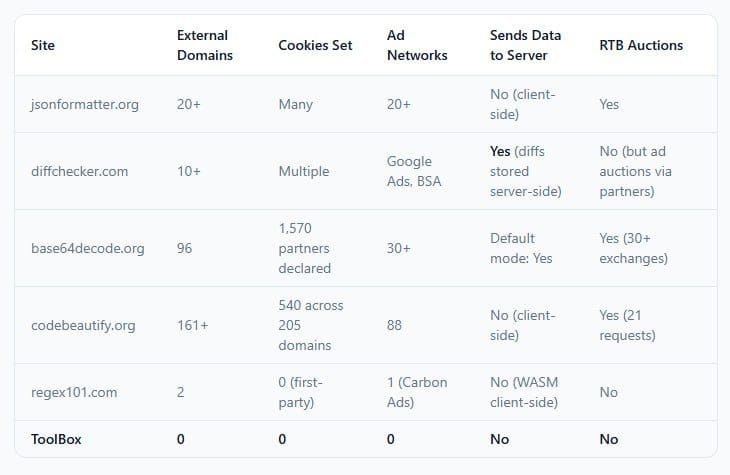
The results varied significantly across tools, but the aggregate picture is worth laying out in full.
jsonformatter.org connects simultaneously to 20 or more advertising networks on page load. Each one records the visitor's IP address and a persistent advertising identifier. According to the audit, the identity syncing observed across these sites means a user's visit is not isolated. The same advertising ID that watches someone format JSON will recognize them when they shop online, read news, or browse social media. Development activity becomes part of a consumer advertising profile.
base64decode.org is where the numbers become difficult to contextualize in any normal framework for website behavior. The site contacted 96 external domains during testing. Its consent management platform discloses 1,570 advertising partners. The site's Live mode, which decodes in the browser without a server request, is not the default. With Live mode off, which is how most users encounter the tool, clicking Decode sends input data to the server via a POST request. That data passes through a system running 96 external tracking domains before the response comes back.
codebeautify.org set 540 tracking cookies across 205 unique domains on a single page load. During testing, the site's ad scripts caused the browser to be forcibly redirected to unrelated destinations, including diffchecker.com, regex101.com, and Temu. These forced redirects expose the browser's context to the tracking ecosystems of the destination sites, compounding the original tracking footprint without any user action.
diffchecker.com differs from the others in a specific and important way. Unlike the other tools, which process input client-side and only expose the user's identity through advertising infrastructure, Diffchecker stores diffs server-side. When a user saves a diff, it generates a URL. That URL is assigned server-side, which means the content exists on Diffchecker's infrastructure. The audit notes this is confirmed by the URL format and Diffchecker's own marketing for its desktop application.
regex101.com stands apart from the others in nearly every measurable dimension. The site uses WebAssembly to run the PCRE2 regex engine locally, meaning patterns and test strings never leave the browser. Instead of Google Analytics, it uses self-hosted Plausible Analytics, which sends only the page URL and referrer. Its cookie count is a fraction of the others. It is, as the audit puts it, proof that a free developer tool can exist without turning its users into advertising inventory. The one concern is indirect: because other tools' ad scripts redirect browsers to regex101, a user who never opens regex101 may have their browsing context exposed to its ecosystem as a destination of those forced redirects.
The Broader Tracking Mechanism
Most developers who have thought about this at all assume the risk model looks like this: a site sends your input data somewhere and someone reads it. The actual mechanism is different, and in some ways more insidious.
For the tools where processing happens client-side, your code generally does not leave your browser in outgoing POST requests. The audit confirmed this for jsonformatter.org: the test data containing fake API keys and passwords was not found in outgoing POST requests. The JSON formatting happens locally.
What leaves your browser is your entire digital identity, running in parallel to the tool you are using.
The advertising ecosystem that these sites have built their revenue models around functions through a real-time bidding process that occurs in the milliseconds between your page load and the first ad rendering. Your browser makes dozens of simultaneous requests to advertising networks. Each one receives your IP address, your persistent advertising identifier, your browser fingerprint, your geographic location, and in some cases information about the content you are viewing. This information is used to place a bid for the ad impression. All of this happens before you have pasted a single character.
When you paste an API key into jsonformatter.org, your browser simultaneously contacts 20+ ad networks. Each one records your IP address and a persistent identifier. If that API key is in the page title or URL, as with some tools, it could end up in analytics databases. The identity syncing observed across these sites means your visit is not isolated.
The practical implication is that while your code may not be exfiltrated in the direct sense most developers imagine, the fact of your visit, including context about what you are debugging, what environment you appear to be in, and what third-party systems you work with, becomes part of a commercial data ecosystem.
The Credential Leak That Was Already Happening
The tracking audit describes what these tools are designed to do. The watchTowr Labs research describes what their features make possible when used as intended.
WatchTowr researchers examined the save functionality on JSONFormatter and CodeBeautify, both of which allow users to save formatted output as a shareable link. The mechanism is common enough that most developers have used something similar without a second thought. You format your JSON, click Save, get a URL, send it to a colleague.
What watchTowr found was that both platforms maintained publicly accessible Recent Links pages listing all saved submissions. The shareable links themselves followed predictable URL formats. Combining those two facts, the researchers wrote a simple crawler and began collecting.
WatchTowr Labs said it captured a dataset of over 80,000 files on these sites, uncovering thousands of usernames, passwords, repository authentication keys, Active Directory credentials, database credentials, FTP credentials, cloud environment keys, LDAP configuration information, helpdesk API keys, meeting room API keys, SSH session recordings, and all kinds of personal information. This includes five years of historical JSONFormatter content and one year of historical CodeBeautify content, totalling over 5GB worth of enriched, annotated JSON data.
Organizations impacted by the leak span critical national infrastructure, government, finance, insurance, banking, technology, retail, aerospace, telecom, and healthcare. Cybersecurity companies were among those whose credentials appeared in the dataset, a detail the researchers noted with appropriate irony.
The specific examples are worth dwelling on. A major global stock exchange accidentally exposed AWS keys tied to Splunk monitoring. A government PowerShell setup script revealed internal configurations. A data-lake technology vendor leaked plain credentials for Docker, JFrog, and Grafana. A major consultancy exposed GitHub tokens. An MSSP leaked Active Directory credentials tied to a U.S. bank. A bank exposed full KYC production data.
None of these organizations made a mistake in the conventional sense. They used a feature as designed. The mistake was trusting that "save and share" meant something controlled rather than something publicly enumerable.
To confirm their hypothesis about active exploitation, the watchTowr team planted fake but valid-looking AWS credentials in the same platforms and waited. 48 hours after their initial upload and save, someone attempted to use one of the exposed canary AWS keys. "We're not alone — someone else is already scraping these sources for credentials, and actively testing them," the researchers noted before deciding to publish their findings.
That timing matters. The fake keys had already expired from the public Recent Links view before the access attempts were logged. Someone was not browsing Recent Links manually. An automated system was collecting credentials and testing them on a delay, presumably to avoid triggering immediate rate limiting or detection.
Two Different Problems, One Shared Root
The tracking audit and the credential leak research expose different failure modes, but they share the same underlying structure: online developer utilities have quietly assumed a dual role. They provide a legitimate service on top of a business model that treats visitor data as the actual product.
This is not unique to developer tools. It describes a significant portion of the free web. What makes developer tools a specific concern is the combination of factors that brings someone to use them in the first place. A developer debugging an authentication flow has real credentials in their clipboard. A DevOps engineer formatting a configuration file has infrastructure details on their screen. An engineer troubleshooting an API integration has production API keys in their test environment. These are not the contexts in which casual web users encounter advertising surveillance tools. They are the contexts in which the information being passively collected, or actively stored through innocuous-seeming features, has the most potential for harm.
The observation is pointed, but the problem it describes is structural rather than individual. The developers pasting credentials into these tools are not being reckless. They are doing exactly what the tools encourage and what the search results and UI patterns make frictionless. The information asymmetry between what the tools advertise and what they actually do is the condition that produces these outcomes, not any failure of individual judgment.
The Radar You Already Have
Both the tracking audit and the watchTowr research point to the same practical intervention: the browser DevTools Network tab.
Opening DevTools before pasting anything sensitive and watching the network requests panel shows every outgoing connection a page makes. A site that contacts 96 domains on a simple Base64 decode request will make that visible immediately. A site that sends your input to a server will show the POST request. The information is available to any developer by default; it simply requires the habit of checking.
The audit also notes that an ad blocker such as uBlock Origin will eliminate most of the advertising tracking described, though it does not prevent server-side data storage on tools like Diffchecker, and does not address first-party analytics.
For organizations, the interventions are different in character:
- Explicit policy prohibiting the use of public online formatting or utility tools for any data that includes credentials, API keys, configuration values, or customer information.
- Local or self-hosted alternatives for common tasks. VS Code handles JSON formatting, regex testing, and Base64 operations natively or via extensions that run entirely locally. Tools like jq, base64, and various shell utilities require no network connection at all.
- Secret scanning in CI/CD pipelines to detect credentials committed to repositories after having been processed through these tools.
- Credential rotation for any secrets that may have been pasted into a save-and-share workflow on JSONFormatter, CodeBeautify, or similar tools with a Recent Links feature.
The watchTowr team posted the canary key access attempt 48 hours after upload. That is the response time window for attackers who have already automated the collection pipeline. For credentials that have been sitting in a Recent Links database for months or years, the question is not whether they have been seen. It is whether the services they authenticate against are still running, and whether the keys have been rotated.
What the Outlier Tells You About What Is Possible
Regex101's presence in this story is unusual, and worth holding onto as a reference point.
It is a free tool, serving a comparable user base to the others on this list, competing in the same search results, and apparently not requiring surveillance infrastructure to exist. It uses WebAssembly to keep regex processing entirely local. It uses a self-hosted, privacy-respecting analytics tool rather than Google Analytics. It does not set hundreds of tracking cookies. It does not connect to advertising exchanges during a normal session.
The contrast is not subtle. And the contrast matters because it removes the defense that invasive tracking is simply the economic reality of providing free utilities to developers. It is one economic reality. It is not the only one.
Conclusion
The picture these two investigations produce together is one of a category of tools that the developer community has treated as infrastructure while those tools have been functioning as advertising platforms with a utility feature attached.
The code stays in your browser in most cases. The tracking still happens. And in the cases where a save feature generates a URL, that URL is enumerable, the data behind it is persistent, and automated systems are already scanning for credentials to test.
For individual developers, the practical change is small: use local tools for anything involving real credentials, and check the network tab before you trust a new utility with anything sensitive. For organizations, the change requires policy. The developers pasting AWS keys into formatting sites are not violating written rules that they know about. They are doing exactly what seems normal, because this class of tool has been normalized.
The tools are working as designed. That is the problem.
Frequently Asked Questions
Q: Do online developer tools like JSONFormatter actually steal my API keys and passwords?
Not in the way most people imagine, but the risk is real and more nuanced than simple theft. For tools that process data client-side, your code generally does not appear in outgoing POST requests — meaning the tool itself is not directly harvesting your keys. However, these sites simultaneously contact dozens of advertising networks that record your session, and the advertising identity built from your visits is persistent and commercially traded. More critically, tools with save-and-share features like JSONFormatter and CodeBeautify have been found to store content in publicly enumerable URLs, which automated systems are already scraping for credentials. Fake AWS keys planted by researchers were tested by unknown parties 48 hours after being uploaded.
Q: What did the watchTowr Labs research actually find?
WatchTowr Labs extracted over 80,000 saved submissions from JSONFormatter and CodeBeautify by crawling their publicly accessible Recent Links pages and pulling content through their predictable URL formats. The dataset, spanning five years of JSONFormatter history and one year of CodeBeautify, contained thousands of real credentials: Active Directory credentials, cloud environment keys, database passwords, GitHub tokens, CI/CD secrets, SSH session recordings, payment gateway keys, and full KYC records from a bank. Affected organizations include governments, critical infrastructure operators, banks, aerospace firms, and cybersecurity companies.
Q: Which of the five tools tested is the most privacy-respecting?
Regex101 stands out clearly from the others. It runs the regex engine locally via WebAssembly so patterns and test strings never leave the browser. It uses self-hosted Plausible Analytics rather than Google Analytics, and it does not connect to advertising exchanges. The others range from moderately invasive (jsonformatter.org) to extreme (base64decode.org with 96 external domains and 1,570 declared advertising partners, and codebeautify.org with 540 cookies across 205 domains on a single page load).
Q: What local alternatives exist for these common developer tasks?
VS Code with standard extensions handles JSON formatting, regex testing, and Base64 encoding natively with no network connection. The command-line tools jq (JSON), base64, and grep with PCRE support cover most common formatting and testing needs entirely offline. For diff operations, git diff, vimdiff, and IDE-native diff views are standard. For developers who prefer browser-based tools, running a local instance of an open-source utility entirely within a private network eliminates external exposure.
Q: How quickly are active scrapers exploiting leaked credentials?
WatchTowr's canary experiment found that fake AWS keys were tested within 48 hours of being uploaded, even after the public link had technically expired. This indicates automated systems are collecting and testing credentials on a near-continuous basis, not waiting for an operator to manually review Recent Links pages. For credentials that have been in these platforms for months or years, the exposure window has already passed — the question is whether those credentials have been rotated.
Q: Does using an ad blocker protect you when using these tools?
Partially. An ad blocker like uBlock Origin eliminates most of the advertising tracking described in the privacy audit, preventing the 96-domain connections and the real-time bidding exposure. It does not prevent server-side data storage on tools that have save functionality, it does not protect against first-party analytics, and it does nothing for content that has already been uploaded through save features. It is a useful protection but not a complete one.
Q: What should organizations do if employees have been using these tools with sensitive data?
The priority actions are: rotate any credentials that may have appeared in saved submissions on tools with public-facing Recent Links features; implement explicit policy prohibiting the use of public online formatting or beautification tools for data containing credentials, API keys, or configuration values; train developers to use local tools for sensitive operations; and deploy secret scanning in CI/CD pipelines to detect credentials before they are committed or shared. WatchTowr recommends treating code-formatting and debugging sites as part of the external attack surface in security assessments.
Related Articles
 Mark
Mark
 Mark
Mark
 Mark
Mark