

Or the story of how a "magic button" for $30 turns into a $1000+ bill
What is Vibe Coding and Why Everyone's Talking About It
Vibe coding is a term coined by Andrej Karpathy, former Director of AI at Tesla. It's an approach to development where you don't write code in the traditional sense, but instead communicate with AI in human language, describing what you want to achieve. The focus is on the "vibe" — the overall atmosphere, idea, concept. AI transforms your thoughts into working code in seconds.
Sounds like magic, right? And it actually works... up to a certain point.
The Illusion of Ease: How the Story Begins
Imagine: you open Cursor, Lovable, or any other AI coding tool. You enter a simple prompt:
"Create a landing page for a SaaS product with a registration form, Stripe integration, and an admin panel"
And voilà — a minute later, you have a working prototype. Buttons click, forms work, design looks decent. Wow! This is free magic!
You think: "If I made in an hour what would take programmers several days, I can build an entire project!"
You pay $30 for a subscription. The journey begins.
Cost Escalation: Anatomy of the Trap
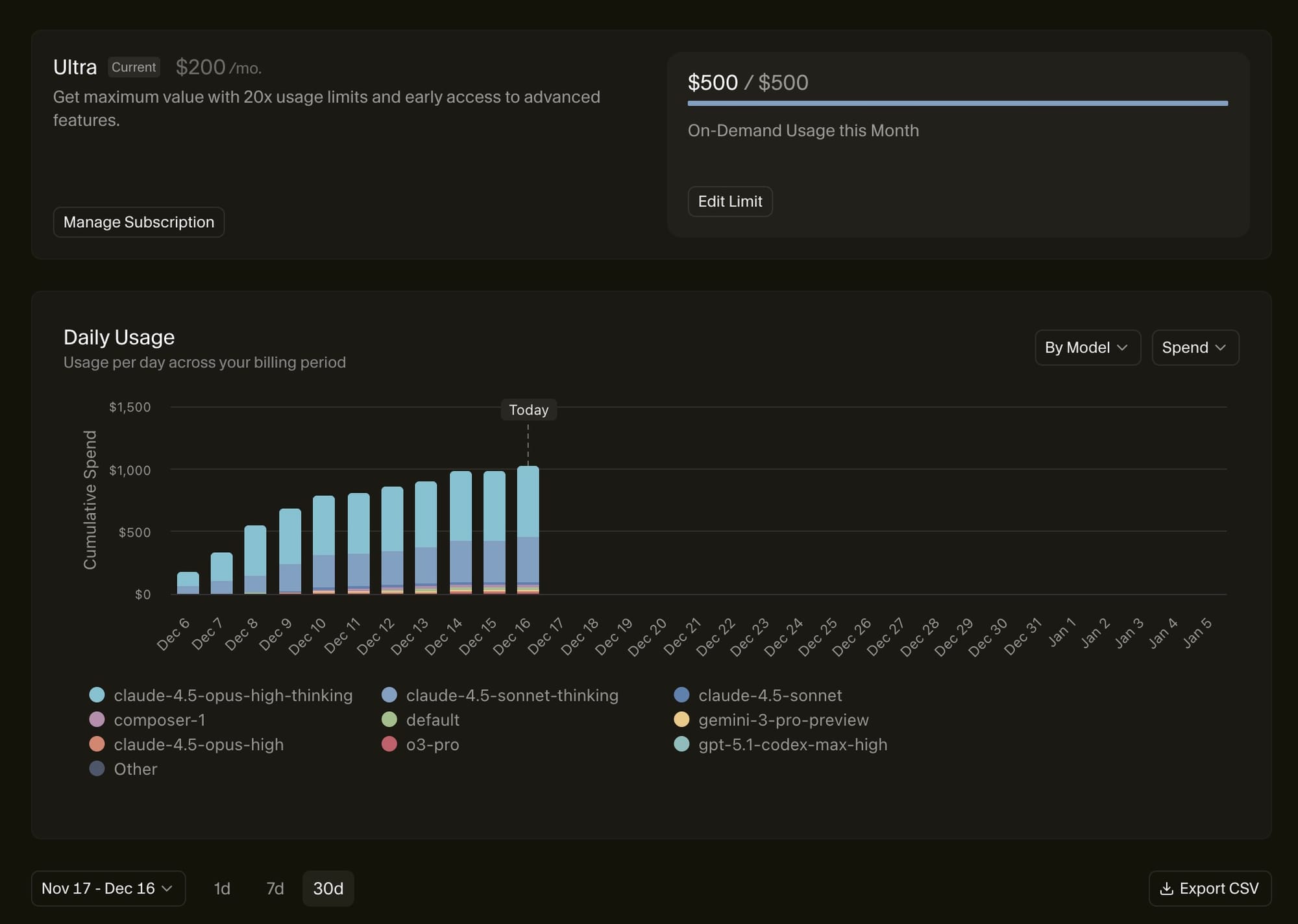
Stage 1: Euphoria ($30/month)
The first month is pure excitement. You generate page after page, adding feature after feature:
- Authentication system
- Dashboard with charts
- API integration
- Email notifications
- Payment system
The project grows right before your eyes. You already see yourself as a successful startup founder. Code generates quickly, everything works (or at least seems to).
Stage 2: First Cracks ($30 → $200/month)
Somewhere around week 3-4 of development, the first setback hits:
"You have exhausted your request limit. Want to upgrade to Pro/Ultra for $200/month?"
By this point, you've already:
- Invested tons of time into the project
- Told friends about your idea
- Maybe even found first potential clients
- Set on seeing it through
Of course, you agree! The project is almost ready, just a few tweaks left...
Stage 3: Valley of Disappointment ($200 → $500+/month)
Now the real fun begins. You start noticing:
Bugs you didn't see before:
- Everything falls apart on mobile devices
- Browser console shows hundreds of errors
- Database runs slowly
- Some features conflict with each other
You try to fix it — and then debugging hell with AI begins:
Attempt 1: "Fix the mobile version bug"
Result: Mobile works, but desktop is broken

Attempt 2: "Keep desktop and fix mobile"
Result: Now the registration form stopped working

Attempt 3: "Restore registration form"
Result: Form works, but database integration is broken

Attempts 4-10: ...endless cycle of fixes
Each attempt costs tokens. And if you don't understand code well and can't precisely explain to AI what the problem is, the number of attempts multiplies. Expensive models (Claude Opus, GPT-4) devour your limit at incredible speed.
Stage 4: Infinite Loop ($500 → $1000+/month)
By this time, your project has turned into Frankenstein's monster:
- Code chunks from different sessions aren't coordinated
- No unified architecture
- Zero optimization
- Security best practices — ignored
- SEO — not configured
- Responsiveness — partial
- Accessibility — absent
But the worst part is the domino effect: you fix one place, three others break. Because AI doesn't see the whole project, it works with the current session's context.
And you've already:
- Spent 3-4 months
- Invested $1000+
- Promised clients a launch
- Can't stop (sunk cost fallacy)
Why It's a Trap: Technical Reasons
1. Lack of Architecture
AI generates code that works "here and now" but doesn't think about scaling. No thoughtful project structure, no design patterns, no separation of concerns.
2. Technical Debt from Day One
Each AI generation adds code that:
- Duplicates existing logic
- Uses outdated approaches
- Ignores best practices
- Creates dependencies that are impossible to break later
3. Context Problems
AI loses context in large projects. It doesn't remember what it generated 2 weeks ago. So new code can conflict with old code.
4. Security — The Weak Link
AI often generates code with vulnerabilities:
- SQL injections
- XSS attacks
- Insecure password storage
- Lack of input validation
For non-programmers, this is an invisible time bomb. There are real examples of startups losing money due to compromised systems built on vibe coding.
Psychology of the Trap: Why You Can't Stop
FOMO (Fear of Missing Out)
"Everyone around is building startups with AI in a week! If I don't do it now, I'll fall behind!"
The AI hype creates pressure: you need to act fast. But speed without quality is a direct path to failure.
Illusion of Progress
Every day you see the number of features growing. But this is visible progress. Invisible regression — accumulating technical debt — stays off-screen until everything starts falling apart.
Sunk Cost Fallacy
"I've already invested $800 and 3 months. I can't just quit! Just a little more, and everything will work..."
This is the classic sunk cost trap. The more you invest, the harder it is to stop, even when it becomes obvious that the project needs complete rework.
Slot Machine in Development
Vibe coding is like a slot machine:
- Each prompt is a coin
- Sometimes you hit the jackpot (perfect code)
- More often — small wins (working but not perfect code)
- But the system is designed to keep you playing
Real Cost Mathematics
Let's calculate honestly:
Month 1: Basic subscription                          $30
Month 2: Upgrade to Pro (limits exhausted)           $200
Month 3: Extra tokens for bugfixes                   $150
Month 4: Ultra plan + tokens for refactoring         $300
Month 5: Continued debugging                         $250
Month 6: Paying a freelancer to fix things           $500

TOTAL for 6 months:                                  $1,430
Yet you could have:
- Hired a Junior developer on outsource for $1,500-2,000
- Bought a ready-made template/boilerplate for $50-200 and customized it
- Used no-code platforms for MVP
For Whom Vibe Coding Works and For Whom It Doesn't
When vibe coding makes sense:
1. Simple utilities and scripts
- Data parsers
- Simple calculators
- Format converters
- Routine task automation
2. Quick prototypes for idea validation
- Landing page for demand testing
- Simple email collection form
- Minimalist MVP for showing investors
3. Learning and experiments
- Exploring new technologies
- Creating demo projects
- Understanding how different approaches work
4. You're an experienced developer
- You know where AI hallucinates
- You can assess code quality
- You use AI as an accelerator but control the process
- You can refactor code yourself
When vibe coding is a bad idea:
1. Full-fledged production projects
- SaaS platforms with admin panel
- Marketplaces
- Fintech applications
- Any projects where security is critical
2. Projects where performance matters
- High-load systems
- Real-time applications
- Complex business logic
3. You're not a developer
- Can't assess code quality
- Don't know how to debug
- Don't understand what to ask AI
- Don't see architectural problems
4. Projects with financial transactions
- Payment systems
- E-commerce
- Financial calculators
- Anything where error = money loss
Alternative Strategies
Hybrid Approach (for those who can code)
- Use AI for "plumbing":
- Boilerplate code
- CRUD operations
- Standard UI components
- Write critical parts yourself:
- Business logic
- Security layer
- Project architecture
- Payment system integrations
- Code review AI-generated code:
- Check each generation
- Refactor immediately
- Maintain consistent style
For Non-Technical Founders
- Start with no-code/low-code:
- Bubble, Webflow, Softr — for MVP
- If the idea takes off, hire a developer
- Buy a ready-made solution:
- SaaS templates on Themeforest
- Boilerplates on Gumroad
- Open-source projects that can be customized
- Find a technical co-founder:
- Better to give away 30-40% equity than lose 100% of a poor-quality product
- If using AI:
- Limit project scope
- Work with simple models (not Opus/GPT-4 for everything)
- Definitely hire a developer at least for final code review
My Verdict
Vibe coding in 2024-2025 is a powerful tool, but NOT a ready solution for serious projects.
The reality is:
✅ For simple tasks (landing pages, scripts, utilities) — works great
✅ For learning and experiments — indispensable
✅ As an accelerator for experienced developers — yes, use it
❌ For full-fledged products with admin panel, users, payments — no, not ready
❌ For people without technical background — dangerous for budget
❌ With expectations to "succeed for $30/month" — an illusion
If You Still Decide to Go This Route:
- Plan a realistic budget: not $30, but $500-1000+ for several months
- Learn to code in parallel: at least basic understanding
- Use expensive models consciously: Opus 4.5/GPT-4 for critical tasks, cheaper ones for routine
- Plan for refactoring: 30-40% of time should go to reworking AI code
- Hire a reviewer: at least once a month show code to an experienced developer
The Golden Rule
If you can't explain to AI what exactly isn't working and why, you'll spend 5-10 times more money and time on fixes.
Vibe coding promises democratization of development. And this is partially true. But it can't fully replace a developer yet. It's like promising that anyone can become a surgeon by watching YouTube videos. Technically, you might perform some operations. But is it worth risking the patient?
In our case, the patient is your project, time, and money.
Use AI as a tool, not as a magic wand. And everything will be fine.
Key Takeaways
- Budget realistically: What starts at $30 can easily become $1000+
- Understand the limitations: AI is great for prototypes, risky for production
- Know your skill level: If you can't debug, costs multiply exponentially
- Consider alternatives: Sometimes no-code or hiring is cheaper
- Use premium models strategically: Not every task needs Opus/GPT-4
- Plan for technical debt: AI-generated code needs constant refactoring
- Security matters: AI often ignores best practices in critical areas
Final Thoughts
The promise of vibe coding is seductive: build anything you imagine without years of programming knowledge. The reality is more nuanced. It's an incredible tool for accelerating development, learning, and prototyping. But treating it as a complete replacement for software engineering expertise is where the money trap closes.
The best approach? Use AI tools as force multipliers, not magic solutions. Understand their limitations, budget accordingly, and don't be afraid to bring in human expertise when needed. The future of development is likely a collaboration between human insight and AI capability — not AI alone.
P.S. If you're already stuck in a vibe coding loop with growing bills — don't throw more money at it. Stop, hire a developer for project audit. Sometimes it's easier to rewrite from scratch with proper architecture than trying to fix what AI has generated.


