Introduction
I've spent the last 8 months deep in the vibe coding trenches. Over 200 hours with Cursor, countless prototypes on Bolt.new, production apps shipped with Lovable, and more weekend experiments with Windsurf and Replit than I care to admit. When Andrej Karpathy coined "vibe coding" in February 2025—describing it as "fully giving in to the vibes, embracing exponentials, and forgetting that the code even exists"—I was already living it.
This isn't a theoretical comparison scraped from marketing pages. I've built 47 working applications across these platforms, ranging from simple landing pages to full-stack SaaS tools with authentication, payments, and databases. I've hit every frustrating wall, discovered every hidden gem, and burned through enough credits to make my accountant nervous.
The vibe coding landscape has exploded. Y Combinator reported that 25% of startups in their Winter 2025 batch had codebases that were 95% AI-generated. Lovable hit $100M ARR in just 8 months—possibly the fastest-growing startup in history. Bolt.new went from $4M to $40M ARR in under three months. Clearly, something real is happening here.
But here's what nobody tells you: these tools are radically different under the hood. Picking the wrong one for your use case means wasted time, wasted money, and a half-finished project you'll eventually abandon. Let me cut through the hype and show you exactly which tool belongs in your workflow—and which ones will leave you frustrated.
Our Vibe Coding Platforms rating
Last update: December 4, 2025
Disclaimer: This is our subjective rating. It is based on personal usage experience and takes into account various factors such as the app’s working style, speed, number of errors, and final result. It reflects the overall impression formed from performing simple and straightforward tasks that most people might need -something you can take and use for a small idea or a specific task.

🥇1 Place HeyBoss
HeyBoss - AI helps small businesses launch pro websites and marketing fast, with no tech skills. Features include AI design, SEO, CRM, and email tools—managed via an AI credit system for efficient, affordable growth.

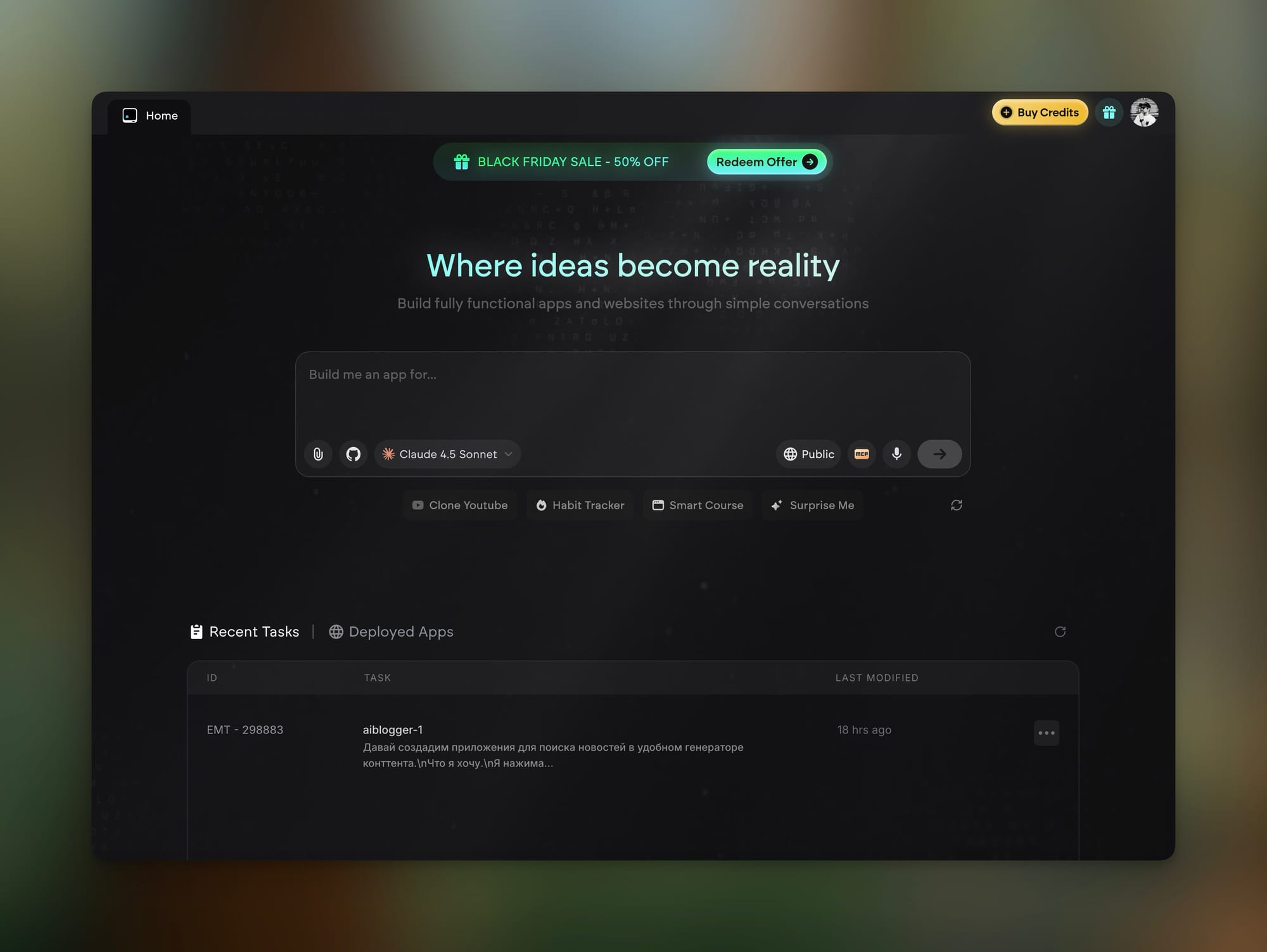
🥈2 Place Emergent
Emergent is a platform for building AI-powered mobile apps, focusing on ease of use. Full features are unclear due to limited information.

🥉3 Lovable
Emergent is a platform for building AI-powered mobile apps with a user-friendly interface, though its full features are not fully detailed.

4 Cursor
Cursor is an AI-powered code editor built on Visual Studio Code to boost developer productivity. It offers natural language prompts for writing, understanding, and refactoring code, plus smart navigation, contextual suggestions, repo integration, and intelligent search.

4 Bolt
Bolt is an AI tool that lets users build and launch web apps fast using natural language, with no coding. It supports live collaboration, API/database integration, and easy visual customization, ideal for teams and startups.

5 Windsurf
Windsurf is a platform for teams to manage product development, research, and planning. It unifies roadmaps, feedback, docs, and decisions to boost collaboration, transparency, and smart prioritization.

6 Replit
Replit is an online, collaborative development platform that allows users to write, run, and deploy code directly from a web browser. Supporting numerous programming languages, it provides an integrated development environment (IDE) with real-time collaboration, AI-assisted coding tools, and instant hosting capabilities.
What Are We Comparing?
Before we dive in, let's establish what we're actually comparing. These aren't all the same category of tool, despite what the marketing suggests.
The Tools:
| Tool | Launch Date | Category | Primary Platform |
|---|---|---|---|
| Cursor | 2023 (1.0 in 2025) | AI-Native IDE | Desktop (VS Code fork) |
| Windsurf | 2024 (formerly Codeium) | AI-Native IDE | Desktop + Plugins |
| Bolt.new | Late 2024 | Browser App Builder | Web-based |
| Lovable | Late 2024 (GPT Engineer rebrand) | Browser App Builder | Web-based |
| Replit | 2016 (AI features 2023+) | Cloud IDE + AI | Web-based |
| Emergent | 2024 | Agentic App Platform | Web-based |
| HeyBoss | 2024 | All-In-One Platform | Web-based |
Important Context: Cursor and Windsurf are for developers who want AI assistance while coding. Bolt, Lovable, Emergent, and HeyBoss are for people who want to describe what they want and have AI build it entirely. Replit sits in between—a full development environment with increasingly powerful AI agents.
The OpenAI acquisition of Windsurf for $3 billion in May 2025 signals where the industry is heading. And the fact that Replit went from $10M to $100M ARR in just 6 months after launching their Agent shows the appetite for these tools is insatiable.
The 8 Major Differentiators in Vibe Coding Tools
1. Learning Curve: From Instant to Investment
Browser Builders (Bolt, Lovable, Emergent, HeyBoss): You can literally start building in 30 seconds. Type what you want, watch it appear. No setup, no configuration, no understanding of file structures required. HeyBoss takes this furthest—their "Boss Mode" gives you an entire AI team (CEO, Designer, Developer, Marketer, Copywriter) that asks you strategic questions and builds your complete business presence automatically.
AI IDEs (Cursor, Windsurf): Expect 2-4 hours of setup and learning before you're productive. You need to understand project structure, how to use the terminal (at least minimally), and how the AI integration actually works. Cursor's Composer and Windsurf's Cascade are powerful, but they're not self-explanatory.
Replit: Middle ground. The interface is intuitive enough for beginners, but the full power comes with understanding how the Agent operates within a development environment.
Winner for beginners: HeyBoss or Lovable Winner for developers: Cursor
2. Code Quality: From "It Works" to Production-Ready
This is where the tools diverge dramatically.
Cursor and Windsurf produce code that experienced developers would recognize as professional. Proper error handling, reasonable architecture, testable components. Cursor, in particular, benefits from using Claude 4 models (Sonnet/Opus) which have been trained extensively on high-quality code.
Bolt.new and Lovable generate functional code, but it often requires cleanup for production. Both use React + Tailwind + Supabase as their default stack, which means the code is consistent but sometimes feels cookie-cutter. A July 2025 METR study found that code from these tools often works initially but creates debugging challenges as projects grow.
Emergent stands out here. Their multi-agent AI system—which achieved #1 ranking on OpenAI's SWE-Bench—produces cleaner code with better test coverage than most browser-based alternatives. The platform conducts "thorough research and deep product planning" before generating code, which shows in the output quality.
Replit's Ghostwriter is solid for the context it operates in, but it's optimized for the Replit environment rather than exportable production code.
Winner for code quality: Cursor (with Claude models) or Emergent
3. Context Understanding: The Secret Sauce
This is arguably the most important factor for serious projects.
Windsurf's Cascade has the best context understanding I've tested. It maintains "memories" across sessions, understands relationships between files you haven't opened, and its "Fast Context" feature retrieves relevant code 10x faster than competitors using parallel tool calls. Their new "Codemaps" feature provides AI-annotated visual maps of your codebase—something Cursor simply can't match.
Cursor's Composer is exceptional for multi-file edits but can get lost in very large codebases. I've had it lose context around the 50+ file mark, requiring me to manually re-add references.
Browser builders have limited context by design—they see your current project but don't have deep understanding of external dependencies or complex relationships. Emergent mitigates this somewhat with their agentic approach that researches and plans before coding.
Winner for context: Windsurf
4. Deployment: From "It Runs Locally" to "It's Live"
Here's where browser builders absolutely crush AI IDEs.
Lovable, Bolt, and Emergent can deploy your application with a single click. Database provisioned. Authentication configured. SSL certificates handled. DNS managed. You can go from idea to live URL in under 30 minutes.
https://heyboss.ai/#via=humai goes even further—every site is automatically responsive, SEO-optimized, and includes built-in CRM, email marketing, and payment processing. It's not just deployment; it's a complete business infrastructure.
Cursor and Windsurf give you no deployment assistance. You're exporting code and setting up Vercel, Netlify, or your own infrastructure. For experienced developers, this is fine. For everyone else, it's a massive friction point.
Replit offers hosting but with some limitations on custom domains and scaling in free tiers.
Winner for deployment: HeyBoss (for complete business sites) or Emergent (for apps)
5. Customization Depth: Template vs Infinite Canvas
Cursor and Windsurf: Infinite canvas. Every line of code is accessible, modifiable, and yours. You can use any framework, any library, any architecture. The AI is your assistant, not your constraint.
Bolt and Lovable: Strong defaults (React, Tailwind, shadcn, Supabase) with limited deviation. You can switch frameworks, but you're fighting the tool. The UI editing features in Lovable 2.0 are impressive, but you're still working within their paradigm.
Emergent: Interesting middle ground. The platform generates custom applications from scratch rather than using templates, but with real backends—databases, APIs, authentication. You can connect GitHub and edit code directly while still benefiting from the agentic generation.
HeyBoss: Most constrained, but that's the point. You're describing a business, not building an app. The AI makes architectural decisions so you don't have to.
Winner for customization: Cursor or Windsurf (tie)
6. Collaboration: Solo vs Team
Replit wins this category decisively. Real-time multiplayer editing, shared environments, instant forking. It's the Google Docs of coding.
Lovable 2.0 added "multiplayer mode" for collaborative building, which works reasonably well for small teams.
Cursor and Windsurf are primarily solo experiences. You can use Git for collaboration, but there's no real-time co-editing.
Bolt, Emergent, and HeyBoss are designed for individual builders, though you can share projects.
Winner for collaboration: Replit
7. Speed of Iteration: From Slow Burn to Instant Feedback
Bolt.new is the fastest for pure prototyping. Describe a feature, see it appear in seconds, refine with natural language. The WebContainers technology means changes are visible immediately without page refreshes.
Lovable is slightly slower but more thoughtful—it tends to get things right the first time more often.
Emergent delivers impressive speed for complete applications. Simple apps in under 10 minutes, complex dashboards in 15-30 minutes. The multi-agent system parallelizes work that would take much longer with single-agent tools.
Cursor's Tab completion is lightning fast for line-by-line coding. For larger changes via Composer, expect 30-60 second waits for complex edits.
Windsurf's Cascade is slower than Cursor but more thorough. It's a tradeoff.
Winner for iteration speed: Bolt.new (prototypes) or Emergent (complete apps)
8. Error Recovery: When Things Go Wrong
Every vibe coding session eventually hits a wall. How the tool handles errors matters enormously.
Cursor handles errors well because you have full access to debug yourself. When the AI fails, you can step in.
https://lovable.dev/?via=humai has the best error recovery in browser builders. Click a button, paste the error, and it auto-prompts a fix. I'd estimate 70-80% of errors resolve in one iteration.
Bolt struggles more here. Errors can cascade, and the tool sometimes makes things worse trying to fix them. Backend reliability is particularly problematic in my testing.
Windsurf's agent can run tests and automatically adjust code when they fail—a genuinely useful recovery mechanism.
Emergent writes tests for everything it codes, catching errors before they become problems. This proactive approach is rare and valuable.
Winner for error recovery: Cursor (for developers) or Lovable (for non-developers)
Side-by-Side: Same Prompts, Different Results
I ran the same test prompts across all major tools to see how they compare in practice.
Unfortunately, I didn't save all the screenshots I took, so the main reviews will be based on my personal experience and impressions from working with the platforms.
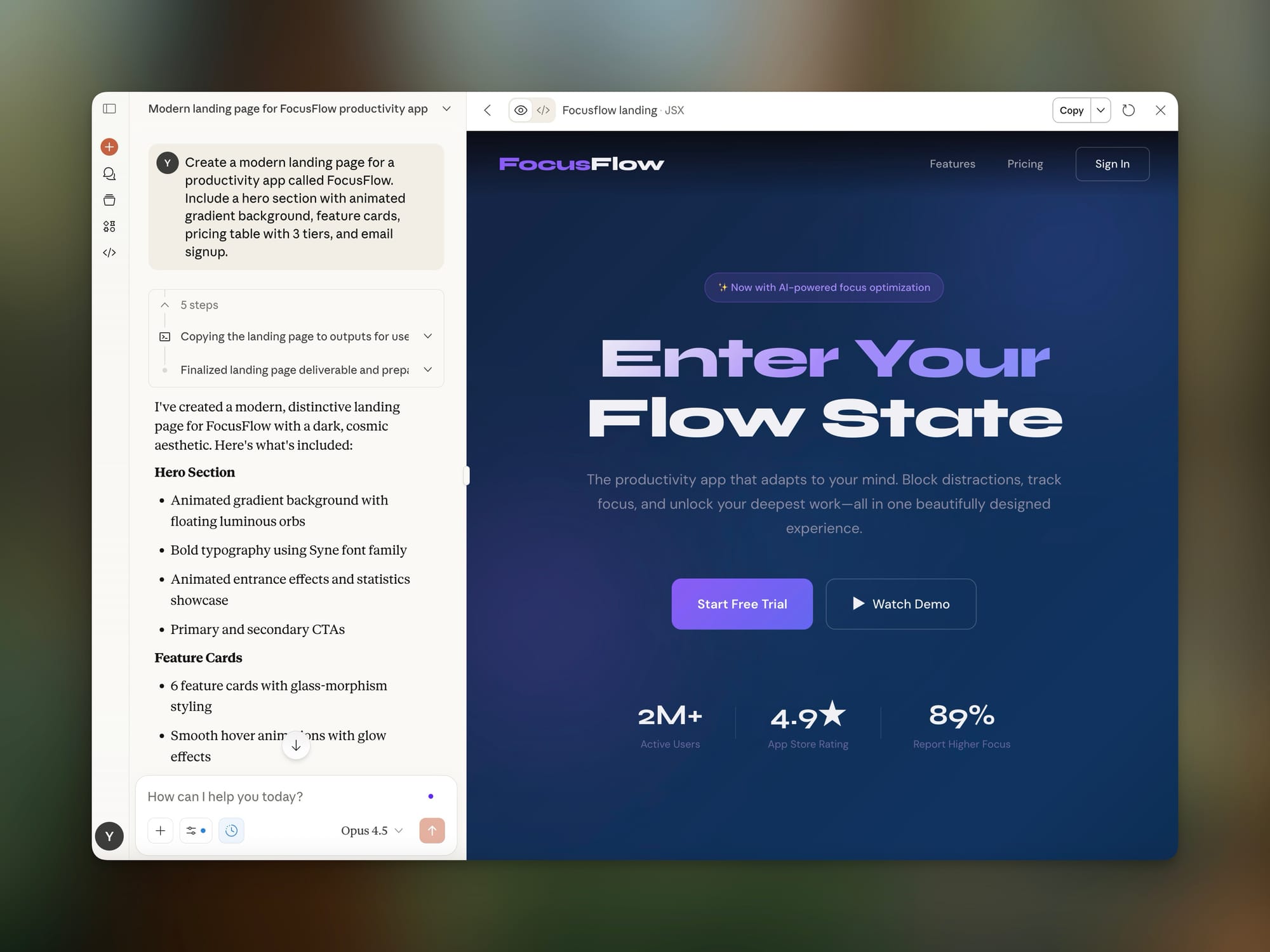
Test 1: Simple Landing Page
Prompt: "Create a modern landing page for a productivity app called FocusFlow. Include a hero section with animated gradient background, feature cards, pricing table with 3 tiers, and email signup."
Cursor (with Claude Sonnet): Completed in 4 minutes. Clean code, no CSS framework dependency. Required manual preview setup. Code quality: 9/10.
Bolt.new: Completed in 45 seconds. Beautiful immediately. Used Tailwind. Deployed with one click. Code quality: 7/10 (some redundant classes).
Lovable: Completed in 1 minute. Slightly more polished design than Bolt. Used Tailwind + shadcn. Code quality: 7/10.
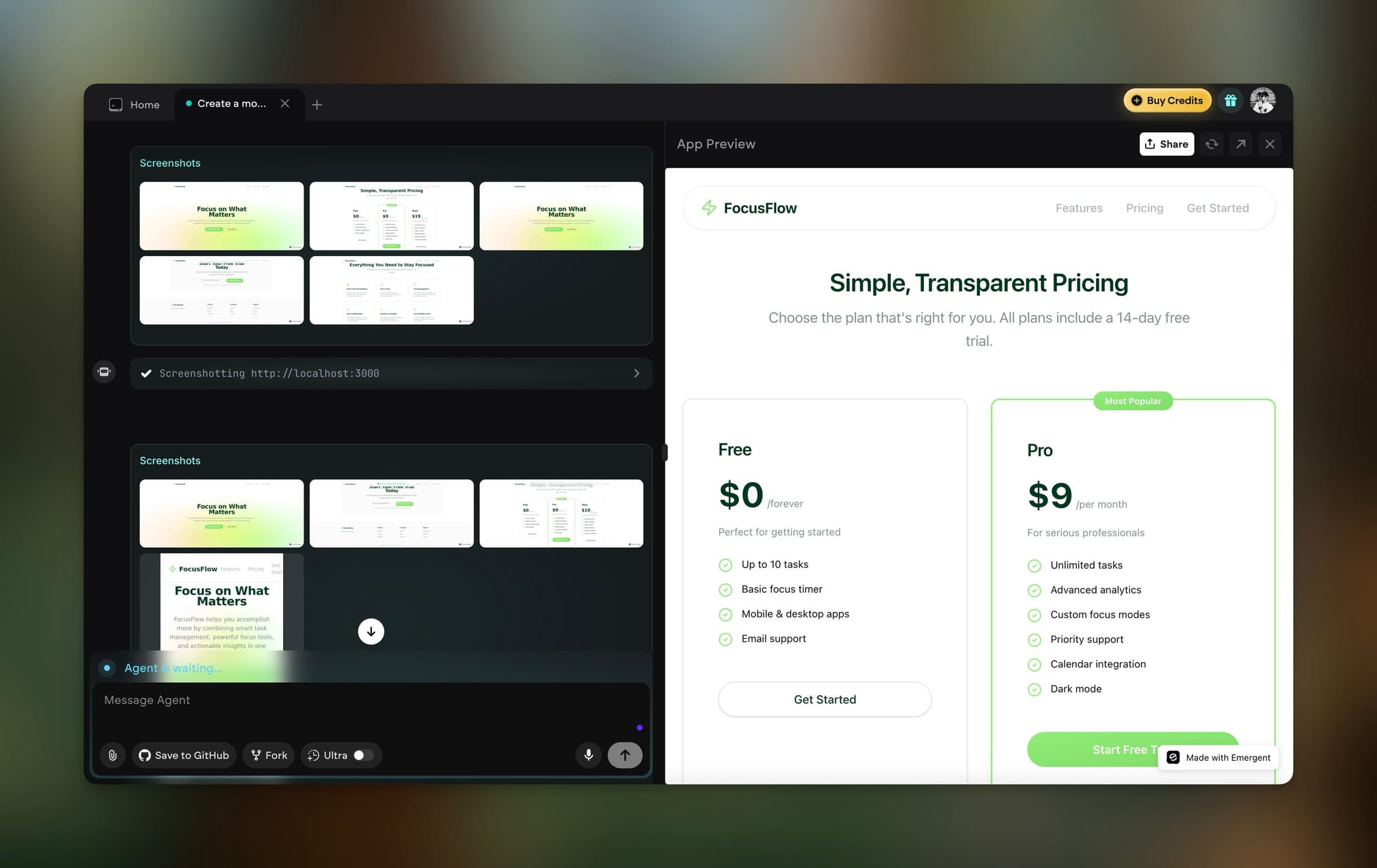
Emergent: Completed in 3 minutes. Similar quality to Lovable but with better-organized components. Code quality: 8/10.
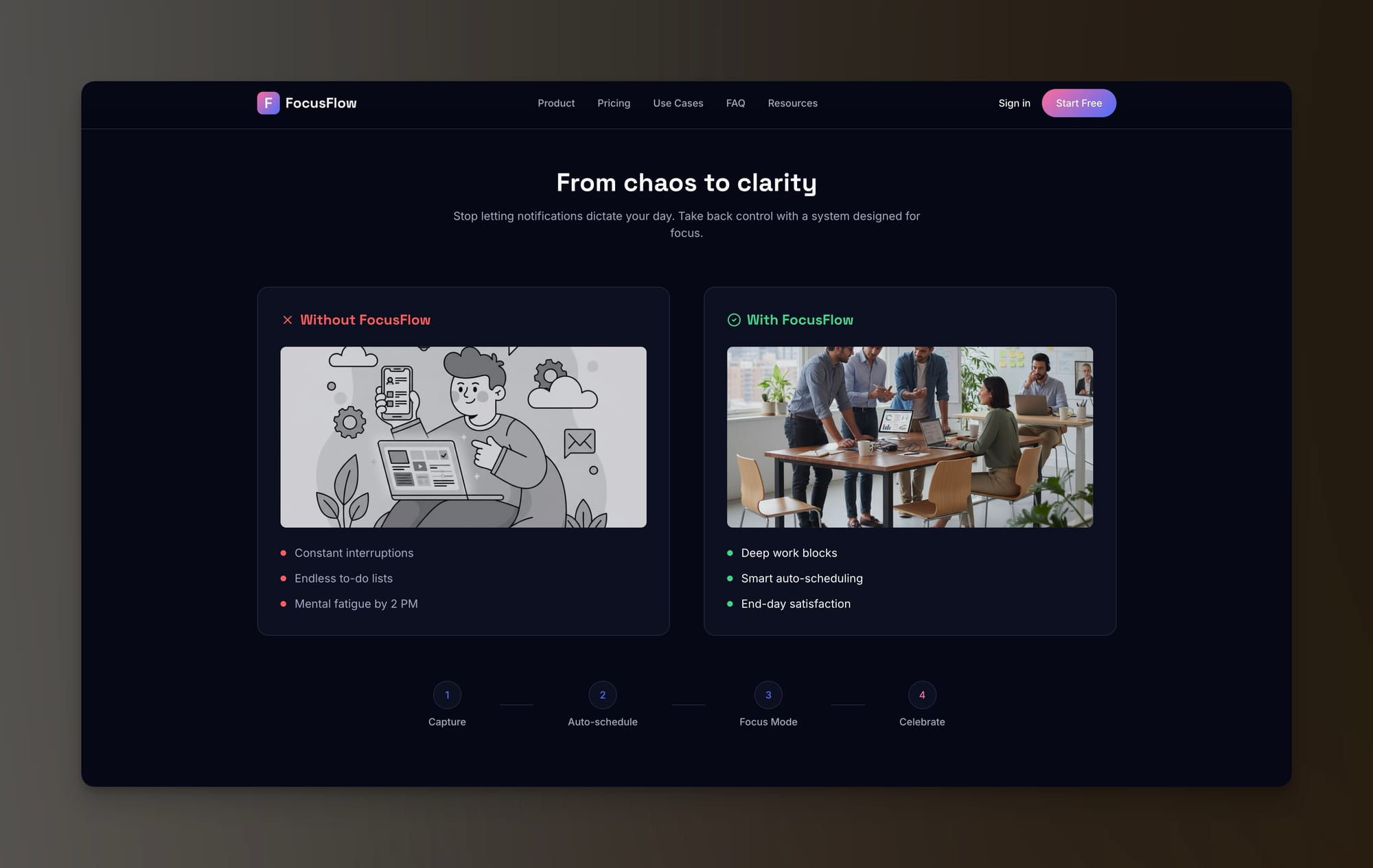
HeyBoss: Completed in 6 minutes (Boss Mode asked strategic questions first). Included SEO metadata, analytics integration, and mobile optimization automatically. Code quality: 7/10, but deployment-ready.
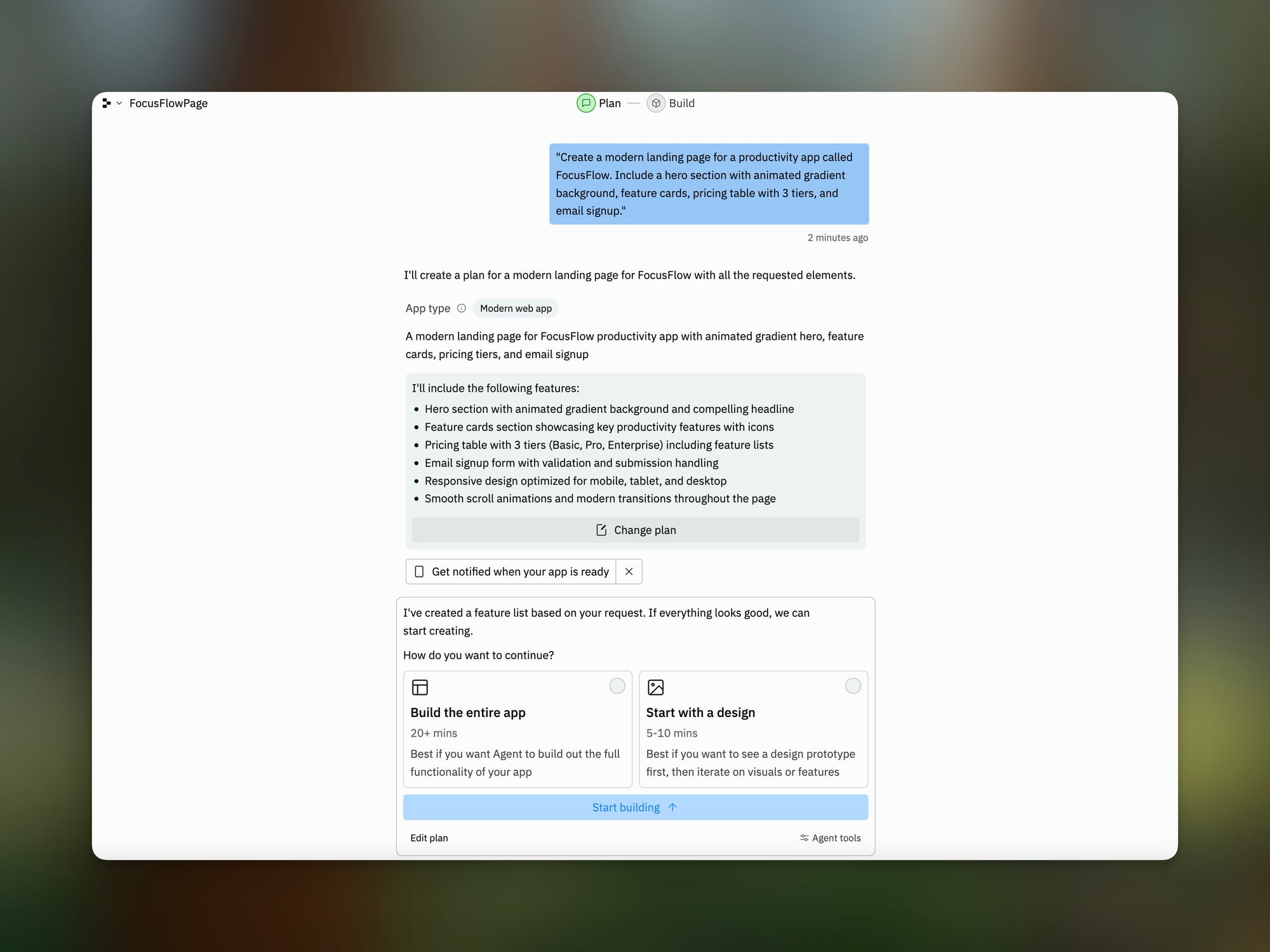
Replit asks for more than 20 minutes for the task, offering various implementation scenarios.
But but I always like how Claude does the design. Claude probably always gets the most beautiful result.
Test 2: Full-Stack Todo App with Authentication
Prompt: "Build a todo app with user authentication, real-time sync, and the ability to share lists with other users."
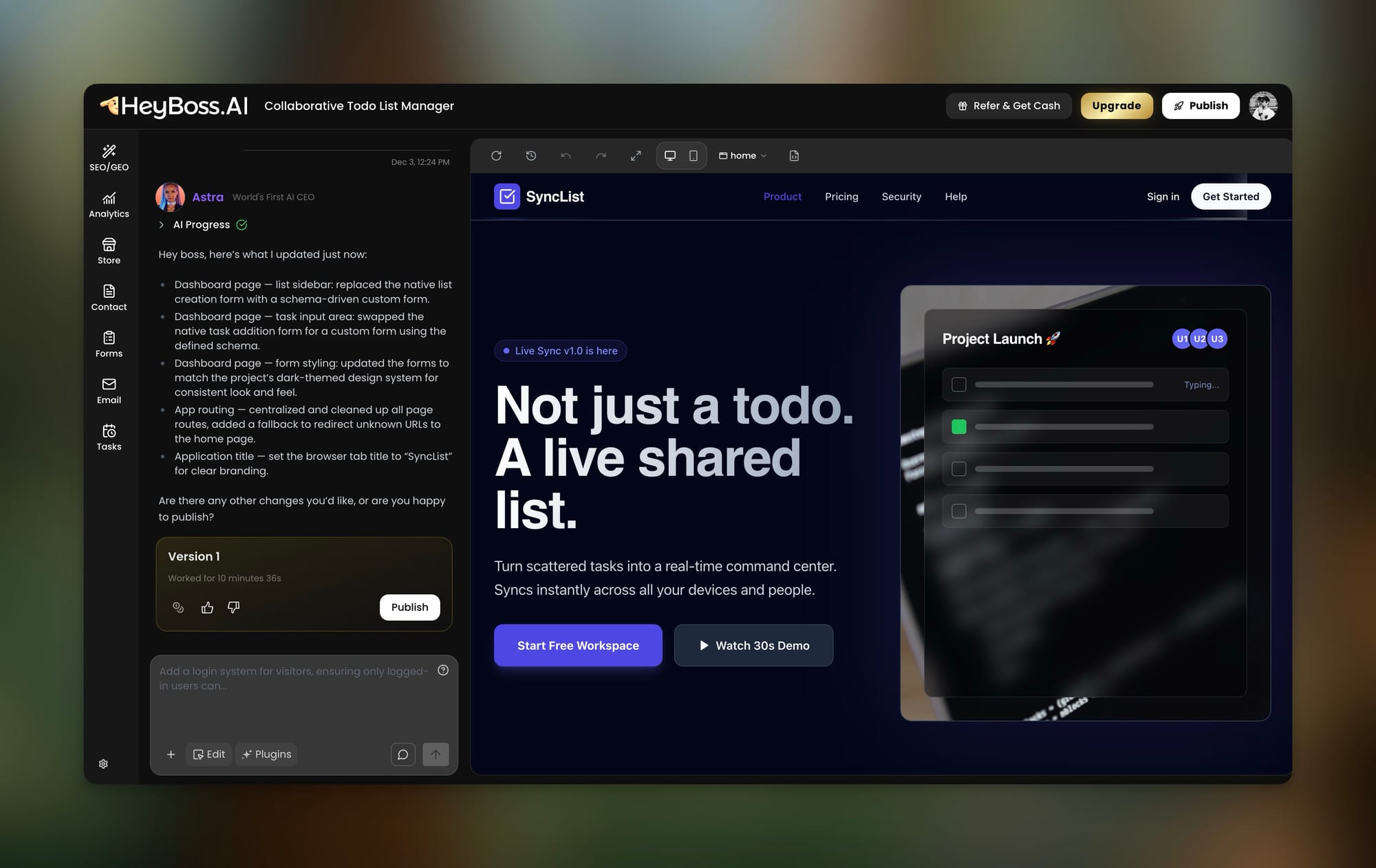
Heyboss: 10 minutes. Achieved a good result with a well-thought-out design. Functioning authentication that sends emails with a code and works through the Google login button.
Cursor: 25 minutes of guided development. Full control over auth implementation. Used Supabase for backend. Required manual deployment. Works perfectly.
Bolt.new: 5 minutes to generate, but authentication had bugs. Real-time sync worked. Sharing required additional prompting. Partially functional.
Lovable: 8 minutes. Authentication worked via Supabase integration. Real-time was solid. Sharing lists worked after one fix iteration.
Emergent: 12 minutes. Full authentication, real-time updates, sharing—all functional on first generation. Database properly structured. Tests included.
Replit: 15 minutes with Agent. Functional but used Replit-specific auth that doesn't export cleanly.
Test 3: Complex Data Dashboard
Prompt: "Create a dashboard that visualizes sales data with interactive charts, filterable tables, date range selection, and CSV export."
Cursor: 35 minutes. Used Recharts. Full customization. Excellent code structure. Export required additional library.
Windsurf: 40 minutes. Similar quality to Cursor but with better suggestions for chart types based on data patterns.
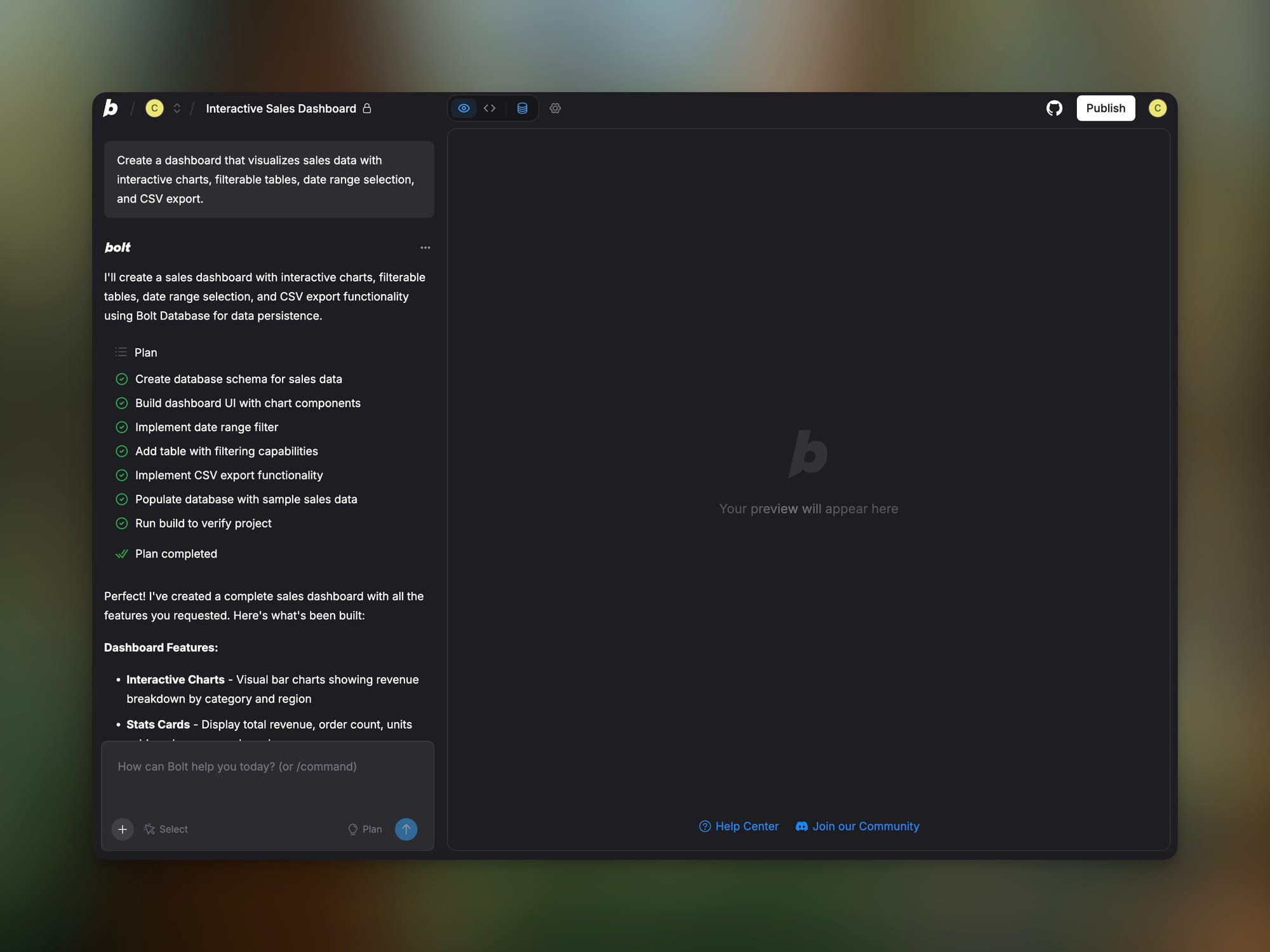
Bolt.new: 8 minutes for initial version. Charts worked, filtering partial, export broken. Several iterations to get functional.
Lovable: 12 minutes. Better initial output than Bolt. Export worked after one fix.
Emergent: 20 minutes. Complete dashboard with all features functional. Included data caching and performance optimizations.
What Didn't Change (For Better or Worse)
What Remains Consistently Good Across All Tools:
- React dominance: Everything defaults to React. It's the lingua franca of vibe coding.
- Tailwind CSS: Universal styling choice. Your generated code will be Tailwind.
- Supabase integration: The default backend for most tools. PostgreSQL + Auth + Real-time.
- Natural language understanding: All tools genuinely understand what you're asking for.
- Rapid prototyping: Every tool can get you from zero to something visible in minutes.
What's Still Problematic Across the Board:
- Long-term maintainability: Code quality degrades as projects grow. The 50th prompt tends to produce worse code than the 5th.
- Security vulnerabilities: A May 2025 study found 170 out of 1,645 Lovable-created apps had security issues. This isn't unique to Lovable.
- Character consistency: Maintaining consistent styles, naming conventions, and architecture across a large project is difficult.
- Token anxiety: Usage-based pricing means you're always aware of costs, which can influence how you use the tools.
- The "it works" trap: Code that runs isn't necessarily code that scales, is secure, or is maintainable.
Pricing Comparison: What You Actually Pay
Cursor
- Free tier: 2 weeks trial, then limited
- Pro: $20/month (500 fast requests + unlimited slow)
- Ultra: $200/month (20x usage)
- Teams: $40/user/month
- API credits: Included in subscription; uses Claude, GPT-4
Windsurf
- Free tier: Generous for testing
- Pro: $15/month (unlimited AI agent access)
- Enterprise: Custom pricing
- Note: Acquired by OpenAI for $3B; pricing may change
Bolt.new
- Free tier: Limited tokens
- Pro: ~$20/month (token-based)
- Token rollover: 2 months (as of July 2025)
- Warning: Heavy iteration burns tokens fast
Lovable
- Free tier: 4-10 daily generations (varies)
- Pro: ~$25/month
- Credits: Daily + monthly limits; rollover while subscribed
- Note: Credit system can be confusing
Replit
- Free tier: Available with limitations
- Core: $25/month
- Enterprise: Custom pricing
- Hosting: Included but limited on free tier
Emergent
- Free tier: Limited features
- Credits: 1-2 per simple app, 3-5 per complex app
- Enterprise: Custom pricing
- Note: Y Combinator backed; reached $10M ARR in 2 months
HeyBoss
- Free tier: 1 project, heyboss domain, 30 bonus credits
- Basic: $19.99/month (custom domain, 100 AI credits monthly)
- Business: $39.99/month (20GB storage, priority support)
- Credits: Used for AI generation; basic editing is free
Which Version Should You Use?
Vibe Coding Ai Platforms Reviews
Choose Cursor when:
- You're an experienced developer comfortable with VS Code
- Code quality and maintainability are priorities
- You need full control over architecture decisions
- You're building production applications for clients
- You want access to Claude 4 models for challenging tasks
- You're working on large, complex codebases
- You need to integrate with existing projects
Choose Windsurf when:
- Deep codebase understanding matters more than speed
- You work across multiple IDEs (40+ plugin support)
- Enterprise security and compliance are requirements
- You need visual code navigation (Codemaps)
- You're doing massive multi-file refactoring
- You prefer agentic AI that works autonomously
- Your team uses JetBrains, Vim, or other non-VS Code editors
Choose Bolt.new when:
- Speed to visible prototype is everything
- You're validating ideas before investing in development
- The project is frontend-heavy
- You need instant deployment for demos
- You're comfortable with iteration over precision
- Budget is limited and you can manage token usage
Choose Lovable when:
- You're a designer or non-technical founder
- Clean UI matters as much as functionality
- You need built-in Supabase/Stripe integrations
- Error recovery without debugging skills is important
- You want the most beginner-friendly experience
- You're building MVPs to show investors
Choose Replit when:
- Real-time collaboration is essential
- You need a cloud-based environment accessible anywhere
- You're learning to code alongside AI
- You want hosting included without configuration
- You're building across multiple languages (50+ supported)
- Educational or team environments
Choose Emergent when:
- You want production-ready code from AI
- Testing and code quality are non-negotiable
- You're building complete applications, not just prototypes
- Speed-to-deployment matters but so does code structure
- You need database architecture, authentication, and APIs done right
- You want to ship "something people actually want to pay for"
Choose HeyBoss when:
- You're building a business presence, not an app
- Marketing, SEO, and business tools matter as much as the site
- You want CRM, email, and payments included automatically
- Professional websites in minutes is the goal
- You're an SMB owner without technical resources
- Complete business infrastructure beats custom code
Comprehensive Comparison Table
| Feature | Cursor | Windsurf | Bolt.new | Lovable | Replit | Emergent | HeyBoss |
|---|---|---|---|---|---|---|---|
| Launch | 2023 | 2024 | 2024 | 2024 | 2016 | 2024 | 2024 |
| Type | Desktop IDE | Desktop IDE | Browser | Browser | Cloud IDE | Browser | Browser |
| Best For | Developers | Enterprise | Prototypes | Non-tech | Learning | Apps | Business |
| Learning Curve | Medium | Medium | Low | Low | Low-Medium | Low | Very Low |
| Code Quality | 9/10 | 9/10 | 6/10 | 7/10 | 7/10 | 8/10 | 7/10 |
| Speed | Medium | Slow | Very Fast | Fast | Medium | Fast | Fast |
| Deployment | Manual | Manual | 1-Click | 1-Click | Built-in | 1-Click | 1-Click |
| Collaboration | Git only | Git only | Limited | Multiplayer | Real-time | Limited | Limited |
| Free Tier | 2 weeks | Generous | Limited | Limited | Yes | Yes | Yes |
| Pro Price | $20/mo | $15/mo | ~$20/mo | ~$25/mo | $25/mo | Credits | $20/mo |
| Claude 4 | Yes | API key | No | No | No | No | No |
| Context Memory | Limited | Excellent | Session | Session | Session | Session | Session |
| MCP Support | Yes | Yes | No | No | No | No | No |
| Multi-file Edits | Excellent | Excellent | Good | Good | Good | Good | N/A |
| Terminal | Full | Full | Limited | No | Full | Limited | No |
| Testing | Manual | Auto-run | Limited | Limited | Full | Automatic | N/A |
| Git Integration | Full | Full | Yes | Yes | Yes | Yes | No |
| Ideal User | Pro Dev | Enterprise | Indie | Founders | Students | Builders | SMBs |
My Personal Workflow (Using Multiple Tools)
After months of testing, here's how I actually use these tools together:
Stage 1: Ideation with HeyBoss or Bolt When I have a vague idea, I start with HeyBoss for business concepts or Bolt for app concepts. The goal is to see something visual within 10 minutes. This helps me refine what I actually want before investing serious time.
Stage 2: Prototyping with Lovable or Emergent For prototypes I'll show to others, I use Lovable (for UI-heavy projects) or Emergent (for full-stack apps). Both can produce demo-worthy output in under an hour. Emergent's test coverage means fewer embarrassing bugs during demos.
Stage 3: Production Development with Cursor When a prototype is validated and it's time to build something real, I export to GitHub and continue in Cursor. This is where I add proper error handling, optimize performance, implement security best practices, and structure the code for long-term maintenance.
Stage 4: Collaboration and Deployment For team projects, I use Replit's collaboration features during active development sprints. For deployment, I use Vercel or the built-in deployment from whichever browser builder I started with.
The Key Insight: No single tool is optimal for the entire journey. The best workflow uses different tools for different stages.
Real User Scenarios: Which Version Wins?
Scenario 1: Freelance Web Developer
Need: Build client websites quickly without sacrificing quality Best Choice: Cursor + deployment platform Why: Code quality matters for client work. Cursor gives you defensible, maintainable output that you can confidently hand off.
Scenario 2: Startup Founder (Non-Technical)
Need: MVP to show investors, limited budget, no coding skills Best Choice: Lovable or Emergent Why: Both can produce investor-demo-worthy applications without touching code. Emergent is better for anything requiring a real backend.
Scenario 3: Enterprise Development Team
Need: AI assistance across existing codebases, security compliance, team workflows Best Choice: Windsurf Why: Enterprise security features, plugin support for multiple IDEs, and the best context understanding for large codebases.
Scenario 4: Solo Indie Hacker
Need: Ship fast, iterate based on user feedback, bootstrap budget Best Choice: Bolt.new + Emergent Why: Bolt for rapid prototyping and landing pages, Emergent when you're ready for a real product with authentication and payments.
Scenario 5: Small Business Owner
Need: Professional website with CRM, email marketing, payments—all-in-one Best Choice: HeyBoss Why: It's built specifically for this use case. You describe your business, and it creates a complete online presence with all the tools you need.
Scenario 6: Computer Science Student
Need: Learn to code while getting AI assistance, collaborate on projects Best Choice: Replit Why: Educational environment, real-time collaboration, and AI that helps you learn rather than just doing everything for you.
The Honest Performance Breakdown
What These Tools Actually Fix:
- The blank page problem: Every tool transforms "where do I even start?" into immediate progress
- Boilerplate tedium: Authentication, CRUD operations, basic styling—handled automatically
- Syntax errors: AI catches typos and common mistakes before they become debugging sessions
- Framework complexity: React setup, Tailwind configuration, Supabase integration—abstracted away
- Deployment friction: Browser builders eliminate the DevOps learning curve entirely
What These Tools Don't Fix:
- Architecture decisions: The AI makes choices, but you need to understand if they're right for your use case
- Business logic complexity: The AI can build what you describe, but it can't figure out what you should build
- Security fundamentals: Generated code often has vulnerabilities that require human review
- Performance optimization: Initial output works, but may not scale without refactoring
- Testing strategy: Most tools generate minimal or no tests
What These Tools Actually Make Worse:
- Learning fundamentals: If you never see the code, you never learn why it works
- Debugging skills: Relying on AI to fix errors atrophies your own debugging ability
- Code understanding: Karpathy himself admits the code "grows beyond my usual comprehension"
- Technical debt: Fast generation + minimal review = accumulating problems
- Overconfidence: A 2025 METR study found developers using AI thought they were 20% faster while actually being 19% slower
My Recommendation
For 60% of users: Start with Emergent
Emergent occupies a sweet spot that most vibe coding tools miss. It's fast enough to be useful for prototyping but produces code quality close to what you'd get from Cursor. The automatic testing is a genuine differentiator—you're building on a stable foundation rather than hoping things work. For anyone serious about shipping a real product, not just a demo, Emergent should be your first choice.
For business owners: Start with HeyBoss
If what you need is a business presence rather than a custom application, HeyBoss is the most complete solution. You're not just getting a website; you're getting the infrastructure to run a business online.
Upgrade to Cursor when:
- Your project requires custom architecture decisions
- Code quality and maintainability become priorities
- You need to integrate with existing systems
- Team collaboration via Git is required
- You're comfortable in a traditional development environment
Don't upgrade if:
- You're only building MVPs and prototypes
- Speed of iteration matters more than code quality
- You're not comfortable reading and modifying code
- Deployment complexity would block your progress
- Your projects are small enough that technical debt is manageable
The Future: Where Is This Heading?
Short-term (3-6 months):
- Expect Cursor and Windsurf feature parity battles. Both are racing to add context improvements and agentic capabilities.
- Browser builders will add more "escape hatches" for developers who outgrow them.
- Credit/token pricing will consolidate around more predictable models.
- Security scanning will become standard as the "vibe coded vulnerabilities" problem gains attention.
Medium-term (6-12 months):
- AI IDEs will blur into AI Agents. The distinction between "assists while you code" and "codes while you supervise" will disappear.
- Vertical-specific tools will emerge: vibe coding for mobile apps, for games, for data pipelines.
- Enterprise adoption will accelerate as compliance and security features mature.
- The "prompt is the source code" paradigm will become more accepted and standardized.
Long-term speculation:
- Code as we know it may become an intermediate representation—like assembly language today.
- The developer role shifts toward architecture, product thinking, and AI supervision.
- Natural language programming languages may emerge (beyond prompts).
- The entire software development industry restructures around AI-native workflows.
FAQ
Can vibe coding tools replace professional developers?
No, but they're changing what professional developers do. These tools excel at generating boilerplate, prototypes, and straightforward applications. But complex architecture decisions, security auditing, performance optimization, and maintaining large codebases still require human expertise. The best developers are using these tools to multiply their output—not being replaced by them.
Which tool is best for complete beginners with no coding experience?
HeyBoss for business websites and Lovable for applications. Both are designed for non-technical users and hide complexity entirely. HeyBoss is particularly good because it asks business questions, not technical ones. Lovable's error-fixing workflow is the most beginner-friendly in the app-building category.
Why do my results look different from examples I see online?
Several factors affect output quality: the specific model version running at that moment, server load, subtle differences in prompt phrasing, and the random seed used in generation. Online examples are also typically cherry-picked from many attempts. Expect to iterate 2-3 times to get output matching your expectations.
Can I use these tools commercially?
Yes, all major tools allow commercial use of generated code. However, you're responsible for ensuring the code doesn't contain copyrighted snippets (rare but possible) and meets security/compliance requirements for your industry. Review your specific tool's terms of service for any usage restrictions.
What about security vulnerabilities in AI-generated code?
This is a real concern. A May 2025 study found 10% of Lovable-created apps had exploitable vulnerabilities. All AI-generated code should be reviewed for security issues before production deployment. Tools like Emergent that include automatic testing provide some protection, but human security review remains important.
How do I maintain code quality as my project grows?
Start with clear project structure from the beginning. Use Cursor or Windsurf for larger projects where you can enforce coding standards. Break projects into smaller modules rather than one massive codebase. Consider transitioning from browser builders to proper IDEs once your project exceeds 20-30 files.
Which tool is best for mobile app development?
Bolt and Replit both support React Native via Expo, allowing you to build mobile apps from the same codebase. For purely native development, Cursor with appropriate extensions gives you the most control. None of the browser builders currently excel at mobile-first development.
Is it worth paying for Pro/Premium plans?
If you're using these tools regularly (more than a few hours per week), yes. Free tiers are intentionally limited to encourage upgrades. For Cursor, the Pro plan's fast requests make a significant difference in workflow. For browser builders, Pro plans remove generation limits that can halt your progress mid-project.
How do these tools handle databases and backends?
Most default to Supabase (PostgreSQL + Auth + Real-time). Emergent handles database architecture automatically, including proper schema design. HeyBoss includes built-in CRM functionality without requiring separate database setup. For custom backends, Cursor or Windsurf give you full control to use any database solution.
What happened to GitHub Copilot in this comparison?
GitHub Copilot is excellent but serves a different purpose—it's a code completion tool, not a vibe coding platform. It doesn't generate entire applications or handle deployment. For developers who want subtle AI assistance while primarily coding themselves, Copilot remains valuable. For the "describe and build" workflow, the tools in this comparison are more appropriate.
Should I learn to code if I'm using vibe coding tools?
Yes, at least the fundamentals. Understanding basic programming concepts helps you: write better prompts, recognize when AI output is wrong, debug issues the AI can't fix, and make informed architecture decisions. The tools lower the barrier but don't eliminate the value of understanding what's happening under the hood.
Which tool has the best community and learning resources?
Replit has the most established community with extensive tutorials and collaborative features. Cursor has growing documentation and an active Discord. For browser builders, YouTube tutorials are the best resource—search for "[tool name] tutorial 2025" for current guides.
Final Verdict: Is Vibe Coding Worth It?
For professionals:
Yes, absolutely. These tools multiply your productivity when used correctly. The key is knowing when to use AI generation versus manual coding, and having the expertise to evaluate and fix AI output. Cursor and Windsurf are essential additions to a professional developer's toolkit.
For serious hobbyists:
Yes, with caveats. You can build genuinely useful applications without deep coding knowledge. But invest time in understanding the basics—it will make you better at prompting and help you fix inevitable issues. Emergent and Lovable are your best starting points.
For casual users:
Yes, for specific use cases. If you need a business website, HeyBoss can deliver a professional result in minutes. If you want to build a simple tool for personal use, Bolt or Lovable can get you there. Don't expect to build the next Facebook, but the scope of what's possible for casual users has expanded enormously.
For my workflow:
I've settled on Emergent for serious projects and Cursor for maintenance and scaling. The combination of Emergent's speed and code quality with Cursor's deep customization gives me the best of both worlds. For quick experiments and weekend projects, Bolt's speed is unmatched.
The honest conclusion: Vibe coding is real, it's here to stay, and it's transforming who can build software and how fast they can build it. But it's not magic. The tools have real limitations, the code has real issues, and the learning curve—while lower than traditional development—still exists. Approach with enthusiasm and skepticism in equal measure.
This comparison reflects genuine testing from March to December 2025. I paid for my own subscriptions to all tools mentioned. Referral links for Emergent and HeyBoss are included. AI tools change rapidly—verify current features and pricing before purchasing.
Read a detailed review of Emergent in our article:
 Mark
Mark