Something fundamental is shifting in how we build intelligent systems. After a decade of sending every data point to distant cloud servers for AI processing, developers and companies are recognizing an uncomfortable truth: the cloud-first model has serious problems that no amount of optimization can fix.
The latency between your device and a data center means AI responses will never feel truly instant. The bandwidth costs of streaming sensor data add up quickly at scale. And perhaps most concerning, every piece of personal information you send to the cloud becomes a potential liability – a breach waiting to happen, a compliance headache, or simply data that lives outside your control.
TinyML and on-device AI offer a different path. Instead of treating edge devices as dumb sensors that funnel data elsewhere, these approaches embed intelligence directly where the data originates. Your smartwatch doesn't need to phone home to detect an irregular heartbeat. Your security camera doesn't need constant internet connectivity to recognize faces. Your industrial sensor doesn't need cloud subscriptions to predict equipment failures.
This guide will take you from understanding the core concepts to deploying your first on-device model. Whether you're a hobbyist curious about running AI on a microcontroller or a professional evaluating edge AI for production systems, the following sections provide everything you need to get started.
Understanding the On-Device AI Landscape
The term "on-device AI" encompasses a broad spectrum of capabilities, from large language models running on smartphones to tiny classifiers operating on battery-powered sensors. Understanding where your application fits within this spectrum determines which tools and approaches make sense.
At the high end, modern smartphones pack remarkable AI horsepower. Apple's Neural Engine, Qualcomm's AI Engine, and Google's Tensor chips deliver tens of trillions of operations per second, enabling features like real-time language translation, photo enhancement, and sophisticated voice assistants, all without cloud connectivity. These devices can run models with billions of parameters, processing vision, language, and audio simultaneously with sub-millisecond latency.
The middle tier includes single-board computers like Raspberry Pi with AI accelerators, development boards with integrated NPUs, and edge servers that handle multiple inference streams. These platforms balance computational capability with reasonable power consumption, making them suitable for smart cameras, robotic systems, and industrial monitoring applications.
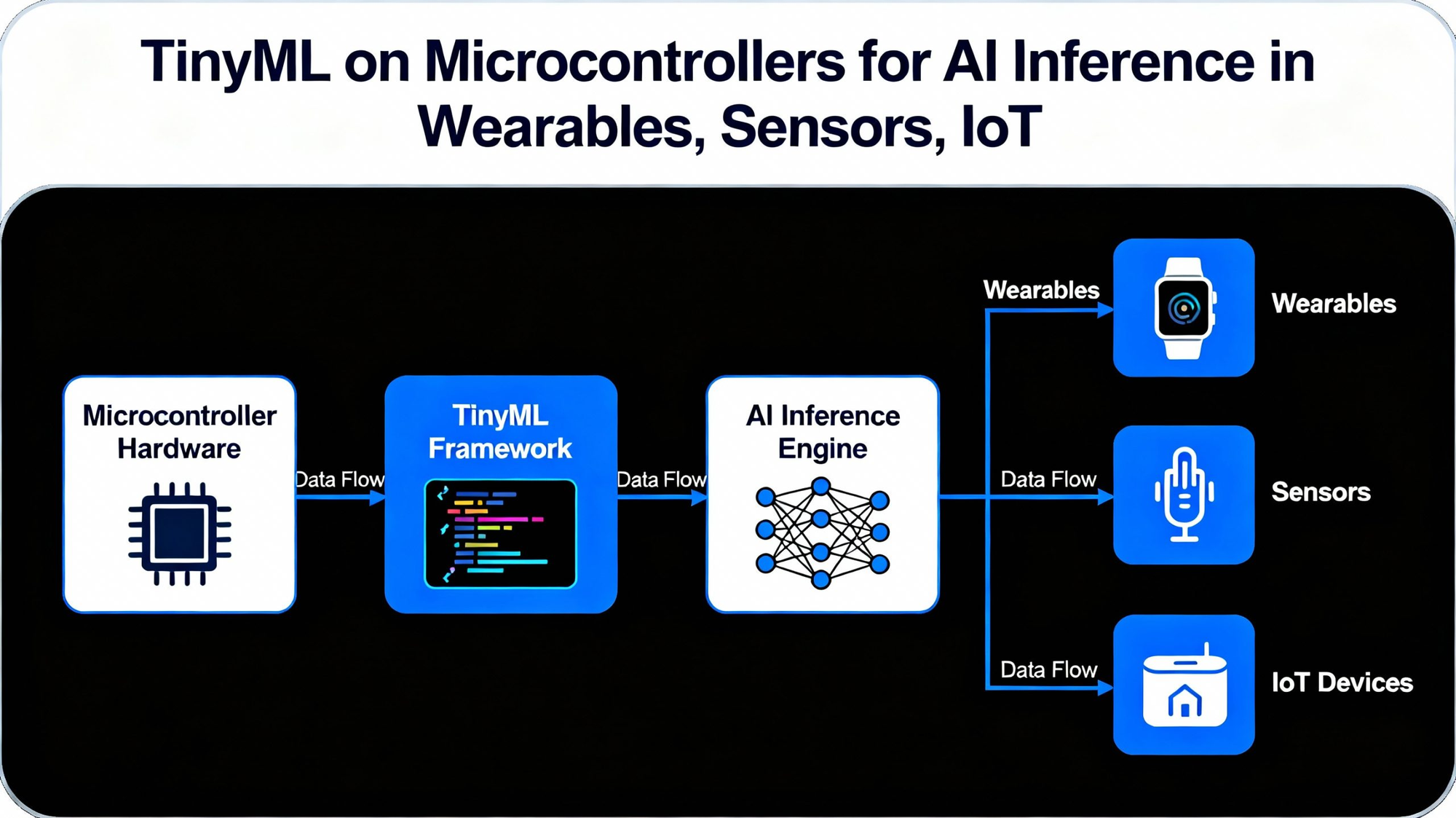
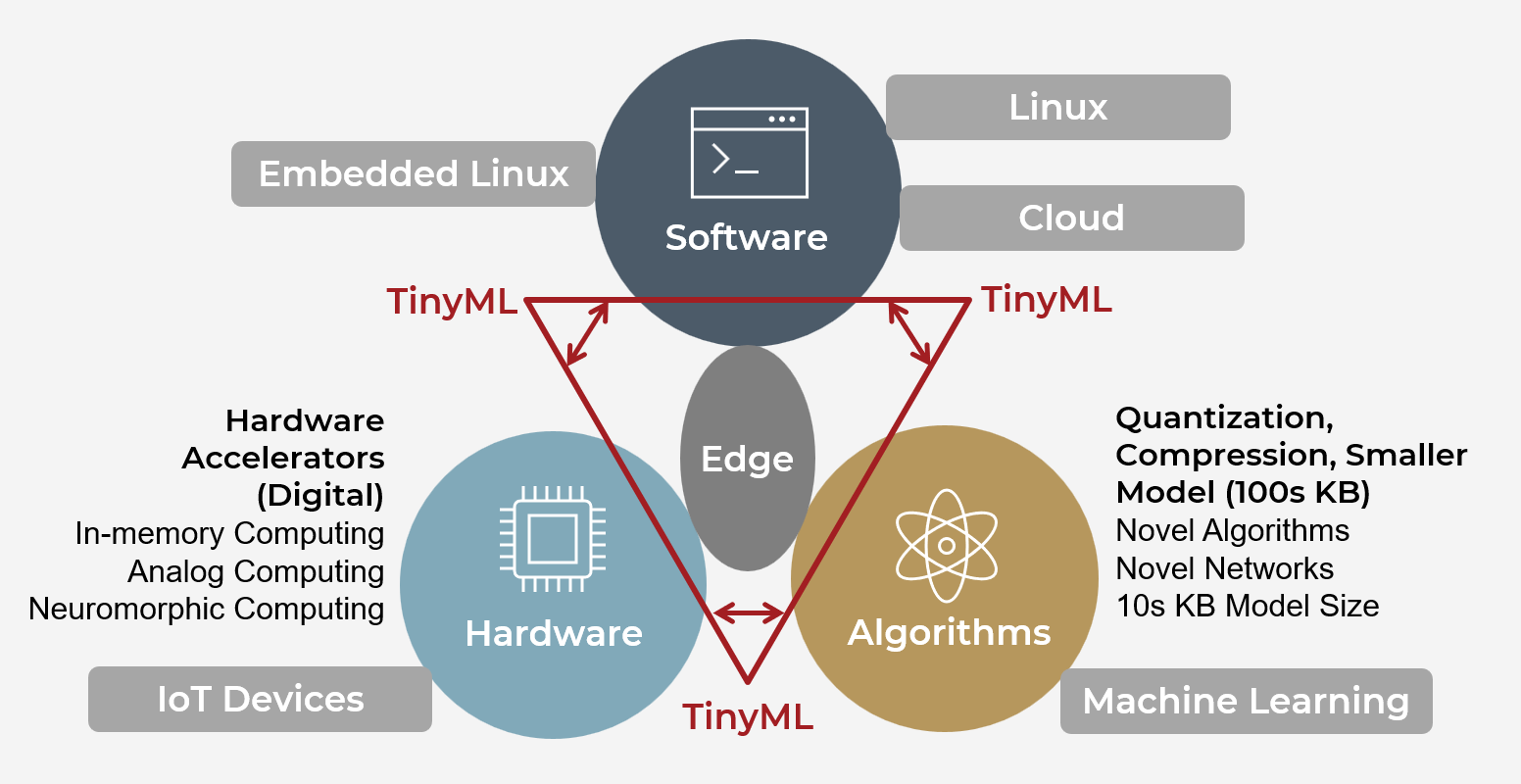
TinyML occupies the most constrained end of this spectrum. We're talking about microcontrollers with kilobytes, not gigabytes, of RAM, running on milliwatts of power from coin cell batteries. These devices can't run GPT or Stable Diffusion, but they can perform highly useful tasks: recognizing wake words, detecting anomalies in sensor readings, classifying gestures, and identifying specific sounds. The constraints force creativity, and the results enable intelligence in places that were previously impossible.
The choice between these tiers depends on your application requirements. If you need conversational AI or complex image generation, target smartphones or edge servers. If you need always-on sensing with multi-year battery life and dollar-level hardware costs, TinyML is your domain.
Why On-Device Processing Matters More Than Ever
The shift toward local AI processing isn't happening because developers enjoy working with constrained hardware. It's driven by practical realities that cloud-dependent architectures simply cannot address.
Privacy has evolved from a nice-to-have into a legal and competitive requirement. Regulations like GDPR, CCPA, and China's PIPL impose significant penalties for mishandling personal data, and the simplest way to comply is ensuring sensitive information never leaves the device in the first place. Healthcare applications processing patient data, financial services handling transaction information, and consumer devices capturing audio or video all benefit from architectures that keep data local by default.
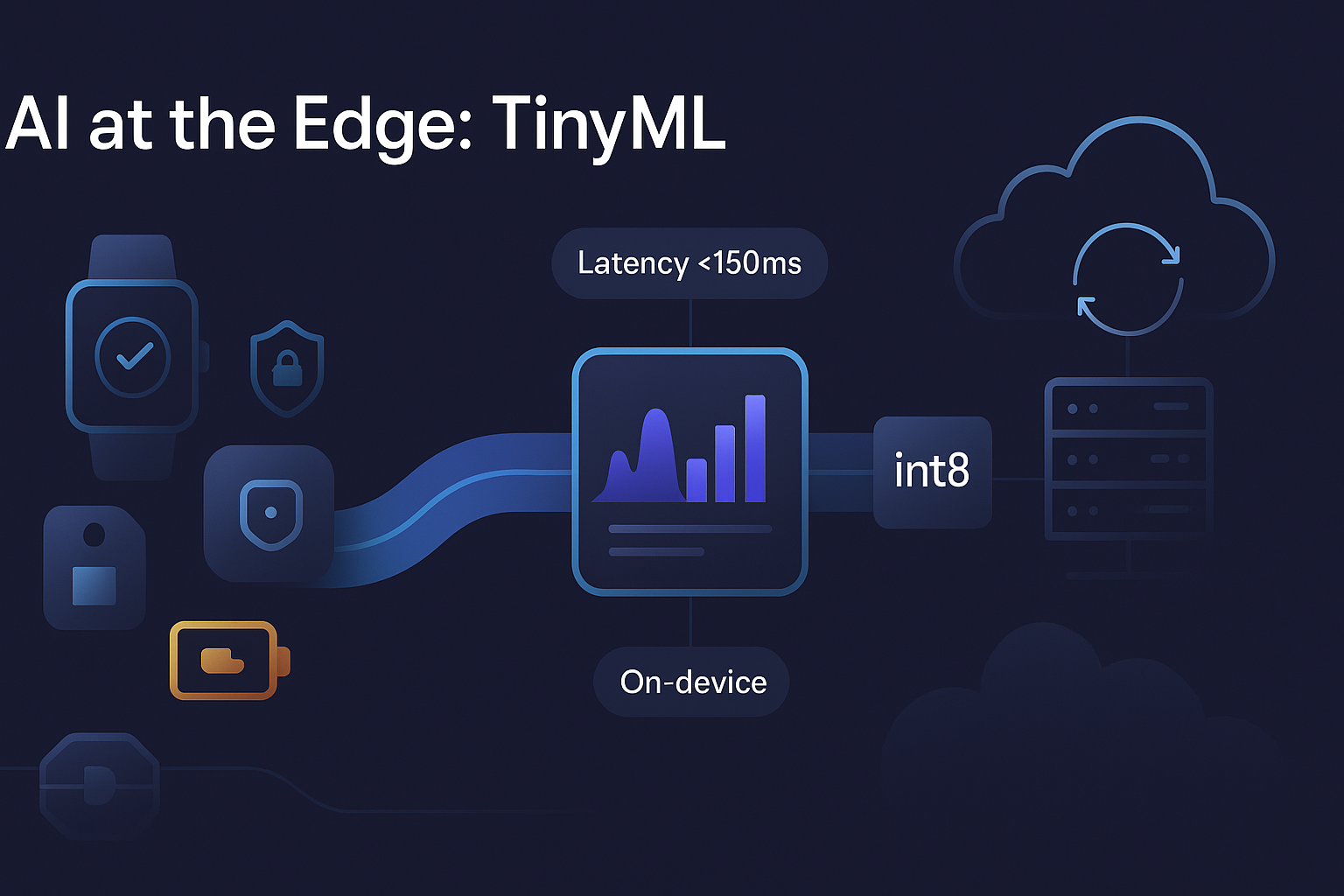
Beyond regulatory compliance, users increasingly distrust cloud AI services. Survey data suggests that nearly 80% of users express reluctance about AI features that transmit data to unknown servers, while over 90% indicate willingness to pay premiums for on-device processing. This privacy-conscious market segment represents a meaningful business opportunity for products that can demonstrate local-only processing.
Latency constraints make cloud processing impractical for many real-time applications. The physics of network round-trips impose minimum delays that no amount of infrastructure investment can eliminate. A voice assistant that responds in 50 milliseconds feels instant and natural; one that takes 500 milliseconds feels sluggish and frustrating. Industrial control systems requiring millisecond response times simply cannot depend on network availability.
Connectivity assumptions fail in more scenarios than many developers realize. An estimated 2.6 billion people worldwide lack reliable internet access. Even in well-connected areas, applications must function in airplanes, elevators, basements, rural locations, and anywhere network coverage proves spotty. Offline capability transforms edge cases into reliable operation.
Cost structures favor on-device processing at scale. Cloud inference pricing of fractions of a cent per request seems negligible until you multiply by millions of users making multiple requests daily. The cumulative cloud costs for a popular AI feature can dwarf the one-time expense of implementing local inference. Additionally, devices with on-device AI require less network bandwidth, reducing both infrastructure costs and energy consumption.
The TinyML Ecosystem: Hardware and Software Foundations
Building TinyML applications requires understanding both the hardware platforms and the software toolchains that make deployment possible. The ecosystem has matured significantly, offering accessible options for beginners while providing the flexibility professionals need for production systems.
Microcontroller Platforms
The ESP32 family has become the most popular platform for TinyML experimentation and deployment. These chips from Espressif combine dual-core processors with Wi-Fi and Bluetooth connectivity, onboard memory sufficient for modest neural networks, and prices low enough for high-volume deployment. The ESP32-S3 variant adds vector instructions that accelerate neural network computation, making it particularly well-suited for TinyML workloads.
Arduino's Nano 33 BLE Sense has established itself as the standard entry point for TinyML beginners. The board integrates an ARM Cortex-M4 microcontroller with onboard sensors including accelerometer, gyroscope, magnetometer, microphone, and environmental sensors. This all-in-one package lets developers focus on building AI applications rather than wiring up sensor circuits.
For more demanding applications, boards based on ARM Cortex-M7 processors offer substantially more computational headroom. STMicroelectronics' STM32 series and Nordic Semiconductor's nRF54 family both provide capable TinyML platforms with excellent power efficiency and robust software support.
At the highest performance tier for microcontrollers, specialized AI-enabled MCUs are emerging. These chips integrate dedicated neural network accelerators alongside general-purpose CPU cores, enabling inference performance that would be impossible through software alone. Expect this category to expand rapidly as silicon vendors recognize the growing demand for embedded AI capability.
Software Frameworks
TensorFlow Lite for Microcontrollers (TFLM) remains the dominant framework for TinyML deployment. Developed by Google, TFLM provides a lightweight runtime that executes quantized TensorFlow models on resource-constrained devices. The framework supports ARM Cortex-M processors, ESP32, and other popular architectures, with a model zoo providing pre-trained networks for common tasks.
Edge Impulse has emerged as the most accessible platform for TinyML development. The web-based interface handles data collection, model training, and deployment generation without requiring deep ML expertise. Connect a supported device, collect training data, click through the training process, and download optimized firmware ready to flash. For beginners and rapid prototyping, Edge Impulse dramatically reduces the barrier to entry.
PyTorch Mobile and ONNX Runtime offer alternatives for developers already invested in those ecosystems. Both frameworks support model optimization and deployment to edge devices, though their primary targets tend toward more powerful hardware than typical TinyML applications.
For ESP32 specifically, the EloquentTinyML library wraps TensorFlow Lite with a simplified Arduino-friendly interface. A few lines of code can load a model and run inference, abstracting away the complexity of tensor allocation and interpreter configuration that trips up many beginners.
From Training to Deployment: The TinyML Workflow
The journey from idea to working TinyML application follows a consistent workflow regardless of the specific framework or hardware platform. Understanding each stage helps avoid common pitfalls and set realistic expectations.
Data Collection
TinyML projects live or die based on training data quality. The model can only learn patterns present in your dataset, so representative data collection becomes critically important.
For sensor-based applications, collect data using the actual hardware you plan to deploy. Microphone characteristics, accelerometer noise profiles, and environmental sensor quirks all vary between devices. A model trained on high-quality desktop microphone recordings may fail completely when deployed to a cheap MEMS microphone on a development board.
Diversity matters as much as quantity. If you're building a gesture recognizer, collect gestures performed by different people, at different speeds, in different orientations. If you're detecting machine anomalies, ensure your normal-operation dataset includes variations across operating conditions, temperatures, and wear states. Models that work perfectly on narrow training data often fail catastrophically when deployed to real-world variability.
Edge Impulse simplifies data collection by connecting directly to supported devices. Wave your development board around while collecting accelerometer data, speak into the microphone while recording audio samples, and the platform handles the rest. For custom hardware, standard data logging approaches work fine—just ensure consistent formatting and accurate labeling.
Model Training
Training happens on powerful machines – your laptop, a cloud GPU, or a dedicated ML workstation. The microcontroller only handles inference; it lacks the memory and processing power for training.
Start with established architectures designed for embedded deployment. MobileNet, EfficientNet-Lite, and other compact architectures provide good starting points for image tasks. For audio, models based on mel-frequency features or spectrograms work well within TinyML constraints. Custom architectures make sense only after validating that standard approaches don't meet your requirements.
The key insight for TinyML training is that smaller models often outperform larger ones when properly optimized for your specific task. A custom 20KB model trained specifically on your data frequently beats a general-purpose 500KB model with broader capabilities. Don't assume that bigger equals better in the embedded context.
Model Optimization
This stage transforms a trained model into something that can actually run on constrained hardware. Two techniques dominate TinyML optimization: quantization and pruning.
Quantization reduces the precision of model weights and activations. Standard training uses 32-bit floating-point numbers, but inference can often use 8-bit integers with minimal accuracy loss. This single change typically shrinks model size by 4x and speeds inference substantially on hardware optimized for integer arithmetic, which includes most microcontrollers.
Post-training quantization applies this conversion after training completes. It's quick and easy but may reduce accuracy, particularly for models near their capacity limits. Quantization-aware training simulates quantization effects during the training process, allowing the model to learn parameters that remain accurate after conversion. This approach typically preserves more accuracy but requires access to training data and additional computational resources.
Pruning removes unnecessary connections from neural networks. Many trained models contain weights near zero that contribute little to output quality. Magnitude-based pruning identifies and removes these low-impact connections, reducing both model size and computational requirements. Research consistently shows that 80% or more of parameters in typical neural networks can be pruned without significant accuracy degradation.
Combining quantization with pruning yields multiplicative benefits. Recent studies demonstrate model size reductions exceeding 90% using hybrid approaches, enabling deployment of sophisticated models on severely constrained hardware.
TensorFlow Lite provides built-in support for both optimization techniques. The converter accepts TensorFlow or Keras models and outputs optimized .tflite files ready for embedded deployment. Edge Impulse handles optimization automatically, selecting appropriate techniques based on your target hardware and accuracy requirements.
Deployment
The optimized model must be converted to a format your microcontroller can use. For TensorFlow Lite, this typically means generating a C array containing the model bytes, which gets compiled directly into your firmware.
The xxd utility converts binary files to C arrays:
xxd -i model.tflite > model_data.cc
This creates a header file you can include in your embedded project. The model becomes part of your firmware image, stored in flash memory and loaded at runtime.
On the microcontroller, the TensorFlow Lite Micro runtime interprets the model and executes inference. You'll need to allocate a tensor arena—a block of RAM that the interpreter uses for intermediate calculations—and register the operations your model requires. The EloquentTinyML library handles much of this boilerplate automatically.
A minimal ESP32 deployment looks roughly like this:
#include <eloquent_tinyml.h>
#include "model_data.h"

Eloquent::TF::Sequential<TF_NUM_OPS, ARENA_SIZE> tf;

void setup() {
    tf.begin(model_data);
}

void loop() {
    float input[] = {/* sensor readings */};
    float output = tf.predict(input);
    // Use prediction result
}
The actual implementation involves more configuration, but the core pattern remains consistent: load model, allocate resources, run inference, use results.
Building Your First TinyML Project
Abstract concepts become concrete through hands-on projects. Let's walk through building a gesture recognition system – a canonical TinyML application that demonstrates the complete workflow.
Hardware Setup
You'll need a development board with an accelerometer. The Arduino Nano 33 BLE Sense includes one onboard; for ESP32, you'll connect an external sensor like the MPU6050 or LSM6DS3.
The accelerometer provides three-axis acceleration data at rates up to several hundred samples per second. Gestures appear as characteristic patterns in this data stream – a wave produces different acceleration signatures than a circle or a punch.
Data Collection with Edge Impulse
Create a free Edge Impulse account and start a new project. Connect your device following the platform's device setup instructions — this typically involves flashing a data collection firmware and establishing a serial connection.
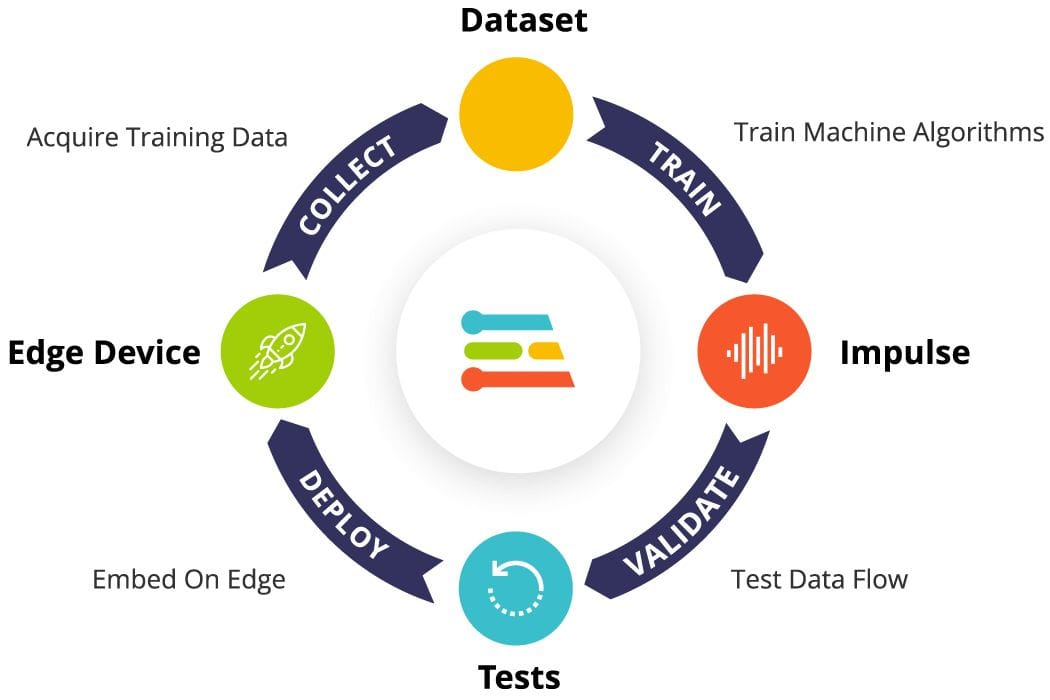
Define the gesture classes you want to recognize. Start simple: perhaps "wave," "circle," and "idle" (no gesture). More classes can be added later, but three provides a good starting point for validating the approach.
Collect training data for each class. Edge Impulse displays the real-time accelerometer stream while recording. Perform each gesture multiple times, varying speed and intensity. Aim for at least two minutes of data per class, though more improves accuracy.
Include an "idle" or "unknown" class containing movements that aren't your target gestures. Without this, the model may confidently classify any movement as one of your defined gestures, producing false positives during deployment.
Signal Processing and Feature Extraction
Raw accelerometer data contains more information than neural networks can efficiently process. Signal processing extracts relevant features while reducing data dimensionality.
Edge Impulse provides several preprocessing options for motion data. Spectral Analysis computes frequency-domain features that capture the periodic components of gestures. Flatten provides statistical summaries (mean, standard deviation, percentiles) of the raw data. For gesture recognition, Spectral Analysis typically works well.
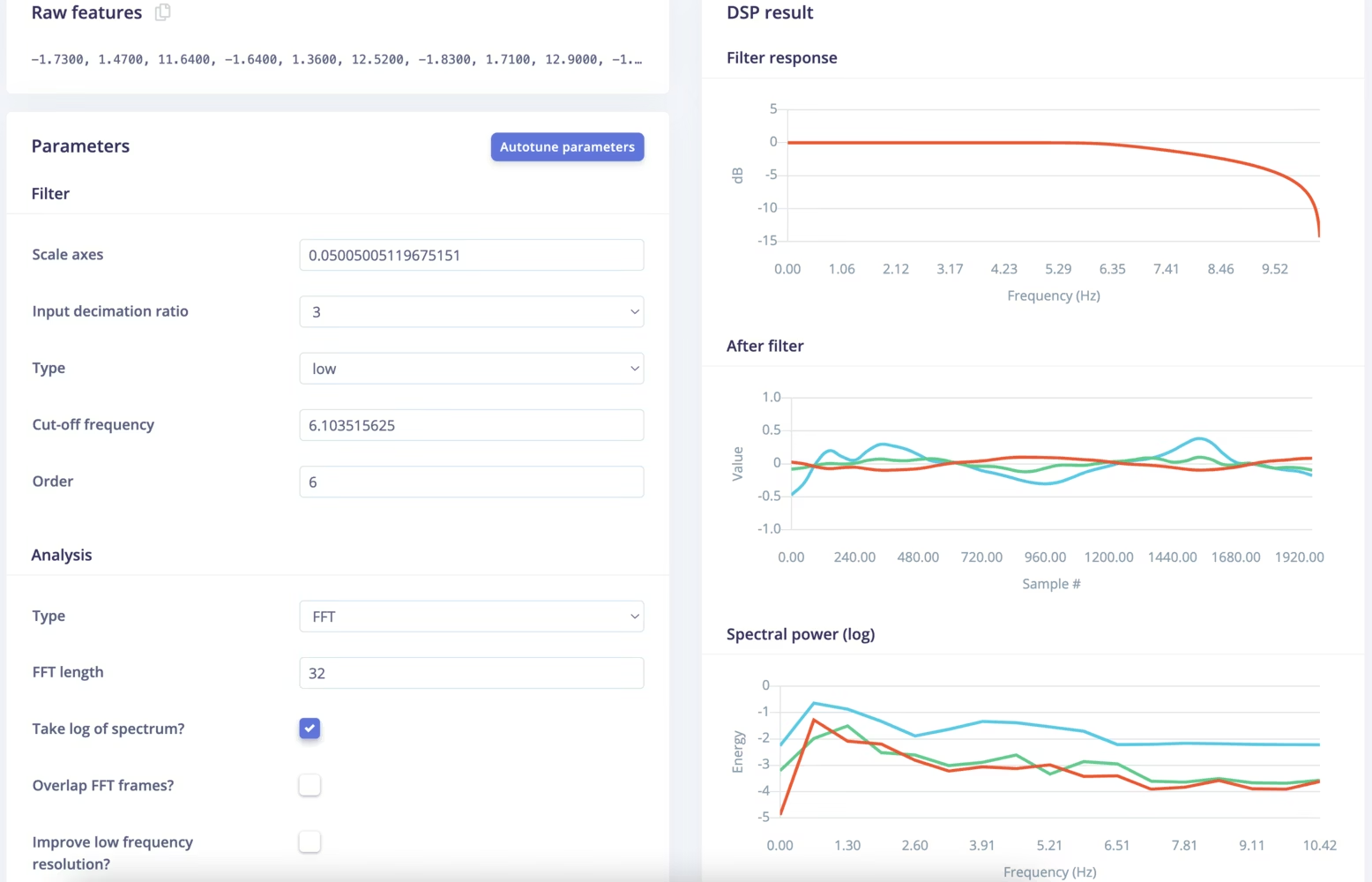
Configure a window size appropriate for your gestures – one to two seconds is common and examine the resulting features. The platform visualizes how different gestures cluster in feature space, giving intuition about whether the chosen features provide good class separation.
Model Training
Edge Impulse automatically suggests neural network architectures based on your data and target hardware. For gesture recognition, a small fully-connected network typically suffices.
Start training and monitor the accuracy metrics. Good gesture recognition systems achieve 90%+ accuracy on held-out test data. If accuracy disappoints, potential improvements include collecting more training data, adding data augmentation, adjusting the signal processing parameters, or increasing model complexity.
The platform shows estimated model size and inference time for your target device. Ensure these fit within hardware constraints, typical microcontrollers can handle models up to a few hundred kilobytes, with inference times measured in milliseconds to tens of milliseconds.
Deployment and Testing
Select your target device and click Build to generate deployable firmware. Edge Impulse creates an Arduino library containing your trained model, preprocessing code, and inference runtime.
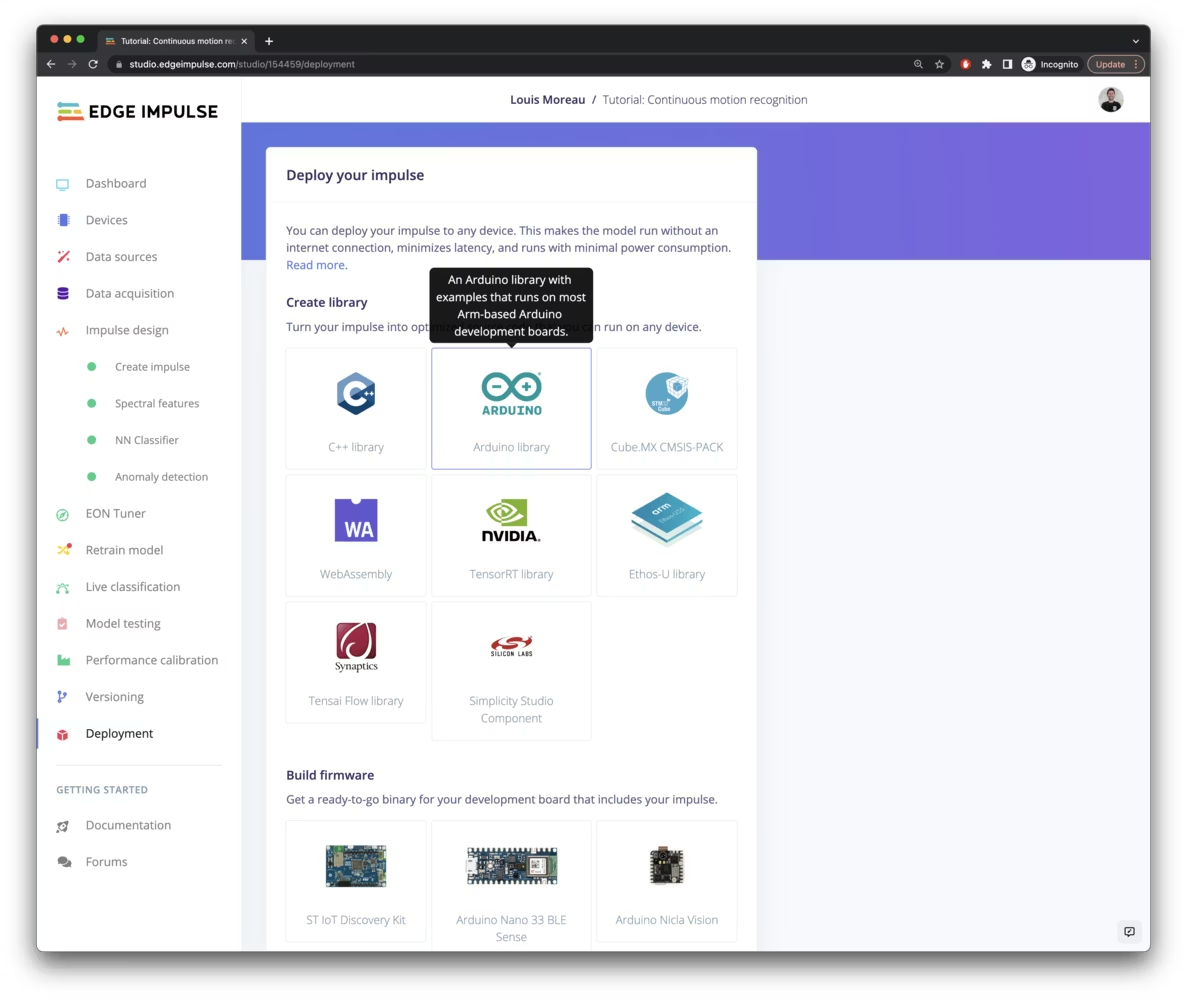
Install the library in Arduino IDE, open the provided example sketch, and upload to your device. Open the serial monitor and perform your gestures—the system should classify them in real-time, displaying predicted class and confidence scores.
Real-world performance often differs from training metrics. Test extensively under varied conditions: different hand positions, movement speeds, and environmental contexts. If accuracy degrades, additional training data from these problematic conditions can improve robustness.
Common Pitfalls and How to Avoid Them
Experience reveals recurring mistakes in TinyML development. Awareness of these pitfalls helps avoid wasted time and frustration.
Memory Management Failures
Microcontrollers have limited RAM, and TensorFlow Lite requires memory for the tensor arena during inference. Underestimating this requirement causes mysterious crashes. Start with a large arena size, verify operation, then reduce gradually until you find the minimum viable allocation.
Stack overflows present another memory-related failure mode. Large local arrays in your code may exceed stack limits, causing crashes unrelated to the ML components. Allocate large buffers globally or use heap allocation with appropriate size limits.
Overfitting to Training Conditions
Models trained on data from a single environment often fail when deployed elsewhere. A gesture recognizer trained in a quiet office may struggle in a noisy factory. A sound classifier trained with one microphone may misclassify when deployed with different hardware.
Combat overfitting by collecting diverse training data across multiple conditions, locations, and hardware samples. Data augmentation—artificially varying training samples through noise injection, time stretching, and similar transformations—also helps.
Ignoring Power Consumption
Impressive inference performance means nothing if the device drains its battery in hours. Profile power consumption under realistic operating conditions, including the duty cycle of inference operations.
Strategies for reducing power include running inference only when triggered by simpler detection mechanisms, adjusting model complexity to match actual requirements, and exploiting low-power modes between inference operations.
Neglecting Deployment Testing
Accuracy metrics from the training process don't guarantee real-world performance. Systematic testing under deployment conditions reveals problems that controlled evaluation misses.
Build testing into your development process. Deploy early prototypes, collect failure cases, and use that data to improve subsequent model versions. The feedback loop between deployment and training often matters more than sophisticated optimization techniques.
The Future of On-Device AI
The trajectory of on-device AI points toward increasingly capable local processing that handles tasks currently requiring cloud connectivity.
Hardware continues improving rapidly. Modern smartphone NPUs already deliver tens of TOPS; next-generation chips will push further. Microcontrollers gain dedicated AI accelerators that multiply inference capability without proportional power increases. Memory technologies enable larger model storage and faster data access.
Model architectures grow more efficient. Research into sparse networks, mixture-of-experts approaches, and alternative architectures like Mamba produces models that achieve comparable results with fewer parameters and operations. These advances directly benefit resource-constrained deployment.
Tools and frameworks mature. The friction of TinyML development continues decreasing as platforms like Edge Impulse handle more complexity automatically. AutoML for embedded targets makes sophisticated optimization accessible without deep expertise. Simulation and profiling tools enable accurate performance prediction before hardware deployment.
The convergence of these trends points toward a future where on-device AI becomes the default rather than the exception. Cloud processing will remain valuable for training, for tasks requiring massive models, and for features that benefit from centralized intelligence. But for applications where privacy, latency, reliability, or cost favor local processing, on-device AI provides an increasingly compelling alternative.
Frequently Asked Questions
What exactly is TinyML, and how does it differ from regular machine learning?
TinyML refers to running machine learning models on microcontrollers and other severely resource-constrained devices with limited memory (kilobytes rather than gigabytes), limited processing power (megahertz rather than gigahertz), and limited power budgets (milliwatts rather than watts). While regular machine learning assumes abundant compute resources and often relies on cloud connectivity, TinyML operates entirely locally on devices that might cost a few dollars and run for years on battery power.
Can I run ChatGPT or similar large language models using TinyML?
No. Large language models require gigabytes of memory and substantial processing power that microcontrollers simply don't have. TinyML handles much simpler models: classifiers that recognize a few categories, detectors that identify specific patterns in sensor data, and similar bounded tasks. The largest models practical for TinyML might have tens of thousands of parameters, while LLMs have billions. For local LLM execution, you need higher-tier edge devices like smartphones with dedicated NPUs or single-board computers with AI accelerators.
What hardware do I need to get started with TinyML?
The easiest starting point is an Arduino Nano 33 BLE Sense (approximately $35), which includes an ARM Cortex-M4 processor, onboard sensors, and excellent software support. Alternatively, ESP32-based boards provide good capability at even lower cost, though you'll need external sensors for most projects. Edge Impulse supports both platforms with minimal configuration.
How do I convert my TensorFlow model to run on a microcontroller?
Use TensorFlow Lite Converter to create a .tflite file from your trained model, applying quantization to reduce size and enable integer-only inference. Then use the xxd utility to convert the binary file to a C array that can be compiled into your firmware. The TensorFlow Lite for Microcontrollers runtime interprets this model and executes inference. Edge Impulse automates this entire process if you train within their platform.
What's the difference between Edge Impulse and TensorFlow Lite for Microcontrollers?
Edge Impulse is a complete platform that handles data collection, model training, optimization, and deployment generation through a web interface. TensorFlow Lite for Microcontrollers is just the runtime that executes models on embedded devices—you're responsible for training and converting models separately. Edge Impulse actually uses TensorFlow Lite under the hood but abstracts away the complexity. Beginners should start with Edge Impulse; experienced developers may prefer direct TensorFlow Lite control.
How much accuracy loss should I expect from quantization?
Typical accuracy loss from INT8 quantization ranges from 0.5% to 3%, depending on the model architecture and task. Some models lose more; carefully designed models lose almost nothing. Quantization-aware training generally preserves more accuracy than post-training quantization. If you see larger accuracy drops, consider whether your model has sufficient capacity or whether your training data adequately represents deployment conditions.
Can TinyML models learn or improve after deployment?
Standard TinyML deployment freezes the model—it makes predictions but doesn't learn from new data. On-device training is possible but challenging due to memory and power constraints. Some systems implement federated learning, where devices contribute to model improvement without sharing raw data, but this requires network connectivity and backend infrastructure. For most TinyML applications, periodic model updates through firmware upgrades provide the practical path to improvement.
What's the maximum model size that can run on typical microcontrollers?
This depends on your specific hardware, but typical ARM Cortex-M4 microcontrollers with 256KB flash and 64KB RAM can run models up to roughly 100KB with appropriate optimization. More capable chips extend this significantly. The tensor arena required for inference often constrains practical model size more than flash storage. Profile your specific model on target hardware rather than relying on general rules.
How do I handle real-time audio processing for voice applications?
Audio processing for TinyML typically involves capturing audio samples, computing frequency-domain features (like mel-frequency cepstral coefficients or spectrograms), and classifying the resulting feature vectors. Libraries like ArduinoFFT compute the necessary transforms on microcontrollers. The challenge lies in managing the real-time data flow while fitting processing within available memory and meeting latency requirements. Start with existing examples like the TensorFlow Lite Micro speech recognition demo and adapt to your specific needs.
Is TinyML suitable for production applications, or just prototyping?
TinyML powers billions of production devices today, including wake word detection in smart speakers, gesture recognition in wearables, and predictive maintenance in industrial equipment. The technology is mature and production-ready. However, production deployment requires attention to reliability, testing, update mechanisms, and edge cases that prototype development may skip. Plan for production requirements from the start if commercial deployment is your goal.
What are the main limitations of on-device AI compared to cloud AI?
On-device AI constrains model size and complexity, limiting what tasks can be performed locally. Cloud AI can run arbitrarily large models with virtually unlimited compute resources. On-device AI also lacks the benefit of centralized learning across all users—each device operates independently. For tasks requiring large models, complex reasoning, or benefits from aggregate data across users, cloud AI remains superior. On-device AI excels when privacy, latency, reliability, or cost considerations favor local processing.
The transition from cloud-dependent AI to on-device intelligence represents one of the most significant shifts in how we build intelligent systems. Whether you're exploring TinyML for personal projects or evaluating edge AI for enterprise applications, the tools, hardware, and knowledge to succeed have never been more accessible. Start with a simple project, learn from the inevitable challenges, and iterate toward increasingly sophisticated applications. The devices around you are waiting to become smarter.
Related Articles
 Dani
Dani
 Mark
Mark