Not every major shift in technology announces itself with a press release. Some of the most consequential ones show up quietly in GitHub repositories, Discord servers, and engineering blogs, adopted by developers and small teams who are simply tired of paying cloud premiums for things they can run themselves.
That's roughly the story of how n8n, Dify, and Ollama ended up being mentioned in the same breath, again and again, across developer communities in 2025 and into 2026. None of these tools were designed specifically to work together. But they've converged into something that functions like a coherent, layered stack for building AI-powered automation: one that keeps sensitive data on your own hardware, avoids per-token API fees for routine workloads, and gives teams genuine control over what they're building.
This isn't a niche hobby project anymore. It's quietly becoming standard practice for developers, small engineering teams, founders, and systems architects who need real AI workflows, not polished demos.
Why This Stack Is Gaining Ground Right Now
The timing isn't accidental. Several forces have aligned to make self-hosted AI automation more viable in 2026 than it was even eighteen months ago.
Cloud AI API costs have not dropped as fast as many teams expected. For organizations running thousands of inference calls per day on routine tasks like log summarization, document classification, and internal Q&A, those bills add up fast. Open-source model quality has improved considerably in parallel. Running a locally hosted 7B or 8B parameter model on modest hardware now yields results that are genuinely useful for a wide range of business tasks, even if they don't match GPT-4-class performance across the board.
Privacy and data governance concerns have also intensified. Regulated industries including healthcare, legal, and finance need to be careful about what data leaves their perimeter. Many teams in these verticals simply can't route sensitive documents through third-party APIs without triggering compliance reviews.
The result is a growing cohort of builders who want the functionality of AI automation without the dependency on external services. The n8n, Dify, and Ollama combination has emerged as one of the cleanest ways to get there.
Understanding the Three Layers
Before getting into how these tools work together, it's worth being precise about what each one actually does. The stack only makes sense when you understand why each component occupies a distinct role.
n8n: The Workflow Orchestration Layer
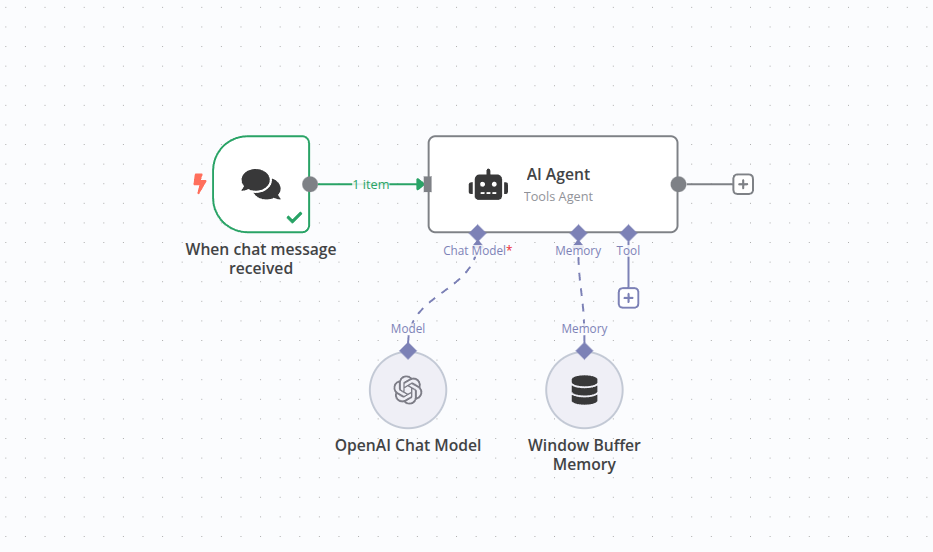
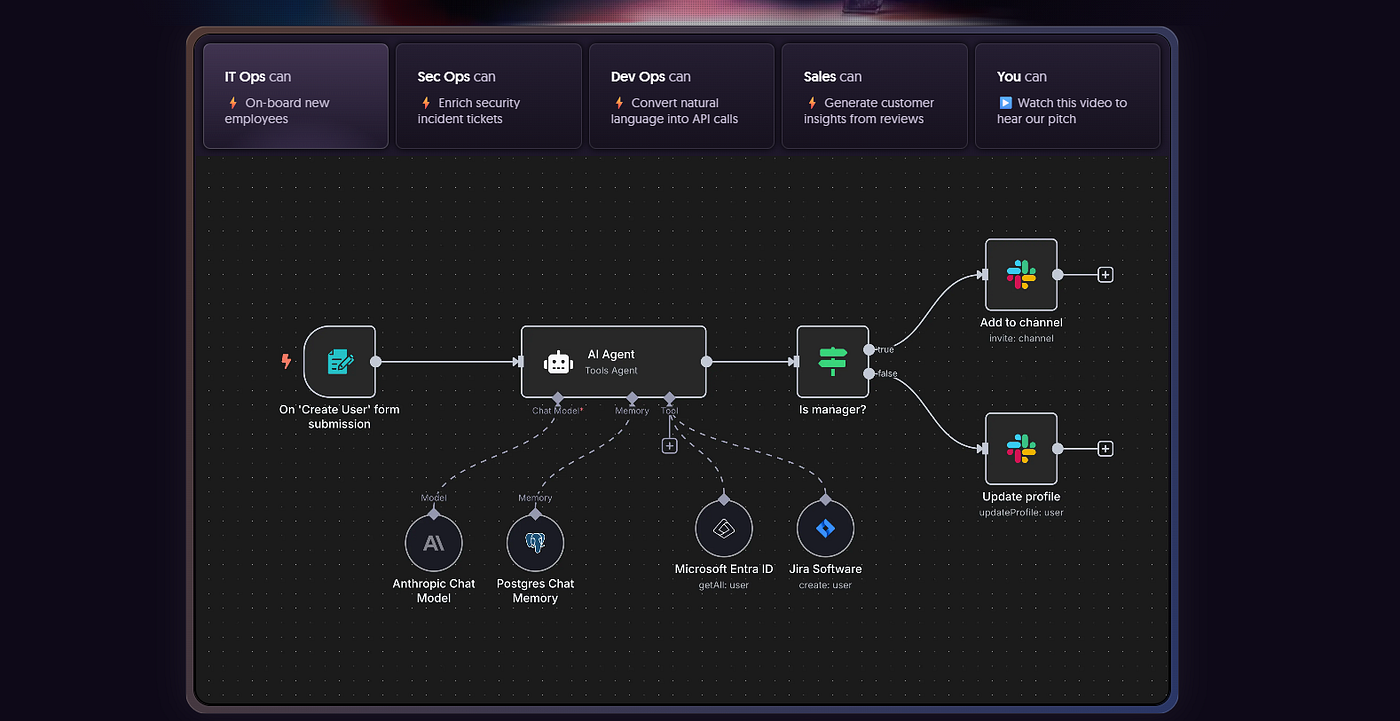
n8n is a visual, low-code workflow automation platform, often described as an open-source alternative to Zapier or Make.com, though that comparison undersells its technical depth. With over 400 native integrations and a node-based canvas for designing automation logic, n8n is built for connecting systems: webhooks, databases, APIs, CRM platforms, messaging services, and more.
In the context of this AI stack, n8n functions as the traffic director. It decides when things run, what data flows where, and how to handle failures. It isn't primarily a product for building chat interfaces or managed knowledge bases, but it can call language models, route their outputs, and orchestrate multi-step processes that include AI as one component among many.
The platform's AI Agent node implements a ReAct-style reasoning loop where the model thinks, acts, observes, and iterates. This makes it possible to build agentic workflows without writing custom code. n8n supports OpenAI, Anthropic, Google Gemini, Mistral, Ollama, and others through native credential nodes. Swapping providers means changing a single node while the rest of the workflow stays intact.
What n8n does particularly well is enforcing workflow logic at scale: retries, conditional branching, explicit failure notifications, and idempotent steps. It's the kind of reliability infrastructure that AI applications genuinely need when they're touching production data.
Dify: The AI Application Layer
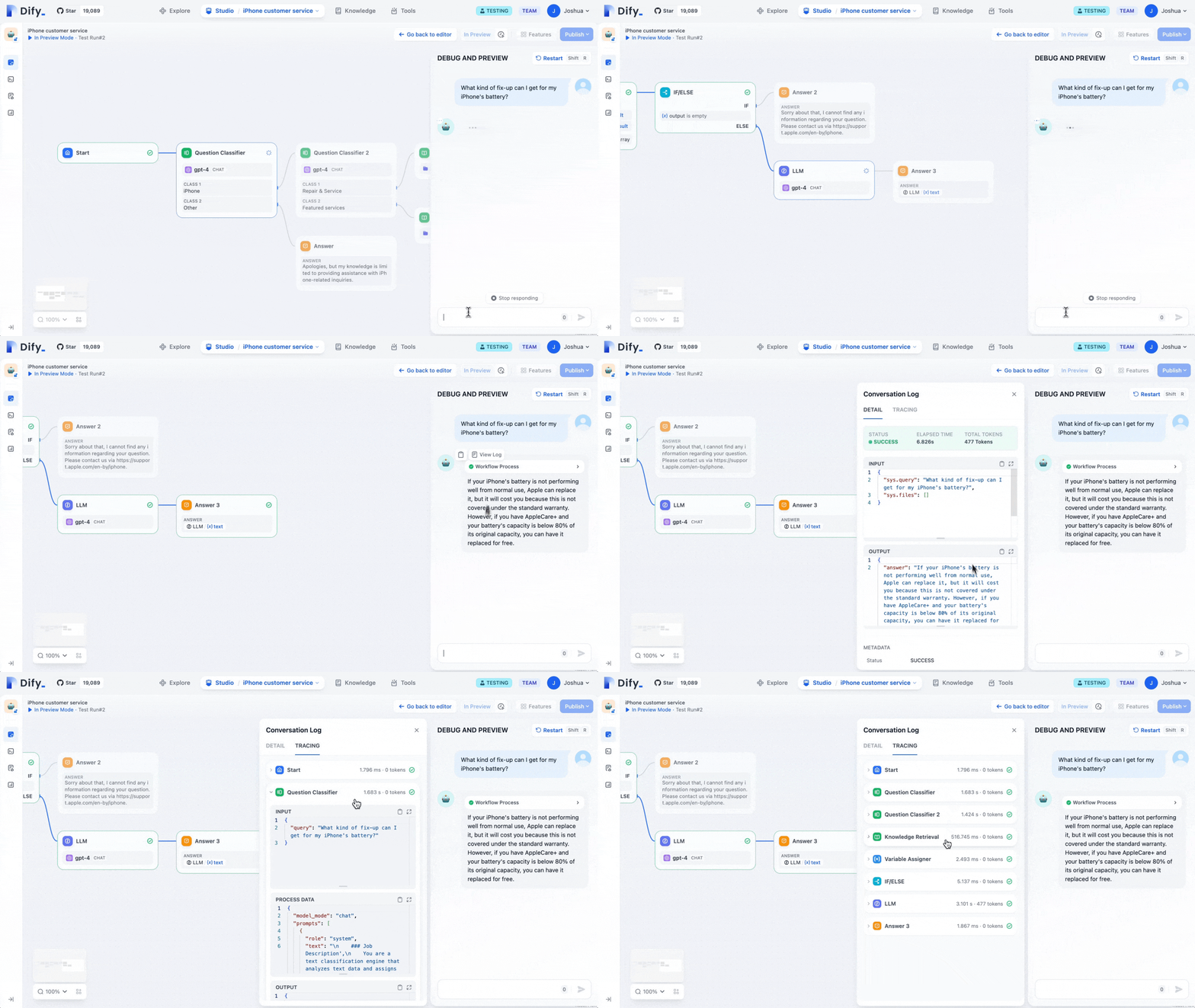
Dify describes itself as an LLMOps platform, sitting somewhere between a developer framework and a finished product for AI application development. The name reportedly stands for "Do It For You," which captures its core proposition: getting from AI prototype to deployed product without drowning in boilerplate code.
The platform provides a visual drag-and-drop canvas for building AI workflows, a built-in Retrieval-Augmented Generation (RAG) pipeline, an agent framework, prompt management tools, conversation memory, and operational observability, all in one interface. It's built for shipping AI features rather than general-purpose data integration.
Where n8n is optimized for connecting disparate systems, Dify is optimized for the user-facing AI experience. Internal Q&A chatbots, document analysis tools, support copilots, and research assistants are Dify's natural habitat. Non-developers can iterate on prompts and knowledge bases without touching code, while developers retain control over model selection, data routing, and deployment configuration.
Dify supports over a hundred LLM providers, including local inference servers running through Ollama. Self-hosted deployments keep all data on your own infrastructure: conversation logs, uploaded documents, and vector database contents never leave your environment. The project has accumulated substantial traction in the open-source community, and its production readiness has improved considerably over the past year.
Ollama: The Inference Layer
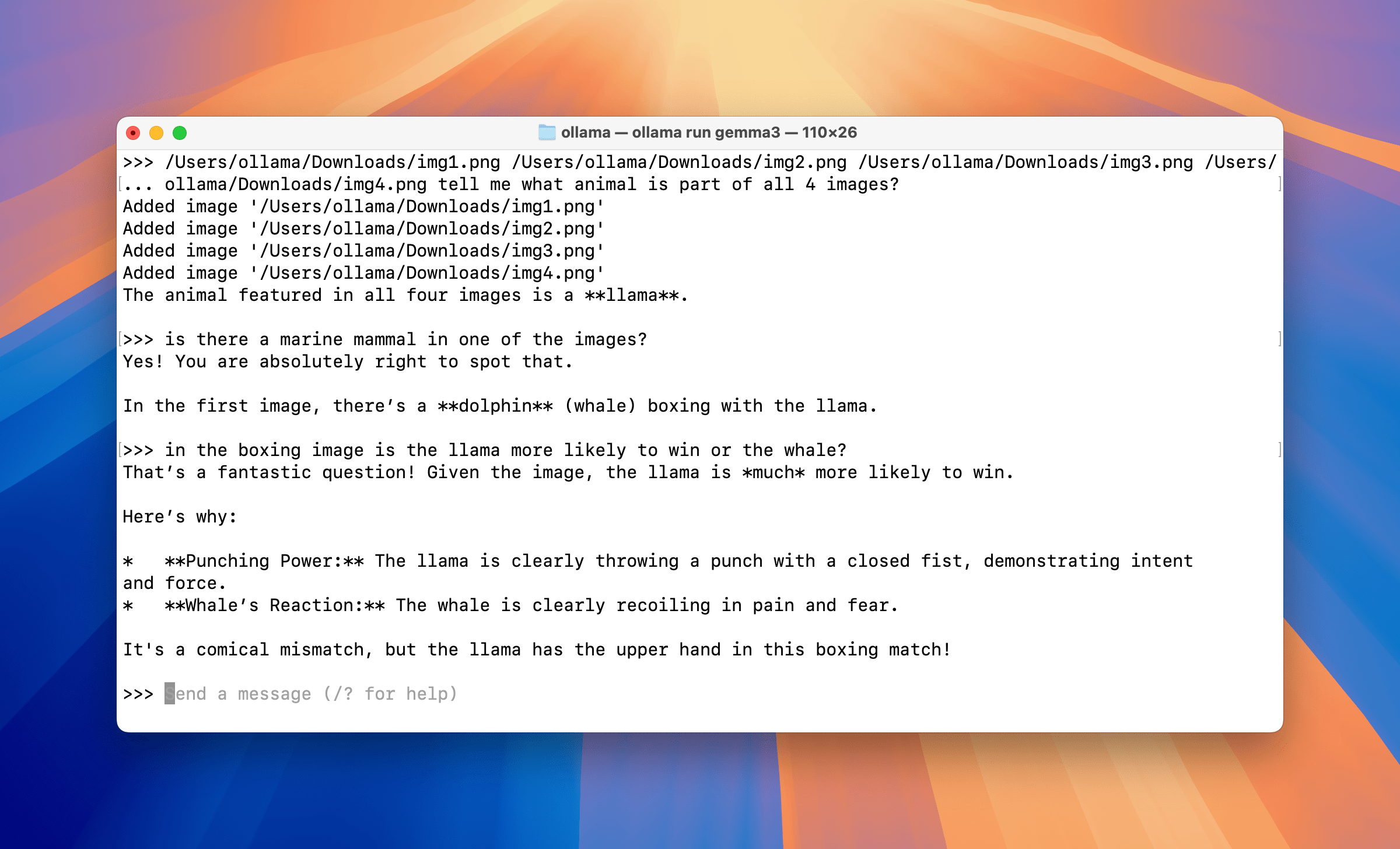
Ollama is the simplest piece to describe and arguably the most important one. It's a local model runtime that exposes an OpenAI-compatible HTTP API. You pull a model, run inference on your hardware, and other services talk to it over standard HTTP.
That's essentially the whole story. Ollama doesn't schedule workflows or build chat applications. It answers one question: which process is actually running the model weights. It supports Llama, Mistral, Gemma, DeepSeek, Qwen, and dozens of other open-source models. For teams with an NVIDIA GPU, hardware acceleration via CUDA is straightforward to configure.
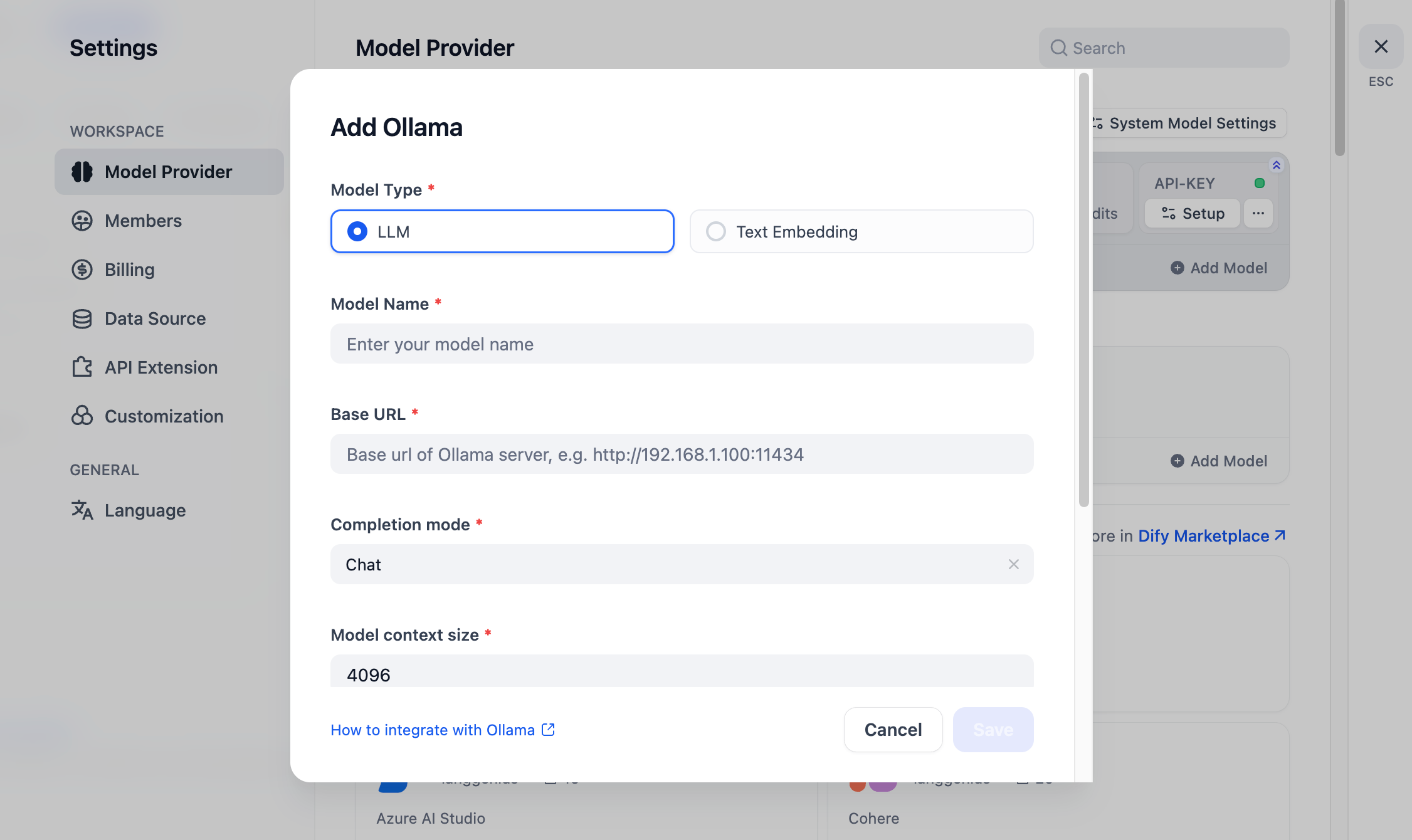
The practical implication is significant. Any service capable of talking to the OpenAI API can be pointed at Ollama instead. n8n's LLM nodes work with it out of the box. Dify connects to it simply by specifying the base URL. The OpenAI-compatible interface removes the integration friction that would otherwise make local inference a significant engineering undertaking.
A note on hardware requirements:
- 7B or 8B parameter models with 4-bit quantization run comfortably on 8GB of VRAM
- 70B-class models require 24GB of VRAM or more
- CPU-only inference works but carries meaningfully higher latency
For many business automation tasks, smaller models running quickly are more practical than larger ones running slowly. That trade-off is worth keeping in mind when scoping hardware.
How the Three Tools Compose
The power of this stack isn't any individual tool. It's how cleanly they divide responsibilities.
The canonical data flow looks like this:
- n8n ingests or normalizes data from external sources and writes cleaned content to storage
- Dify indexes that content and serves it through a governed AI application layer
- Ollama handles private inference when a query arrives
- Cloud API endpoints act as fallback or burst capacity when local resources are constrained
A Real-World Example: Automated Log Analysis
Consider a team that wants automated log analysis without sending system data to a third-party API.
An n8n workflow triggers every five minutes and reads application logs from a local directory. It performs deterministic preprocessing, grouping by service, deduplicating stack traces, and extracting timestamps and error codes before passing a condensed summary to Ollama. The model receives a scoped prompt asking it to cluster failures and generate plausible root-cause hypotheses. n8n then parses the response, checks whether confidence exceeds a defined threshold, and routes the output to Slack or opens a support ticket.
No cloud LLM sees raw log data at any point in the process.
A Real-World Example: Internal Research Assistant
For knowledge-intensive applications, the pattern shifts toward Dify's strengths. A team building an internal research assistant would use Dify to manage the knowledge base: ingesting documents, handling chunking and embeddings, and serving a governed chat interface. n8n handles document refresh by watching for new files, processing them, and writing to the vector store. Ollama provides inference for sensitive queries.
The three-layer separation is what makes this maintainable at scale. Each tool has a clear boundary. You don't try to make n8n into a chat platform, or Dify into an enterprise integration hub, or Ollama into a scheduler. When teams collapse those boundaries and force one tool to do everything, that's typically when the operational pain begins.
Who Is Actually Using This, and For What
The early adopters skew toward technically capable developers who are comfortable with Docker and self-hosting, but the use cases span a wider range than you might expect.
- Cybersecurity researchers have built automated vulnerability analysis workflows where n8n ingests RSS feeds and CVE metadata, routes content to an Ollama-powered agent for analysis, and stores findings in a vector database for retrieval.
- Legal and compliance teams are using local RAG pipelines to compare contract clauses against approved baselines without sending sensitive documents off-premise.
- Engineering teams are automating code review summaries and incident postmortems using locally hosted models that never see production secrets.
The developer community tooling around this stack has also matured considerably. Projects on GitHub now offer Docker Compose configurations that deploy n8n, Ollama, Dify, vector databases like Qdrant, and monitoring via Grafana in a single command. What would have been a multi-day infrastructure project eighteen months ago can now be operational in an afternoon.
The Real Costs and Trade-offs
It would be misleading to describe this stack as free. It's more accurate to say it shifts costs rather than eliminates them.
Self-hosting trades subscription and API fees for engineering time, infrastructure operations, GPU hardware, backup management, and security reviews. The people running these stacks seriously aren't doing it because they think open-source software is inherently superior. They're doing it because the control and cost profile matches their specific situation.
Who benefits most from the trade-off:
- A startup handling sensitive client data in a regulated industry, where compliance requirements alone may justify the operational overhead
- An engineering team running high-volume, repetitive AI tasks, where API savings can pay for a modest GPU server within a few months
- A solo developer building internal tools who simply prefers to understand exactly what their infrastructure is doing
The stack also has genuine capability limitations worth understanding clearly. Local models, even well-quantized 7B and 13B parameter models, are not drop-in replacements for frontier API models on complex reasoning tasks. They hallucinate more on open-ended prompts and require more careful prompting architecture to produce structured, reliable outputs.
The teams getting the most out of this setup understand those constraints and design their workflows accordingly: tight, scoped prompts rather than open-ended requests, deterministic preprocessing before inference, and structured output formats that downstream systems can validate.
Model Context Protocol (MCP) integration is increasingly part of how teams address the hallucination problem. By defining explicit contracts for what tools a model can call, rather than letting it invent parameters or assume response formats, teams add a meaningful layer of reliability without complex custom code. Both n8n and Dify have added MCP support, which positions the stack well as the protocol gains broader industry adoption.
Comparing the Alternatives
Teams evaluating this stack are usually coming from one of a few directions: hosted automation tools like Make.com or Zapier, managed AI platforms, or pure code frameworks like LangChain or LlamaIndex.
Make.com and Zapier remain more accessible for non-technical users and handle simpler automation reliably. For teams with basic automation needs and no requirement for local inference, they're often the right choice. The n8n-Dify-Ollama stack makes sense when requirements include data privacy, high inference volumes, or the need for deep customization.
LangChain and similar developer frameworks offer more flexibility for complex, custom implementations, but require significantly more engineering work to reach production. Dify is generally better for rapid prototyping and non-technical team members, while LangChain provides more control for developers who prefer working in code. Many teams end up using both: prototyping in Dify and building production systems in LangChain, which is a reasonable and common pattern.
Managed AI platforms from major cloud providers offer enterprise-grade reliability and compliance tooling, but at a price point and data-sharing model that doesn't fit every organization. The open-source stack trades that reliability guarantee for ownership and control.
Getting Started: A Practical Framework
For teams considering this stack, the most useful framing is phased adoption rather than trying to build everything at once.
Phase 1: n8n and Ollama
Start with a simple n8n and Ollama integration via Docker Compose. Connect n8n to Ollama through its native credential node and build one or two automation workflows that incorporate local inference. Most production-grade setups recommend 4-bit quantization for 7B models as a starting point, offering a solid balance of speed and output quality on consumer hardware. This phase establishes the foundation without requiring full commitment to the complete stack.
Phase 2: Add Dify
Add Dify once there's a clear need for a knowledge base or governed chat application. Connect Dify to the Ollama base URL and test retrieval against real documents, not synthetic test data, before building the production pipeline. This step is where the AI application surface starts to take shape.
Phase 3: n8n Workflows for Ingestion (Ongoing)
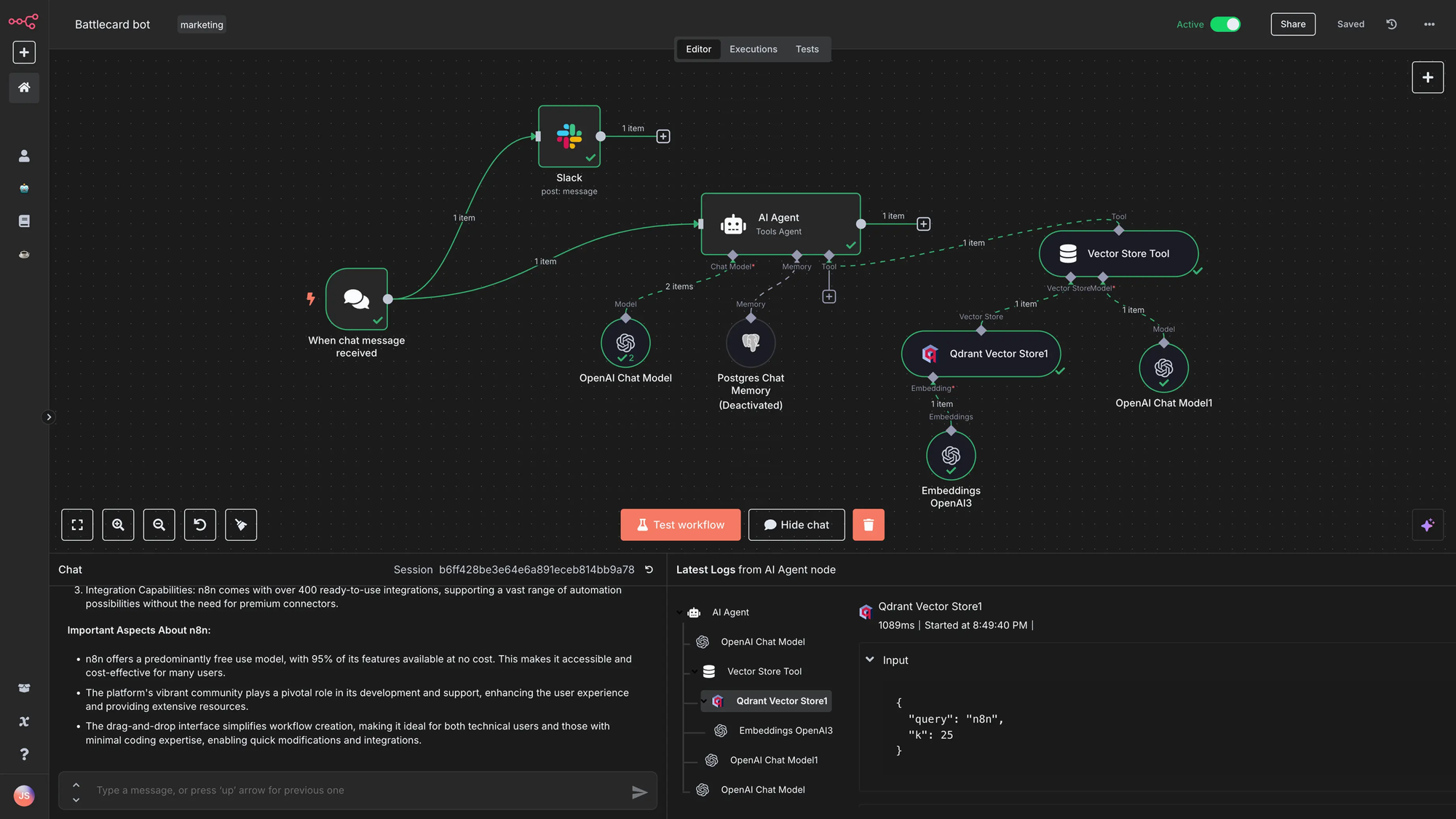
Build n8n workflows to handle document ingestion, data refresh, and side effects like CRM updates or alerting. Prefer idempotent steps and add explicit failure notifications. AI steps should not silently drop records when something goes wrong.
Phase 4: Hardening
The hardening phase covers backups, rate limits, observability across latency and error rates, and clear policies about when cloud models are permitted. This isn't a one-time milestone. It's an ongoing commitment that comes with operating your own AI infrastructure.
The Broader Significance
There's something worth naming explicitly about what this stack represents in the current moment.
For years, meaningful AI application development required either significant capital for API access or deep ML engineering expertise to run models locally. The combination of improved open-source model quality, more accessible local inference tools like Ollama, and visual platforms like n8n and Dify has compressed that barrier considerably. A developer with a capable laptop or a modest cloud VM can now build AI automation workflows that would have required a dedicated ML team not long ago.
That doesn't mean the cloud AI providers are losing their core market. Frontier models for complex reasoning, multimodal tasks, and high-stakes decisions will continue to be served predominantly through managed APIs for the foreseeable future. But for the large portion of AI automation tasks that are repetitive, scoped, and routine, which describes the majority of enterprise AI use cases, the open-source local stack is increasingly competitive.
The teams building quietly on n8n, Dify, and Ollama right now are figuring out something the broader industry will likely acknowledge more loudly over the next year or two: that a lot of real AI work doesn't need to touch a frontier model, and that keeping it local is often the smarter choice.
Conclusion
n8n, Dify, and Ollama didn't plan to be a stack. They're three separate open-source projects built by different teams for different purposes. But they've found each other in the hands of developers who needed a practical, composable way to build AI automation without the cost, dependency, and data exposure of purely cloud-based approaches.
The division of labor is clean. n8n moves data and enforces workflow logic. Dify delivers the AI application surface and manages knowledge. Ollama runs inference locally. Each tool does its job and stays in its lane, which is a rarer quality in software than it sounds.
For founders, developers, and engineering teams evaluating their AI infrastructure in 2026, this stack deserves a serious look. Not as a replacement for cloud AI services across the board, but as a deliberate choice for the use cases where control, privacy, and cost predictability matter more than raw model capability.
Frequently Asked Questions
What is the n8n, Dify, and Ollama stack used for?
The stack is used to build private, self-hosted AI automation workflows. n8n handles workflow orchestration and system integration, Dify provides the AI application layer including RAG pipelines and chatbots, and Ollama runs large language models locally. Together, they enable teams to build production AI automation without sending sensitive data to external cloud APIs.
Do I need a GPU to run Ollama locally?
A dedicated GPU is not strictly required, but it significantly improves inference speed. For 7B or 8B parameter models, 8GB of VRAM is recommended for comfortable performance. For 70B-class models, you'll need 24GB of VRAM or more. Teams running Ollama on CPU-only hardware can still get usable results with smaller quantized models, though latency will be noticeably higher.
How does Dify differ from LangChain?
Dify is a visual, no-code and low-code platform for building LLM applications, with a built-in UI, RAG engine, and deployment infrastructure. LangChain is a code-first developer framework that offers more flexibility for complex custom implementations but requires significantly more engineering work. Many teams use both: prototyping rapidly in Dify and building production systems in LangChain.
Is self-hosting this stack actually cheaper than using cloud AI APIs?
It depends on your use case and volume. Self-hosting shifts costs from API fees to infrastructure, hardware, and engineering time. For teams running high volumes of routine AI tasks, the savings can be substantial. For teams with low inference volumes or limited DevOps capacity, managed cloud APIs are often more cost-effective once the full operational overhead of self-hosting is accounted for.
Can this stack connect to cloud AI providers like OpenAI or Anthropic?
Yes. Both n8n and Dify support a wide range of cloud AI providers alongside local Ollama inference. A common pattern is using Ollama for sensitive or high-volume routine tasks and routing to cloud models for complex reasoning tasks that require frontier model capability. This hybrid approach gives teams flexibility without committing entirely to one model source.
What is Retrieval-Augmented Generation (RAG) and how does Dify handle it?
RAG is a technique that improves LLM outputs by retrieving relevant information from a knowledge base before generating a response, rather than relying solely on the model's training data. Dify includes a built-in RAG pipeline that handles document ingestion, chunking, embedding, and retrieval, with out-of-the-box support for common file formats including PDF and PPTX. This makes it straightforward to build AI applications that answer questions based on your own proprietary documents.
What is MCP and why does it matter for this stack?
Model Context Protocol (MCP) is a standard for defining what tools and data sources an AI model can access during inference. By setting explicit contracts for tool usage, MCP reduces hallucination in agentic workflows and prevents models from inventing parameters or calling tools in unintended ways. Both n8n and Dify have added MCP support, which improves reliability for teams building agent-style automation on this stack.
Is this stack suitable for regulated industries like healthcare or finance?
The self-hosted configuration can be appropriate for regulated industries because all data, including conversation logs, documents, and model outputs, stays within your own infrastructure. However, compliance with specific regulations like HIPAA or SOC 2 requires careful review of your full deployment, including access controls, logging, encryption, and vendor agreements. Teams in highly regulated environments should conduct a formal compliance review before using this stack with sensitive data.
Related Articles
 Dani
Dani
 Mark
Mark
 Dani
Dani