If you're using Sora 2 to generate videos and suddenly hit a wall with the sentinel_block error, you're not alone. This is one of the most common frustrations developers and creators face when working with OpenAI's video generation API.
The error message looks something like this:
{
  "error": {
    "code": "sentinel_block",
    "message": "Hmmm something didn't look right with your request. Please try again later or visit https://help.openai.com if this issue persists.",
    "param": null,
    "type": "invalid_request_error"
  }
}
That vague "something didn't look right" message doesn't tell you much. But understanding what's actually happening behind the scenes is the first step to fixing it.
What sentinel_block Actually Means
When you receive a sentinel_block error, it means your request was intercepted by OpenAI's Content Safety System, internally called "Sentinel." This isn't a bug or a random glitch. It's a deliberate block triggered by something in your request.
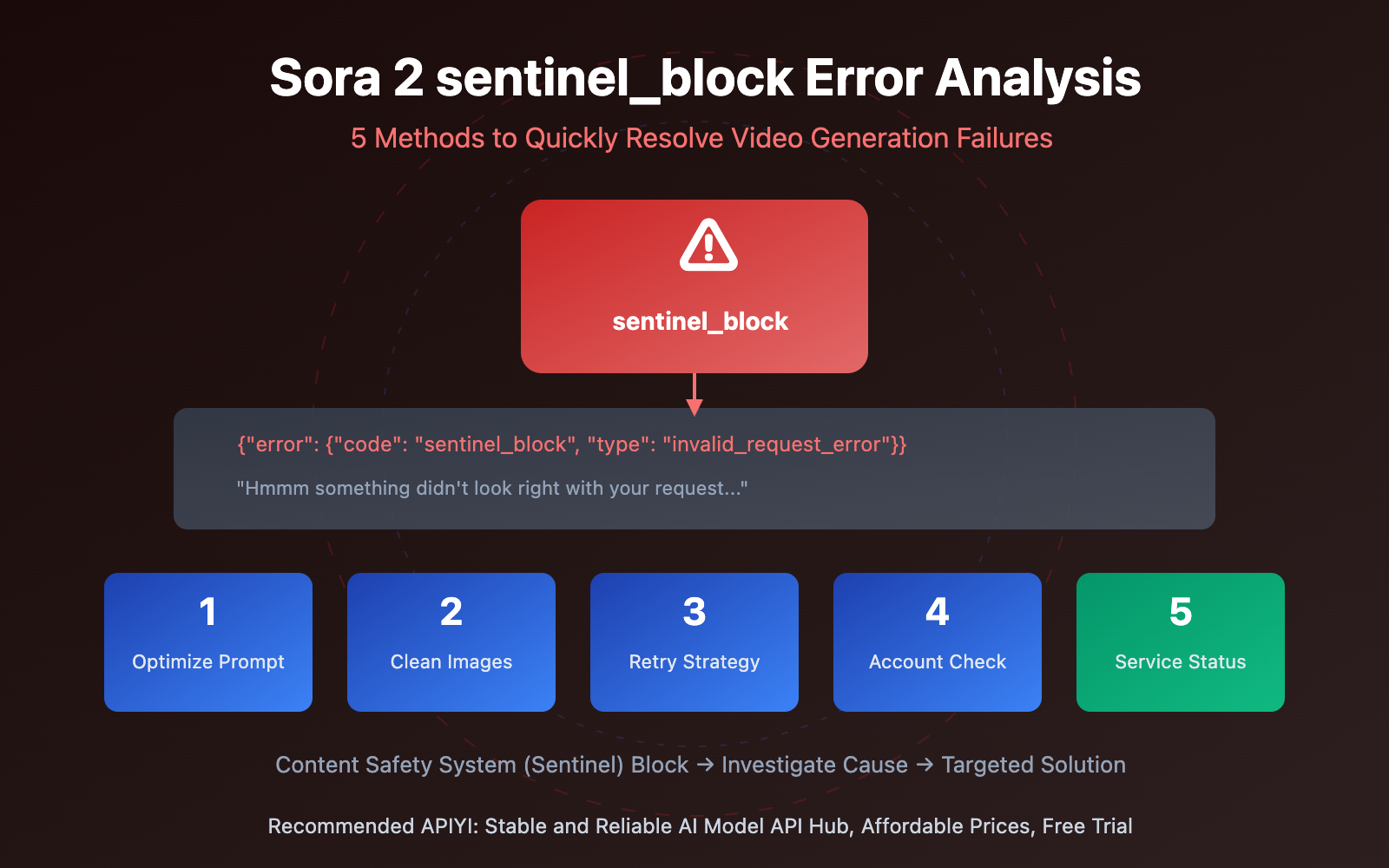
Here's how to interpret the error components:
- The
code: sentinel_blocktells you the request was actively blocked by the security system. Something in your content or request parameters triggered OpenAI's review rules. - The
type: invalid_request_errorindicates the issue is with the request itself. This means you need to modify your request content rather than simply retrying the same thing. - The
param: nullmeans no specific problematic parameter was identified. You'll need to investigate potential trigger points one by one to find what caused the block.
The key insight here is that sentinel_block is a proactive interception by OpenAI's content safety system, not a regular API error. It happens before video generation even begins, which is actually good news because it means you haven't wasted credits or generation time.
The 5 Major Triggers for sentinel_block Errors
Based on OpenAI's documentation and extensive community feedback, sentinel_block errors stem from five main causes. Understanding which one applies to your situation determines the right fix.
1. Prompt Content Triggers Content Review
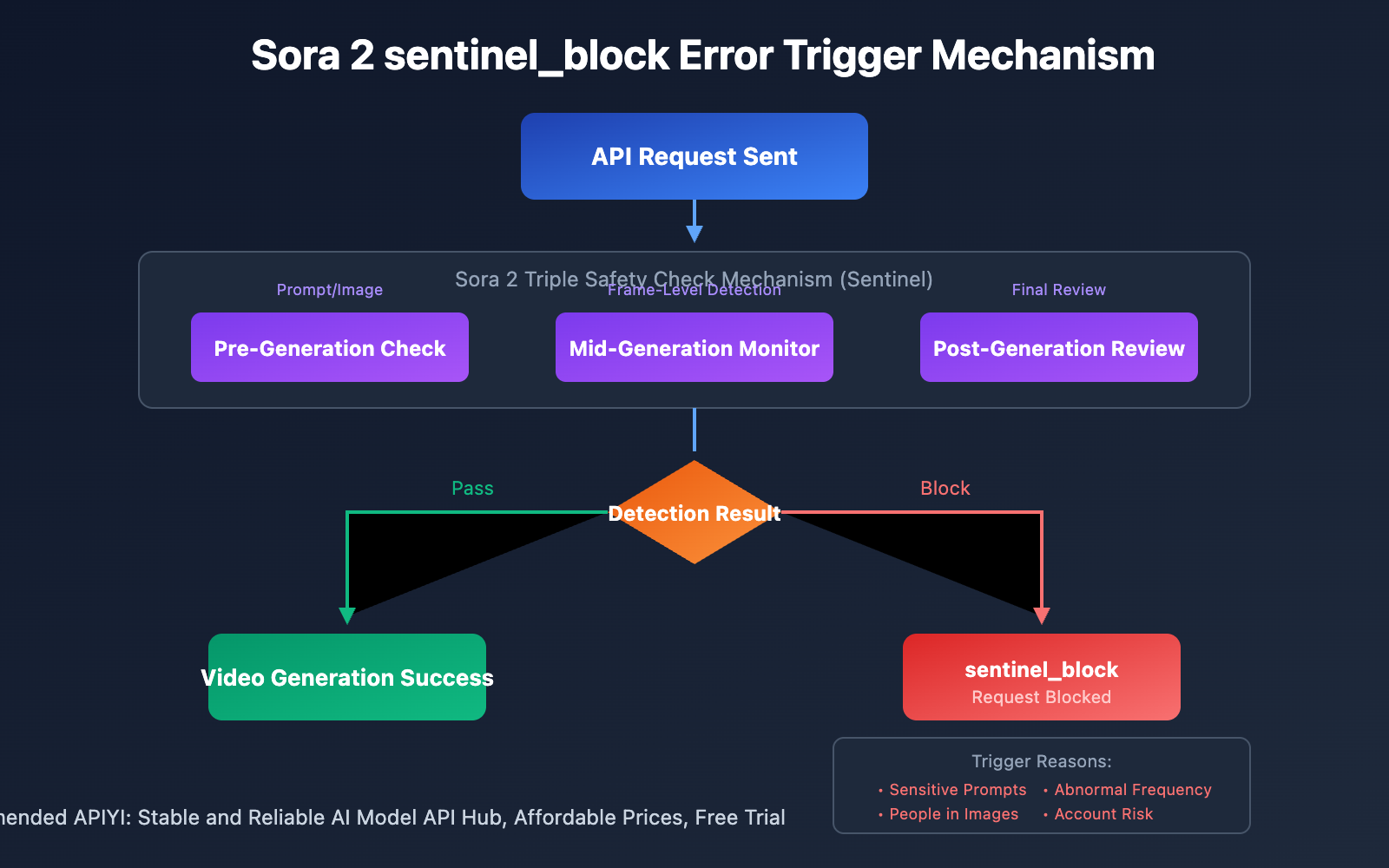
Sora 2 employs a triple safety check mechanism: pre-generation check, mid-generation monitoring, and post-generation review. The sentinel_block error specifically comes from the pre-generation check failing.
Prompts involving violence, sexual content, copyrighted characters, real people, and similar restricted categories will trigger an immediate block. But the system also catches subtler issues. It uses semantic understanding, not just keyword matching, which means innocent word combinations can sometimes pattern-match to problematic content.
Users have reported being blocked for surprisingly mundane prompts. Descriptions of outfit changes, beach scenes, workout videos, and even classical art recreations have all triggered false positives. The system errs on the side of caution, and sometimes that caution is overly aggressive.
2. Uploaded Images Contain People
OpenAI explicitly prohibits uploading images containing real people for video generation. This restriction applies regardless of whether it's your own photo, whether you have authorization, or whether the person consented.
The automated system cannot verify consent or identity. Its solution is to block all photorealistic human faces by default. Even professional headshots or licensed stock photos will be rejected if they contain recognizable human faces.
This catches many legitimate use cases, particularly for creators who want to animate their own likeness or work with authorized talent. But the restriction is firm. The only workaround is using images without human faces: landscapes, objects, products, abstract art, or stylized illustrations.
3. Abnormal Request Frequency
Sending a large number of requests in a short time window may trigger security blocks. The system interprets rapid-fire prompting as potentially abnormal behavior, whether it's automated abuse, a runaway script, or just an eager developer testing variations too quickly.
If you're iterating on prompts rapidly or running batch generations, you may hit this trigger even with completely compliant content. The solution is implementing rate limiting in your workflow and spacing requests appropriately.
4. Account Risk Flagging
If an account has previous violation records or has been marked as high-risk, new requests face stricter scrutiny. This can create a frustrating cycle where past false positives make future generations more difficult.
Account-level flags aren't visible to users. If you're consistently hitting sentinel_block errors with content that seems compliant, and the same prompts work on other accounts, you may have an account-level issue that requires contacting OpenAI support directly.
5. Temporary Server-Side Issues
Not all sentinel_block errors are content-related. OpenAI's Sora service has experienced multiple service interruptions and elevated error rates throughout 2025 and into 2026. Some sentinel_block errors are actually temporary server-side problems masquerading as content blocks.
The OpenAI status page documents several significant incidents: complete outages affecting ChatGPT, Sora, and the API, periods of elevated error rates, and episodes of increased latency. When the system is struggling, it may return sentinel_block errors for requests that would normally succeed.
Before spending hours rewriting prompts, check status.openai.com. If there's an ongoing incident, wait for resolution rather than troubleshooting a problem that isn't actually yours.
Solution 1: Optimize Your Prompt Content
This is the most common solution and the most effective for content-triggered blocks. The goal is replacing potentially sensitive words with neutral expressions while preserving your creative intent.
Here are proven substitutions that reduce false positives:
Beyond specific word swaps, adopt these prompt optimization techniques:
- Use film director terminology instead of direct descriptions. Phrases like "medium shot," "golden hour lighting," "shallow depth of field," and "cinematic color grading" signal professional intent and receive more favorable treatment from the moderation system.
- Add modifiers like "stylized" and "artistic" to reduce realism requirements. The system is particularly cautious about photorealistic human content, so explicitly steering away from realism helps.
- Avoid specific celebrity names, brand names, and copyrighted character references entirely. Even oblique references can trigger IP similarity filters.
- Minimize detailed descriptions of faces and bodies. These are high-scrutiny areas where the moderation system applies extra caution.
- Emphasize positive framing. Words like "heartwarming," "inspiring," "tranquil," and "joyful" signal benign intent and can help borderline prompts pass review.
Solution 2: Check and Clean Uploaded Images
If you're using Sora 2's image-to-video feature, your input images may be the trigger rather than your text prompt.
For reliable generation, use images that don't contain people:
- Landscape scenes work consistently. Natural environments, cityscapes, and architectural photos process without issues.
- Product photos are safe. Objects, devices, food, and similar non-human subjects won't trigger the face detection systems.
- Abstract art and stylized illustrations pass review. If you need character content, using illustrated or animated source material rather than photographs often succeeds.
Images that will likely trigger blocking include any photograph containing recognizable human faces, selfies, portraits, group photos, and even images where people appear in the background. The system scans uploaded images specifically for human presence and applies strict filtering.
If your creative vision requires human subjects, you'll need to generate them from text prompts using the character description techniques above rather than uploading reference images.
Solution 3: Implement a Request Retry Strategy
Some sentinel_block errors are transient. A proper retry strategy can improve your success rate without requiring any content changes.
The approach is simple: when you receive a sentinel_block error, wait briefly and try again with the identical request. Use exponential backoff to avoid hitting rate limits. If the first retry fails after 2 seconds, wait 4 seconds before the second retry, then 8 seconds, and so on.
A reasonable maximum is 3 retry attempts. If the same prompt fails three times with increasing delays, the block is likely content-related rather than temporary, and you should shift to prompt optimization instead.
For developers building applications on the Sora 2 API, implementing automatic retry logic prevents transient errors from surfacing to users and improves the overall reliability of your integration.
The key distinction: retry mechanisms help with temporary server issues and rate-related blocks. They won't help with genuine content policy violations. If retries consistently fail, that's your signal to investigate the content itself.
Solution 4: Monitor Service Status
Before diving into troubleshooting, always check whether the problem is on OpenAI's end.
Visit status.openai.com for real-time monitoring of Sora API service status. If there's an ongoing incident, you'll see it reported there. Common issues include elevated error rates, increased latency, and partial or complete outages.
During service disruptions, the system may return sentinel_block errors for requests that would normally succeed. These aren't real content blocks. They're the system failing in a way that happens to return the sentinel_block error code.
If you see an active incident, the right response is waiting for resolution rather than modifying your content. Check back periodically until the status page shows normal operation, then retry your original request.
This simple check can save hours of unnecessary prompt rewriting when the actual problem is infrastructure-related.
Solution 5: Use the Troubleshooting Decision Tree
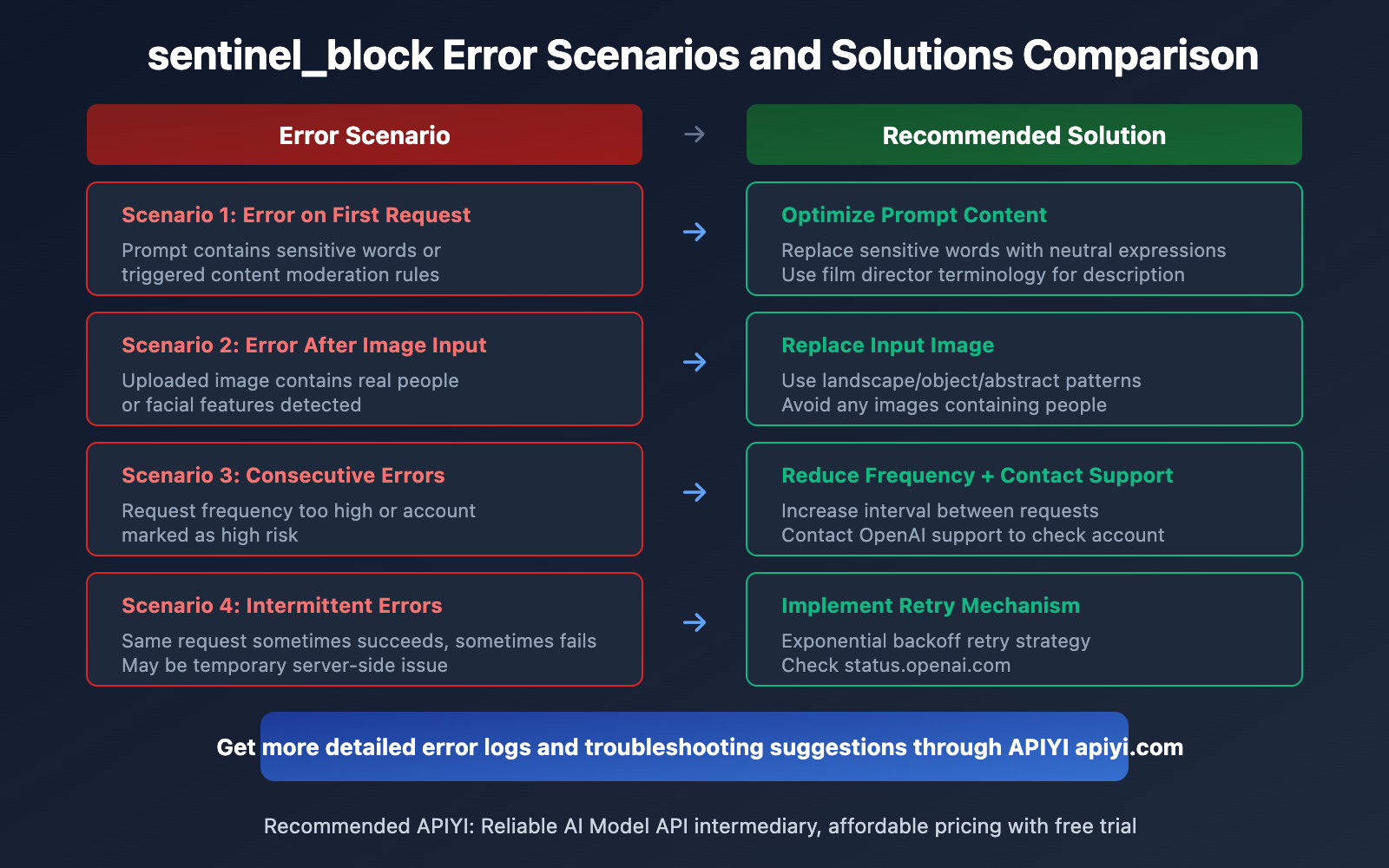
Different error scenarios point to different root causes. Use this framework to identify your specific situation:
The Difference Between sentinel_block and moderation_blocked
Understanding which error you're facing helps determine the right fix.
The resolution approaches are similar for both errors: you need to optimize your content. But sentinel_block errors are generally easier to fix because they allow faster iteration. You can test prompt variations rapidly without waiting for generation each time.
If you're consistently hitting moderation_blocked rather than sentinel_block, your prompts are passing initial review but producing outputs that fail the post-generation scan. This may require more fundamental changes to your concept rather than just word substitutions.
When sentinel_block Is Working as Intended
Not every sentinel_block is a false positive. OpenAI's content safety system exists for legitimate reasons, and some content is genuinely prohibited.
Sora 2 will not generate: explicit sexual content, graphic violence, content depicting or sexualizing minors, terrorist propaganda, material promoting self-harm, unauthorized deepfakes of real individuals, or direct reproduction of copyrighted characters and intellectual property.
If your creative vision fundamentally requires any of these elements, no amount of prompt engineering will make it work. The system is functioning correctly by blocking such requests.
For legitimate creative work that happens to share surface characteristics with prohibited content, the solutions above usually work. But if you're repeatedly blocked across multiple prompt variations for the same core concept, consider whether your request might genuinely conflict with OpenAI's policies rather than just triggering false positives.
FAQ
What does sentinel_block error mean in Sora 2?
The sentinel_block error means your request was intercepted by OpenAI's Content Safety System before video generation began. Something in your prompt content, uploaded images, or request pattern triggered the pre-generation content filter. It's a proactive block, not a random error.
What's the difference between sentinel_block and moderation_blocked?
sentinel_block is a request-phase interception that happens before video generation starts. moderation_blocked is a generation-phase interception where video generation began but was then aborted. Both require content optimization, but sentinel_block allows faster iteration since no generation time is consumed.
Why does my normal prompt trigger sentinel_block?
Sora 2's content moderation system is quite strict and may produce false positives. It uses semantic understanding beyond simple keywords, so certain word combinations can trigger blocks even when your intent is harmless. Using more neutral descriptive language and cinematic terminology reduces false positives.
Can I upload images with people in them?
No. OpenAI explicitly prohibits uploading images containing real people for video generation. The automated system will reject such uploads regardless of consent or authorization. Use landscapes, objects, products, or stylized illustrations instead.
Will I be charged for sentinel_block errors?
No. Because sentinel_block occurs before video generation begins, no computational resources are consumed and no charges apply. This is different from moderation_blocked errors, which may consume partial credits since generation had already started.
How do I know if it's a content issue or server problem?
Check status.openai.com first. If there's an ongoing incident, wait for resolution before troubleshooting your content. You can also retry the same prompt after a few minutes. If identical prompts sometimes succeed and sometimes fail, the issue is likely server-side. If a prompt consistently fails, it's content-related.
What words should I avoid in Sora 2 prompts?
Avoid violence-related terms, sexually suggestive language, copyrighted character names, celebrity names, brand names, and detailed descriptions of realistic human faces and bodies. Use neutral alternatives like "dynamic action scene" instead of "violent battle" or "elegant person" instead of "sexy woman."
How can I test prompts quickly to find the trigger?
Start with a minimal version of your prompt that conveys only the core concept. If that succeeds, gradually add elements back one at a time until you identify which addition triggers the block. This A/B testing approach isolates the specific problematic element for targeted substitution.
My account seems to get blocked more than others. Why?
Accounts with previous violation records or high-risk flags face stricter scrutiny on new requests. If you're consistently hitting blocks with content that works for others, you may have an account-level issue. Contact OpenAI support for clarification and potential resolution.
Will Sora 2's moderation become less strict?
OpenAI has stated that reducing false positives is an ongoing priority. They've introduced contextual understanding features to better distinguish legitimate creative work from harmful content. However, the core "prevention-first" philosophy is unlikely to change significantly given regulatory and public safety concerns.
Related Articles
 Dani
Dani
 Dani
Dani