


I've been watching companies bolt AI assistants onto their workplace tools for the past two years, and honestly, most of them have felt like distractions rather than productivity boosters. You spend more time explaining context to the AI than you'd spend just doing the task yourself.
So when Salesforce announced on January 13, 2026 that they'd completely rebuilt Slackbot into a full-fledged AI agent, I was skeptical. Another corporate AI feature designed for press releases rather than actual work?
Then I saw the internal adoption numbers. Salesforce tested this with their own 80,000 employees before release. Within weeks, they had 25,000 weekly active users — with no marketing push, no mandatory adoption, no nudging. People just started using it because it actually helped.
Let me walk you through what the new Slackbot actually does, why it's fundamentally different from the old version, whether it's worth using, and how it stacks up against Microsoft's Copilot.
The Old Slackbot vs. The New Slackbot
Let me be clear about what just happened: Salesforce kept the name "Slackbot" purely for brand recognition. The underlying technology is completely different.
The old Slackbot was a rule-based automation tool. You could set reminders, get scripted responses to preset questions, and receive notifications. It was useful in a very limited way, but nobody would confuse it with intelligence.
The new Slackbot is powered by a large language model — reportedly Anthropic's Claude, though Salesforce has indicated they're testing alternatives. It doesn't just respond to commands. It understands context, reasons about your work, and takes autonomous action.

Parker Harris, Salesforce's CTO and co-founder, put it bluntly: "It is an agent, it is a super agent that is your employee agent. It's powered by generative AI, and it is something that is highly crafted and highly curated to be an agentic experience that employees and users love."
That's corporate-speak, but he's not wrong about the functional difference. The old Slackbot was a tool. The new Slackbot is closer to a colleague — one that's been reading your Slack messages for months and actually understands what you're working on.
What Makes This Different
Here's the fundamental problem with most workplace AI assistants: they start from zero. Every time you ask ChatGPT or a generic AI tool for help, you have to explain your situation, your team, your priorities, your project history. It's like working with an intern who hasn't read any of the briefing documents.
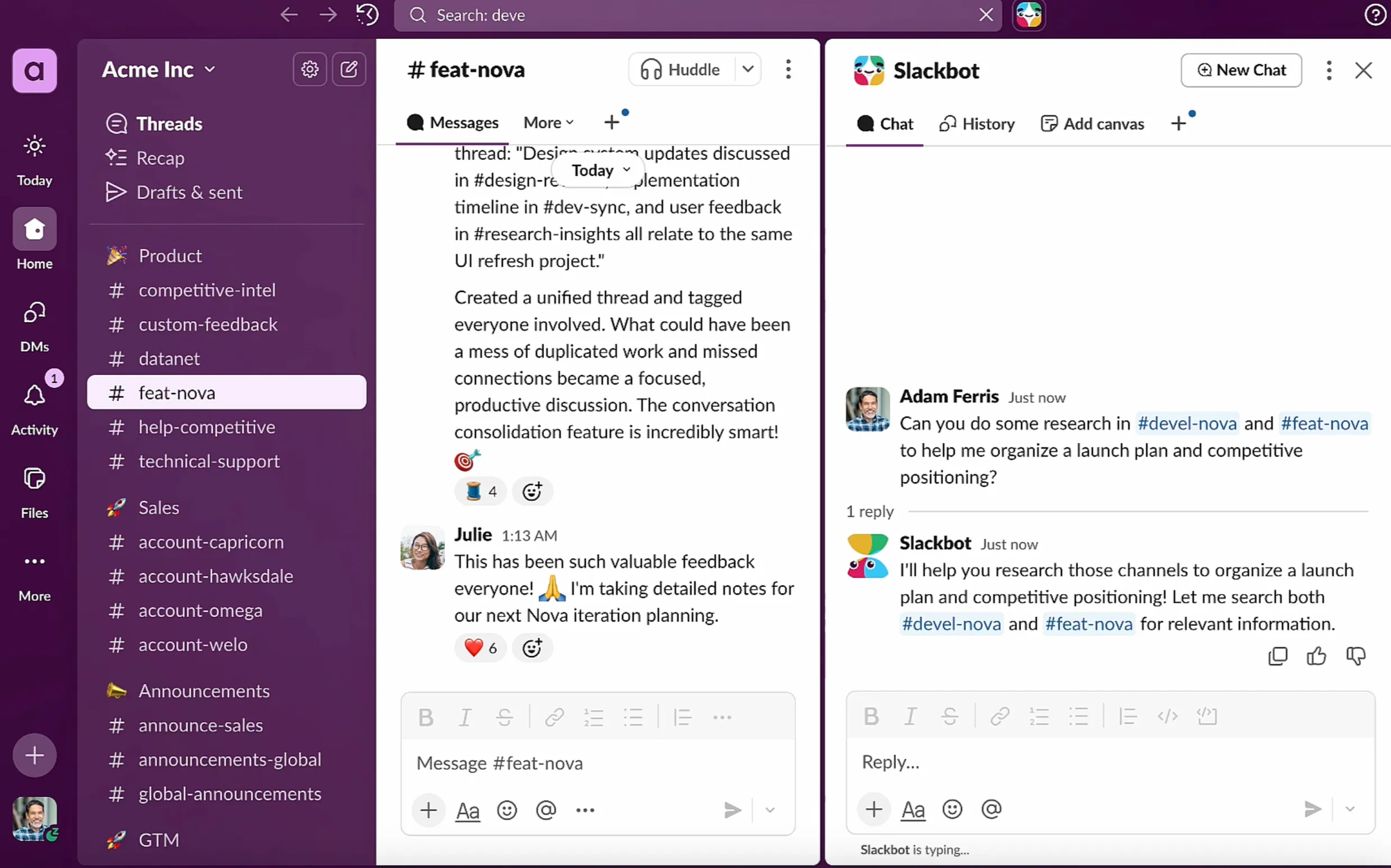
Slackbot starts with context because it lives inside Slack. It sees your conversations, your files, your channels, the people you work with. It understands who makes decisions, where projects stand, and how your team actually operates.
Rob Seaman, Slack's chief product officer and interim CEO, describes the advantage simply: "It knows what you're working on, and it knows what your company's priorities are because it can access what you have access to within Slack."
During a press demo, Amy Bauer from Slack's product team asked Slackbot a deliberately playful question: "What animal would I be based on my activity in Slack?" The system identified her as a dolphin based on her communication patterns — strategic coordination, analytical deep-dives into data, specific collaboration behaviors.
That's not a party trick. It demonstrates that Slackbot can synthesize behavioral context across thousands of interactions. That same capability, applied to actual work questions, becomes genuinely useful.
When Ryan Gavin, Slack's CMO, asks Slackbot "What are the areas that my team needs my focus right now? What are the places they could use help based on the priorities of Slack and the business?" — the system can actually answer meaningfully. It infers team membership and business priorities from months of communication patterns without being explicitly told.
What Slackbot Can Actually Do Now
The capabilities break down into several categories, and I want to be specific about what works well versus what's still developing.
Information Retrieval
This is probably the strongest use case right now. You can ask Slackbot questions in natural language and it searches across your entire Slack history — conversations, files, and connected systems like Google Drive, Box, Salesforce, Confluence, and OneDrive. The system respects permission controls, so it only shows you information you're already authorized to access.
Instead of trying to remember which channel discussed the Q3 budget decision or digging through document folders for the project timeline, you just ask. The AI parses your query and synthesizes relevant information from multiple sources.
Content Creation
Slackbot can draft meeting notes, project updates, briefs, and documents through conversational refinement. You provide rough direction, review the output, iterate until it matches your needs. It generates Slack Canvas documents directly from prompts.
One early adopter, Sinan from Beast Industries, reported: "Slackbot is saving me, at bare minimum, 90 minutes a day. I ask it to create a canvas for a meeting tomorrow, and in 17 seconds it's better than I could ever do."
I'd take that 90-minute claim with some skepticism — it's marketing testimonial territory — but the core capability is real. The AI can produce first-draft quality content that's pre-loaded with relevant context from your Slack history.
Task Management
Slackbot handles scheduling by checking calendars, surfaces priorities based on your communication patterns, and sets reminders. For Salesforce customers, it can pull CRM data to generate customer briefings that combine account history with recent Slack discussions.
Cross-Platform Reach
This is where things get interesting. Slackbot can connect to and interact with other enterprise products — Microsoft Teams, Google Drive, Salesforce, Box, Confluence, and more — if granted permission. You can work across multiple common enterprise applications without leaving Slack.
Salesforce has also announced plans for Slackbot to use the Model Context Protocol (MCP) to access third-party systems even more broadly. The company envisions a "reusable prompts" library that helps users automate routine tasks.
What's Coming Next
The current text-based version is explicitly described as "just the beginning." Salesforce has announced plans for:
- Voice capabilities — the ability to interact with Slackbot through spoken conversation rather than just typing
- Web browsing — letting Slackbot access and navigate the internet alongside users
- Screen access — an opt-in feature where Slackbot can view what you're looking at, like a Canvas document you're editing, to provide more contextual help
- Multi-agent coordination — Slackbot will eventually coordinate with other AI agents across your organization, routing requests to the right specialized agent (whether that's Agentforce for customer data, an HR agent, or a third-party tool)
Harris was careful to temper expectations on the multi-agent front: "I still think we're in the single agent world. FY26 is going to be the year where we started to see more coordination. But we're going to do it with customer success in mind, and not demonstrate and talk about, like, 'I've got 1,000 agents working together,' because I think that's unrealistic."
That kind of honesty is refreshing in enterprise AI marketing.
How Slackbot Compares to Microsoft Copilot
The obvious comparison is Microsoft Copilot, which embeds AI assistance into Teams, Outlook, Word, Excel, and the broader Microsoft 365 suite. Both are betting that the winning enterprise AI will be the one embedded in tools workers already use.
The approaches differ in meaningful ways.
Microsoft Copilot works within applications. When you're in Word, Copilot helps with documents. When you're in Teams, Copilot summarizes meetings. When you're in Outlook, Copilot drafts emails. It's deeply integrated with each Microsoft tool, but it participates directly in those tools' workflows.
Slackbot operates as a supervisory layer. It sits in a dedicated panel, observing your entire Slack corpus rather than participating in individual conversations. When you invoke Slackbot, you're querying an intelligent system that searches, synthesizes, and acts across all your accessible communications — but it maintains separation from the conversations themselves.
As Seaman explained: "We're treating Slackbot as your personal agent and assistant." Salesforce does support third-party agents that can be added directly to channels, but Slackbot itself provides oversight rather than participation.
From a pricing perspective, there's a significant difference. Slackbot is included at no additional cost for Business+ and Enterprise+ customers — it's part of the existing subscription. Microsoft Copilot for 365 costs $30 per user per month as an add-on.
The Business+ tier recently increased to $15 per user per month after Salesforce eliminated separate AI add-ons, so there's some cost baked in. But for organizations already paying for Slack's higher tiers, Slackbot arrives as a feature, not an additional expense.
Microsoft has the advantage of scale — Teams has over 320 million monthly active users compared to Slack's roughly 42-65 million. For organizations already embedded in the Microsoft 365 ecosystem, Copilot offers deeper integration across Word, Excel, PowerPoint, and Outlook.
Slack's advantage is flexibility and third-party integrations. The platform connects with over 2,600 apps, and its Salesforce integration (natural given the ownership) provides capabilities that Microsoft can't easily replicate.
Who Should Care About This
Let me be specific about who will actually benefit from the new Slackbot versus who can probably ignore it.
This matters if:
- You're already a Slack Business+ or Enterprise+ customer. You're getting this at no additional cost, and the contextual intelligence built on your existing Slack data is immediately valuable.
- Your team relies heavily on Slack for work coordination. The more you communicate in Slack, the more context Slackbot has to work with, and the more useful it becomes.
- You're dealing with "agent sprawl" — multiple AI tools across different platforms that don't talk to each other. Slackbot's positioning as an orchestration layer that coordinates with other agents could simplify your AI tooling.
- You work in a fast-moving environment where finding information quickly matters. The search and synthesis capabilities are the strongest part of the current feature set.
This probably doesn't matter if:
- You're on Slack's free or Pro tiers. The new Slackbot is only available for Business+ and Enterprise+ customers.
- Your organization is deeply embedded in Microsoft 365. Copilot's integration across Word, Excel, Outlook, and Teams might provide more value than Slackbot's Slack-centric intelligence.
- You're a small team with simple communication needs. The contextual AI capabilities shine in larger, more complex organizational environments with lots of channels, files, and cross-functional collaboration.
You don't currently use Slack. This isn't a reason to switch platforms by itself.
Real-World Use Cases
The theoretical capabilities are interesting, but I'm more curious about how people actually use these tools in practice. Based on early adopter reports and Salesforce's internal testing, a few patterns are emerging.
Meeting Preparation
Harris mentioned using Slackbot to prepare for meetings — researching topics, pulling relevant context from past discussions, and generating briefing materials. Before a recent all-hands meeting, Seaman asked Slackbot to check the meeting deck and provide guidance on how to pronounce the names of more than 60 new hires. That's a mundane task that saves real time.
End-of-Day Sanity Checks
Demetri Salvaggio, VP of customer experience at travel software company Engine, reported using Slackbot to "sanity check" himself at the end of each workday — making sure he hasn't failed to respond to important messages. For people managing high volumes of communication, that peace of mind has real value.
Priority Surfacing
Ryan Gavin's example of asking Slackbot "What are the areas that my team needs my focus right now?" represents a use case that wasn't really possible before. The AI infers team membership and business priorities from communication patterns, then synthesizes that into actionable guidance. You're essentially asking the system to think strategically about your workload.
Campaign Visibility for Marketing Teams
For marketers managing campaigns across planning, analytics, and creative work, Slackbot can provide context-rich summaries pulled from scattered threads, files, and meeting notes. Ask "What's the latest on the Q2 launch?" and get a synthesis that would normally require digging through multiple channels and documents.
Customer Briefings
For Salesforce customers, the CRM integration enables generating briefings that combine account history with recent Slack discussions. Before a customer call, you can ask Slackbot to prepare materials that draw from both your customer data and your team's recent conversations about that account.
Will This Actually Change How You Work?
I want to be honest about my skepticism here. Enterprise AI features tend to launch with impressive demos and then fade into irrelevance as people discover they don't fit into actual workflows.
The promising signs for Slackbot are the internal adoption numbers at Salesforce — 25,000 weekly active users, 80% retention, 96% satisfaction, all achieved without marketing push. Those are real engagement metrics, not demo-day excitement.
The challenge is whether that internal success translates to other organizations. Salesforce employees are presumably more familiar with the company's AI tools and more motivated to make them work. External users might have different experiences.
The architectural decision to make Slackbot contextually aware from day one is the right approach. The frustration with most AI assistants is the cold-start problem — they don't know anything about your situation. Slackbot solves that by inheriting your Slack history as context.
But context also creates potential problems. If your Slack is messy, disorganized, or full of outdated information, Slackbot's synthesis might be confusing rather than helpful. The quality of output depends on the quality of input.
My suggestion: start with simple use cases like information retrieval and meeting prep. Get comfortable with how Slackbot interprets your questions and synthesizes responses. Build up to more complex use cases like document drafting and priority management as you develop intuition for what works.
How to Get Started
If you want to try the new Slackbot, here's what you need:
- You must be on a Slack Business+ or Enterprise+ plan. The feature isn't available on free or Pro tiers.
- The rollout started January 13, 2026 and continues through February. Not all eligible customers have access immediately.
- To find Slackbot, look for the icon just to the right of the search bar at the top of your workspace.
Enterprise admins can set specific access permissions or restrict access entirely through February 10, 2026, after which the feature becomes generally available with default settings.
Mobile capabilities will complete by March 3, 2026.
There's nothing to install, nothing new to learn in terms of interface. If you know how to use Slack's search and chat, you know how to interact with Slackbot. Just start asking questions in natural language.
Frequently Asked Questions
What is the new Slackbot?
The new Slackbot is a completely rebuilt AI agent powered by a large language model (reportedly Anthropic's Claude). Unlike the old rule-based Slackbot that handled reminders and scripted responses, the new version can search enterprise data, draft documents, schedule meetings, and take actions across multiple systems. Salesforce describes it as a "personal agent for work" that understands your context because it lives inside Slack.
How much does the new Slackbot cost?
Slackbot is included at no additional cost for customers on Business+ ($15/user/month) and Enterprise+ plans. Unlike Microsoft Copilot which costs $30/user/month as an add-on, Slackbot is bundled into existing Slack subscriptions. Users on free or Pro plans don't have access.
When is Slackbot available?
The phased rollout began January 13, 2026 and continues through January and February. Enterprise admins can set access permissions through February 10, 2026. Mobile capabilities complete by March 3, 2026.
What can Slackbot do?
Current capabilities include searching across Slack conversations, files, and connected systems (Google Drive, Salesforce, Box, Confluence, OneDrive) using natural language; drafting documents and Canvas content; checking calendars and scheduling; surfacing priorities; and pulling CRM data for customer briefings. Future capabilities will include voice interaction, web browsing, and screen viewing.
Is Slackbot better than Microsoft Copilot?
It depends on your ecosystem. Slackbot excels at contextual intelligence drawn from Slack communications and works well for teams already using Slack extensively. Copilot integrates more deeply with Microsoft 365 apps (Word, Excel, Outlook, PowerPoint) and offers meeting-focused AI features in Teams. Slackbot is included in premium Slack plans; Copilot costs $30/user/month as an add-on.
What AI model powers Slackbot?
CNBC reported that Slackbot uses Anthropic's Claude, though Salesforce's Parker Harris indicated the company is testing alternatives. The system is built on Salesforce's Agentforce AI framework.
Can Slackbot access my files and other apps?
Yes, Slackbot can search across Slack conversations and files, plus connected systems like Google Drive, OneDrive, Salesforce, Box, and Atlassian's Confluence. It respects existing permission controls — it can only access information you're already authorized to see.
Is the new Slackbot safe to use with sensitive data?
Slackbot operates within Slack's existing enterprise-grade security and compliance standards. It respects permissions and access controls already in place. Enterprise admins can set specific access permissions or restrict Slackbot entirely. However, you're trusting Salesforce's AI with analysis of internal communications, so organizations with particularly sensitive data should evaluate their specific compliance requirements.
How is Slackbot different from ChatGPT or other AI assistants?
Most AI assistants start with zero context — you have to explain your situation every time. Slackbot starts with your Slack history: conversations, files, channels, and collaboration patterns. It understands your work context because it's been observing your communications. As Slack describes it: "Most AI tools are like interns who haven't read the brief yet... Slackbot is the teammate that was in the meeting with you."
Can Slackbot schedule meetings and manage my calendar?
Slackbot can check calendars and help coordinate scheduling. Full meeting booking capabilities are coming soon. The system can also set reminders and surface daily priorities based on your communication patterns.
Will Slackbot work with other AI agents?
Salesforce envisions Slackbot as a "super agent" that coordinates with other AI agents across your organization. When Agentforce and third-party agents are introduced, Slackbot will route requests to the appropriate specialized agent (customer data agents, HR agents, IT support tools) rather than requiring you to know which agent handles which task.
Does Slackbot work on mobile?
Mobile capabilities are rolling out with full completion expected by March 3, 2026. Currently, the desktop and web experiences are more complete.
Can I use Slackbot if I'm on the free Slack plan?
No. The new AI-powered Slackbot is only available for Business+ and Enterprise+ customers. Users on free or Pro plans don't have access to these capabilities.
What's the difference between Slackbot and Slack AI?
Slack AI (launched in 2024) included features like thread summarization and channel recaps. The new Slackbot builds on and expands these capabilities significantly, adding document creation, cross-platform search, task management, and agentic capabilities that can take action on your behalf. Slackbot represents the next evolution of Slack's AI strategy.
Related Articles
 Dani
Dani
 Mark
Mark
 Dani
Dani


