Look, I'll be honest with you. When Google first dropped Nano Banana back in August, I thought it was just another AI image generator trying to cash in on the hype. I mean, we've all been burned by tools that promise the world and deliver... well, something that looks like my three-year-old nephew got creative with Photoshop.
But here's the thing — I was completely, utterly wrong.
I've spent the last four months going absolutely bananas (pun very much intended) testing every single trend that's blown up on social media this year. And honestly? Some of these results have left me speechless. My mom literally cried when I showed her the restored photo of my late grandmother. My wife thinks I've developed some kind of supernatural ability to "make pictures pretty." And my Instagram engagement has gone through the roof.
So whether you're a complete newbie who's never touched an AI image tool, or you're a seasoned creator looking for fresh inspiration, I'm about to walk you through everything I've learned. We're talking real prompts, real results, and real talk about what works and what needs a little finessing.
Grab a coffee, maybe a banana (sorry, had to), and let's dive into the 13 most incredible Nano Banana trends that defined 2025.
What Even Is Nano Banana?
Before we jump into the good stuff, let me give you the 30-second rundown if you're new to this whole thing.
Nano Banana is Google's AI image generation and editing model that lives inside the Gemini app. The name sounds silly — and trust me, I've made more banana puns than I care to admit — but the technology behind it is genuinely impressive. It first launched in late August 2025 as part of the Gemini 2.5 Flash update, and within weeks, it had become the top-rated image editing model in the world.
What makes it different from other AI image tools? A few things, actually.
First, it maintains character consistency like nothing else on the market. If you upload a photo of yourself, Nano Banana can place you in different scenes, change your clothes, even age you up or down, while keeping your actual face looking like, well, your actual face. This sounds simple, but anyone who's tried other AI tools knows how rare this is.
Second, it can blend multiple images together seamlessly. Want to combine two photos into one cohesive image? Done. Want to take the style from one picture and apply it to another? No problem. This opens up creative possibilities that simply weren't accessible to regular people before.
Third — and this is where Nano Banana Pro really shines — it uses Gemini's reasoning capabilities to understand context. When you ask it to create an infographic about a plant, it doesn't just slap some generic text on an image. It actually pulls from its knowledge base to create something informative and accurate.
Now, with Nano Banana Pro (which launched in November, built on Gemini 3 Pro), these capabilities have been cranked up to eleven. Better text rendering, higher resolution output up to 4K, and an even deeper understanding of complex prompts.
Alright, enough backstory. Let's get to the trends that have taken the internet by storm.
Trend #1: Photo Edits That'll Make You Question Reality
Let's start with the foundation of everything Nano Banana does well — general photo editing. But we're not talking about slapping a filter on your sunset pic. We're talking about completely transforming the entire vibe of an image while keeping everything else intact.
Here's a real example that blew me away.
I uploaded a daytime hiking photo from my trip to Sedona last year. Beautiful red rocks, blue sky, classic Arizona landscape. Then I asked Nano Banana to turn it into a dramatic night scene lit by the moon, with moody shadows and atmospheric lighting.
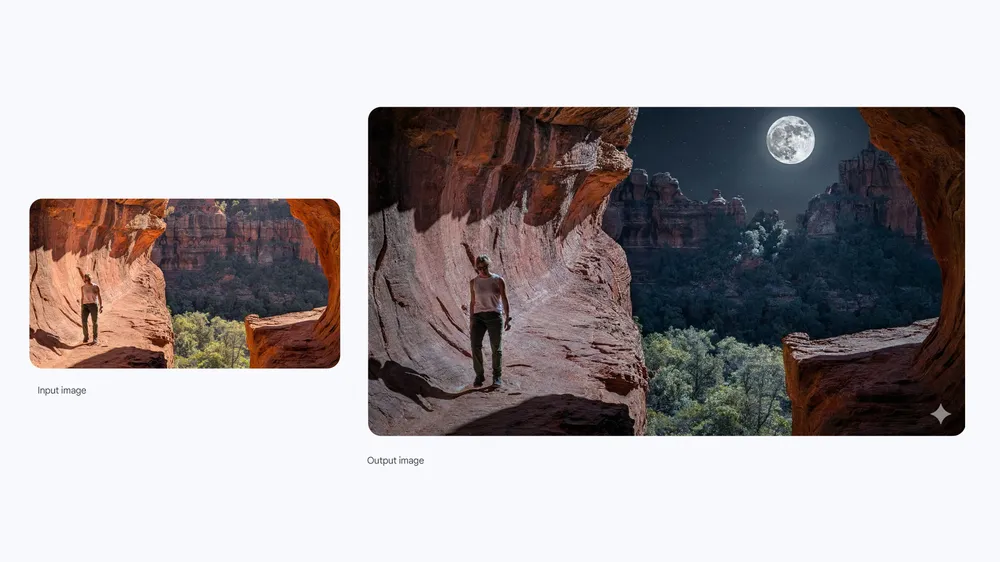
The result? It looked like I had hired a professional photographer to follow me around at midnight with a full lighting rig. The way the moonlight caught the rock formations, the subtle shadows stretching across the canyon floor, the almost ethereal quality of the whole scene — it was genuinely breathtaking.
The prompt that works best:
Here's what I've learned about getting the best results with this kind of edit. Be specific about the lighting source. Saying "make it dark" gives you very different results than "lit by moonlight from the upper left." The AI responds incredibly well to directional cues.
Also, don't be afraid to ask for emotional qualities. Words like "dramatic," "moody," "ethereal," or "peaceful" help the AI understand not just what you want to see, but how you want to feel when you look at the image. This is where Nano Banana really separates itself from simpler editing tools.
The applications here are endless. Wedding photos that need a romantic golden hour glow? Done. Real estate shots that need better lighting? Handled. That one group photo from the party where the flash made everyone look like ghosts? Fixed.
Trend #2: The Figurine Phenomenon That Broke the Internet
Okay, if you've been anywhere near social media in the last few months, you've seen this trend. It started small, then absolutely exploded. People were turning their pets, their babies, their partners, even themselves into hyper-realistic 3D figurines that looked like they came straight out of a professional collectibles shop.
I'll admit, I was skeptical at first. How good could a fake figurine really look?
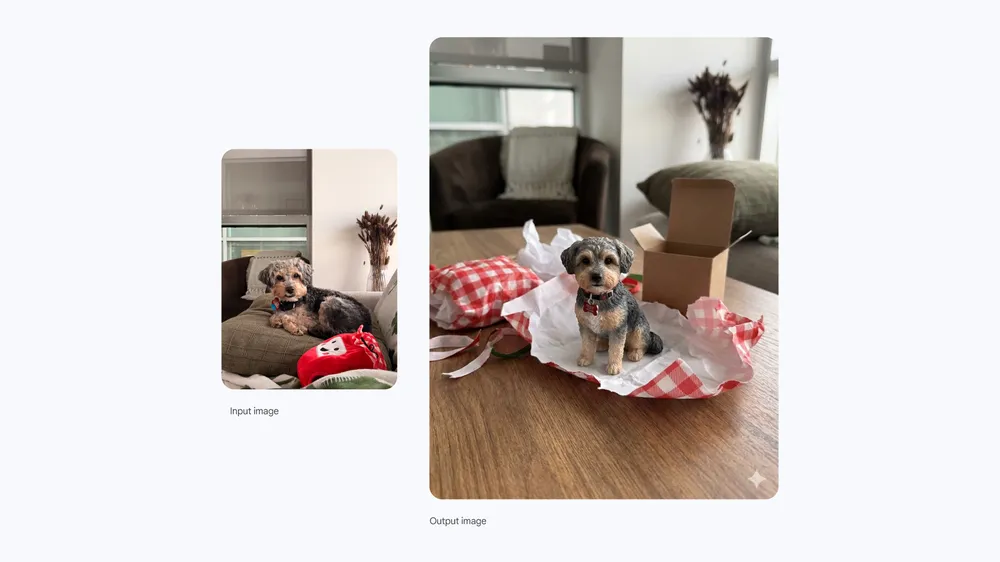
Then I tried it with a photo of my dog, Murphy. He's a medium-sized mutt with the most expressive face you've ever seen, and I've always joked that he deserves his own action figure. So I uploaded his photo and asked Nano Banana to create a realistic-looking small 3D model of him, placed on a desk next to birthday packaging like he'd just been unwrapped as a gift.
Friends, when I tell you my jaw dropped. The figurine looked real. The texture of his fur, the shine in his eyes, even the way his little tongue poked out — it was all there. The packaging around it even had that authentic unwrapped-present messiness. I immediately sent it to my family group chat, and my sister asked where I bought it.
The prompt that works best:
The key here is specificity in your setting. Don't just say "make it a figurine." Tell the AI where the figurine is, what's around it, what the lighting situation is. The more context you provide, the more realistic the final image becomes.
I've since made figurines of basically everyone in my life. They make incredible personalized gifts — just get them printed through a service that turns images into actual figurines, and you've got something truly unique. Fair warning though: once people find out you can do this, prepare to become everyone's personal figurine factory.
Trend #3: Meeting Your Younger Self (Prepare for Feels)
This one hit different. Really different.
The concept is simple: you upload two photos — one of yourself as a child and one from today — and ask Nano Banana to create an image where your current self is hugging or interacting with your younger self.
I tried this with my wife's photos first because I wanted to surprise her. I found an old snapshot of her from when she was about five years old, standing in her grandparents' garden, and combined it with a recent photo. The result showed her hugging her younger self, both of them in the garden, with that vintage Polaroid quality that made it feel like a moment captured in time.
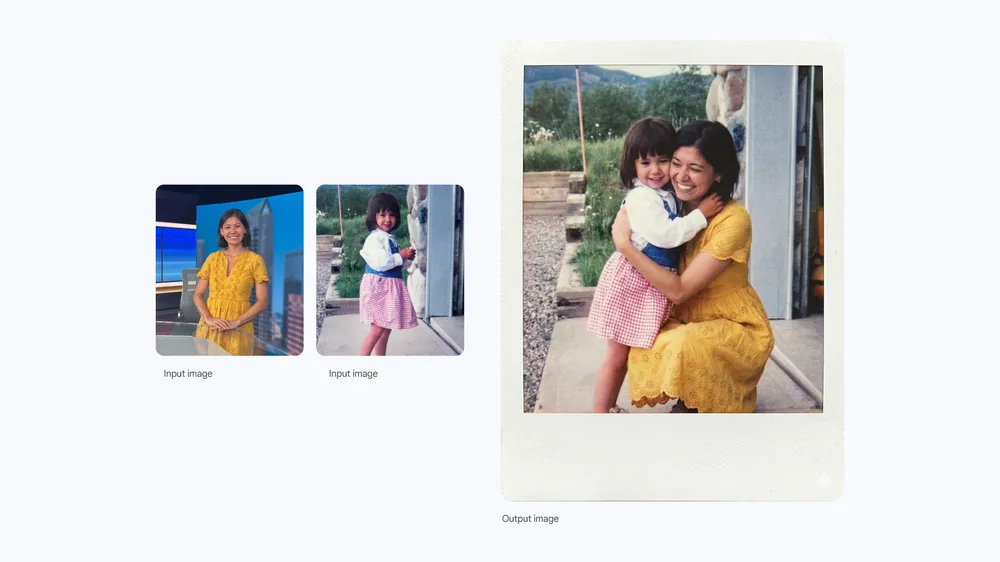
She cried. I'm not going to pretend I didn't get a little misty-eyed myself.
The prompt that works best:
That last part – "don't change the faces" is crucial. Without it, Nano Banana might try to stylize or blend the faces in ways that lose the recognizable features. You want both faces to remain completely authentic.
I've seen people use this trend for everything from birthday posts to memorial tributes. One person created an image of their late parent meeting their grandchild for the first time – the child the parent never got to meet in real life. That one broke me.
The technology here isn't just impressive from a technical standpoint. It's emotionally powerful in a way that I really didn't expect from an AI tool. Use it thoughtfully, and you can create images that genuinely mean something to the people who receive them.
Trend #4: Comic Strips and Cartoons Straight From Your Imagination
Remember when creating a comic strip required actual artistic ability? When you'd see those amazing webcomics and think "I wish I could do that, but I can barely draw stick figures"?
Those days are officially over.
Nano Banana can generate full comic strips complete with panels, characters, action sequences, and dialogue. And I don't mean janky-looking amateur hour stuff. I'm talking about legitimate, visually cohesive comic art that tells an actual story.
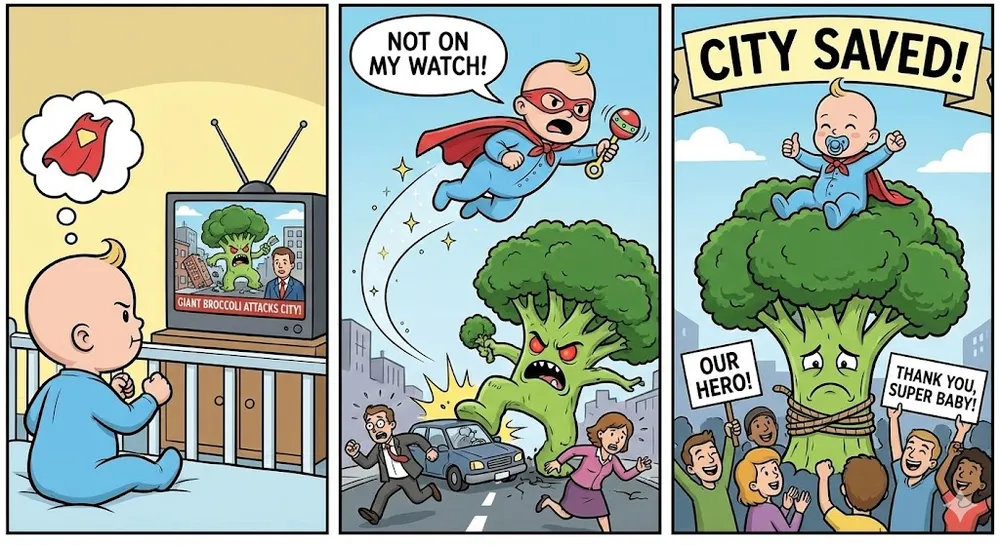
I tested this by asking for a three-panel comic strip about a baby who becomes a superhero and saves a city from a giant piece of evil broccoli. Yes, it's ridiculous. That was the point — I wanted to see how the AI handled absurd creative prompts.
The result was better than half the webcomics I follow. The baby character was consistent across all three panels, the evil broccoli was genuinely menacing (and hilarious), and the visual flow from panel to panel made perfect sense. There was even subtle humor in the background details that I didn't specifically ask for but that made the comic feel alive.
The prompt that works best:
For best results, keep your story simple enough to fit in the panels you're requesting. Three panels means you need a setup, confrontation, and resolution. Six panels gives you room for more development. Don't try to cram an epic saga into a short format.
Also, character description matters more than you might think. Instead of just saying "a person," try "a tired office worker with messy hair and a coffee cup that's always empty." The specificity translates into more memorable visual characters.
I've started using this for my newsletter content, creating quick comic explanations of concepts that would otherwise require paragraphs of text. Engagement is way up. People love visual storytelling, and now you don't need to hire an illustrator to provide it.
Trend #5: Watercolor Dreams and Artistic Transformations
Not every image needs to look like a photograph. Sometimes, what you really want is something that looks like it belongs in an art gallery.
The artistic style transformation capabilities of Nano Banana have created their own subcategory of trends. People are turning ordinary photos into watercolor paintings, oil portraits, anime scenes, Renaissance masterpieces — you name it, someone's tried it.
My personal favorite has been the watercolor transformation. There's something about the soft, flowing quality of watercolor that makes even mundane subjects feel magical. I tried it with a photo of my neighborhood bakery during the holidays, asking for a cozy, warm watercolor-style painting.
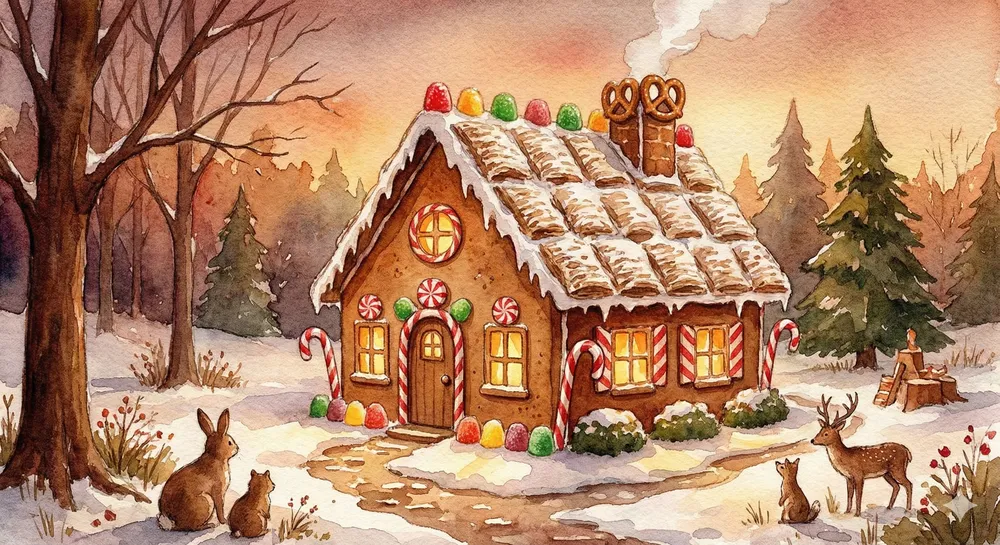
The result looked like something you'd find framed in a grandparent's home — in the best possible way. The colors bled into each other beautifully, there were soft edges and deliberate imperfections that gave it that hand-painted feel, and the overall warmth of the scene made me want to frame it myself.
The prompt that works best:
The emotional quality modifier is really important here. "Watercolor painting of a house" gives you very different vibes than "watercolor painting of a house that feels nostalgic and warm." Lean into the feelings you want the art to evoke.
I've seen people use this for wedding invitations, nursery art, anniversary gifts, and even memorial pieces. The artistic filter transforms personal photos into something that feels more permanent, more significant, more worthy of display.
One pro tip: the style works best when there's already interesting composition in your original photo. A well-framed shot transforms into a well-framed painting. A boring snapshot becomes a boring painting with watercolor effects. Garbage in, garbage out — but good input becomes incredible output.
Trend #6: Virtual Hairstyle Experiments (Finally, Risk-Free Makeovers)
Every single person reading this has wondered what they'd look like with a different hairstyle. A different color. Bangs or no bangs. Long or short. We've all been there, staring at our reflection, wondering if a dramatic change would be amazing or catastrophic.
The problem? Finding out used to require actually doing it. And hair, unlike many things in life, doesn't come with an undo button.
Enter Nano Banana, and suddenly you can experiment to your heart's content without touching a single strand.
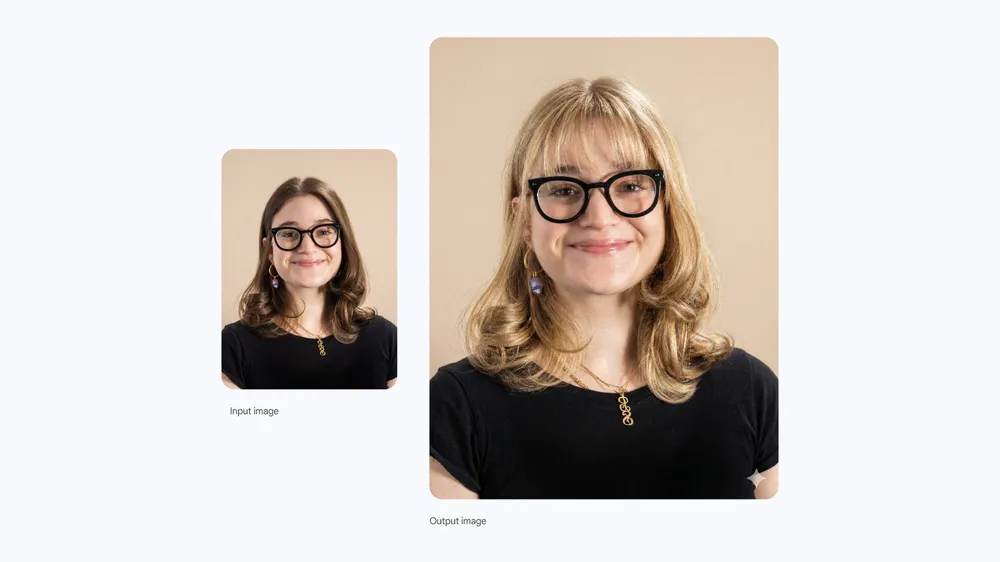
So I uploaded a regular headshot and asked to see her with silver hair, styled slicked back. The result? Definitely distinguished, maybe just a tiny bit villainous, and honestly something I'm now seriously considering doing in real life.
The prompt that works best:
Keep your prompts direct and specific. "Blonde with bangs" gets better results than "different hair." If you want to see multiple options, run several separate prompts rather than asking for multiple variations in one image.
This trend has practical applications beyond satisfying curiosity. Event planning? See if that updo would actually work for the wedding. Career change? Check if the more conservative haircut you're considering projects the right image. Major life moment? Preview the transformation before committing.
Several of my friends have used this to communicate with their actual stylists. Instead of trying to describe what they want with words or showing celebrity photos that don't match their face shape, they generate an image of themselves with the desired style and just show the result. It's transformed the entire salon experience.
Trend #7: Complex Infographics That Used to Require Design Degrees
Here's where Nano Banana Pro really flexes its capabilities. Creating infographics used to require either design software skills, expensive template subscriptions, or hiring an actual graphic designer. Now? You can generate genuinely useful, visually appealing infographics from scratch with a single prompt.
I tested this with a photo of a String of Turtles plant that's been sitting on my windowsill. I asked for an infographic about the plant focusing on interesting information, and what I got back was comprehensive enough that I learned things about my own plant that I didn't know.
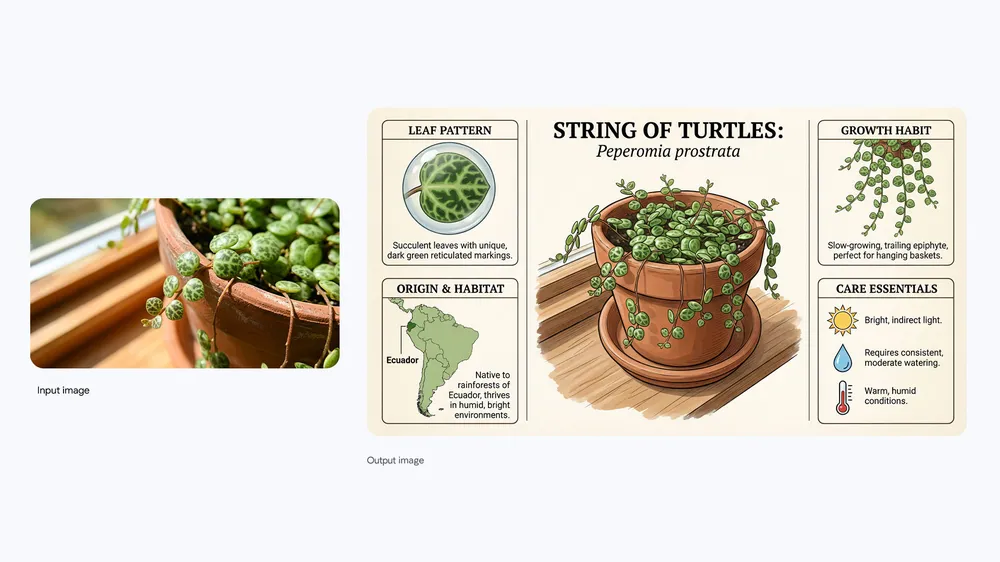
The infographic included the plant's origins, care essentials like watering frequency and light requirements, growth patterns, and even common problems to watch out for. All presented in a clean, readable visual format with the photo integrated naturally.
The prompt that works best:
The more specific your focus, the better your results. "Infographic about coffee" will be too broad and generic. "Infographic about the coffee brewing process with temperature and timing guidelines" gives the AI direction and results in something actually useful.
I've started using this capability for work presentations, blog posts, and even just understanding topics I'm researching. Upload a product photo and ask for an infographic about its features. Upload a historical image and ask for context. Upload literally anything and ask for an educational breakdown.
The educational applications here are massive. Teachers are using this to create custom visual aids for their students. Parents are using it to explain complex topics to kids. Content creators are using it to add value to their posts without spending hours in Canva.
Fair warning: always verify the information in generated infographics. Nano Banana Pro has extensive knowledge, but it's not infallible. Double-check facts before sharing, especially for anything remotely technical or scientific.
Trend #8: Holiday Photo Transformations That Skip the Professional Shoot
We took a casual selfie with our dog in our living room and transformed it into a full holiday portrait worthy of a Christmas card.
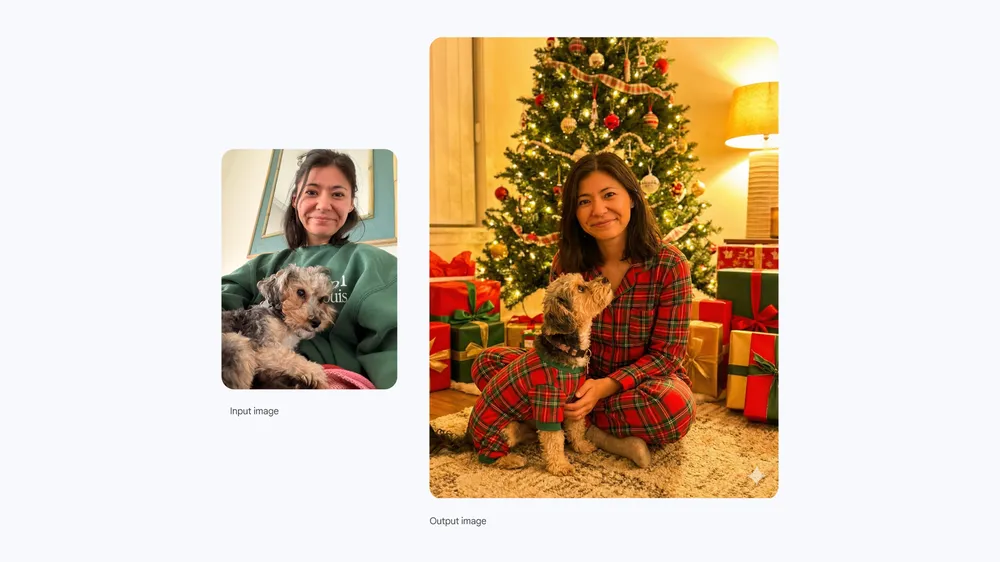
The prompt specified that we should be sitting in front of a Christmas tree, wearing red and green pajamas, with wrapped gifts around us, warm golden lighting, and natural expressions. The result looked like we'd hired a photographer and spent thousands on a professional holiday shoot. My actual smile from the casual selfie transferred to the transformed scene, so for once I didn't look like a hostage.
The prompt that works best:
The key phrase there is "mimic my real face." This tells Nano Banana that you want your actual expressions and features preserved, not generated from scratch. Without this instruction, you might get a beautiful holiday portrait of someone who vaguely resembles you but isn't quite right.
I've seen this trend expand beyond Christmas to basically every holiday and special occasion. Thanksgiving scenes, Halloween portraits, birthday celebrations, anniversary photos — if there's an event that traditionally requires a nice photo, someone's using Nano Banana to create it without the hassle.
For families with young kids or pets who refuse to cooperate with traditional photo shoots, this is an absolute game-changer. Get one good candid moment and transform it into whatever polished final product you need.
Trend #9: Isometric Art That Looks Like Expensive 3D Renders
If you've spent any time on design websites like Dribbble or Behance, you've seen those beautiful isometric illustrations that look like tiny 3D worlds. Clean lines, perfect angles, miniature cities and landscapes that you want to reach out and touch.
Creating these traditionally required serious 3D modeling skills or hours in specialized illustration software. Now? A good prompt and about ten seconds of generation time.
I asked for a 3D isometric image of a fantastical underwater city, and what came back looked like it belonged in a professional game studio's concept art portfolio. Spherical buildings connected by tubes, fish swimming through the structures, coral formations providing natural elements, all rendered with consistent lighting and that satisfying isometric perspective.
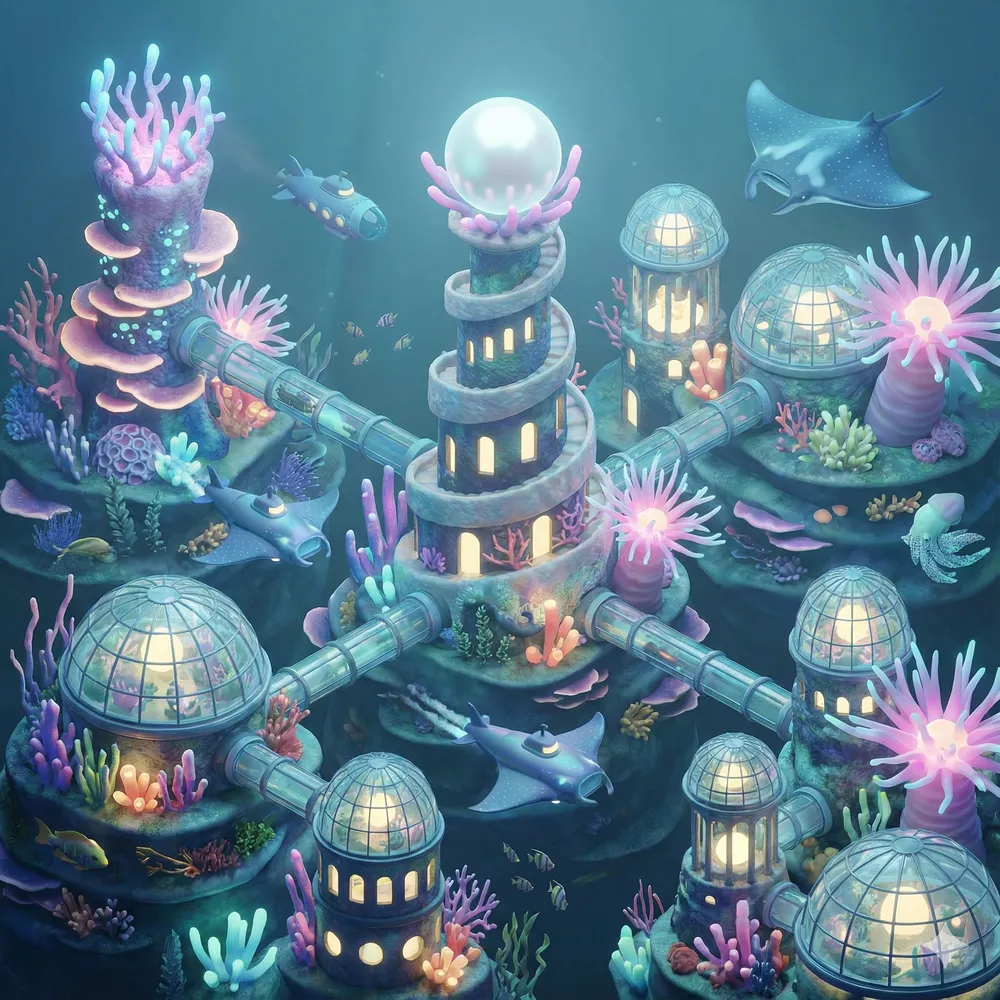
The prompt that works best:
The isometric specification is important — it ensures that the perspective is consistent and that the image has that distinctive stylized look rather than a regular 3D render. Add "fantastical" or "detailed" or "miniature" to further refine the aesthetic you're going for.
These images work beautifully for social media profiles, website headers, presentation backgrounds, or even prints. There's something about the isometric style that feels both professional and playful, making it versatile across many different contexts.
I've also experimented with creating isometric versions of real locations — my apartment building, my office, my favorite coffee shop. The results are like owning little model versions of familiar places, which is oddly satisfying in a way I didn't expect.
Trend #10: Turning Landscapes Into Board Games You Actually Want to Play
This one combines creativity with actual practical application in a way that caught me off guard.
The concept: take a landscape photo and transform it into a game board, complete with game elements, obstacles, and a clear objective. It sounds simple, but the results can be genuinely impressive and potentially functional.
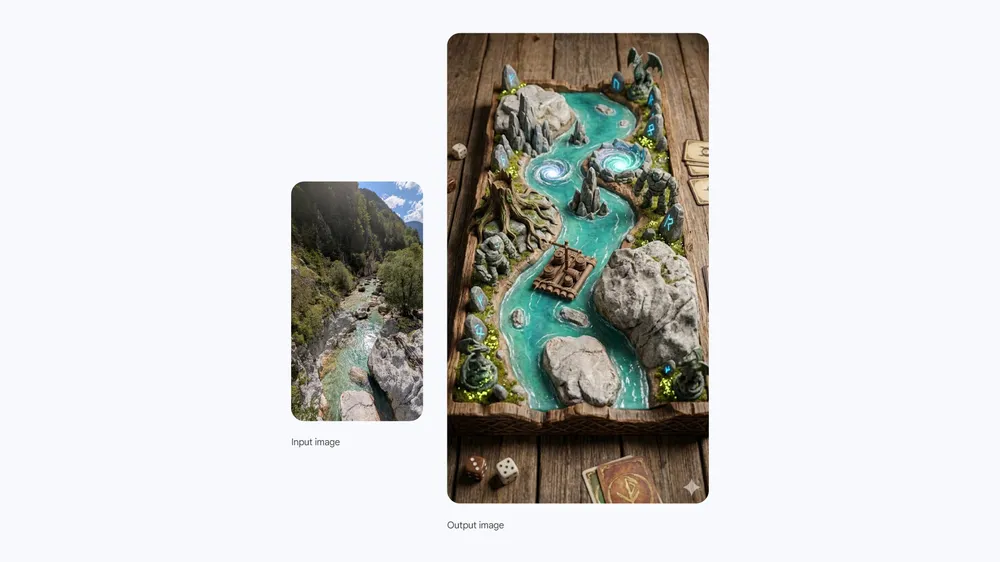
I tried this with a photo I took of a river running through a rocky canyon during a hiking trip. The prompt asked to turn it into a rustic game board where the objective is to bring a raft down the river while avoiding obstacles, in a photorealistic style with some fantastical elements.
What came back was a fully realized game board that looked like it belonged in a boutique board game shop. The river became the path, rocks became obstacles, there were marked start and end points, and the whole thing had this weathered, authentic game board texture while maintaining the actual landscape features from the photo.
The prompt that works best:
Specifying the game objective helps the AI understand what elements to emphasize and what kind of path or challenge structure to create. The photorealistic specification ensures it doesn't veer into overly cartoonish territory (unless that's what you want).
I've seen people actually produce these as physical game boards for custom family games. Take a photo from your family vacation, transform it into a game board, print it professionally, and you've got a one-of-a-kind game that carries genuine personal meaning. It's gift-giving on another level.
For tabletop gaming enthusiasts, this capability is enormous. Custom maps, personalized playing fields, unique game assets — all generated from real photographs that mean something to the players.
Trend #11: Fashion Experimentation Without the Shopping Trip
How many times have you stood in a fitting room, trying to imagine whether that outfit would work with different accessories, different colors, different contexts? Or scrolled through an online store, wondering if that jacket would actually look good on you specifically, not just on the model?
Nano Banana has turned virtual fashion experimentation into something that actually works.
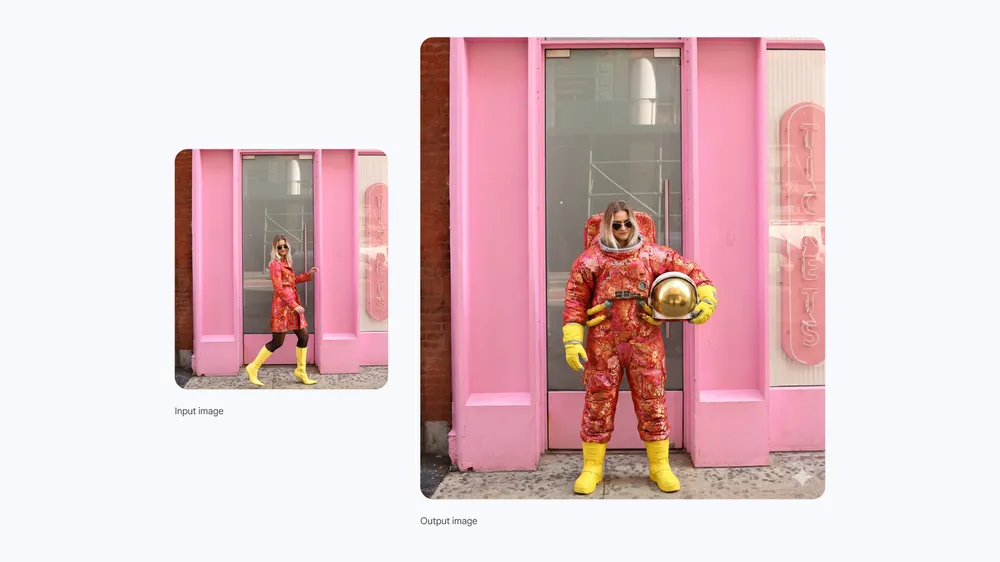
I saw a demo where someone took a photo of themselves in a patterned pink dress and yellow boots, then asked to change the outfit to an astronaut suit while keeping the same colors and patterns from their original clothes. The result was a completely unique, personalized astronaut outfit that looked like it could exist in a fashion-forward sci-fi movie.
The prompt that works best:
That color/pattern preservation is the secret sauce here. It maintains visual continuity while allowing for wild outfit transformations, creating results that feel intentional and stylish rather than random.
The practical applications are obvious. Want to see if that dress would work in a different color before buying? Generate it. Curious how a particular style would look on your body type? Test it. Planning an event outfit and want to experiment with different approaches? Try them all without spending a dime or leaving your couch.
Fashion influencers have absolutely exploded this trend, using it to showcase outfit possibilities and creative styling ideas. Some are even using it for virtual "try-on" content where they show themselves in items they're considering purchasing, giving their audience a preview before committing.
Trend #12: Photo Restoration That Brings History Back to Life
This trend might be the most emotionally significant of them all.
We all have those old family photos — the ones that are faded, damaged, torn, discolored, or otherwise degraded by time. Photos of grandparents, great-grandparents, family members who are no longer with us. Photos that capture moments that can never be recreated, preserved only in images that are slowly deteriorating.
Nano Banana can restore these photos in ways that genuinely feel like magic.
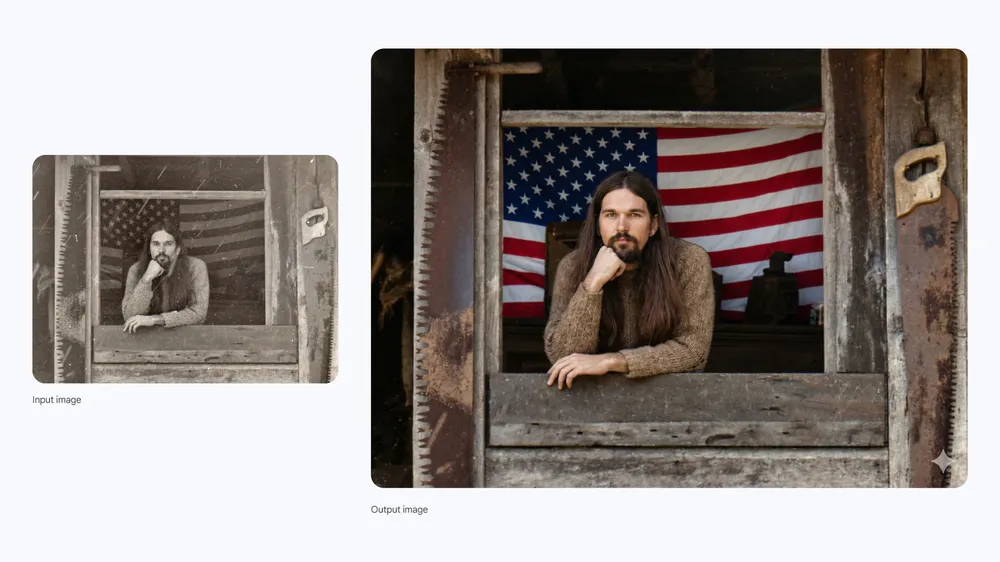
I tried this with an old black-and-white photo of my grandfather from the 1950s. The image had significant damage — white streaks, blurriness in certain areas, that overall faded quality that happens to photos stored in shoeboxes for decades. I asked Nano Banana to restore it, remove the damage, add vivid color, and keep his face exactly the same.
The restored version looks like it could have been taken yesterday. The colors are natural and appropriate for the era. His face is recognizable — more importantly, it's him, not some AI approximation. The damage is gone, replaced with clean, clear image quality.
I showed it to my mother, who hadn't seen her father that clearly in years. She just stared at it for a long time without saying anything. Some things are beyond words.
The prompt that works best:
That last instruction — keeping the face the same — is absolutely critical. Photo restoration can sometimes drift into uncanny territory where the AI tries to "improve" faces in ways that make them unrecognizable. By specifying face preservation, you maintain the authenticity that makes the photo valuable in the first place.
I've helped several family members restore photos this year, and it's become one of the most meaningful applications of this technology that I've found. There's something profound about seeing people from the past rendered with modern image quality, about bridging that visual gap across generations.
Trend #13: Puppies Galore (And Other Scenes You Wish Were Real)
Let's end on something purely joyful, because 2025 has been a lot and we could all use some happy content.
The "surrounded by puppies" trend started as a silly experiment and turned into one of the most popular uses of Nano Banana this year. The premise: take a photo of yourself and transform it into a scene where you're surrounded by adorable dogs (or cats, or other animals of your choosing).
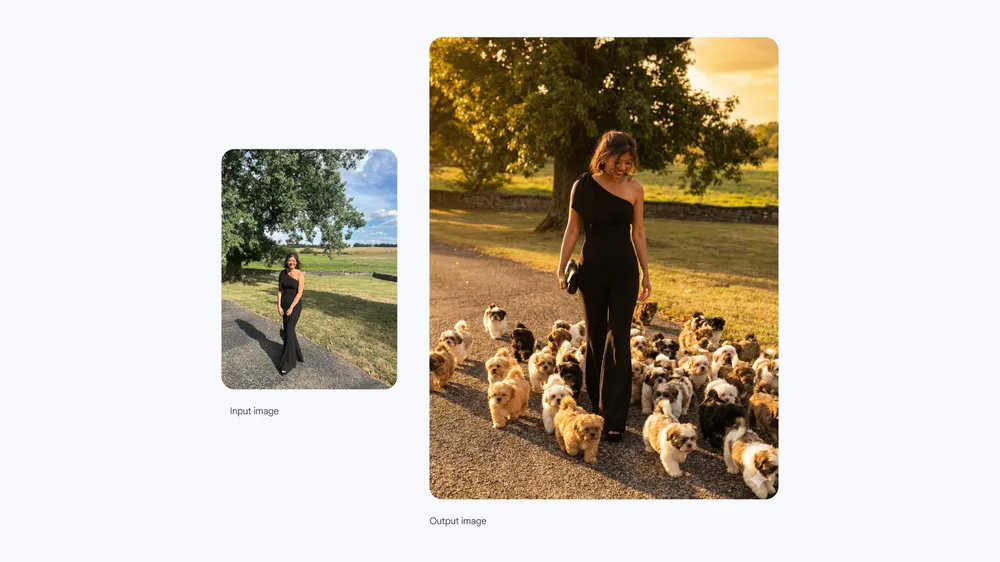
The prompt I saw go viral asked for a realistic, high-fashion, editorial-style image where the subject is surrounded by different small fluffy shih tzu puppies, walking towards the camera but not looking directly at it, with consistent lighting and a golden glow.
The results look like they belong in a perfume commercial or a high-end magazine spread. Luxurious, glamorous, and absolutely overflowing with puppies. It's ridiculous in the best possible way.
The prompt that works best:
The fashion photography language (editorial-style, consistent lighting, golden glow) elevates what could be a goofy concept into something that actually looks professional. The specific instruction about camera angle and gaze makes the composition feel intentional.
People have expanded this beyond puppies to all sorts of dream scenarios. Surrounded by butterflies. Standing in fields of flowers. Meeting their favorite historical figures. Visiting places they've never been. The technology enables wish fulfillment at a visual level — you can see yourself in situations that would be impossible or impractical in real life.
Is it silly? Sometimes, absolutely. But there's genuine joy in seeing ourselves in scenes that make us happy, even if we know they're not "real." After everything the world has thrown at us, a little AI-generated joy isn't the worst thing we could ask for.
Getting the Best Results: What I've Learned After Hundreds of Prompts
After months of extensive testing, I've developed some general principles that apply across all of these trends. Consider this your cheat sheet for Nano Banana success.
- Be specific but not overwhelming. There's a sweet spot between "make this picture better" (too vague) and a three-paragraph description of every element (too much for the AI to handle). Aim for clear, direct instructions that cover the key elements you care about most.
- Include emotional and atmospheric descriptors. Words like "moody," "warm," "dramatic," "playful," or "nostalgic" help the AI understand not just what you want to see, but how you want to feel. These qualitative descriptors often have more impact than technical specifications.
- Always protect faces when they matter. Any time you're editing a photo where preserving someone's recognizable features is important, include explicit instructions like "keep my face exactly as it is" or "mimic my real face." Without this, the AI might optimize for aesthetics at the expense of authenticity.
- Start simple, then add complexity. If your first attempt doesn't work, resist the urge to add more instructions. Sometimes, simpler prompts get better results. Try removing elements rather than adding them.
- Use the right model for the task. Standard Nano Banana is great for quick, casual edits. Nano Banana Pro (available through the "Thinking" model option) handles complex prompts, detailed text rendering, and sophisticated compositions much better. Choose based on what you're trying to accomplish.
- Verify information in generated infographics. This bears repeating: the AI is knowledgeable but not infallible. Any factual information in generated images should be checked before sharing, especially for educational or professional use.
Frequently Asked Questions About Nano Banana
I get asked about Nano Banana constantly since people found out I've been testing it. Here are the questions that come up most often, answered with everything I've learned.
How do I access Nano Banana?
Nano Banana is available through the Gemini app on desktop, iOS, and Android. You can also access it through AI Mode in Google Search (select "Thinking with 3 Pro" and choose "Create Images Pro"), NotebookLM, and various Google Workspace tools like Slides and Vids. Select "Create images" from the tools menu and choose either "Fast" for standard Nano Banana or "Thinking" for Nano Banana Pro.
Is Nano Banana free to use?
There's a free tier with usage limits. Once you hit those limits, the app defaults to the standard Nano Banana model. Google AI Plus, Pro, and Ultra subscribers get higher quotas and more consistent access to Nano Banana Pro capabilities. For most casual users, the free tier is plenty to experiment with.
What's the difference between Nano Banana and Nano Banana Pro?
Standard Nano Banana (built on Gemini 2.5 Flash) is optimized for speed and efficiency — great for quick edits and casual creativity. Nano Banana Pro (built on Gemini 3 Pro) uses advanced reasoning for better prompt interpretation, superior text rendering, higher resolution output (up to 4K), and more nuanced understanding of complex requests. Use standard for everyday stuff, Pro for anything that needs to look professional.
Can I use Nano Banana images commercially?
The images can be used for various purposes, but specific commercial use terms are governed by Google's user agreements. Check the current terms of service for the most accurate information about commercial licensing. All generated images include SynthID watermarks (both visible and invisible) to indicate they're AI-generated.
Why do my generated images have watermarks?
Google has implemented SynthID watermarking on all Nano Banana outputs to clearly indicate when images are AI-generated. This is part of their commitment to transparency and helps prevent AI-generated content from being mistaken for authentic photographs. The technology includes both visible watermarks and invisible digital signatures.
How can I tell if an image was generated by Nano Banana?
You can verify whether an image was created by Google's AI by uploading it to the Gemini app and asking if it was generated by Google AI. The SynthID verification can detect the invisible watermarks even if visible watermarks have been cropped out.
What file types does Nano Banana accept?
Standard image formats like JPEG, PNG, and WebP are accepted, typically with a file size limit of around 5MB. For best results, use clear, high-quality source images — the AI can only work with what you give it.
Can I generate images of real celebrities or public figures?
Nano Banana has guardrails around generating images of real public figures to prevent misuse. The tool is designed primarily for personal photos and creative content, not for creating potentially misleading images of celebrities or public personalities.
How do I get consistent results when creating multiple related images?
Character consistency is one of Nano Banana's strengths. When creating multiple images with the same subject, be consistent with your descriptions and explicitly mention that you want the same character or person across images. For best results, upload a reference image and mention consistency in your prompt.
What should I do if my prompt doesn't work?
Start by simplifying your prompt — sometimes less is more. Check that your source image is clear and well-lit. Try rephrasing your request using different descriptive words. If you're using standard Nano Banana, try switching to Pro for more complex requests. And remember that some prompts might not work due to content policies designed to prevent misuse.
Can Nano Banana edit videos?
Currently, Nano Banana is focused on image generation and editing. Video capabilities are separate features within Google's AI ecosystem. However, you can create images that could serve as storyboards, thumbnails, or conceptual frames for video projects.
Is my uploaded data private?
Google's standard privacy policies apply to the Gemini app and Nano Banana. Review Google's privacy documentation for complete details about how uploaded images and generated content are handled, stored, and potentially used.
The Future of AI Image Creation
Looking back at everything that's happened with Nano Banana in 2025, it's wild to think that just a year ago, this level of image editing wasn't accessible to regular people. The barriers between "I can imagine this" and "I can see this" have collapsed in ways that genuinely change what's possible for creative expression.
And we're just getting started.
The progression from the original Nano Banana launch in August to Nano Banana Pro in November shows how quickly this technology is advancing. Text rendering, character consistency, resolution quality — all of these have improved dramatically in just a few months. It's reasonable to expect even more impressive capabilities by this time next year.
What excites me most isn't the technical improvements, though. It's the democratization of visual creativity. The figurine trend doesn't require 3D modeling skills. The photo restoration doesn't require hours in Photoshop. The infographic generation doesn't require a design degree. These capabilities are just... available now. To everyone.
That accessibility matters. When more people can create, more perspectives get expressed. More stories get told. More ideas become visible. The trends I've covered in this article represent millions of people who found ways to visualize something that mattered to them — whether that's a silly puppy fantasy or a restored memory of a lost loved one.
So wherever you are in your creative journey, I encourage you to experiment. Try the trends that spoke to you. Develop your own. See what's possible when the gap between imagination and image becomes almost nothing.
And hey — if you create something amazing, share it. The best part of this whole year has been watching what people do with these tools, the unexpected applications and emotional moments and just plain fun that emerges when creativity becomes accessible.
Now go make something. The only limit is your imagination. (And your monthly usage quota, but that's what the subscription is for.)
Related Articles
 Dani
Dani
 Dani
Dani
 Mark
Mark