When NotebookLM launched its Audio Overviews feature in September 2024, the reaction was something between genuine delight and mild unease. The tool could take a stack of PDFs, synthesize them into a conversational podcast-style discussion between two AI hosts, and deliver something that sounded, unsettlingly, like a real NPR segment. It went viral. People uploaded everything from academic papers to their own therapy notes.
Google has been building on that moment ever since, and the latest step is the most ambitious yet. On March 4, 2026, the company announced Cinematic Video Overviews, a new feature that transforms your uploaded documents and research notes into fully animated, narrative-driven videos. Not slideshows. Not bullet points with voiceover. Actual cinematic video, with fluid animation, original visuals, and a structured narrative arc tailored to your source material.
This is not a feature update. It is a meaningful shift in what research tools are expected to do.
From Podcast to Documentary: The Evolution of NotebookLM's Output Formats
Understanding what Cinematic Video Overviews represents requires a quick look at how NotebookLM has expanded its output capabilities over the past two years.
NotebookLM was first introduced in May 2023 under the experimental name Project Tailwind, presented as an AI-driven notebook capable of learning from user-provided documents. The core premise was simple: upload your sources, and the tool would synthesize answers, summaries, and study aids grounded in your own material rather than the open web.
The trajectory since then has followed a consistent pattern. Each major feature release has moved NotebookLM one step further along the spectrum from text to richer, more experiential output. Audio Overviews, released in September 2024, convert documents into a conversational, podcast-like discussion between two AI hosts. In 2025, Google added a Video Overviews feature, which transforms document summaries into visual slide-style videos combining AI narration, images, diagrams, and structured explanations. Later that year, in November 2025, NotebookLM added Infographics and Slide Deck features, powered by Google's image-generation model Nano Banana Pro.
Cinematic Video Overviews is the next step in that sequence. Up until now, Video Overviews mainly generated slide-based animations. With Cinematic Video Overviews, the platform can now generate unique, immersive videos tailored to you. The word "cinematic" is doing real work in that framing. The distinction being drawn is between a presentation format and a storytelling format — between something that conveys information and something designed to immerse a viewer in it.
The Three-Model Stack Powering Cinematic Video Overviews
The technical architecture behind this feature is one of the more interesting aspects of the announcement, and it reflects a broader pattern in how Google is deploying its AI infrastructure across consumer products.
Cinematic Video Overviews does not rely on a single model. Using a combination of advanced AI models, including Gemini 3, Nano Banana Pro, and Veo 3, Cinematic Video Overviews generate fluid animations and rich, detailed visuals to help you learn and engage with the topics you care about. Each model handles a distinct layer of the production pipeline.
Gemini 3: The Creative Director
Gemini now acts as a creative director, making hundreds of structural and stylistic decisions to best tell the story with your sources. It determines the best narrative, visual style and format, and even refines its own work to ensure consistency.
This is the most consequential piece of the architecture to understand. Gemini is not simply summarizing your documents and handing off a script. It is making editorial judgments: deciding what the video is about, in what order the story should unfold, what visual register best serves the material, and then checking its own output for coherence. The "hundreds of decisions" language is specific enough to be meaningful — it signals that the narrative construction process is iterative and structured, not a single-pass generation.
Gemini also checks its own work to keep things visually consistent throughout. That self-refinement loop is significant because consistency is one of the most persistent failure modes in generative video: a face that changes mid-video, a visual style that shifts unexpectedly, a narrative that loses its thread. Building the refinement pass into the pipeline rather than relying on post-hoc editing is a meaningful design choice.
Nano Banana Pro: Image Generation
Nano Banana Pro handles image generation. This is the same model that powered NotebookLM's Infographics and Slide Deck features, which arrived in November 2025. Its role in the Cinematic Video pipeline is to generate the still and animated asset layer — the visual elements that depict the research content being narrated — before Veo 3 brings them into motion.
Veo 3: Bringing It to Life
Veo 3 produces the actual video. Google's Veo series has been the company's primary competitive answer to OpenAI's Sora and other video generation models. Its integration into NotebookLM puts professional-grade video generation infrastructure behind what is fundamentally a note-taking and research tool — a pairing that would have seemed implausible two years ago.
The division of labor across these three models reflects a compositional approach to AI production pipelines that is increasingly common in complex generation tasks. Rather than asking a single model to do everything, the system routes each stage of production to the model best suited for it.
| Model | Role in Pipeline | Specialty |
|---|---|---|
| Gemini 3 | Creative director, narrative structure, self-refinement | Language, reasoning, editorial judgment |
| Nano Banana Pro | Visual asset generation | Image creation and animation elements |
| Veo 3 | Final video synthesis and audio | Video generation, motion, coherence |
Who It's For, and Who It Isn't
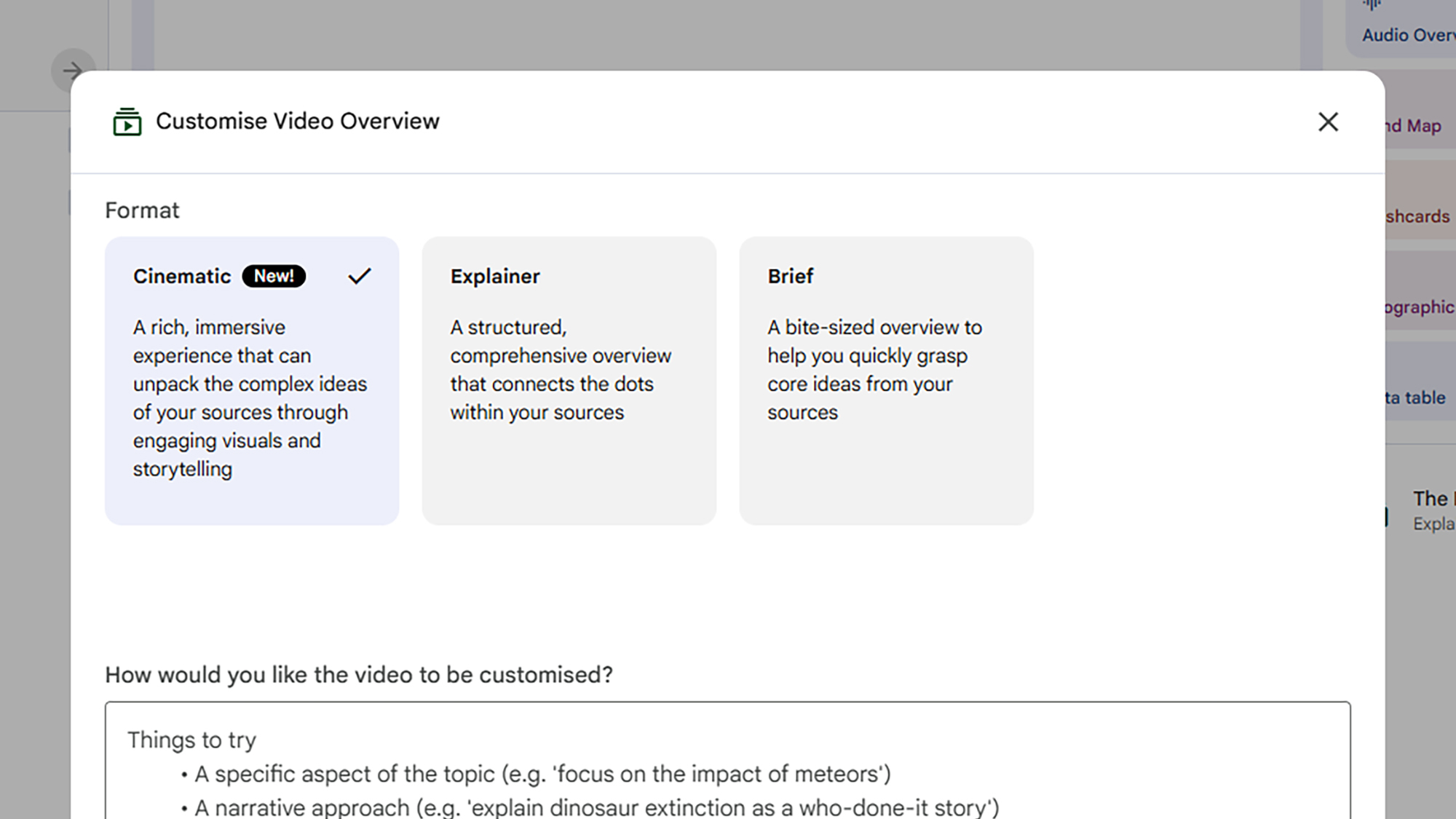
The feature is currently available exclusively to Google AI Ultra subscribers over 18 on web and mobile, and there's a maximum of 20 overviews generated per day.
Google AI Ultra subscribers pay $250 per month. That price point is not aimed at students or casual users. It is aimed at researchers, content teams, educators, and professional knowledge workers who are generating significant volumes of output and need tools that can keep pace. The 20-video-per-day limit is generous within that context while also signaling that each video requires non-trivial compute resources.
For context on who the Ultra tier is actually designed for: subscribers paying $250 per month get 5,000 chats, 200 Audio Overviews, 200 Video Overviews, 1,000 Reports, 1,000 Flashcards, 1,000 Quizzes, and 200 Deep Research generations per day. These are team-scale numbers. The platform at this tier is less a personal productivity tool and more an infrastructure layer for high-volume research and content operations.
For individual power users, the calculus is different. The Pro tier at $19.99/month covers 99% of power user needs. Ultra makes sense for research teams or content operations generating dozens of outputs daily. If you are a solo researcher who wants to occasionally generate a cinematic summary of a project, the Ultra subscription is a significant commitment to access a single feature.
The 18+ age restriction on Cinematic Video Overviews is consistent with Google's broader policy on its most advanced generative features, particularly those that produce novel visual content. It is not an indication that the content itself is inappropriate for younger users, but rather a compliance and safeguarding boundary around AI-generated video at scale.
What This Means for Research, Education, and Content Creation
The practical implications of Cinematic Video Overviews extend across several distinct use cases, and they are not uniform across audiences.
For Researchers and Academics
The most immediate utility is in science communication and literature synthesis. A researcher who has uploaded 40 papers on a topic can now generate a narrative video summarizing the state of the field, the key findings, and the open questions — in a format that is significantly more accessible to non-specialist audiences than a written summary. The source-grounded nature of NotebookLM means the video narrative is constrained by what is actually in the uploaded material, which distinguishes it from a general-purpose video generation tool that might hallucinate or editorialize freely.
That said, the question of accuracy in visual representation of technical content is not fully answered by the announcement. A model that makes "hundreds of structural and stylistic decisions" about how to visualize research is also making interpretive choices that could introduce subtle misrepresentations of complex findings. This is worth watching carefully as the feature matures.
For Educators
The educational case is compelling. A teacher preparing a unit on a historical event, a scientific concept, or a literary work can upload primary sources and generate a documentary-style explainer without any video production skills. The barrier to creating high-quality visual learning materials has effectively collapsed for anyone with access to the platform. The 20-videos-per-day limit under Ultra is more than sufficient for educational content production.
The more interesting question is whether students will be able to access the feature through institutional agreements. NotebookLM is available to Google Workspace users through the Google Workspace Standard plan and higher tiers, though whether Cinematic Video Overviews will extend to those plans or remain Ultra-exclusive is not yet confirmed.
For Content Creators and Media Professionals
This is where the implications get genuinely disruptive. A journalist who has assembled a research notebook on a story can now generate a documentary-style overview of the material. A podcast producer who wants to accompany an audio episode with visual content can generate it from the same source notes. A corporate communications team that has produced a lengthy report can turn it into an executive summary video without a production budget.
The quality ceiling here is the real variable. If Cinematic Video Overviews can consistently produce videos that pass a basic professional standard, the demand for low-budget explainer video production services will compress significantly.
The Bigger Strategic Picture for Google
Cinematic Video Overviews is not an isolated feature decision. It is part of a deliberate Google strategy to make NotebookLM the most comprehensive research-to-output platform in the market, and to use that platform as the primary justification for the Ultra subscription tier.
During Google's I/O 2025 keynote, the tech giant introduced the Ultra plan with a $249.99/month price tag. The initial reception was skeptical — the benefits for NotebookLM users in particular were vague at launch, promising only "highest limits and best model capabilities (later this year)." The subsequent months have been Google systematically building the features that make that price point defensible: Deep Research integration, Infographics and Slide Decks in November 2025, expanded source limits, and now Cinematic Video Overviews.
The bundled value of the Ultra tier is also relevant context. Google AI Ultra includes access to Veo 3.1 video generation, Deep Research, audio overviews, and Google's most capable models, along with Project Mariner agent capabilities, 30TB of storage, and YouTube Premium. At $250 per month, the subscription is positioned as a comprehensive AI infrastructure package rather than a standalone tool, and NotebookLM is increasingly the centerpiece feature that justifies the premium for knowledge workers specifically.
What Google is building toward is a full content pipeline that originates in your own documents and can terminate in any format: podcast, slide deck, infographic, written report, or now, cinematic video. The competitive moat that creates is meaningful. No other tool currently offers that end-to-end transformation of research material into diverse, high-quality output formats within a single platform.
The closest competition comes from tools like Claude Projects and ChatGPT's similar multi-document analysis capabilities, both of which can synthesize sources into text outputs. Neither currently offers the Audio Overview or Cinematic Video pipeline that differentiates NotebookLM at the output layer.
What's Still Missing
The announcement notes that Cinematic Video Overviews are currently available in English only, with expansion to other languages forthcoming. Google anticipates expanding the feature to other languages including Spanish, and to lower tiers of Google AI, which would allow more people to access the tool, albeit with certain limitations.
The 18+ restriction, the Ultra-only access, and the English-only availability collectively limit the feature's reach at launch. These are all presumably temporary constraints driven by a combination of compliance considerations, compute cost management, and the typical staged rollout pattern Google follows for advanced features.
What is less clear is how much user control the feature offers over the output. The announcement describes Gemini making hundreds of decisions about narrative and visual style, but does not address whether users can specify the style, length, tone, or format of the generated video before generation begins, or whether revision workflows are supported. The ability to steer the creative direction, even through simple prompts or style presets, would substantially increase the feature's utility for professional applications where brand consistency or specific communication objectives matter.
Conclusion
NotebookLM's Cinematic Video Overviews is a meaningful technological step, and a telling indicator of where Google believes the future of knowledge work is heading. The ability to upload research materials and receive a coherent, visually compelling documentary-style video in return is not a feature that would have been commercially viable two years ago. The three-model pipeline — Gemini as director, Nano Banana Pro as image generator, Veo 3 as video engine — represents a convergence of Google's AI capabilities that is more significant than any of those components individually.
The Ultra-only launch will limit exposure in the short term, but the expansion trajectory is clear. As Google extends the feature down through its subscription tiers, and as the English-only restriction lifts, the audience for this tool will grow substantially. The more important question is not whether the technology works, but whether the outputs it produces are accurate enough, controllable enough, and consistent enough quality for professional use.
That question will be answered in the next several months, as the people paying $250 a month to access it put it under real-world pressure. Early signals from the broader NotebookLM ecosystem suggest the underlying platform is mature enough to bear the weight of the expectation. The audio overviews were better than anyone expected. The visual pipeline now gets its turn.
Frequently Asked Questions
Q: What are NotebookLM Cinematic Video Overviews?
Cinematic Video Overviews is a new NotebookLM feature that transforms your uploaded research documents, notes, and sources into fully animated, narrative-driven videos. Unlike the previous Video Overviews feature, which generated narrated slideshows, Cinematic Video Overviews produce immersive videos with fluid animation, original visuals, and structured storytelling. The feature uses a three-model pipeline: Gemini 3 acts as creative director, Nano Banana Pro handles image generation, and Veo 3 produces the final video.
Q: Who can access Cinematic Video Overviews right now?
The feature is currently available to Google AI Ultra subscribers who are 18 or older, on both web and mobile. Users can generate up to 20 Cinematic Video Overviews per day under the Ultra plan. It is currently available in English only, with expansion to other languages planned. Google AI Ultra costs $249.99 per month.
Q: How is this different from the previous Video Overviews feature?
The original Video Overviews feature, introduced in 2025, generated slide-based animations with AI narration. Cinematic Video Overviews moves beyond that format to produce fully animated, immersive videos that look more like short documentaries than presentation recordings. The key distinction is that Gemini 3 actively makes narrative and stylistic decisions, rather than simply converting slides into a voiceover sequence.
Q: What kinds of sources can I use to generate a Cinematic Video Overview?
NotebookLM accepts a range of source types including PDFs, Google Docs, websites, YouTube videos (via transcripts), and pasted text. Any combination of these sources can serve as the foundation for a Cinematic Video Overview. The generated video will be grounded in the content you provide rather than drawing from the open web, which constrains potential hallucination relative to general-purpose video generation tools.
Q: Will Cinematic Video Overviews be available to free or Pro users?
Google has indicated plans to expand the feature to lower subscription tiers and additional languages, though no specific timeline has been confirmed. At launch, the feature is exclusive to Google AI Ultra subscribers. The free tier currently supports up to 3 audio overviews per day, with no Cinematic Video Overview access.
Q: What are the main use cases for this feature?
The most practical applications are in education, research communication, and content creation. Educators can generate documentary-style explainers from primary sources. Researchers can produce accessible video summaries of complex literature for non-specialist audiences. Content creators and journalists can transform research notebooks into narrative video overviews without production resources. Corporate teams can convert lengthy reports into executive summary videos.
Q: How does NotebookLM's approach compare to general AI video tools like Sora or Runway?
The core difference is source grounding. General-purpose AI video tools like Sora generate video from a text prompt, with the model drawing on its training data to produce output. NotebookLM constrains the generation to your uploaded material, which means the video narrative reflects what is actually in your sources rather than what the model imagines might be relevant. This makes NotebookLM more appropriate for research and professional contexts where accuracy to source material matters, while general-purpose tools offer more creative flexibility.
Q: Is there any concern about accuracy when AI visualizes complex research content?
This is a legitimate open question. Gemini 3 making editorial and visual decisions about how to represent research findings introduces the possibility of interpretive errors that are harder to detect than factual errors in text. A visual metaphor that slightly misrepresents a data relationship, or a narrative framing that overemphasizes one finding relative to another, may be difficult for a viewer to identify without reading the original sources directly. Google's source-grounding approach mitigates this relative to open-generation tools, but it does not eliminate the risk entirely. Users working with technical or high-stakes content should treat the generated video as a communication aid and not as an authoritative representation of the source material.
Related Articles
 Mark
Mark
 Dani
Dani