Your marketing team is drowning in spreadsheets, deadlines, and data pulls. Meanwhile, somewhere in the back of everyone's mind is the nagging thought: we should really be working on strategy right now.
This is the modern marketing paradox. The tools designed to make work easier have somehow created more work. Analytics dashboards demand constant monitoring. Content calendars need feeding. Reports require formatting. By the time the operational tasks are done, there's no energy left for the creative thinking that actually moves the needle.
AI was supposed to fix this and in 2026, it finally can, if you know which tools to use and how to use them.
Google has quietly built one of the most comprehensive AI ecosystems for marketing teams. It's not a single product but a collection of tools that work together across content creation, automation, and analytics. Most marketers are already inside the Google ecosystem through Workspace, Search, and Analytics. The AI layer adds capabilities without requiring a wholesale platform change.
This isn't about replacing your team with robots. It's about eliminating the tedious work so humans can focus on judgment calls, creative leaps, and the strategic thinking that actually requires a human brain.
The Three Pillars of Google's Marketing AI
Google's AI tools for marketers fall into three categories, each addressing different parts of the workflow.
- Content creation tools help teams produce visual and written assets faster. This includes Google AI Studio for accessing Gemini models directly, Nano Banana for image generation and editing, Imagen 4 for photorealistic visuals from scratch, and Veo 3.1 for video content creation through text prompts.
- Automation tools handle repetitive processes and data management. NotebookLM serves as an AI research assistant grounded in your own documents. Google Apps Script enables custom automation through JavaScript. Gemini for Workspace embeds AI assistance directly into Gmail, Docs, Sheets, Slides, and Meet.
- Analytics and forecasting tools help teams understand performance and predict outcomes. Gemini Gems allow custom chatbot configurations for specific roles. Gemini in Google Sheets enables complex calculations and data analysis without external platforms.
The power isn't in any single tool. It's in how they connect. Research in NotebookLM flows into content briefs. Briefs become visual assets through Nano Banana. Assets get distributed through Workspace with Gemini assistance. Performance data comes back through Sheets for analysis. The loop closes, and the cycle repeats with less friction each time.
Content Creation AI Toolbox
Let's start with what most marketing teams need most urgently: help creating content faster without sacrificing quality.
Google AI Studio provides direct access to Google's most capable AI models, including Gemini 3 Pro. For marketers, this means a web-based platform where you can generate copy, brainstorm campaign concepts, analyze competitor messaging, or draft entire content strategies through conversation.
The interface is straightforward. You describe what you need, provide context about your brand and audience, and the AI generates options. But the real value comes from iteration. Unlike static templates, you can refine outputs through dialogue. "Make this more conversational." "Add statistics to support the second point." "Rewrite for a senior executive audience."
Marketers using AI Studio report that first drafts take minutes instead of hours. The human work shifts from blank-page creation to editing and refinement, which is typically faster and more enjoyable.
Nano Banana has become Google's breakout tool for image generation and editing. The name started as an internal codename and stuck when the community embraced it. Behind the playful name is serious capability: native multimodal understanding that can generate, edit, and transform images through natural language prompts.

For marketing teams, Nano Banana solves a persistent problem: creating on-brand visuals quickly. Need a product shot with a different background? Describe what you want. Want to test how your packaging looks in various settings? Upload an image and ask for variations. Need consistent character representation across a campaign? Nano Banana maintains visual consistency better than previous generation tools.
The Pro version adds 4K resolution output, advanced text rendering for infographics and marketing materials, and the ability to reference up to 14 images when generating new content. This multi-image capability is transformative for brand consistency. Upload your style guide, product photos, and mood references, then generate new assets that feel cohesive with existing materials.
Imagen 4 handles photorealistic image generation from scratch. When you need entirely new visuals rather than edits to existing images, Imagen 4 produces results that can pass for professional photography in many contexts. Marketing applications include lifestyle imagery for campaigns, product visualization before physical prototypes exist, and location-specific visuals without expensive photo shoots.


Veo 3.1 extends creation into video. Through text prompts, marketing teams can generate short video clips with synchronized audio, sound effects, and even dialogue. The tool understands film terminology, so prompts like "aerial shot pulling back from the product, golden hour lighting, upbeat background music" produce coherent results.
For teams that previously needed video production budgets or external agencies for any moving content, Veo 3.1 is a genuine capability shift. Social media content, product demonstrations, and campaign teasers become achievable without production crews.
Automation AI Toolbox
Content creation tools generate assets. Automation tools handle the operational work that consumes so much marketing time.
NotebookLM has become essential for marketing teams dealing with information overload. Unlike general AI assistants that draw from broad training data, NotebookLM works exclusively with documents you provide. Upload competitor reports, customer research, industry analyses, and campaign performance data. The AI becomes an expert specifically on your materials.
The practical applications are immediate. Need to synthesize findings from twelve customer interviews? Upload the transcripts and ask for themes. Preparing for a campaign review? Upload last quarter's reports and ask NotebookLM to identify what worked. Building a presentation for leadership? The tool can generate summaries, pull relevant quotes, and even create audio overviews you can listen to while commuting.
Everything NotebookLM tells you includes citations back to your source documents. This grounding in provided materials means fewer hallucinations and outputs you can actually trust for professional contexts.
Google Apps Script remains underutilized by marketing teams, which is a missed opportunity. This JavaScript-based platform lets you automate workflows across Google products without being a developer. Connect Sheets to external data sources. Automatically format reports. Send triggered emails based on campaign thresholds. Build custom dashboards that update without manual intervention.
The learning curve is real, but the payoff is substantial. Teams that invest in Apps Script automation often reclaim hours per week previously spent on manual data manipulation and reporting tasks.
Gemini for Workspace embeds AI assistance directly into the tools marketing teams use daily. In Gmail, Gemini can draft responses, summarize long email threads, and surface relevant information from your inbox. In Docs, it helps with writing, editing, and formatting. In Sheets, it generates formulas, creates visualizations, and analyzes data through natural language requests. In Slides, it helps structure presentations and generate speaker notes. In Meet, it can transcribe meetings and summarize key points.
The Workspace integration matters because it meets marketers where they already work. There's no context switching, no new platform to learn, no additional login to remember. The AI capabilities are simply there, available when needed.
Analytics and Forecasting AI Toolbox
Marketing generates enormous amounts of data. Making sense of it traditionally required either specialized analysts or significant time investment from marketers who would rather be doing something else.
Gemini Gems allow you to create custom AI assistants configured for specific roles and tasks. A marketing team might create a Gem that understands their brand voice, knows their target audience demographics, and has context about ongoing campaigns. When team members interact with this Gem, responses are already tuned to their specific context.
For analytics, you might configure a Gem with your measurement framework, KPI definitions, and reporting templates. Team members can then ask questions like "how did the Q1 email campaign perform against our engagement benchmarks" and receive contextually relevant answers.
Gemini in Google Sheets transforms how marketing teams interact with data. Instead of learning complex formulas or pivot table configurations, you can describe what you want in plain English. "Calculate month-over-month growth for each channel." "Create a chart showing conversion rate by traffic source." "Highlight cells where cost per acquisition exceeds $50."
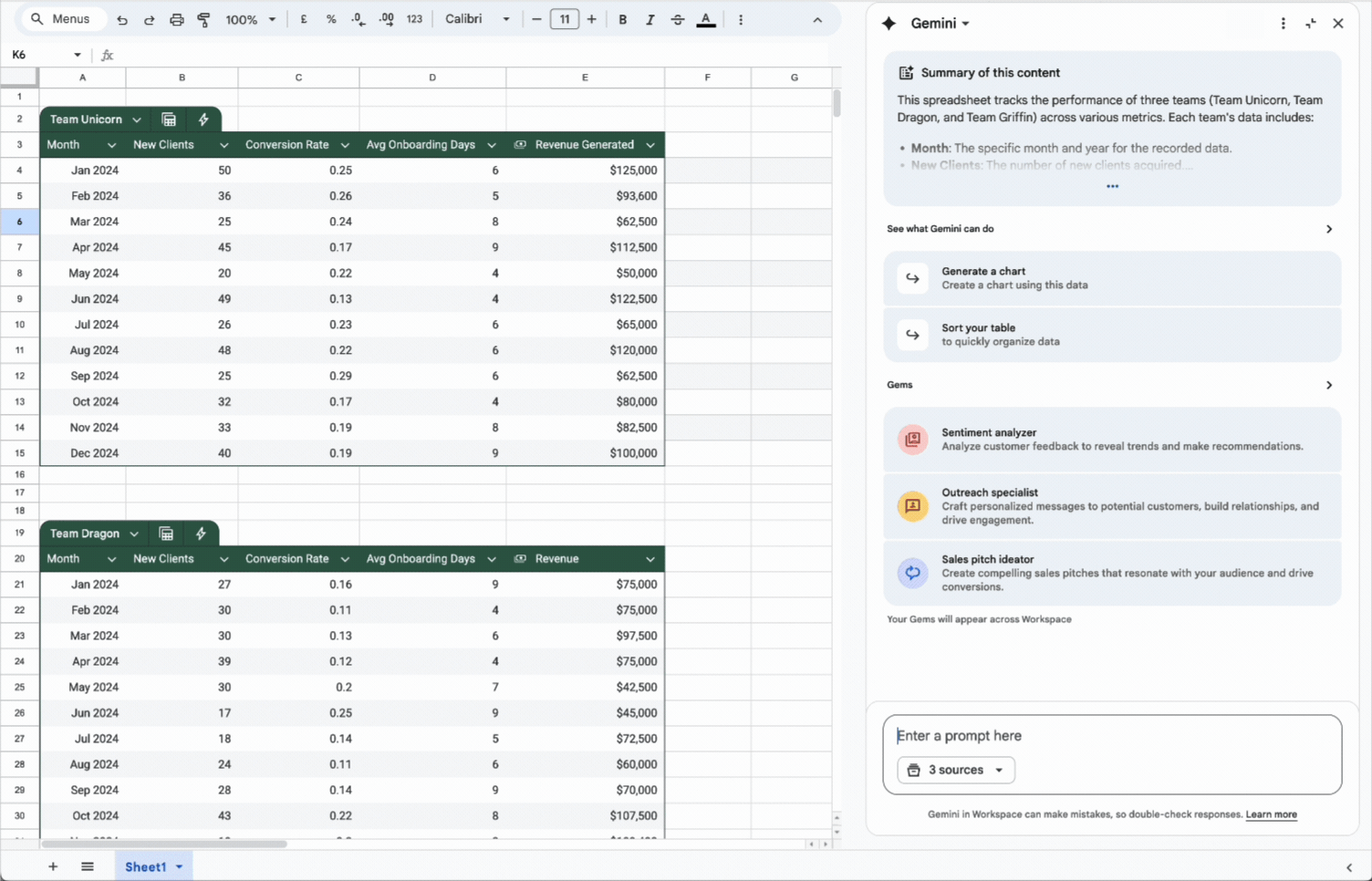
The AI handles the technical implementation while humans focus on interpretation and action. This democratizes data analysis within marketing teams, reducing dependence on analysts for routine questions while freeing analytical resources for more complex work.
For teams serious about forecasting, combining Gemini's analytical capabilities with historical data enables predictive insights. Upload performance history, describe what you're trying to predict, and the AI can identify patterns and generate projections. This doesn't replace sophisticated statistical modeling, but it makes directional forecasting accessible to teams without dedicated data science resources.
A Practical Framework for Integrating AI
Having powerful tools isn't the same as using them effectively. Marketing teams that successfully integrate AI follow patterns worth emulating.
Start with routine tasks that consume disproportionate time or directly impact revenue. Don't try to transform everything at once. Identify one or two workflows where the pain is acute and the potential impact is clear. Maybe it's the weekly reporting process that takes a full day. Maybe it's creating social media content that never quite keeps up with the calendar. Maybe it's responding to customer inquiries that follow predictable patterns.
Pick your starting point based on where you'll feel the relief most immediately. Early wins build momentum and buy-in for broader adoption.
Estimate potential savings before scaling. Before rolling out AI tools across the team, calculate what the current process costs in time and dollars. Then pilot the AI-assisted version and measure the difference. This discipline accomplishes two things: it ensures you're solving real problems rather than chasing technology for its own sake, and it gives you data to justify continued investment.
Marketing leaders who can say "we reduced reporting time by 60% and reallocated those hours to campaign optimization" have a much easier time expanding AI initiatives than those who can only offer vague assertions about "productivity improvements."
Invest in training and establish clear guidelines. AI tools are only as effective as the people using them. Teams need time to learn capabilities, experiment with prompts, and develop intuitions about what works. This isn't a one-time training session. It's ongoing skill development as tools evolve and use cases expand.
Maintain human authority over final decisions. AI should augment human judgment, not replace it. The most effective marketing teams use AI to generate options, identify patterns, and handle execution, while keeping strategic decisions firmly in human hands.
AI tools can produce outputs that look polished but miss strategic context. They can reflect biases in training data. They can confidently present information that's subtly wrong. Human review isn't just a nice-to-have. It's essential quality control.
Measure impact through KPIs and team feedback. Quantitative metrics matter: time saved, output volume, error rates, cost reduction. But so does qualitative feedback from the people using the tools daily. Is the AI actually helping, or creating new problems? Are there friction points in the workflow? What's missing that would make the tools more useful?
Regular check-ins that capture both data and sentiment help teams iterate toward genuinely effective AI integration rather than assuming that adoption equals success.
What This Looks Like in Practice
Consider a typical marketing workflow: launching a new product campaign.
In the pre-AI world, this process might involve weeks of research synthesis, multiple rounds of creative briefing, several iterations with designers and video producers, extensive manual reporting setup, and ongoing performance monitoring that pulls team members away from other priorities.
With Google's AI toolkit integrated, the same workflow compresses significantly.
The time savings compound across each phase. More importantly, the humans on the team spend their time on judgment and creativity rather than mechanical execution.
Wrap up
Google's AI ecosystem offers marketing teams a genuine opportunity to reclaim time for strategic work. The tools are mature enough to deliver real value today, integrated enough to work together across workflows, and accessible enough that you don't need to be a technologist to use them.
| Category | Tool | Description |
|---|---|---|
| Content Creation | Google AI Studio | Web platform providing access to Gemini models and related AI technologies |
| Content Creation | Nano Banana | Tool for generating and editing images |
| Content Creation | Imagen 4 | Creates photorealistic images from scratch |
| Content Creation | Veo 3.1 | Generates professional video content from text prompts |
| Automation | NotebookLM | “Notebook assistant” that works with data you upload |
| Automation | Google Apps Script | Cloud-based JavaScript platform for workflow automation |
| Automation | Gemini for Workspace | Built-in AI assistant across Google Workspace tools |
| Analytics & Forecasting | Gemini Gems | Custom chatbot versions tailored for specific roles |
| Analytics & Forecasting | Gemini in Google Sheets | Enables advanced calculations and deep data analysis without external tools |
But tools alone don't create transformation. The teams that benefit most approach AI integration deliberately: starting with clear pain points, measuring results, investing in training, maintaining human oversight, and iterating based on feedback.
The goal isn't to automate marketing. It's to automate the parts of marketing that don't require human judgment so that humans can focus on the parts that do. Strategy, creativity, relationship building, brand stewardship: these remain fundamentally human activities.
FAQ
What Google AI tools are best for marketing content creation?
For marketing content creation, the key Google AI tools are Nano Banana Pro for image generation and editing with up to 4K resolution, Imagen 4 for photorealistic image creation from text prompts, Veo 3.1 for video content generation with synchronized audio, and Google AI Studio for accessing Gemini models for copywriting and brainstorming. Gemini for Workspace also helps with writing directly in Google Docs.
Is NotebookLM free for marketing teams?
Yes, NotebookLM is completely free for personal and educational use with no subscription required. You can upload and analyze unlimited documents. For higher usage limits including more notebooks, more sources per notebook, and more daily queries, NotebookLM Plus is included with Google AI Pro and AI Ultra subscriptions starting at $19.99 per month.
How does Nano Banana help with marketing campaigns?
Nano Banana helps marketing teams create consistent visual assets quickly. You can generate product shots, edit existing images through natural language prompts, maintain brand consistency across campaigns, create infographics with accurate text rendering, and produce variations for different channels. Nano Banana Pro adds 4K resolution and can reference up to 14 images to maintain visual consistency.
Can I use Google AI tools for commercial marketing purposes?
Yes, Google AI tools support commercial use for creating professional content, marketing materials, and social media assets. All AI-generated images include SynthID watermarking for transparency. For commercial applications, ensure you have proper rights to any reference images used, your generated images don't violate intellectual property, and include appropriate AI disclosure in marketing materials where required.
What's the difference between Google AI Pro and AI Ultra for marketers?
Google AI Pro ($19.99/month) includes access to Gemini models, NotebookLM with 5x higher limits, Nano Banana Pro image generation, Veo video creation, and Gemini in Workspace apps. Google AI Ultra ($124.99 for three months) adds the highest usage limits across all tools, Deep Think capabilities, more advanced video generation, 30TB of storage, and priority access to new features.
How do I integrate Google AI tools into my existing marketing workflow?
Start by identifying one or two routine tasks that consume significant time, such as reporting, content creation, or data analysis. Pilot the relevant AI tool for that specific workflow. Measure time savings before and after. Once you validate the approach, expand to other use cases. Provide team training and establish guidelines for AI use, including what requires human review.
Can Gemini in Google Sheets replace my data analyst?
Gemini in Sheets can handle many routine analytical tasks through natural language queries, including creating formulas, building visualizations, calculating metrics, and identifying patterns. However, it's best viewed as augmentation rather than replacement. Complex statistical analysis, custom modeling, and strategic interpretation still benefit from human expertise. Gemini frees analysts for higher-value work.
What is Google AI Studio and how do marketers use it?
Google AI Studio is a web-based platform providing direct access to Google's AI models including Gemini 3 Pro. Marketers use it for drafting copy, brainstorming campaign concepts, analyzing competitor messaging, generating content strategies, and testing different approaches through iterative conversation. It's free to start with, and more advanced features are available through paid subscriptions.
How does Veo 3.1 work for marketing video content?
Veo 3.1 generates video content from text prompts. You describe the scene, camera movements, lighting, and mood using natural language, and the tool produces short video clips with synchronized audio including dialogue, music, and sound effects. Marketing applications include social media content, product demonstrations, campaign teasers, and promotional videos. It understands film terminology for professional-style direction.
What are Gemini Gems and how can marketing teams use them?
Gemini Gems are custom AI assistants you configure for specific roles and contexts. Marketing teams can create Gems that understand their brand voice, target audience, campaign history, and measurement framework. Team members then interact with a Gem that's already tuned to their specific context, providing more relevant responses than a generic AI assistant.
Related Articles
 Dani
Dani
 Dani
Dani
 Mark
Mark