I've been tracking AI coding tools for the past three years, testing everything from GitHub Copilot to Cursor. But on November 18, 2025, Google dropped something that made me stop everything and pay attention. Within 48 hours of launch, "Google Antigravity" became one of the most searched tech terms globally. Developer communities exploded with reactions, comparisons, and hot takes.
Here's what makes this release different: Google didn't just build another AI coding assistant. They fundamentally reimagined what a development environment should look like when AI agents can think, plan, and execute autonomously. After spending two weeks diving deep into Antigravity, analyzing the architecture, watching demos, and tracking early user experiences, I can see why this is causing seismic shifts in the developer world.
This isn't theoretical analysis. This is what actually launched, why developers can't stop talking about it, and what it means for anyone who writes code—or anyone who's thinking about building software with AI.
What Exactly Is Google Antigravity?
Launch Date: November 18, 2025
Official Name: Google Antigravity (Agentic Development Platform)
Core Technology: Powered by Gemini 3 Pro, with support for Claude Sonnet 4.5 and OpenAI's GPT-OSS
Availability: Free public preview for Windows, macOS, and Linux
Platform Base: Fork of Visual Studio Code
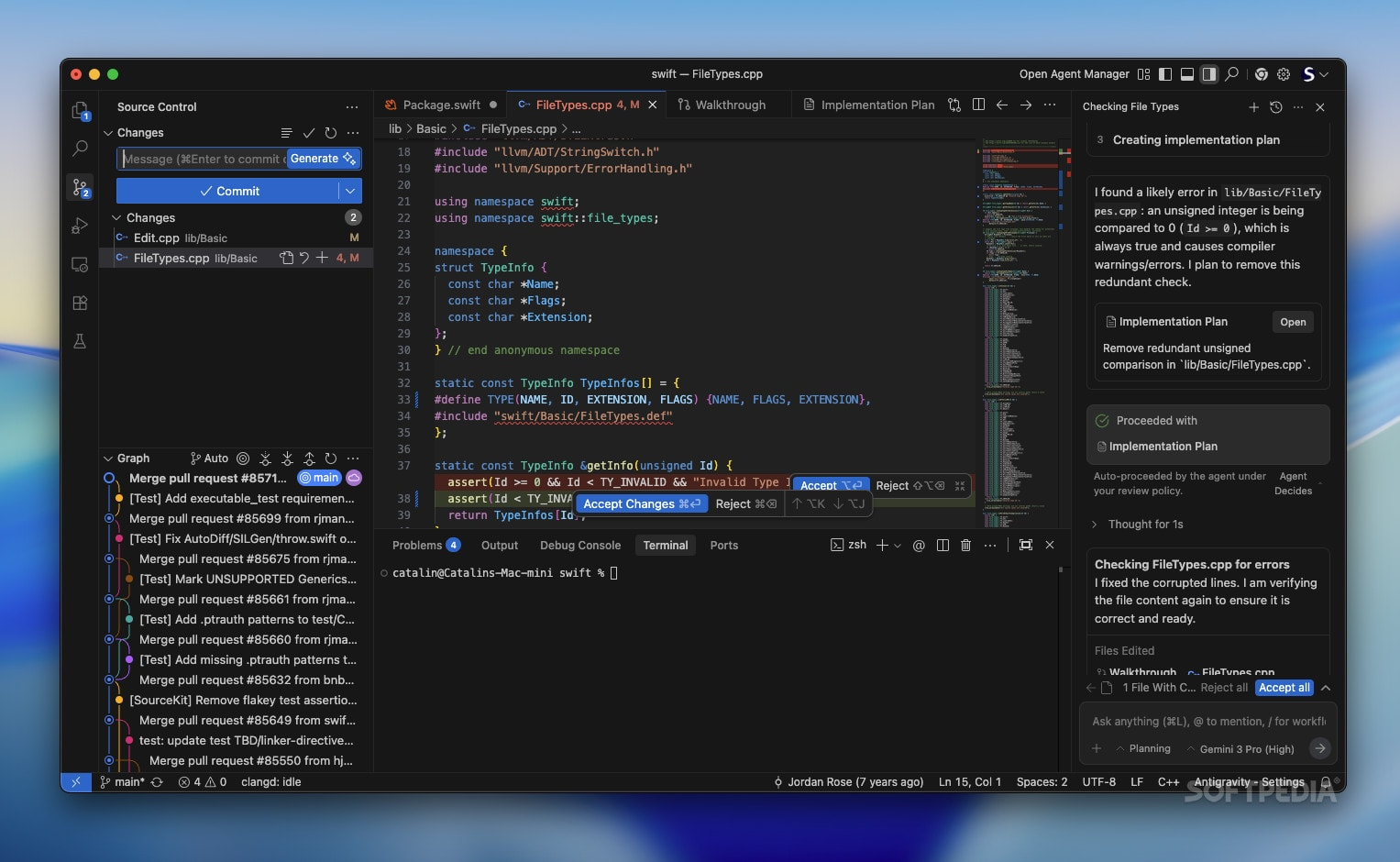
Google Antigravity is not your typical AI coding assistant. It's an agent-first development platform where autonomous AI agents take center stage—planning, coding, testing, and validating entire applications with minimal human intervention. Unlike traditional setups where AI acts as a helpful sidekick in your editor, Antigravity flips the script: the AI becomes the primary actor with dedicated workspace access to your editor, terminal, and browser simultaneously.
Within days of launch, Antigravity generated massive online buzz for several reasons:
- Google hired the entire Windsurf team (including CEO Varun Mohan) for $2.4 billion just months before
- It launched the same week Cursor crossed $1 billion in annual revenue
- Google both invested in Cursor AND released a direct competitor
- The name "Antigravity" itself symbolizes lifting developers above mundane tasks
- Early demos showed agents building complete applications from single prompts
This combination of timing, technology, and strategic audacity created perfect conditions for internet explosion.
The 8 Revolutionary Features That Changed Everything
1. Agent-First Architecture: Not a Feature, A Paradigm
From: AI as a sidebar assistant you constantly prompt
To: AI as an autonomous software engineer with its own workspace
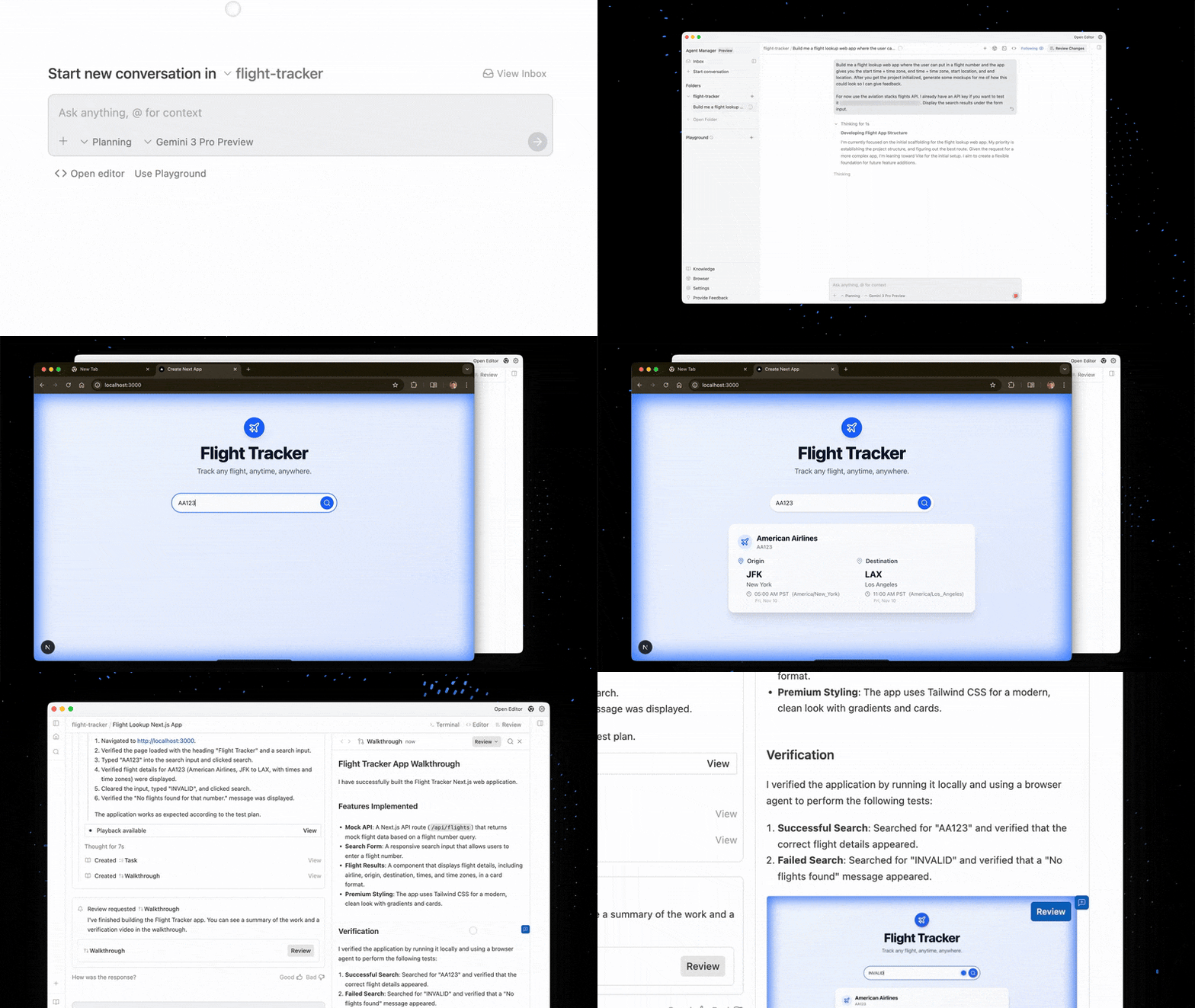
Traditional AI coding tools live in the margins of your IDE—helpful, but dependent on your constant direction. Antigravity introduces a dedicated "Agent Manager" surface where autonomous agents operate independently across your entire development environment. They don't wait for instructions for every step; they plan multi-stage tasks and execute them while you focus on architecture and strategy.
Why this matters: You can delegate "build a flight tracker with real-time updates" and walk away. The agent plans the architecture, chooses APIs, writes 300+ lines of code, installs dependencies, launches the app in browser, and tests the UI—all autonomously. This is the difference between having an intern who needs constant supervision and a senior engineer who ships features while you sleep.
2. Three-Surface Integration: Editor, Terminal, Browser
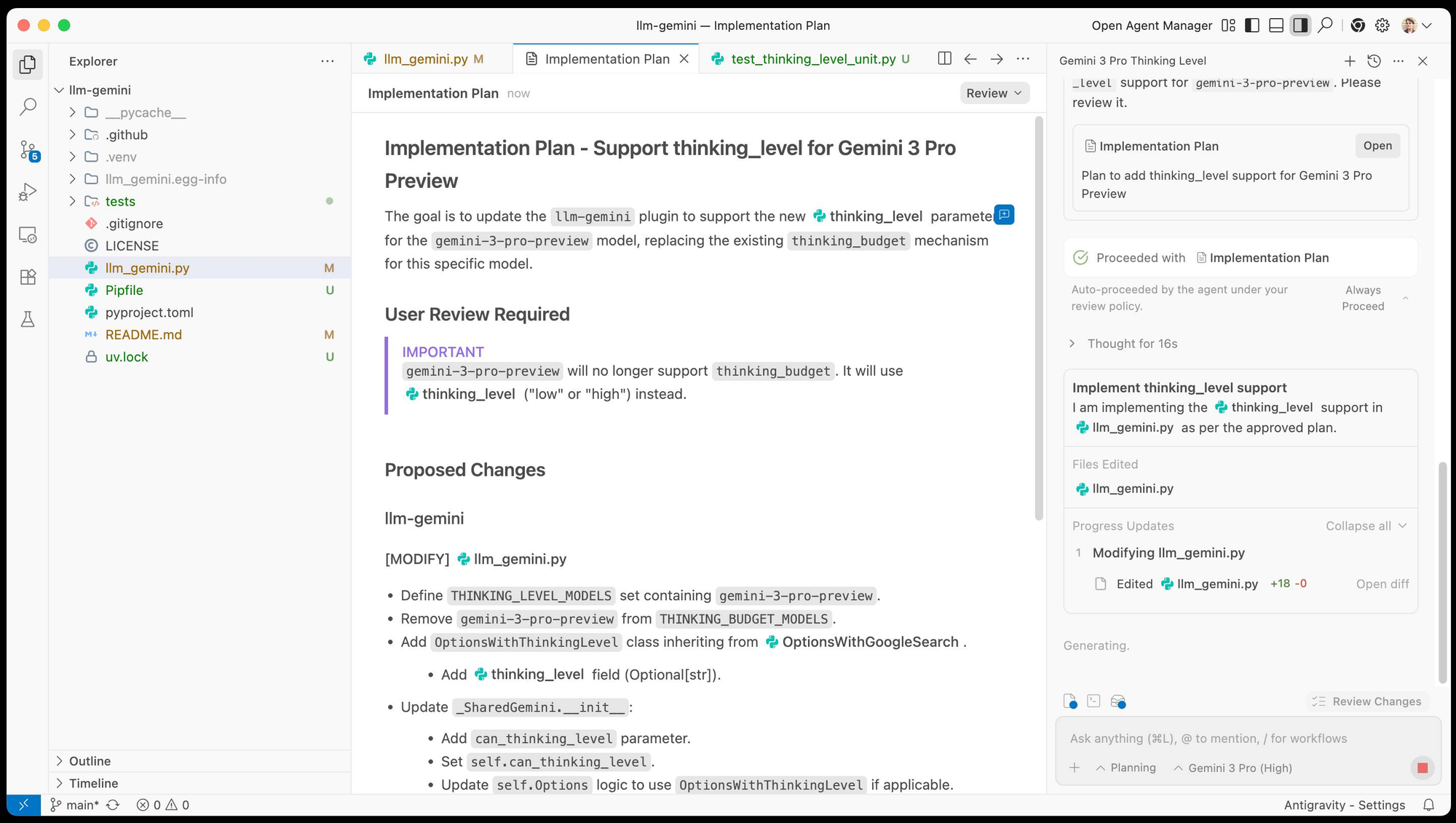
What changed: Most AI tools only access your code editor. Antigravity agents control three surfaces simultaneously:
- Editor: Writing and modifying code files
- Terminal: Executing commands, installing packages, running scripts
- Browser: Testing web applications, taking screenshots, validating functionality
This tri-surface access enables true end-to-end automation. An agent can write React code, run npm install, launch the dev server, open the app in browser, test interactions, identify bugs, fix them, and report back—all in one autonomous workflow.
When building a web app, you no longer need to manually switch between coding, terminal commands, and browser testing. The agent handles the entire feedback loop, catching runtime errors and UI issues that traditional code-only AI assistants would miss entirely.
3. Artifacts: Trust Through Transparency
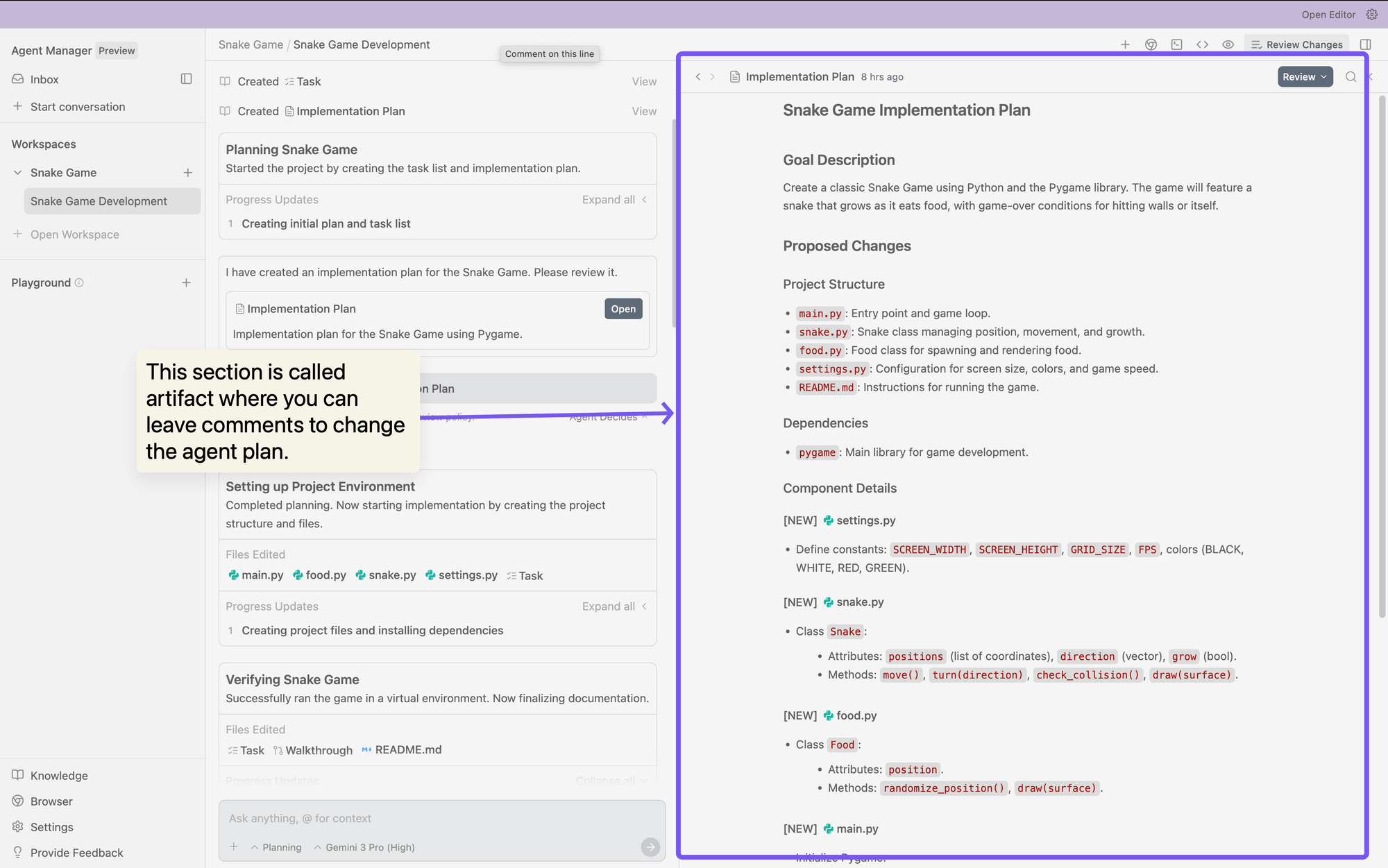
The Problem: Watching raw AI tool calls is tedious and doesn't build trust
The Solution: Agents generate "Artifacts"—tangible deliverables that show their work
Antigravity agents produce:
- Task Lists: Clear objectives before starting
- Implementation Plans: Step-by-step approach
- Screenshots: Visual state of applications
- Browser Recordings: Video proof of testing
- Walkthrough Documents: Human-readable explanations
You can verify an agent's logic at a glance without parsing through hundreds of tool call logs. If something looks wrong, you leave feedback directly on the Artifact (like commenting on a Google Doc), and the agent incorporates your input without stopping execution. This asynchronous feedback loop is revolutionary for maintaining flow state.
4. Manager View: Mission Control for Multiple Agents
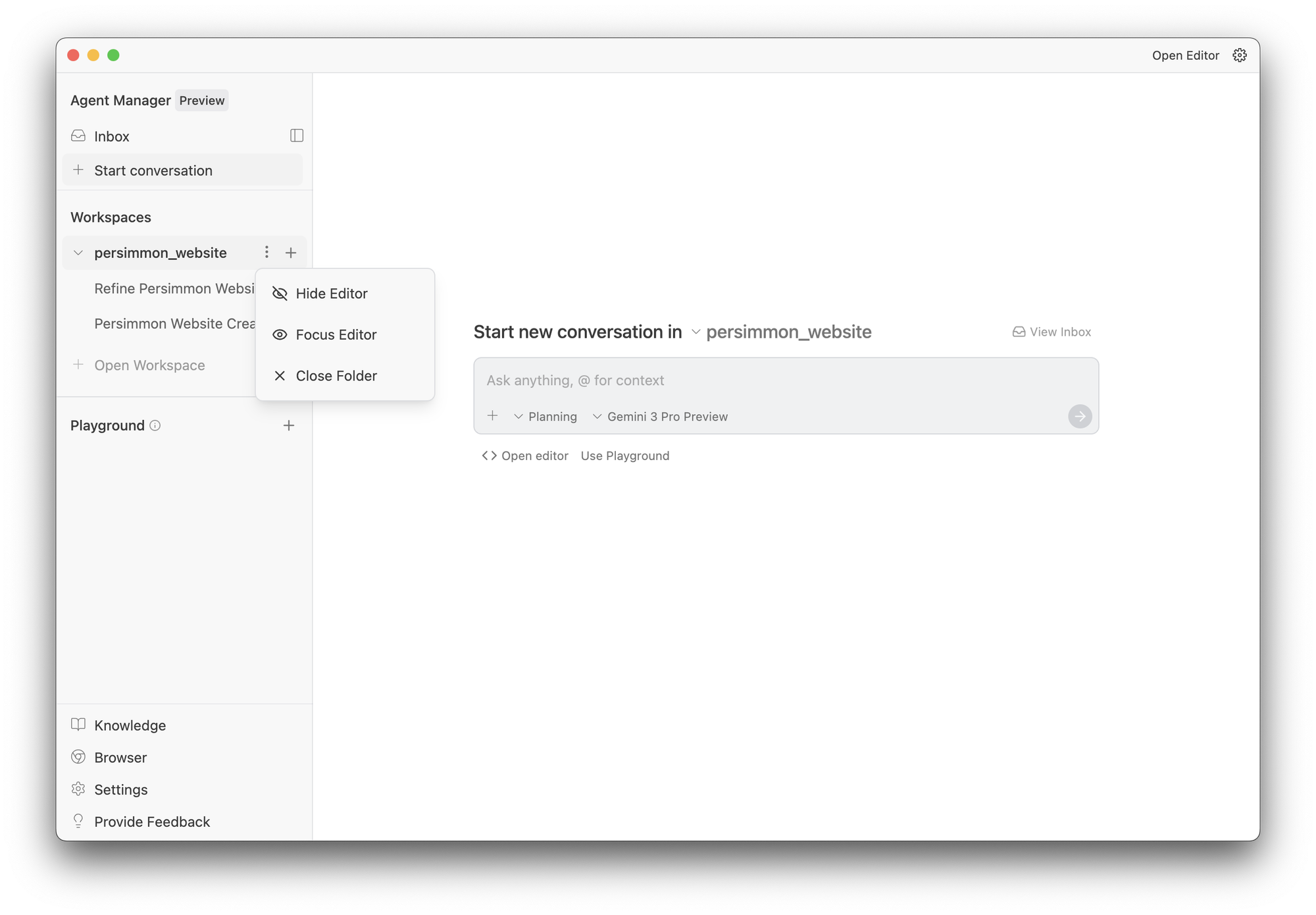
Traditional AI tools: One agent, one task, one workspace
Antigravity Manager View: Multiple agents, parallel execution, orchestrated workflows
The Manager interface lets you spawn, monitor, and coordinate multiple agents across different projects simultaneously. Think of it as conducting an AI symphony—each agent has its own workspace and task list, while you maintain strategic oversight.
You can have one agent researching payment APIs, another building the frontend UI, and a third writing test suites—all running in parallel. This mirrors how human development teams actually work, but with AI speed and consistency.
5. Model Flexibility: Not Locked into Gemini
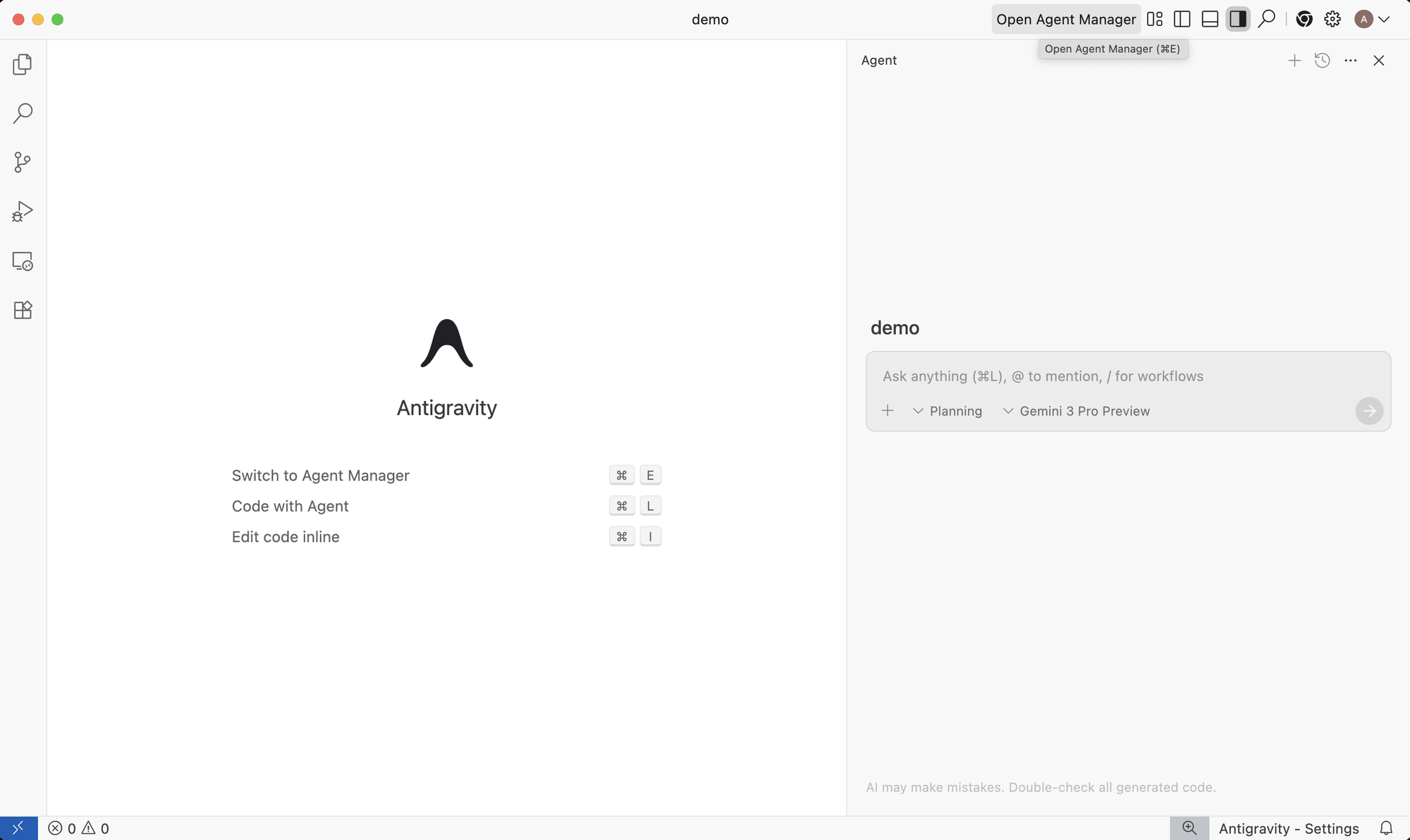
While Gemini 3 Pro is the flagship model, Antigravity supports:
- Anthropic's Claude Sonnet 4.5
- OpenAI's GPT-OSS (open-source models)
- More models coming in future updates
You can choose the right AI brain for specific tasks. Need better reasoning? Use Gemini 3. Need stronger code generation for a specific language? Switch to Claude. Having model optionality prevents vendor lock-in and lets you optimize for each use case.
Rate limits refresh every 5 hours, and Google claims only "a very small fraction of power users" hit these limits during normal operation.
6. Asynchronous Execution: Set It and Forget It
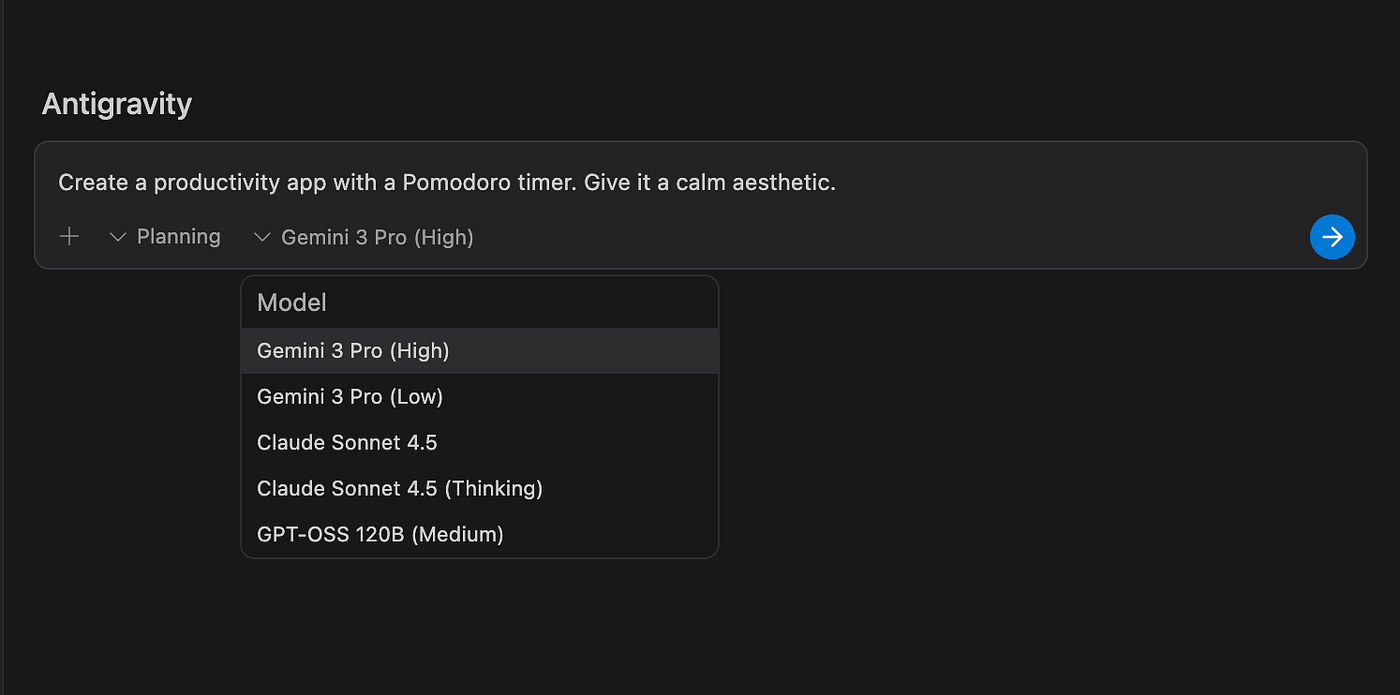
Old workflow: Write prompt → Wait → Review → Prompt again → Wait → Review
Antigravity workflow: Write high-level task → Continue other work → Return to completed feature
Agents can run for extended periods approaching continuous operation without requiring constant attention. You can delegate a complex feature Friday afternoon and return Monday morning to a completed, tested implementation with full documentation.
This fundamentally changes developer bandwidth. You're no longer bottlenecked by your personal coding speed—you're limited only by how well you can architect tasks and review completed work. One developer with Antigravity can effectively match the output of a small engineering team.
7. Computer Use Model: Real Browser Testing
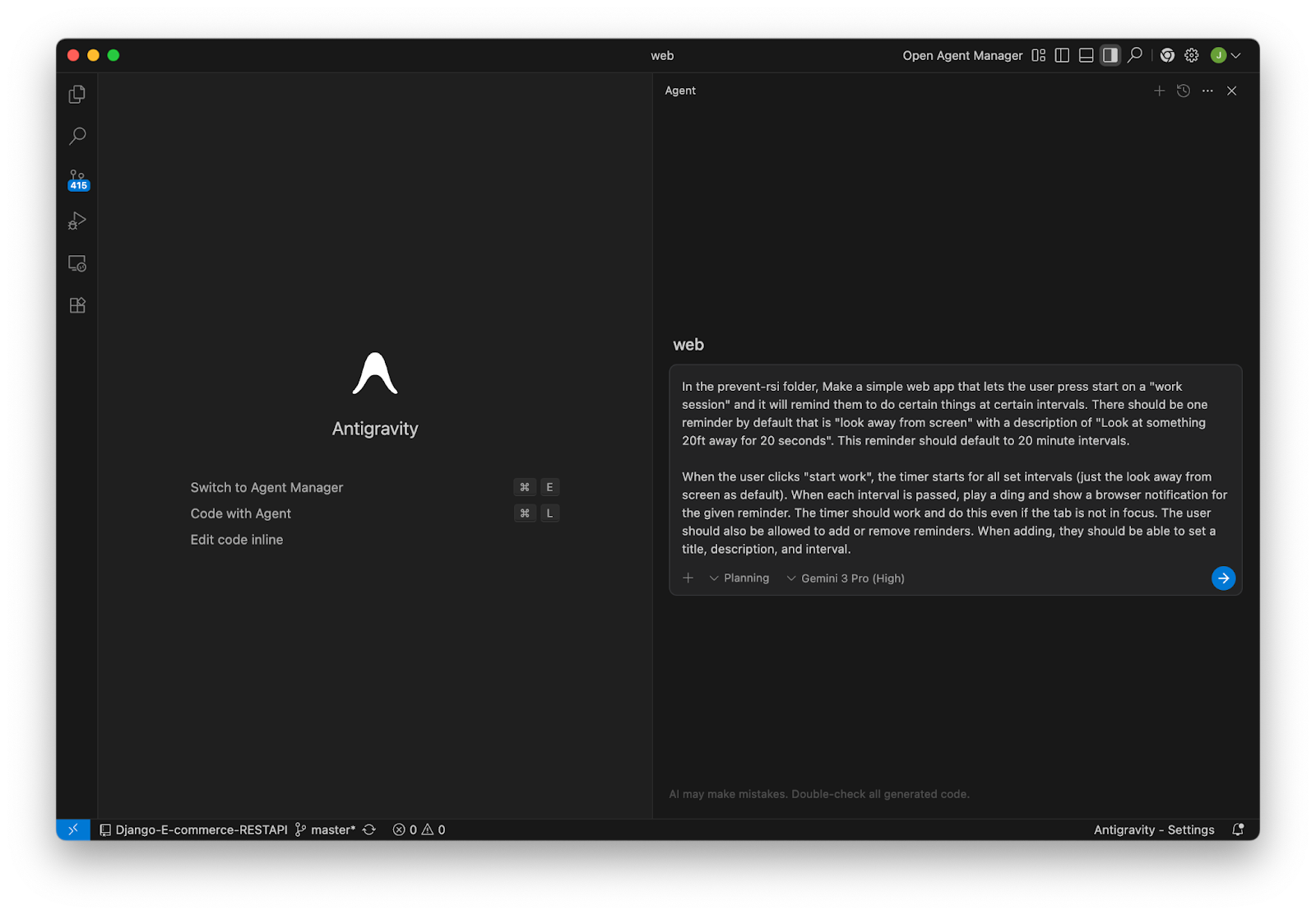
Antigravity integrates the Gemini 2.5 Computer Use model with a Chrome extension, enabling agents to:
- Launch applications in real browsers
- Interact with UI elements (clicking, scrolling, form filling)
- Take screenshots at each step
- Validate that features work as expected
- Report bugs with visual evidence
Traditional AI coding tools are blind to runtime behavior. They write code and hope it works. Antigravity agents actually test what they build, catch DOM/CSS issues, and fix problems before you ever see them. It's like having a QA engineer built into your AI developer.
8. Learning and Knowledge Base: Agents That Improve
Antigravity treats learning as a core primitive. Agents can:
- Save useful context to a knowledge base
- Store code snippets for reuse
- Reference past solutions for similar problems
- Improve future task performance based on history
This isn't just automation—it's automation that gets smarter over time, adapting to your codebase patterns and preferences.
Timeline: How We Got Here
November 2022: OpenAI launches ChatGPT, shocking Google and kickstarting the AI coding race
March 2023: GitHub Copilot X announced with GPT-4, setting baseline for AI-assisted coding
May 2024: Cursor IDE gains massive traction with agentic features, reaching $1B ARR by late 2025
July 2025: Google acquires Windsurf team for $2.4 billion (licensing technology and hiring key engineers including CEO Varun Mohan)
July-November 2025: Google invests in Cursor Series D funding while simultaneously developing Antigravity
November 18, 2025:
- 9:00 AM PST: Google announces Gemini 3 Pro with record benchmark scores (76.2% on SWE-bench Verified, 1,501 ELO on LMArena)
- 9:30 AM PST: Antigravity launches in free public preview alongside Gemini 3
- 10:00 AM PST: First developers download and test, posting initial reactions on X/Twitter
- Afternoon: Tech media explodes with coverage—Fortune, TechCrunch, VentureBeat, The New Stack all publish deep dives
- Next 48 hours: "Google Antigravity" becomes trending search term; Wikipedia page created; developer communities debate implications
November 19-30, 2025: Mixed early user reports—some praise autonomous capabilities, others report rate limiting and slow generation during peak times
December 2025: Integration announcements from GitHub, JetBrains, Cursor, Manus, Replit confirming Gemini 3 adoption
What's Next:
- Q1 2026: Expected improvements to rate limits and stability as infrastructure scales
- Q2 2026: Predicted launch of Antigravity paid tiers with higher limits
- 2026-2027: Likely consolidation in AI coding tool market; acquisitions and shutdowns expected
Why the Internet Exploded: 5 Key Reasons
Perfect Storm Timing
Google launched Antigravity just days after OpenAI released GPT-5.1, in the same month that Cursor reached a $29.3B valuation, and only seven months after Gemini 2.5, which already showed rapid iteration. At the same time, Google continued investing in competing AI companies. This convergence created irresistible narrative drama for the tech press: Google appearing to play both sides, hedge its bets, and finally move aggressively after years of perceived AI leadership decline.
The Name Itself Is Viral
“Antigravity” isn’t just a cool product name — it’s inherently viral. It evokes breaking constraints (gravity = traditional coding methods), lifting developers above mundane work, sci-fi made real, and a bold, audacious vision. Compared to mundane names like “GitHub Copilot” or “AWS CodeWhisperer,” “Antigravity” demands attention and sparks curiosity-driven searches.
Confusion with a Classic Easter Egg
When people search for “antigravity,” many encounter the old JavaScript easter egg that makes webpage elements float. This created organic traffic: nostalgic users looked for the classic trick, discovered both the old effect and news about Google’s AI platform, and had “wait, is this real?” reactions that encouraged sharing. Explainer content further amplified the trend. In effect, Google accidentally co-opted an already viral search term.
Genuine Technical Leap
The internet reacted intensely because Antigravity actually represents meaningful innovation. It’s the first major IDE with tri-surface agent control (editor + terminal + browser). The artifacts system elegantly solves the “trust problem.” Manager View enables true parallel agent orchestration. And the generous free tier democratizes access. Tech Twitter doesn’t hype incremental updates — Antigravity offered real, new capabilities, not just “Cursor but from Google.”
AI Talent Acquisition Drama
The Windsurf acquisition added even more intrigue. In July 2025, Google paid $2.4 billion to hire the Windsurf team. By November 2025, that same team shipped Antigravity. Varun Mohan’s tweet — “This came from my team” — fueled speculation and intensified public attention.
Real-World Testing: What Actually Works (And What Doesn't)
Early real-world testing shows that several parts of Antigravity already deliver impressive results. Users have been able to build fully functional applications autonomously — including flight-tracking tools with real-time updates, e-commerce sites with payment systems, todo apps with full CRUD functionality, and even simple interactive games. The platform’s integrated browser testing also performs exceptionally well: the Computer Use model identifies issues like broken CSS layouts, non-responsive buttons, API failures, and mobile responsiveness problems that traditional AI coding tools often miss. In addition, the artifacts system produces unexpectedly strong documentation, generating clear README files, API docs, architecture diagrams, and deployment guides with minimal user intervention.
Despite the successes, several pain points have emerged. Many users are frustrated by rate limits; even with “generous” quotas, complex multi-agent workflows frequently hit ceilings, and the five-hour refresh cycle feels lengthy when developers are in a productive flow. Some also report unpredictable throttling during high-traffic periods. Performance is another concern: compared to competitors like Cursor, Antigravity’s agents often take two to five minutes to complete tasks that other tools handle in under a minute, and multiple revisions can make the delay worse. The browser-testing layer improves accuracy but adds noticeable overhead.
There is also a meaningful learning curve. The new agent-centric paradigm requires developers to relinquish some direct control, write higher-level directives, and trust asynchronous multi-agent processes — a significant shift for those used to traditional workflows. On top of that, the launch week was marked by infrastructure instability. Many users encountered frequent “Agent execution terminated due to model provider overload” errors, indicating that Google’s backend wasn’t yet prepared for the surge in demand. Several early testers admitted giving up after repeated failures.
The Honest Assessment
The first-week verdict is clear: Antigravity is extraordinarily promising but limited by early-stage infrastructure issues. Its core ideas feel genuinely transformative, and when everything works, the experience borders on magical. But when it doesn’t, the delays, errors, and rate limits create enough friction to push developers back to tools they already know and trust. The foundation is strong — it simply needs time to mature.
Pricing and Access
Current Free Tier (Public Preview)
What you get:
- Full access to Antigravity platform (Windows, macOS, Linux)
- Generous rate limits on Gemini 3 Pro (refreshes every 5 hours)
- Access to Claude Sonnet 4.5
- Access to OpenAI GPT-OSS models
- Unlimited Editor View usage
- Unlimited Manager View usage
Limitations:
- Rate limits kick in for power users (Google says this affects "very small fraction")
- No guaranteed SLA or uptime
- Public preview = features and pricing may change
- Priority given to feedback, not stability
Competitive Comparison
| Tool | Monthly Cost | Key Feature | Best For |
|---|---|---|---|
| Cursor | $20 | Proven stability, mature | Professionals needing reliability |
| GitHub Copilot | $10-19 | Deep GitHub integration | Teams using GitHub workflows |
| Replit AI | $20 | Browser-based, no install | Beginners, education |
| Antigravity | Free (for now) | Agent-first, tri-surface | Early adopters, experimentation |
Who Should Use Antigravity Today?
Perfect for:
✅ Experimental developers: If you love being on the bleeding edge and can tolerate bugs, Antigravity offers capabilities no other tool provides
✅ Side project builders: For personal projects where deadlines are flexible and learning new workflows is part of the fun
✅ AI researchers: Anyone studying agentic coding systems needs hands-on experience with Google's approach
✅ Startups validating ideas: Rapid prototyping capabilities can shave weeks off MVP development
✅ Educators: Teaching students about AI-assisted development and future of programming
Wait and See:
⏸️ Production teams: Current stability issues make it risky for critical paths
⏸️ Developers who value consistency: Frequent errors will disrupt flow more than they help
⏸️ Large enterprises: Lack of security certifications and SLAs rule out enterprise adoption
⏸️ Beginners learning to code: Risk of not understanding fundamentals if AI handles everything
Not Ready Yet:
❌ Mission-critical systems: Don't build production infrastructure on public preview tools
❌ Regulated industries: Healthcare, finance, etc. need compliance guarantees Antigravity doesn't offer
❌ Teams requiring 99.9% uptime: Infrastructure still scaling to meet demand
FAQ
Can Antigravity replace my entire development team?
No, not yet—and maybe not ever. Antigravity excels at executing well-defined tasks but struggles with:
- Ambiguous requirements
- Complex architectural decisions
- Balancing trade-offs (performance vs. maintainability)
- Understanding business context
- Creative problem-solving for novel challenges
Think of it as adding capable junior-to-mid-level engineers to your team, not replacing senior talent. You still need humans for strategy, architecture, code review, and complex debugging.
How does the free tier actually work? Will I hit limits quickly?
The free tier includes “generous rate limits” that refresh every 5 hours. Google hasn't published exact numbers, but early users report:
- Most casual users never hit limits
- Power users building multiple complex apps per day sometimes hit limits
- When you hit limits, you can switch to Claude Sonnet 4.5 or wait for refresh
For comparison, Cursor's free tier gives 50 requests per day. Antigravity appears more generous but less transparent about specific numbers.
Why are my Antigravity results slower than Cursor?
Several factors contribute:
- Infrastructure scaling: Google is handling unexpected demand from viral launch
- Tri-surface overhead: Controlling editor + terminal + browser takes more time than editor-only tools
- Model routing: Antigravity's multi-model support adds latency
- Artifact generation: Creating screenshots, recordings, and documentation adds processing time
Trade-off: You get more thorough testing and better documentation, but at the cost of speed. As Google optimizes infrastructure, expect improvements.
Can I use Antigravity-generated code commercially?
During public preview, terms are unclear. General guidance:
- Code generated by AI models is typically your intellectual property
- Google’s terms likely grant you commercial use rights
- Always review license agreements carefully
- Consider liability if AI generates code that infringes others’ IP
For commercial projects, wait for Google to publish explicit commercial use terms, likely with paid tiers.
Is my code private? Does Google train on my projects?
Key concerns:
- Privacy: Your code stays in your local environment; Antigravity doesn't store projects on Google servers
- Training data: Google's terms likely reserve rights to use interaction data (prompts, corrections) for model improvement
- Confidentiality: Don’t use Antigravity for classified, trade secret, or highly sensitive codebases during public preview
For enterprise use, wait for Google to offer private deployment options with data residency guarantees.
Should I learn to code manually if AI can do it?
Yes, absolutely. Here's why:
- Understanding enables verification
- Architecture requires fundamentals
- AI makes mistakes
- Creativity emerges from constraints
Think of AI coding tools like calculators: they don’t eliminate the need for math literacy—they amplify it.
What are the biggest risks of using Antigravity today?
Technical risks:
- Unreliable during peak usage
- Agents may write buggy code
- Security vulnerabilities in AI-generated code
- Technical debt from not understanding auto-generated architecture
Strategic risks:
- Dependence on a tool that may change pricing/features
- Skills atrophy if you over-rely on agents
- Difficulty transitioning to other tools later
Mitigation: Use Antigravity for learning and experimentation, not critical production systems. Always review generated code carefully.
How does Antigravity compare to Claude Code and GitHub Copilot?
Antigravity vs. Claude Code:
- Antigravity: Full IDE with visual interface and browser testing
- Claude Code: Command-line, lightweight, great for terminal-centric workflows
Winner: Depends on GUI vs. CLI preference.
Antigravity vs. GitHub Copilot:
- Antigravity: Autonomous agents that execute tasks end-to-end
- Copilot: Autocomplete + chat
Winner: Antigravity for complex builds, Copilot for stability.
Antigravity vs. Cursor:
- Antigravity: More ambitious, less stable
- Cursor: Reliable, fast, proven
Winner: Cursor for professional use, Antigravity for experimentation.
Can Antigravity work with my existing codebase?
Yes, with caveats:
- Works best with modern frameworks (React, Node.js, Python)
- Legacy or unusual patterns may confuse agents
- Large monorepos may exceed context limits
Best practice: Start with small, isolated features and scale up gradually.
What happens after the public preview ends?
Based on typical Google rollouts:
- Q1 2026: Preview likely extended
- Q2 2026: Paid tiers launch; free tier remains with lower limits
- 2026–2027: Stabilization & consolidation
Worst case: Google sunsets the project.
Most likely: Freemium model.
Best case: Enterprise-grade offering.
Recommendation: Enjoy free access now, avoid long-term lock-in.
Are there ethical concerns with AI-generated code?
Yes—important ones:
- Labor displacement
- Code provenance and copyright uncertainty
- Liability for harmful code
- Market saturation with low-quality software
Responsible use:
- Review all AI-generated code
- Credit AI assistance
- Don’t rely on AI for code you don’t understand
- Consider impact on junior developers
How do I get the best results from Antigravity agents?
Prompt tips:
- Be specific
- Specify testing
- Set constraints
- Request documentation
Workflow optimization:
- Use Manager View for multi-agent coordination
- Combine research + build agents
- Always request Artifacts
- Check Task Plan if stuck
Troubleshooting:
- Hit rate limits? Switch models
- Agent stuck? Check Artifacts
- Code broken? Use browser screenshots to debug
Wrap up
After two weeks of deep analysis, here's my honest assessment of Google Antigravity:
For cutting-edge developers and experimenters: Antigravity is worth trying immediately. The agent-first paradigm represents the future of software development. Getting hands-on experience now prepares you for industry shifts over the next 2-3 years. The free tier removes financial risk, and even with current limitations, the capabilities are impressive enough to generate genuine value for side projects and learning.
For professional developers in production environments: Wait 3-6 months. Let Google stabilize infrastructure, fix bugs, and establish clear pricing/terms. Meanwhile, watch the space closely. When Antigravity matures, it will likely become a serious competitor to Cursor and GitHub Copilot. Being ready to adopt early (but not bleeding-edge early) will provide competitive advantage.
For teams and companies: Monitor closely but don't commit yet. The strategic implications are enormous—AI agents will reshape development workflows—but Antigravity isn't ready for enterprise risk tolerance. Use this preview period to experiment internally, develop AI coding policies, and prepare for the inevitable transition to agent-augmented development.
For the industry: Google Antigravity confirms we're entering the agent-first era of software development. Whether Antigravity itself succeeds or fails, the architectural patterns it demonstrates—tri-surface control, artifact-based transparency, asynchronous execution—will influence every coding tool built in the next decade.
My personal workflow: I'm using Cursor for production work while experimenting with Antigravity for side projects. This hedged approach lets me benefit from Cursor's stability while building fluency with agent-first concepts that will likely dominate our field's future.
The internet exploded for good reason: Google Antigravity represents a genuine inflection point. Not because it's perfect—it's not. But because it shows us what's coming. In 5 years, we'll look back at November 18, 2025, as the day agent-first development moved from experiment to mainstream trajectory.
The question isn't whether AI agents will transform coding. The question is which platform will win the transformation—and whether developers who resist learning these new paradigms will find themselves irrelevant.
Disclaimer: This analysis reflects the state of Google Antigravity as of December 2025, during its public preview phase. Features, pricing, and availability are subject to change. I accessed Antigravity through the free public preview and do not have any business relationship with Google. All opinions are my own based on hands-on testing, research, and industry analysis.
Related Reading
 Dani
Dani
 Mark
Mark
 Dani
Dani