Let me paint you a picture.
It's 2 AM. I'm on my fourth cup of coffee, staring at a cryptic error message that simply says "Something went wrong." My MCP server is running, my OAuth endpoints are returning 200s, and yet ChatGPT refuses to connect. The documentation says one thing, the behavior says another, and Stack Overflow has never heard of half the things I'm debugging.
Sound familiar? If you're diving into the ChatGPT Apps SDK, it will be.
I've spent the last couple of weeks building various ChatGPT apps since OpenAI released their Apps SDK, and I'll be honest — it's been equal parts exhilarating and infuriating. The potential here is enormous. The ability to build interactive experiences that live directly inside ChatGPT, serving over 800 million users? That's not a small opportunity. But the path from "hello world" to "production-ready app" is paved with undocumented gotchas, deprecated examples, and enough CORS errors to make you question your career choices.
So I'm writing the guide I wish I'd had when I started. Not the sanitized, everything-works-perfectly version. The real one. With all the rough edges, workarounds, and hard-won insights from actually shipping these things.
Whether you're a seasoned developer looking to tap into the ChatGPT ecosystem or someone who just wants to understand what these "apps" actually are, I've got you covered. We're going deep on MCP servers, OAuth 2.1 implementation, widget development, CORS configuration, and everything in between.
Grab your beverage of choice. This is going to be a thorough one.
What Even Is a ChatGPT App?
Before we dive into the technical weeds, let's establish what we're actually building here. A ChatGPT app isn't like a mobile app or a web app in the traditional sense. It's something genuinely new — a piece of software that lives inside ChatGPT itself, extending what the AI can do and see.
When a user installs your app, they're essentially giving ChatGPT superpowers. Your app can provide data, execute actions, and render interactive user interfaces right in the chat. The user says "Spotify, make me a playlist for my Friday party," and suddenly there's a fully functional Spotify interface embedded in their conversation. No tab switching, no copy-pasting, no friction.
From a technical perspective, a ChatGPT app consists of three main pieces.
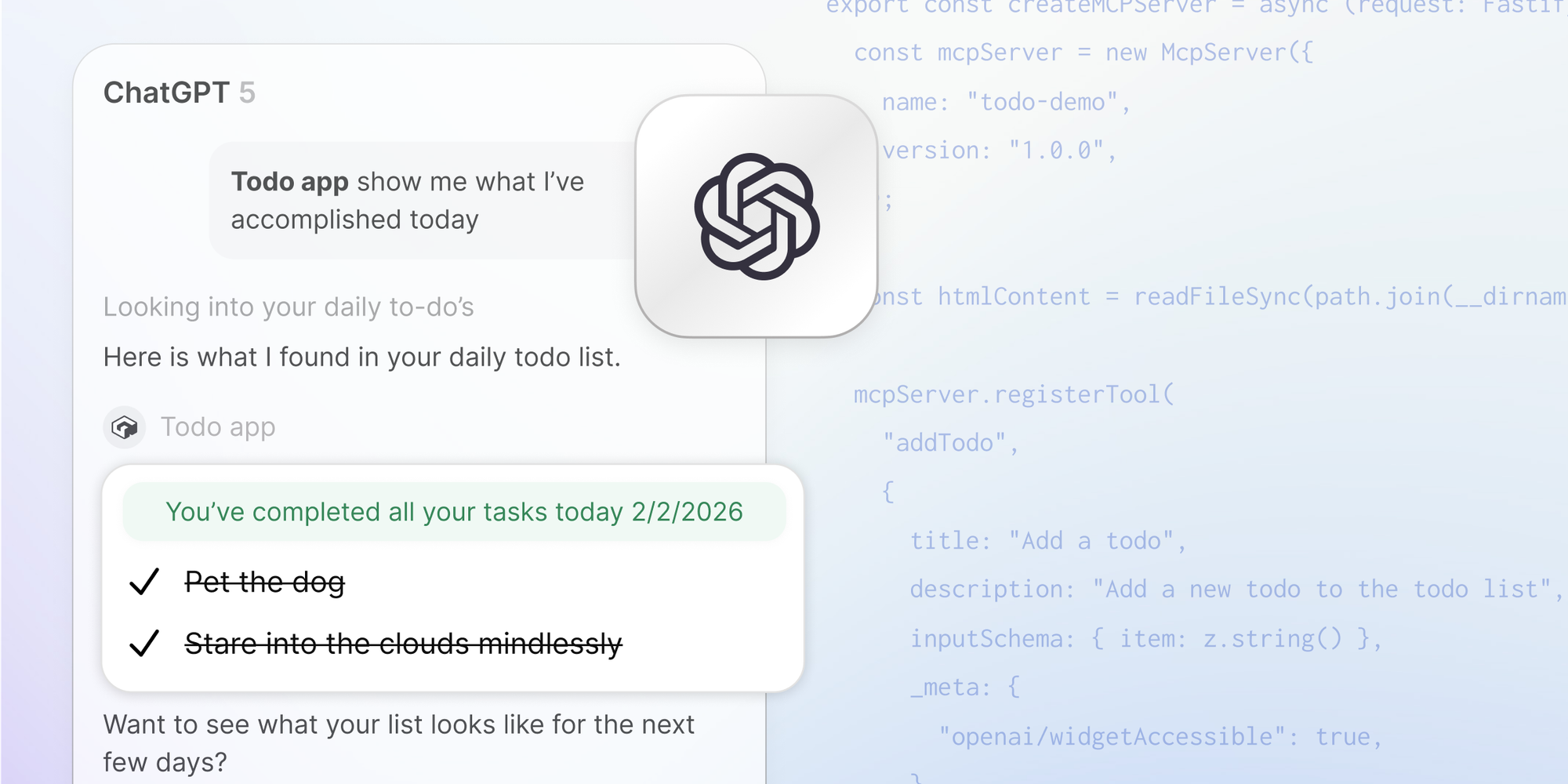
First, there's an MCP server. MCP stands for Model Context Protocol, which is an open standard that lets ChatGPT communicate with external tools and data sources. Your MCP server tells ChatGPT what your app can do (through tools) and provides the actual functionality when ChatGPT decides to use those tools.
Second, there's optional OAuth 2.1 authentication. If your app needs to know who the user is or access their data on other services, you'll need to implement OAuth. But here's the twist that trips up almost everyone: you're not using OAuth to authenticate with someone else. You're becoming the OAuth provider, allowing ChatGPT to authenticate with you. This is backwards from what most developers are used to, and it's a major source of confusion.
Third, there are widgets. These are the interactive UI components that render inside the chat. They're essentially sandboxed iframes that can display anything from simple data visualizations to full-blown applications. Think of Figma showing you an architecture diagram, or Zillow displaying an interactive map of home listings — that's the widget layer at work.
All three pieces work together to create experiences that feel native to ChatGPT. The model decides when to invoke your tools based on user prompts, your server executes the logic and returns data, and your widgets present that data in a user-friendly way. When it all works, it's genuinely magical. Getting it to all work? That's where things get interesting.
Building Your MCP Server
Let's start with the MCP server, because everything else depends on it working correctly. The MCP (Model Context Protocol) is what lets ChatGPT talk to your backend. It's an open standard, which means the same server you build for ChatGPT could theoretically work with other AI clients that support MCP.
OpenAI provides examples using the official @modelcontextprotocol/sdk package, and I recommend starting there. But here's my first hot take: the official examples are using an older version of the protocol, and you should probably use the newer one.
The examples default to SSE (Server-Sent Events) transport, but ChatGPT supports the newer Streamable HTTP transport, and it's just... better. It's more scalable, works better with serverless platforms, and doesn't require maintaining persistent connections. The StreamableHTTPServerTransport class from the SDK handles this perfectly.
Here's what a basic MCP server looks like using Fastify and the streamable transport:
import { RouteHandler } from "gadget-server";
import { createMCPServer } from "../../mcp";
import { StreamableHTTPServerTransport } from "@modelcontextprotocol/sdk/server/streamableHttp.js";

const route: RouteHandler = async ({ request, reply, api, logger, connections }) => {
  const transport = new StreamableHTTPServerTransport({
    sessionIdGenerator: undefined, // stateless mode
    enableJsonResponse: true
  });
  const server = await createMCPServer(request);

  reply.hijack();

  await server.connect(transport);
  await transport.handleRequest(
    request.raw,
    reply.raw,
    request.body
  );
};

export default route;
Notice that sessionIdGenerator is set to undefined. This runs the transport in stateless mode, which means you don't need to maintain session state between requests. This is crucial for serverless deployments where you can't guarantee the same instance handles subsequent requests. The official examples use an in-memory session map that breaks every time you deploy and doesn't work at all on platforms like Vercel or Cloudflare Workers.
Now, here's something that will save you hours of frustration: test your MCP server using the MCP Inspector before trying to connect it to ChatGPT. I cannot stress this enough.
ChatGPT's error messages are, to put it diplomatically, not informative. When something goes wrong, you'll often get a generic "Something went wrong" message that tells you absolutely nothing about what actually failed. Was it your OAuth flow? Your tool definitions? A CORS header? Who knows! ChatGPT isn't telling.
The MCP Inspector, on the other hand, gives you actual error messages, lets you see the exact requests and responses, and validates your implementation against the protocol spec. Get everything working there first, then move to ChatGPT for final testing. Trust me on this one.
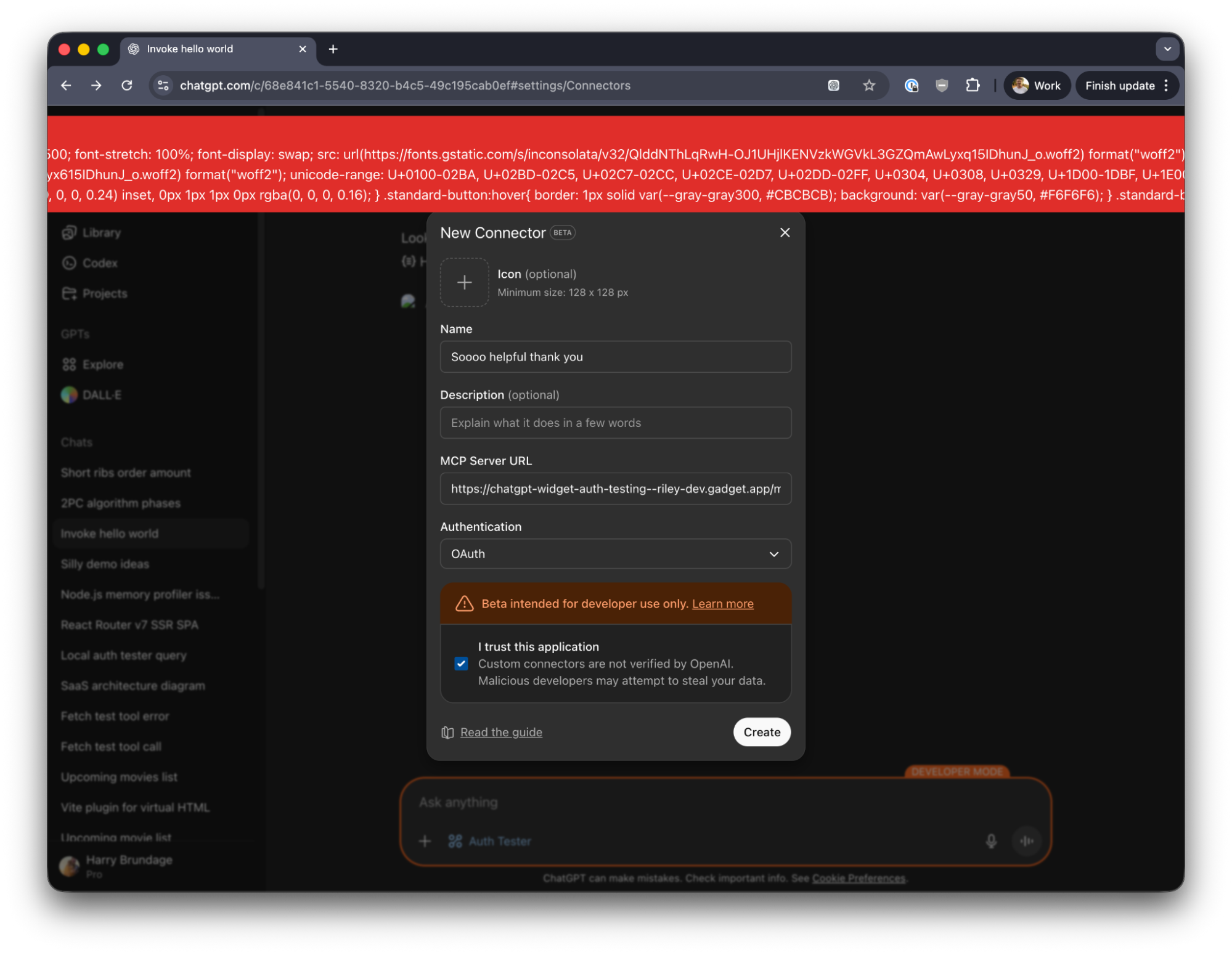
Your MCP server needs to define tools — the actions that ChatGPT can perform. Each tool has a name, description, input schema, and the actual logic that runs when it's called. The name and description are critically important because they're what ChatGPT uses to decide when to invoke your tool.
Think of tool descriptions as the manual for ChatGPT to use your app. Clear, accurate descriptions make your app safer, easier for the model to understand, and easier for users to trust. Tool names should be human-readable, specific, and descriptive. Use plain language that directly reflects the action, ideally as a verb like get_order_status or create_playlist.
One thing that caught me off guard: tool annotations. You need to label your tools with hints that tell ChatGPT (and users) what kind of action they're performing. Is this tool just reading data? Mark it with readOnlyHint. Does it modify something? Does it interact with external systems? These annotations affect how ChatGPT handles confirmations and how your app is reviewed for publication.
Incorrect or missing annotations are apparently a common cause of app rejection, so get them right from the start. A tool that reads your to-do list should have readOnlyHint set to true. A tool that creates a new to-do item should have it set to false and probably needs openWorldHint if it's modifying data in an external system.
OAuth 2.1: Where Things Get Interesting (And Confusing)
If your app needs to identify users or access their data, you'll need OAuth. And this is where most developers I've talked to hit their first major roadblock, because OAuth in the ChatGPT Apps world works backwards from what you're probably used to.
Normally, when you implement "Sign in with Google" or similar, you're an OAuth client. You send users to Google, they authenticate, Google sends back a token, and you use that token to access Google's APIs on the user's behalf. You've probably done this dozens of times.
With ChatGPT apps, you're not the client. You're the provider. ChatGPT is the client, and it needs to authenticate with your backend. You need to implement the OAuth provider endpoints — the authorization endpoint, the token endpoint, and the OIDC discovery endpoints that tell ChatGPT how to find everything.
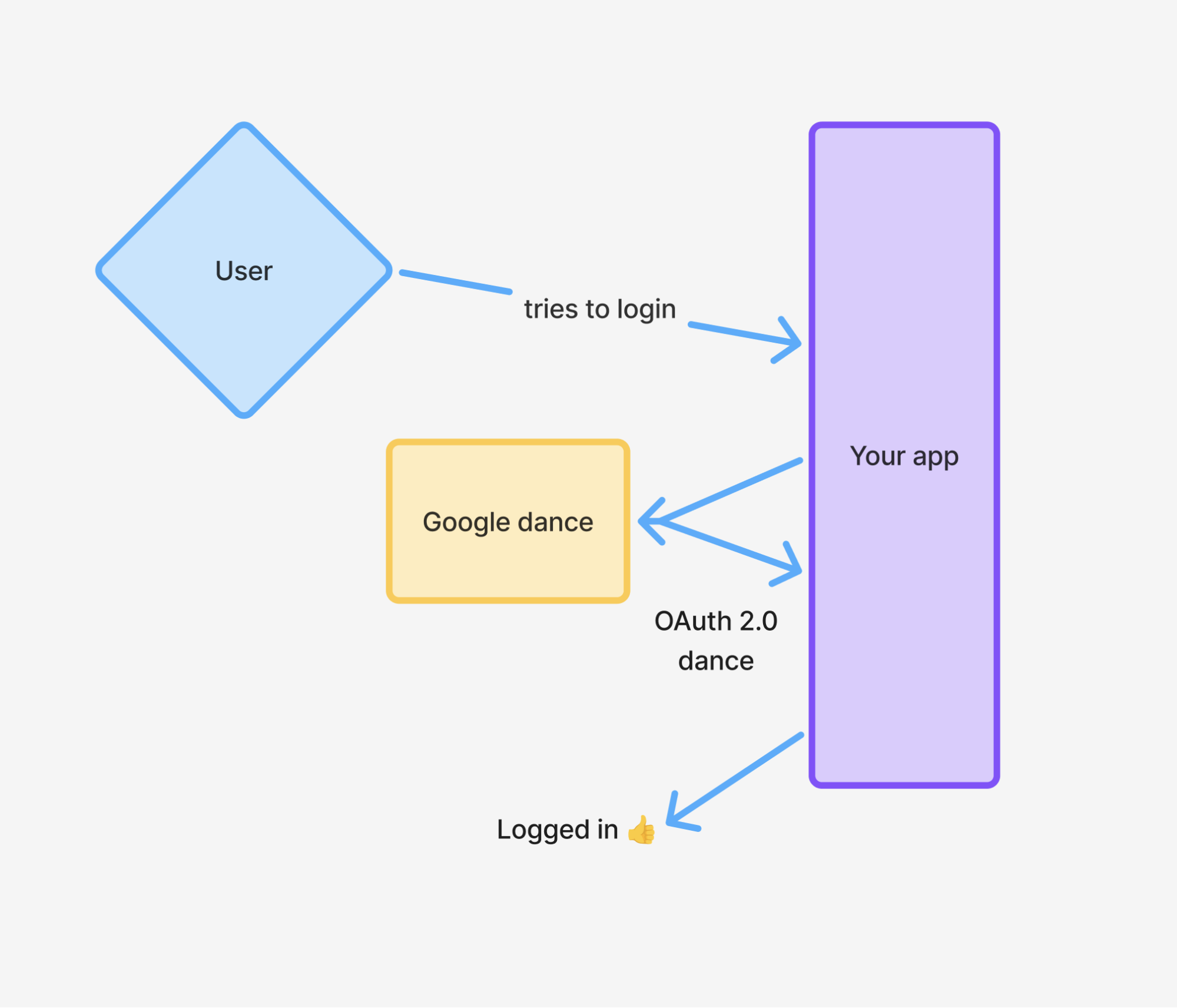
Let me draw this out because it's genuinely confusing at first.
In traditional OAuth, the flow goes: Your app redirects user to Provider, Provider authenticates user, Provider redirects back to your app with a token, Your app uses token to call Provider's APIs.
In ChatGPT apps, the flow goes: ChatGPT discovers your OAuth endpoints, ChatGPT redirects user to your authorization endpoint, Your server authenticates user, Your server redirects back to ChatGPT with a code, ChatGPT exchanges code for access token at your token endpoint, ChatGPT uses token to call your MCP endpoints.
You're Google in this scenario. You're the one who needs to implement /authorize, /token, client registration, and all the rest.
This is not trivial to implement from scratch. You need PKCE support (required in OAuth 2.1), proper token generation, JWKS rotation, scope management, CSRF protection, and user consent flows. If you're building this all yourself, prepare for a significant engineering effort.
My strong recommendation: don't build this yourself unless you have a very good reason. Use an existing auth provider that can act as an OAuth server — services like Auth0, Clerk, Stytch, or platform-specific solutions like Gadget all provide this functionality out of the box. They handle the hard parts (security, compliance, token management) so you can focus on your actual app logic.
For OIDC discovery, you need to serve specific metadata at well-known URLs. ChatGPT will hit /.well-known/oauth-authorization-server to figure out where your authorization and token endpoints are. This needs to return a JSON document with all the relevant URLs and supported features.
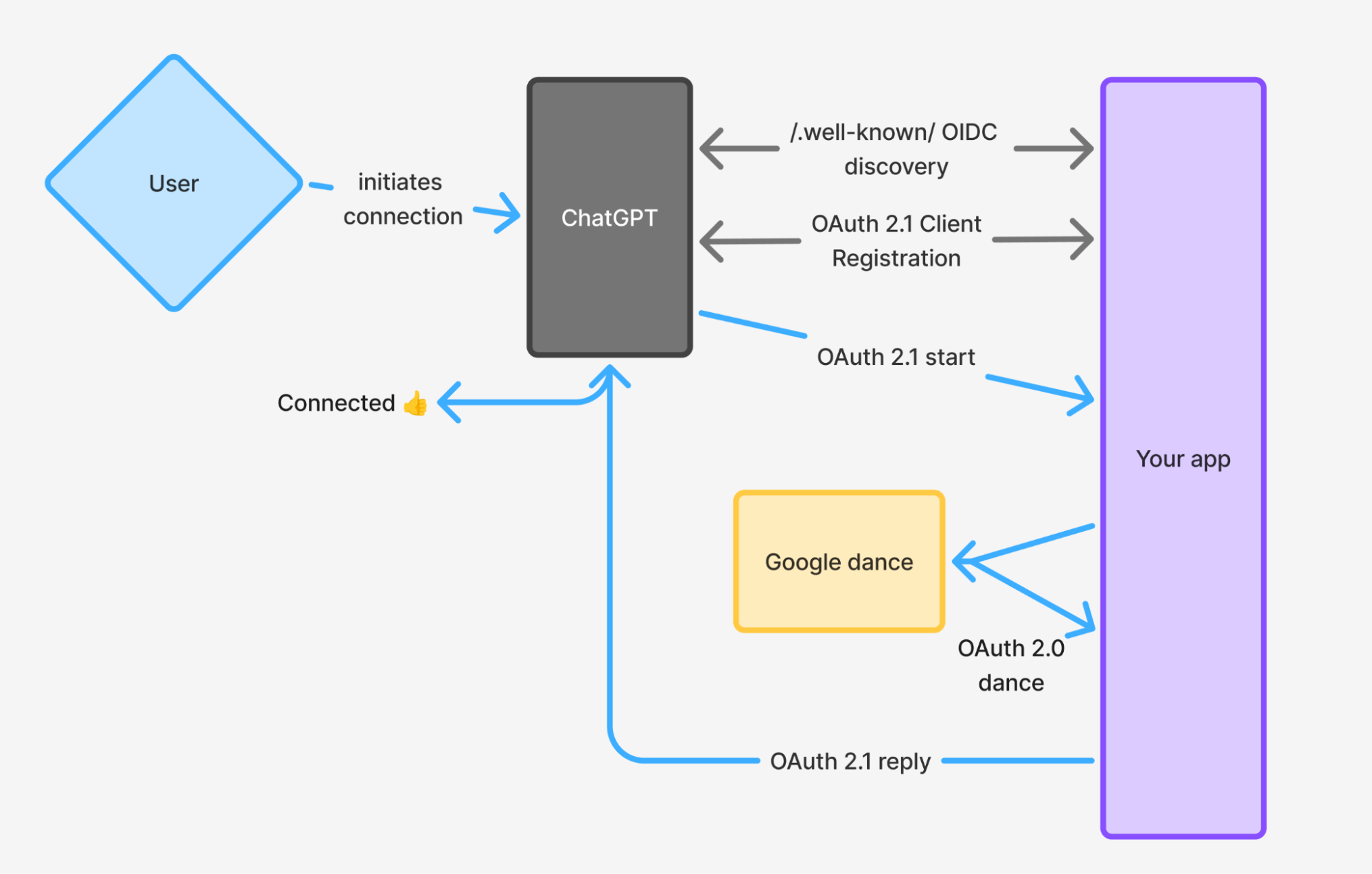
One gotcha I encountered: the MCP spec has been evolving, and there have been changes to how auth works. The most recent spec (as of mid-2025) separates the authorization server from the resource server more clearly. Your MCP server is now a resource server that validates tokens, while authentication can be delegated to a separate authorization server. This is actually cleaner architecturally, but it means some older tutorials might be out of date.
When things go wrong with OAuth (and they will), the error messages are even less helpful than the MCP ones. I spent an embarrassing amount of time debugging what turned out to be a time synchronization issue between my server and the auth provider. JWT validation is very sensitive to clock skew, so make sure your servers are using NTP properly.
Also, double-check your redirect URIs. This is OAuth debugging 101, but it's worth repeating: the redirect URI you register must match exactly what ChatGPT sends. Not "mostly the same." Exactly the same. Including trailing slashes.
Building Widgets: Where the Magic Happens (And the Pain Begins)
Widgets are the most exciting part of the ChatGPT Apps SDK, and also the most frustrating to develop. The ability to render interactive UI directly in the chat is genuinely transformative — it's what makes ChatGPT apps feel like apps rather than just fancy API calls.
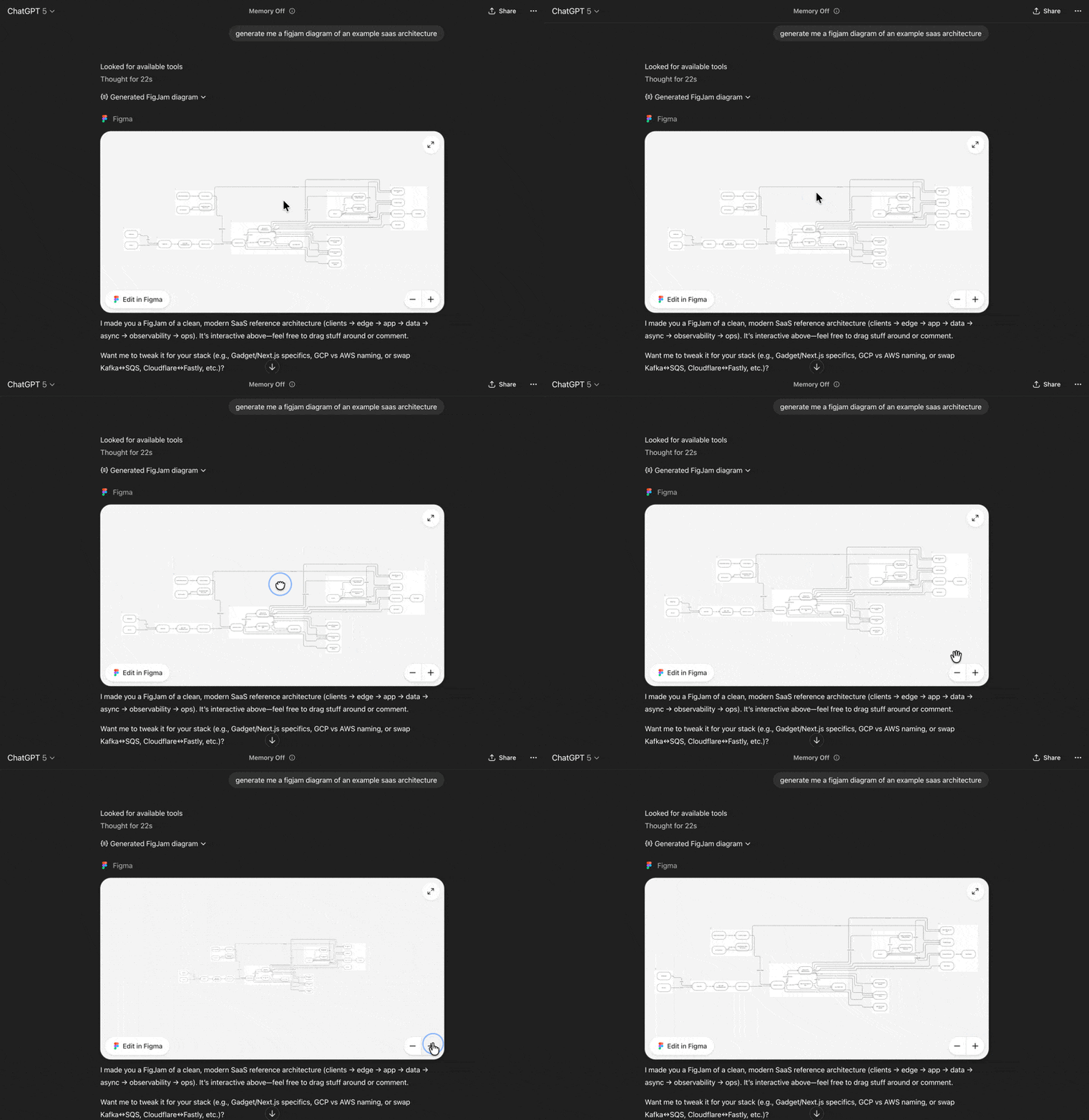
I connected the Figma app to my ChatGPT and asked it to generate a SaaS architecture diagram. Figma's MCP did its thing, and right there in the chat was an interactive Figma canvas. I could zoom, pan, select elements, make edits. Inside ChatGPT. That's the promise of widgets, and when it works, it's incredible.
Under the hood, widgets are sandboxed iframes. Your MCP server tells ChatGPT to render a particular HTML document, and that HTML runs in an iframe with the window.openai object injected by ChatGPT. Your widget can read data from tool responses, make additional tool calls, send follow-up messages, and handle user interactions.
Here's the challenge: ChatGPT expects static HTML. Your widget can't be dynamically rendered per-user because it gets cached when your app is installed. This means traditional server-side rendering is out. You're building a client-side single-page application whether you like it or not.
ChatGPT accepts plain HTML with no built-in support for TypeScript, Tailwind, JSX, or any of the modern development conveniences we've grown accustomed to. In development, you need to figure out how to bundle your React (or whatever framework you prefer) app, compile your TypeScript, process your CSS, and serve it all in a way that works cross-origin from inside a sandboxed iframe.
Getting this development environment working is finicky and annoying. Every time you make a change to your HTML, you'd normally need to refresh your MCP connection to load the latest version. The feedback loop is painfully slow without the right tooling.
The good news is that Vite makes this much more manageable. I've been using a Vite-based setup with hot module reloading (HMR), and it's transformed the development experience. Changes show up almost instantly, TypeScript compilation is handled automatically, and Tailwind classes just work.
There's a Vite plugin specifically for ChatGPT widgets (vite-plugin-chatgpt-widgets) that handles a lot of the boilerplate. It creates virtual HTML entrypoints for each of your React components, handles the bundling, and provides helpers for getting widget HTML from your MCP server. I highly recommend using it or something similar.
Here's a basic Vite configuration that works:
import { defineConfig } from "vite";
import { chatGPTWidgetPlugin } from "vite-plugin-chatgpt-widgets";

export default defineConfig({
  plugins: [
    chatGPTWidgetPlugin({
      widgetsDir: "web/chatgpt",
      baseUrl: "https://your-app.com",
    }),
  ],
  build: {
    manifest: true,
  },
  server: {
    cors: {
      origin: [
        "https://your-app.com",
        "https://web-sandbox.oaiusercontent.com",
      ],
    },
  },
});
That web-sandbox.oaiusercontent.com origin is important — that's the domain where ChatGPT serves widgets by default. Your CORS configuration needs to allow requests from there, or your assets won't load.
The window.openai object is your widget's lifeline to the ChatGPT environment. It provides access to tool output data, widget state persistence, theme information, locale settings, and methods for calling tools or sending follow-up messages. OpenAI publishes TypeScript types for this object in their examples repo, which makes development much more pleasant.
For reading data, window.openai.toolOutput contains the structured content returned by your MCP tool. This is how data flows from your backend to your widget. If your tool returns a list of to-do items, window.openai.toolOutput will contain that list, and your React component can render it.
For persistence, window.openai.widgetState and setWidgetState let you save state that survives page refreshes. If a user leaves and comes back to the conversation, their widget will be in the same state as when they left. This is crucial for any kind of interactive experience.
For making additional backend calls, you have two options: window.openai.callTool or regular fetch requests to your own API.
Using callTool is the recommended approach. It roundtrips through ChatGPT to your MCP server, which means you get authentication for free (ChatGPT sends the OAuth token automatically), and the LLM can "see" the interactions for context in future turns. The downside is latency — the request has to go through OpenAI's infrastructure.
Using your own API is faster but comes with complications. You're on your own for authentication (the OAuth token isn't available in the iframe, as far as I can tell), and ChatGPT won't know about any changes made this way. If your widget modifies data through a direct API call, the LLM won't have that context in subsequent turns.
My recommendation: default to window.openai.callTool. The auth and context benefits outweigh the latency cost for most use cases. Only switch to direct API calls if you have specific performance requirements that justify the added complexity.
CORS: The Inevitable Boss Fight
If you've gotten this far without encountering CORS errors, you're either very lucky or haven't actually deployed anything yet. Cross-Origin Resource Sharing is the bane of ChatGPT app development, and you will fight it multiple times.
The fundamental issue is that ChatGPT apps are inherently cross-origin. Your MCP server is on your domain. OAuth requests come from OpenAI's infrastructure. Widgets run on oaiusercontent.com. Your assets might be on a CDN. Nothing shares an origin with anything else, and browsers (rightfully) have strong protections against cross-origin requests.
There are three separate CORS configurations you need to get right.
First, CORS for your MCP routes. These need to accept requests from ChatGPT's backend and from the MCP Inspector during development. Since MCP endpoints are protected by OAuth tokens anyway, a permissive Access-Control-Allow-Origin: * header is fine here. Any attacker would still need a valid token to actually call your tools.
Second, CORS for your OAuth routes. Same logic applies — these are inherently cross-origin APIs, and access is controlled by the OAuth flow itself, not by origin restrictions. Use permissive CORS headers.
Third, CORS for your widget assets. This one's trickier because you need to be more careful. Your CSS, JavaScript, and any other assets loaded by your widget need to be accessible from web-sandbox.oaiusercontent.com (where ChatGPT serves widgets) and possibly from your own domain during development.
For Vite development servers, you can configure this in your vite.config:
server: {
  cors: {
    origin: [
      "https://your-app.com",
      "https://web-sandbox.oaiusercontent.com",
    ],
  },
},
For production, make sure your CDN or hosting provider is configured to send appropriate CORS headers for asset requests.
A common trap: you've got CORS configured correctly for simple requests, but preflight requests are failing. Browsers send OPTIONS requests before certain types of cross-origin requests, and your server needs to handle these. Make sure you're responding to OPTIONS with appropriate Access-Control-Allow-Methods and Access-Control-Allow-Headers values.
Here's a gotcha that cost me hours: Chrome 142 and later introduced local network access restrictions that can block widget rendering during local development. If your widgets work in Firefox but not Chrome, try disabling the local-network-access flag in chrome://flags. This is a development workaround — proper CORS configuration should make it unnecessary in production.
Another thing to watch out for: some HTTP libraries automatically follow redirects, which can break the CORS handshake. If you're getting inconsistent CORS errors, check whether your requests are being redirected and ensure the redirect target also has proper CORS headers.
Talking to Your Backend
Once your widget is rendering, you need to actually do stuff. Read data, write data, respond to user interactions. This is where you make some architectural decisions that will affect your app's behavior and user experience.
As I mentioned earlier, you can use window.openai.callTool to make requests through ChatGPT's infrastructure, or you can use regular fetch calls to your own backend. But the choice isn't just about authentication — it affects how ChatGPT understands your app.
When you use callTool, ChatGPT sees the interaction. Not the user — they can't see these tool calls in the chat — but the model knows what happened. If your widget adds a to-do item via callTool, and the user later asks "what did I just add?", ChatGPT has the context to answer correctly.
When you use direct API calls, ChatGPT is blind to those changes. The model's understanding of the app state can drift from reality, leading to confusing experiences. The user adds an item, asks about it, and ChatGPT has no idea what they're talking about.
For read operations, this distinction matters less. If you're just fetching data to display, it doesn't really matter whether ChatGPT "knows" about the fetch.
For write operations, I strongly recommend using callTool. The latency cost is real, but the coherence benefit is worth it. Users expect ChatGPT to understand what's happening in their conversation, and surprising them with "I don't know what you just did" is a bad experience.
There's another architectural consideration: where to put your business logic. You could implement everything in your MCP tools, making the widget a pure presentation layer. Or you could put logic in the widget and use the backend primarily for data persistence.
I lean toward keeping most logic on the server for a few reasons. Server-side code is easier to debug, test, and update without requiring users to refresh their connections. It's also more secure — any validation or business rules that matter should be enforced server-side regardless.
But there's a case for widget-side logic too, particularly for things that need to feel instantaneous. If you're building something with a lot of micro-interactions — a drawing tool, a music player, a game — round-tripping every action through the server would kill the experience. Use your judgment, and remember that the widget environment is sandboxed and constrained.
Testing and Debugging: Hard-Won Wisdom
Debugging ChatGPT apps is an exercise in patience and triangulation. You've got multiple systems (your backend, ChatGPT's infrastructure, the widget iframe), multiple protocols (MCP, OAuth, CORS), and error messages that range from unhelpful to actively misleading.
My debugging workflow has evolved through painful experience. Here's what works for me.
Start with the MCP Inspector. Before you touch ChatGPT, verify that your MCP server responds correctly. Does it list tools? Do tool calls return expected data? Are your resources (widget HTML) properly registered? The Inspector tells you what's actually happening, not what ChatGPT thinks is happening.
Use verbose logging. Log every incoming request to your MCP server. Log the OAuth flow at each step. Log when widgets request assets. When something breaks, you need to know exactly where in the pipeline the failure occurred.
Test OAuth separately. Your OAuth flow can be tested with tools like Postman or the OAuth 2.0 debugger. Make sure you can complete the entire authorization code flow before trying to do it through ChatGPT. If OAuth works in isolation but fails through ChatGPT, you've narrowed the problem significantly.
Watch the browser console. When your widget loads in ChatGPT, you can still access browser dev tools. Open them and watch for errors. CORS issues, JavaScript exceptions, failed asset loads — they all show up here. This is especially useful for widget-specific problems.
Check network requests. The Network tab in dev tools shows every request your widget makes. You can see if assets are loading, if API calls are succeeding, and what headers are being sent and received. CORS errors often show up as failed preflight requests here.
Try different browsers. Some CORS and security behaviors vary between browsers. If something works in Firefox but not Chrome, that's a clue. If it works in no browsers, the problem is more fundamental.
Read the response bodies. ChatGPT's error messages are unhelpful, but sometimes the raw response body has more information. Network tools let you inspect what's actually coming back from the server.
Be systematic. When something breaks, change one thing at a time. It's tempting to try a bunch of fixes at once, but then you don't know which one worked (or if you introduced new problems). Scientific method applies to debugging.
One specific tip: if your app was working and suddenly stops, check if ChatGPT's connector system needs a refresh. Connectors can get stale, especially during development. There's usually a Refresh button in Settings → Apps & Connectors that forces ChatGPT to re-fetch your tool definitions and metadata.
Deployment and Production Considerations
Getting your ChatGPT app working locally is step one. Getting it working reliably in production is step two, and it comes with its own set of considerations.
First, your MCP server needs to be publicly accessible over HTTPS. ChatGPT's infrastructure needs to reach it, which means no localhost, no self-signed certificates, no firewalls blocking inbound requests. Deploy to a cloud provider or use a platform that handles this for you.
During development, tools like ngrok can expose your local server temporarily. But for production, you need actual infrastructure. Services like Vercel, Cloudflare Workers, AWS Lambda, or Railway all work. Just make sure whatever you choose can handle the stateless nature of MCP requests if you're using the streamable transport.
Second, your widget assets need to be fast and reliable. These load in an iframe every time someone uses your app. Slow assets mean slow app. Use a CDN, enable compression, minimize your bundle sizes. The usual frontend performance best practices apply.
Third, think about rate limiting and abuse prevention. Your MCP endpoints are authenticated, but that doesn't mean someone won't try to hammer them. Implement reasonable rate limits, monitor for unusual patterns, and have a plan for scaling if your app gets popular.
Fourth, error handling needs to be robust. In production, you can't just check the console when something goes wrong. Implement proper error tracking (Sentry, LogRocket, whatever you prefer) so you know when users are hitting problems. Return graceful error states from your widgets instead of just crashing.
Fifth, consider the update process. When you change your MCP server — new tools, modified schemas, updated widget HTML — how do users get the new version? ChatGPT caches connectors, so changes don't always propagate immediately. Document your update process and test that changes actually reach users.
For widget updates specifically, be aware that the HTML template is cached when the app is installed. If you need to push urgent fixes, you might need to version your widget URLs or find ways to invalidate the cache. This is an area where the platform is still evolving, so keep an eye on documentation updates.
Security and Privacy
ChatGPT apps have access to user conversations and potentially sensitive data. Taking security seriously isn't optional — it's both an ethical obligation and a practical requirement for app review.
Authentication should be properly implemented, not hacked together. Use established auth providers rather than rolling your own. Implement proper scope restrictions — your app should request only the minimum permissions it actually needs. Don't ask for write access if you only need read access.
Token handling requires care. OAuth tokens should be stored securely, never exposed to client-side code unnecessarily, and refreshed before expiration. If you're using JWTs, validate them properly — check the signature, issuer, audience, and expiration. Don't just decode them and assume they're legitimate.
Widget security has specific concerns. The widget runs in a sandboxed iframe, which provides some protection, but you should still sanitize any content you render. If your widget displays user-generated content or data from external sources, treat it as untrusted. XSS vulnerabilities in widgets could potentially affect the ChatGPT experience.
Data minimization applies here. Don't collect or store more user data than you need. Don't send unnecessary data to external services. Be especially careful with conversation content — users might share sensitive information with ChatGPT not realizing that your app can see it.
Transparency matters for trust and review. Your app needs a clear privacy policy that explains what data you collect and how you use it. Be honest about any external services your app calls. Don't do anything that would surprise a user who carefully read your privacy policy.
For tool annotations, be accurate about what your tools do. A tool marked as read-only should actually be read-only. A tool marked as interacting with external systems should actually interact with external systems. Misrepresenting tool behavior is both a review rejection risk and a trust violation.
OpenAI has review guidelines for ChatGPT apps that cover security and privacy requirements. Read them carefully before submitting your app. Reviewers will check for proper tool annotations, accurate descriptions, appropriate permission scopes, and compliance with usage policies.
The Ecosystem and What's Coming Next
The ChatGPT Apps SDK is still young. It launched in late 2025, and while the core functionality is solid, the ecosystem is evolving rapidly. Documentation is being updated, best practices are being established, and new capabilities are being added.
App submissions for the directory opened up, which means apps can now be discovered by ChatGPT users. This is a significant distribution opportunity — over 800 million people use ChatGPT, and having your app suggested at the right moment in a conversation is powerful. But it also means competition is coming, and the bar for quality will rise.
Monetization options are coming too. OpenAI has mentioned support for the Agentic Commerce Protocol, which would enable things like instant checkout within ChatGPT. If your app has premium features, there may be native ways to handle payments.
The platform will likely get more capable over time. Better debugging tools, more widget capabilities, expanded MCP features, improved authentication options. Stay plugged into the developer community and documentation updates.
I'd also watch the broader MCP ecosystem. Since MCP is an open standard, tools you build could work with other AI clients, not just ChatGPT. Anthropic's Claude, for example, supports MCP. There may be opportunities to reach users across multiple AI platforms with a single implementation.
Frequently Asked Questions
What is the ChatGPT Apps SDK?
The ChatGPT Apps SDK is OpenAI's framework for building interactive applications that run inside ChatGPT. It's built on the Model Context Protocol (MCP), an open standard for connecting AI to external tools and data. The SDK allows developers to define tools (actions ChatGPT can perform), create widgets (interactive UI components), and authenticate users through OAuth 2.1. Apps appear naturally in ChatGPT conversations, either when users invoke them by name or when ChatGPT suggests them as relevant.
Do I need a paid ChatGPT subscription to build apps?
Yes, a paid ChatGPT plan is required for development. You'll also need to enable Developer Mode in Settings → Apps & Connectors → Advanced. Once enabled, you can create and test apps using your own MCP servers. Free-tier ChatGPT users can use published apps but cannot develop them.
What is MCP and why does it matter?
MCP (Model Context Protocol) is the communication protocol between ChatGPT and your app. It standardizes how AI models discover and use external tools. Your MCP server advertises available tools (with names, descriptions, and input schemas), ChatGPT decides when to call those tools based on user prompts, and your server executes the requested actions. MCP is an open standard, meaning tools you build could potentially work with other AI clients that support it.
Do I have to implement OAuth 2.1 for my ChatGPT app?
Only if your app needs to identify users or access protected data. Simple apps that provide the same functionality to everyone can work without authentication. But if you need to know who's using your app, access their data on other services, or provide personalized experiences, you'll need OAuth. The key difference from typical OAuth implementations is that you're the provider, not the client — ChatGPT authenticates with you.
What's the difference between SSE and Streamable HTTP transport?
Both are transport options for MCP. SSE (Server-Sent Events) is the older approach that maintains a persistent connection. Streamable HTTP is newer, stateless, and works better with serverless platforms. ChatGPT supports both, but I recommend Streamable HTTP for most use cases. It's more scalable, doesn't require session management, and plays nicer with modern deployment infrastructure.
How do widgets work in ChatGPT?
Widgets are sandboxed iframes that render inside the chat. Your MCP server tells ChatGPT to render a specific HTML document, ChatGPT loads it in an iframe, and the widget can display interactive content. ChatGPT injects a window.openai object that provides access to tool output data, state persistence, and methods for calling additional tools. Widgets must be client-side applications (React, Vue, vanilla JS) — server-side rendering is not supported because the HTML is cached.
Why am I getting CORS errors?
Cross-Origin Resource Sharing errors occur because ChatGPT apps are inherently cross-origin. Your MCP server, OAuth endpoints, and widget assets all need appropriate CORS headers. For MCP and OAuth routes, a permissive Access-Control-Allow-Origin: * is fine since access is controlled by authentication. For widget assets, allow requests from https://web-sandbox.oaiusercontent.com and your own domain. Don't forget to handle preflight OPTIONS requests.
How do I debug ChatGPT app issues?
Start with the MCP Inspector to verify your server works correctly in isolation. Use browser dev tools to check the widget console and network requests. Enable verbose logging on your backend. Test OAuth flows separately before integrating with ChatGPT. If something worked before and stopped, try refreshing your connector in ChatGPT settings. Be systematic — change one thing at a time.
Can I use TypeScript and React for widgets?
Yes, but you need a build step. ChatGPT expects plain HTML, so you'll need to bundle your TypeScript/React code into a static HTML file. Vite works well for this — there's even a vite-plugin-chatgpt-widgets package that handles much of the setup. Hot module reloading dramatically improves the development experience.
How do I call my backend from a widget?
Two options: window.openai.callTool routes requests through ChatGPT to your MCP server, providing free authentication and keeping ChatGPT aware of interactions. Direct fetch calls to your own API are faster but require separate authentication handling and ChatGPT won't know about those interactions. For write operations, I recommend callTool to maintain conversational coherence.
What happens when I update my app?
Changes to your MCP server (new tools, modified schemas) and widget HTML may not propagate immediately due to caching. You may need to refresh your connector in ChatGPT settings, or users may need to disconnect and reconnect. For production apps, consider versioning strategies for your widget URLs and plan for how updates will reach users.
Is there a review process for ChatGPT apps?
Yes, apps submitted for the directory go through OpenAI's review process. Reviewers check for proper tool annotations (readOnlyHint, destructiveHint, openWorldHint), accurate descriptions, appropriate permission scopes, privacy policy compliance, and adherence to usage policies. Incorrect annotations and misleading descriptions are common rejection reasons.
Can my ChatGPT app work with other AI clients?
Since the Apps SDK is built on MCP (an open standard), there's potential for cross-platform compatibility. Other AI clients that support MCP could theoretically connect to your server. However, ChatGPT-specific features like widgets and the window.openai API won't work elsewhere. The MCP tools and resources should be portable.
Building ChatGPT apps is genuinely exciting. The platform has rough edges, the documentation has gaps, and you will encounter frustrating bugs. But when it all comes together — when your app smoothly responds to natural language, renders an interactive interface, and helps users accomplish something real — it feels like building for a new kind of computing.
We're in the early days of conversational interfaces being more than just chat. Apps in ChatGPT represent a shift toward AI as a platform, not just a tool. Getting in early, understanding the patterns, and shipping real products gives you a head start as this space matures.
If you're building something and get stuck, the developer community is growing. The official Discord, Stack Overflow, and various forums have people who've hit the same walls and found solutions. Don't suffer in silence.
And if you build something cool, I'd love to hear about it. Drop a comment, find me on X, or just ship it and let the users discover it. The best part of being early to a platform is that there's room for everyone to create something valuable.
Now go build something. And remember: when CORS breaks at 2 AM, it's always the Access-Control-Allow-Headers you forgot.
Related Articles
 Mark
Mark
 Mark
Mark