


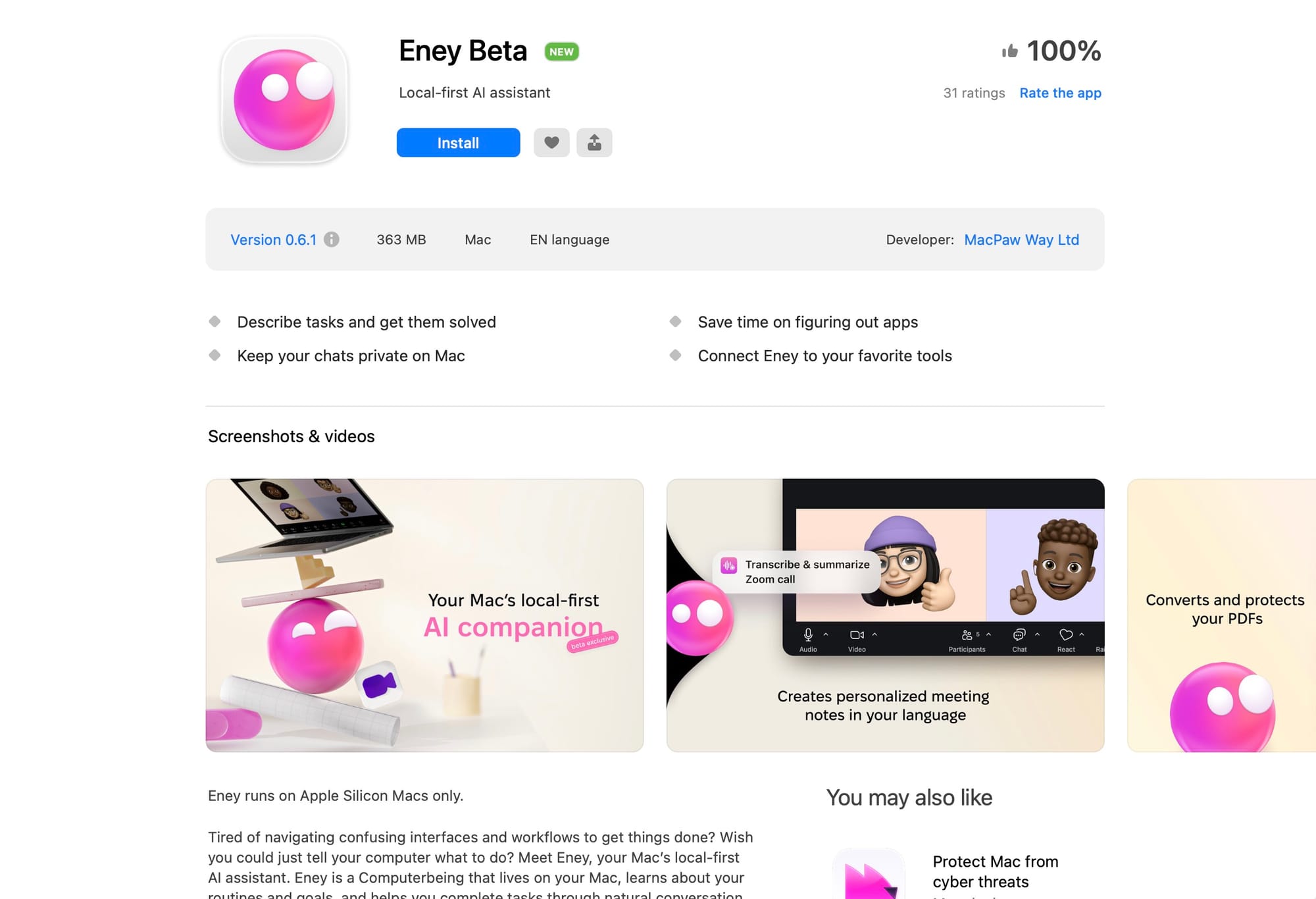
MacPaw has launched Eney, a game-changing local-first AI assistant exclusively for Apple Silicon Macs. Unlike cloud-dependent AI tools, Eney processes most tasks directly on your Mac, combining privacy, speed, and genuine task automation in ways traditional AI assistants simply can't match.
If you're tired of AI chatbots that only talk about getting work done, Eney is the Mac productivity tool you've been waiting for.
Official website: eney.ai
What Makes Eney Different from Other AI Assistants?
The AI assistant market is crowded with tools that excel at conversation but fall short on execution. Eney breaks this pattern by being a "Computerbeing" — an AI that doesn't just understand your requests but actually completes them on your Mac.
Key Features That Set Eney Apart
1. Local-First Processing for Maximum Privacy
Eney runs directly on your Apple Silicon Mac, handling everyday tasks — VPN connections, file operations, calendar updates, email management — without sending your data to the cloud. For more intensive operations like summarizing lengthy meetings, Eney can use secure cloud processing, but only with your explicit permission.
Your conversations remain completely private. No data mining. No third-party access. Just you and your AI assistant.
2. Action-Oriented, Not Just Conversational
Most AI assistants stop at providing answers. Eney takes action. Ask it to:
- Summarize documents and meeting recordings
- Check weather forecasts
- Upload files to Google Drive
- Play your favorite music
- Schedule calendar events
- Connect to VPN servers
- Trim and edit videos
With your approval, Eney selects the right tools and completes these tasks automatically.
3. 100+ Skills Triggered by Natural Language
Forget memorizing commands or switching between different modes. Tell Eney what you need in plain English, and it leverages one of its 100+ built-in skills to execute. Want to schedule a call? Say it. Need to connect to a VPN? Just ask. Looking to trim a video? Eney's got you covered.
The skills library is constantly expanding, making Eney more capable with each update.
4. Contextual Suggestions Based on Your Routines
Eney learns your patterns. The more you use it, the better it understands your workflow. It proactively suggests relevant next steps, reminds you when your Mac needs optimization, and helps eliminate inefficiencies in your daily routines.
Think of it as having a personal productivity consultant that never takes a day off.
5. Seamless Integration with Your Essential Tools
Creating a new Google Doc or uploading files to Google Drive no longer requires clicking through multiple menus. Eney connects your most-used tools into one unified experience. Work faster by speaking naturally instead of navigating complex interfaces.
Who Should Use Eney AI?
Perfect For:
- Privacy-conscious Mac users who want AI assistance without cloud dependency
- Productivity enthusiasts seeking genuine task automation, not just suggestions
- Apple Silicon Mac owners (M1, M2, M3, M4 chips) looking to maximize their hardware
- Professionals managing multiple tools who need streamlined workflows
- Remote workers handling calendars, files, and communication tools daily
- Creative professionals editing videos, managing projects, and organizing assets
System Requirements:
- Apple Silicon Mac only (M1 or newer)
- macOS compatibility as specified by MacPaw
- Internet connection for cloud-assisted tasks (optional)
How Eney Compares to Other Mac AI Tools
| Feature | Eney | Siri | ChatGPT Desktop | Copilot |
|---|---|---|---|---|
| Local Processing | ✅ Primary | ✅ Yes | ❌ Cloud-only | ❌ Cloud-only |
| Task Execution | ✅ Automated | ⚠️ Limited | ❌ Manual | ❌ Manual |
| Skills Library | 100+ | ~50 | None | None |
| Learning Routines | ✅ Yes | ⚠️ Basic | ❌ No | ❌ No |
| Privacy-First | ✅ Yes | ✅ Yes | ❌ No | ❌ No |
| Natural Conversation | ✅ Yes | ⚠️ Limited | ✅ Yes | ✅ Yes |
| Third-Party Integration | ✅ Expanding | ⚠️ Limited | ❌ Manual | ⚠️ Limited |
Real-World Use Cases for Eney
Morning Workflow Automation
"Eney, check my calendar for today, summarize my emails from overnight, and play my focus playlist."
File Management
"Upload this presentation to my Google Drive work folder and share it with my team."
Meeting Preparation
"Summarize yesterday's 2-hour strategy meeting recording and create action items."
Evening Routine
"Connect to my home VPN, back up today's documents, and remind me about tomorrow's 9 AM call."
Content Creation
"Trim the first 30 seconds from this video and export it in 1080p."
Privacy and Security: How Eney Protects Your Data
In an era where AI companies face scrutiny over data practices, Eney's local-first approach is refreshing. Here's how MacPaw ensures your privacy:
- On-device processing: Most tasks execute entirely on your Mac
- Opt-in cloud processing: You control when cloud resources are used
- No data harvesting: Your conversations aren't used to train models
- Encrypted communication: When cloud processing is necessary, data travels securely
- Transparent permissions: Eney asks before accessing tools or services
Getting Started with Eney AI
Installation and Setup
- Visit eney.ai and download the application
- Verify you have an Apple Silicon Mac (M1 or newer)
- Install Eney following the standard Mac application process
- Grant permissions for the tools and services you want Eney to access
- Start conversing naturally — no training required
Pricing
Check eney.ai for current pricing models. MacPaw typically offers:
- Free trial periods
- Individual subscription plans
- Potential team/enterprise options
Tips for Maximizing Eney's Potential
- Be specific with requests: "Schedule a 30-minute call with John next Tuesday at 2 PM" works better than "set up a meeting"
- Explore the skills library: Review available skills to understand Eney's capabilities
- Connect your tools early: Integrate Google Drive, calendar, and other services during setup
- Let it learn: Use Eney consistently for a few weeks to unlock routine-based suggestions
- Provide feedback: Help Eney improve by confirming successful completions or correcting mistakes
- Start small: Begin with simple tasks before automating complex workflows
Limitations to Consider
While Eney is impressive, it's worth noting:
- Apple Silicon only: Intel Mac users are left out
- macOS exclusive: No Windows or Linux support
- Growing skills library: Still expanding compared to mature automation tools
- Third-party integration limits: Dependent on API availability from services
- Learning curve: Understanding which tasks work best locally vs. cloud takes time
Frequently Asked Questions
Does Eney work offline?
Yes, for most tasks. Eney processes the majority of actions locally on your Mac without internet. Cloud connectivity is only needed for specific tasks like accessing Google Drive or using cloud-based AI models for intensive processing.
Is my data safe with Eney?
Eney prioritizes privacy by processing locally. When cloud processing is necessary, MacPaw uses encryption and you maintain control over when this happens. Your conversations aren't used for model training or shared with third parties.
Can Eney replace Siri on Mac?
Eney offers significantly more automation capabilities and a broader skills library than Siri. While Siri remains useful for quick queries and system-level controls, Eney excels at complex task automation and third-party integrations.
What's the difference between Eney and ChatGPT?
ChatGPT is a conversational AI that requires manual execution of suggestions. Eney automates task completion, runs locally on your Mac for privacy, and integrates directly with your tools and workflows. Eney is action-focused; ChatGPT is conversation-focused.
How often does MacPaw add new skills?
MacPaw is actively developing Eney with regular updates. The skills library is continuously expanding based on user feedback and common productivity needs.
Can I use Eney for business/commercial purposes?
Check MacPaw's licensing terms on eney.ai for commercial use policies. Enterprise options may be available or in development.
Does Eney support multiple languages?
Visit the official Eney website for current language support information, as this may expand over time.
The Future of Local-First AI Assistants
Eney represents a significant shift in how we think about AI assistants. By prioritizing local processing, task automation, and user privacy, MacPaw has created something genuinely useful rather than just another chatbot.
As Apple Silicon becomes more powerful and MacPaw expands Eney's capabilities, we're likely to see:
- Expanded integration ecosystem
- More sophisticated routine learning
- Enhanced voice interaction
- Deeper system-level automation
- Collaborative features for teams
Final Verdict: Is Eney Worth It?
For Apple Silicon Mac users seeking privacy-focused productivity automation, Eney is a compelling choice. It bridges the gap between conversational AI and practical task execution in ways that feel genuinely futuristic.

Pros:
✅ Local-first processing protects privacy
✅ Actually completes tasks, doesn't just chat
✅100+ skills with natural language interface
✅ Learns your routines and suggests improvements
✅ Seamless tool integration
✅ Fast performance on Apple Silicon
Cons:
❌ Apple Silicon Macs only
❌ Skills library still growing
❌ Limited to macOS ecosystem
❌ Some integrations require cloud processing
Rating: 4.5/5 — An innovative AI assistant that delivers on its promises, with room to grow.
Get Started with Eney Today
Ready to experience a Mac AI assistant that actually gets things done? Visit eney.ai to download Eney and transform how you interact with your computer.
Stop navigating confusing interfaces. Stop switching between apps. Just tell Eney what you need, and watch it happen.
Related Articles:


