I've been using AI assistants for years now, and I'll be honest — most of the "revolutionary" features turn out to be incremental improvements wrapped in marketing speak. So when Anthropic announced Claude Cowork on January 12, 2026, I was skeptical. Another chatbot update? Another "game-changing" feature that would require me to babysit the AI through every step?
Then I actually tried it.
Cowork isn't a chatbot update. It's something fundamentally different. For the first time, I pointed Claude at a folder full of messy files, described what I wanted done, and walked away. When I came back, the work was finished. Real files, properly organized, sitting in that folder. No copy-pasting. No "here's what I would do" suggestions that I then have to implement myself.
This is what AI agents are supposed to be, and Anthropic just made it accessible to people who have never opened a terminal in their lives.
Let me walk you through what Cowork actually is, what it can genuinely do well, where it still struggles, and whether the $100-$200 monthly price tag makes sense for you.
What Claude Cowork Actually Is
Here's the simplest way I can explain it: Cowork is Claude Code for people who don't code.
Claude Code has been enormously popular with developers since Anthropic launched it as a command-line tool in late 2024. Programmers use it to write code, debug problems, and automate development tasks directly from their terminals. It's powerful, but it requires technical knowledge that most people don't have.
Anthropic noticed something interesting happening, though. Boris Cherny, who heads Claude Code at Anthropic, shared the unexpected ways people were using their developer tool: vacation research, building slide decks, cleaning up email, cancelling subscriptions, recovering wedding photos from a hard drive, monitoring plant growth, even controlling ovens. People were forcing a coding tool to do general productivity work because the underlying AI agent was just that capable.
Cowork takes that same agentic architecture and wraps it in a friendly interface anyone can use. You open the Claude Desktop app on your Mac, click the Cowork tab, give Claude access to a folder, and describe what you want done in plain English. Claude makes a plan, executes it step by step, and delivers finished work directly to your file system.
The difference from regular AI chat is significant. In a normal conversation with Claude, you ask a question, Claude responds, you refine your request, Claude responds again. It's a back-and-forth that requires your constant attention. With Cowork, you delegate a task and step away. Claude handles the planning, execution, and file creation autonomously. As Anthropic puts it, "It feels much less like a back-and-forth and much more like leaving messages for a coworker."
That's not just marketing language. I've now tested this for various tasks, and the workflow genuinely changes how you interact with AI.
How Cowork Works
When you start a Cowork session, you first select which folder on your computer Claude can access. This is important — Claude can only see and modify files in that specific folder. It can't roam around your entire system looking at sensitive documents unless you explicitly give it permission.
Once you've granted folder access, you describe what you want done. Claude analyzes your request, creates a plan, breaks complex work into subtasks if needed, and starts executing. The work happens in a virtual machine environment on your computer, which provides some security isolation while still allowing Claude to create real files that persist after the session ends.
Throughout the process, you can see what Claude is doing. A sidebar shows the steps as they unfold, which tools and files are being used, and outputs as they're created. You can jump in to redirect if needed, or just let it run to completion.
One feature I particularly appreciate: you don't have to wait for Claude to finish one task before giving it another. You can queue up multiple requests, and Claude works through them in parallel. This is possible because Cowork can spin up independent sub-agents, each with fresh context, to handle different parts of complex work simultaneously.
The whole system runs locally on your Mac. Sessions don't sync to web or mobile, which has privacy benefits but also means you can't check on progress from your phone. The Claude Desktop app needs to stay open while Claude works — close it and your session ends.
What Cowork Can Actually Do Well
I've tested Cowork across several use cases, and some tasks genuinely shine. Here's where I've seen the best results:
File Organization and Cleanup
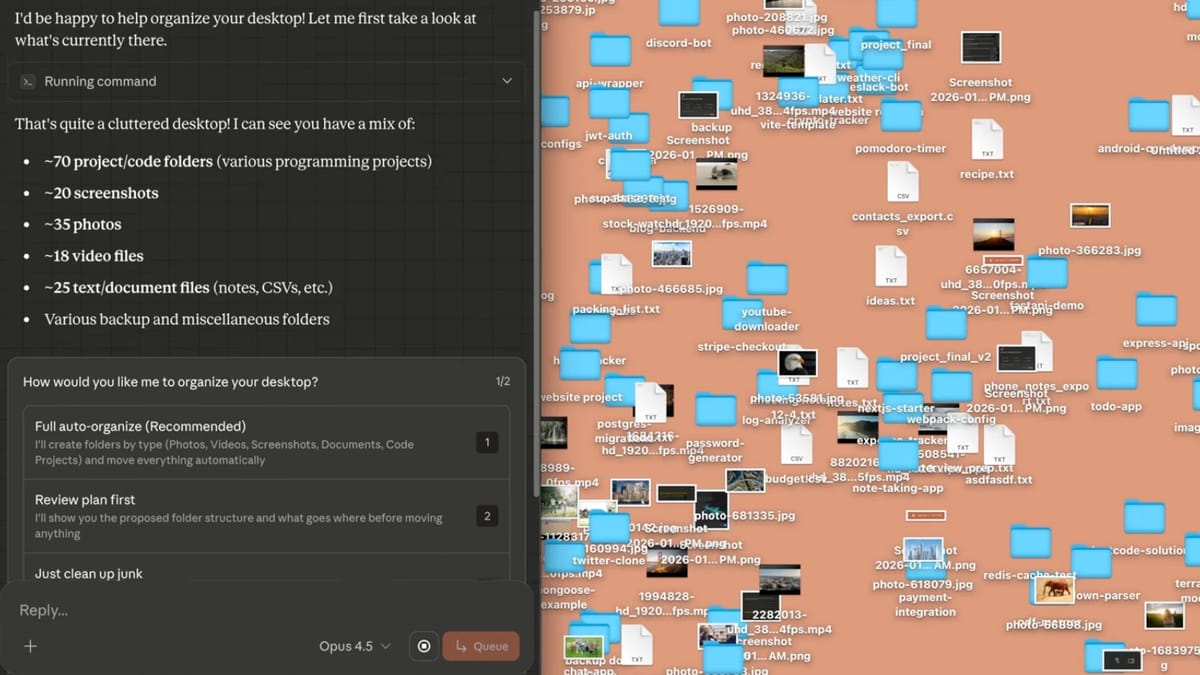
This is perhaps the most immediately satisfying use case. I pointed Claude at my Downloads folder — which had accumulated hundreds of files over months of neglect — and asked it to organize everything by type and date. Within minutes, Claude had sorted documents, images, installers, and archives into categorized folders with consistent naming conventions.
The AI doesn't just look at file extensions. It examines content and context to make intelligent decisions about where things belong. A screenshot of a receipt gets grouped differently than a screenshot of a conversation. Project files get organized together even if they have different formats.
Expense Report Generation
This use case appears in almost every Cowork demonstration, and for good reason — it works remarkably well. Drop a folder full of receipt photos, and Claude extracts the relevant information (vendor, amount, date, category) and compiles it into a formatted spreadsheet. The OCR capabilities handle various receipt formats, and the output is genuinely usable.
I tested this with about 50 receipt images from a recent trip. The resulting expense spreadsheet needed only minor corrections, and it included automatic category totals. What would have taken me an hour of tedious data entry was done in minutes.
Report Drafting from Scattered Notes
If you're someone who takes notes across multiple documents, apps, and formats, Cowork can synthesize that chaos into coherent drafts. I gave it access to a folder containing meeting notes, research snippets, and rough outlines, then asked for a first draft of a report. The result wasn't perfect — it rarely is with AI-generated content — but it was a substantial starting point that captured the key points and organized them logically.
Data Analysis
Claude can process CSV files, perform analysis, generate charts, and create visualizations. Lenny Rachitsky, a well-known tech podcaster, used Cowork to analyze 320 podcast episode transcripts, extracting themes and insights that would have taken a human analyst days to compile. The AI handles outlier detection, cross-tabulation, and time-series analysis reasonably well.
Presentation Creation
When given access to folders containing brand assets, context documents, or source materials, Claude can build slide decks automatically. The results include proper formatting, charts generated from data, and layouts that follow professional conventions. You can iterate on the design with follow-up instructions like "make this more visual" or "add a summary slide at the end."
The Surprising Use Cases People Are Discovering
Beyond the official demonstrations, early adopters are finding creative applications that Anthropic probably didn't anticipate.
Some users are teaching Cowork workflows by recording sequences of actions — copying text, navigating websites, submitting prompts, downloading results — and saving them as reusable skills. The AI can then replay these workflows automatically, turning repetitive multi-step processes into background tasks.
When paired with Claude in Chrome (Anthropic's browser extension), Cowork can complete tasks requiring web access: researching information, extracting data from websites, even filling out forms. The combination of local file access and web navigation opens up possibilities that neither capability offers alone.
I've seen reports of people using Cowork to manage media libraries, scan social media for relevant content, batch process video files for different platform formats, and even prepare tax documents by organizing receipts and statements across folders.
The common thread is tasks that involve unstructured inputs (messy files, scattered notes, raw data) and need structured outputs (organized folders, formatted spreadsheets, polished reports). If your work regularly involves that transformation, Cowork might genuinely change your workflow.
The $100-$200 Question: Is Cowork Worth It?
Cowork is currently available only as a research preview for Claude Max subscribers. That's Anthropic's premium tier, priced at either $100 or $200 per month depending on your usage needs. It's also limited to macOS — Windows support is planned but has no announced timeline.
For comparison, Microsoft Copilot runs about $30 per month for business users, and standard Claude Pro costs $20 per month. The Max tier represents a significant premium.
Is it worth it? That depends entirely on how you work.
If your job regularly involves the kinds of tasks Cowork handles well — file organization, document synthesis, expense processing, report generation — the time savings could easily justify the cost. Tasks that took hours now take minutes. The productivity gain is measurable.

But if you primarily need AI for conversation, brainstorming, or occasional document editing, Cowork's additional capabilities might be overkill. The standard Claude chat, available at lower price points, handles those use cases just fine.
I think Cowork makes the most sense for knowledge workers who deal with high volumes of unstructured information: consultants, researchers, content creators, analysts, anyone who regularly transforms raw inputs into polished outputs. For that audience, Cowork isn't just an AI assistant — it's effectively an additional team member who handles the tedious work.
For casual users, the research preview pricing feels too steep. Wait for broader availability and potential price adjustments.
How Cowork Compares to Microsoft Copilot and Other Options
The obvious comparison is Microsoft 365 Copilot, which embeds AI assistance directly into Word, Excel, Outlook, and Teams. The approaches differ fundamentally.
Copilot works within Microsoft's ecosystem, enhancing tools you're already using. It drafts emails in Outlook, creates charts in Excel, generates text in Word. The integration is seamless if you live in Microsoft's world. But Copilot doesn't operate on your local file system the way Cowork does — it's focused on documents within Microsoft's applications.
Cowork takes a file-system-first approach. It doesn't care which application created your files. It sees folders and documents and operates on them directly. This makes it more flexible but also more raw — you're not getting polished integration with specific productivity suites.
Microsoft has over 90% penetration among Fortune 500 companies with Copilot. Anthropic is competing from a consumer-first position, building reputation with individual users and smaller teams before pursuing enterprise dominance. The strategies are different, and so are the ideal use cases.
Simon Willison, who has tested both extensively, noted that he wouldn't be surprised if Google and OpenAI follow suit with their own file-system agents in this category. Cowork represents a bet that desktop-native agents operating on local files beat browser-only tools. Whether that bet pays off will depend on how well Anthropic executes over the coming months.
What Cowork Can't Do Yet
The research preview has notable limitations that Anthropic is working to address.
Projects integration doesn't work with Cowork yet, meaning you can't use it within Claude's project workspaces. Chat sharing isn't available — sessions stay on your machine with no way to share progress or results. Memory features don't work, so Claude won't remember previous Cowork sessions. You also can't switch between Cowork and regular chat mid-conversation.
There's no mobile access, no web interface for Cowork specifically, and no cross-device sync. Everything happens locally on your Mac.
Windows support is coming but unscheduled. Anthropic says they're prioritizing it based on user feedback from the research preview.
These limitations make sense for an early release. Anthropic is testing how people actually use Cowork before building out the full feature set. But if any of these missing capabilities are essential for your workflow, you'll need to wait.
How to Get Started with Claude Cowork
If you want to try Cowork yourself, here's what you need:
- A Claude Max subscription ($100 or $200 per month)
- A Mac running macOS (Windows isn't supported yet)
- The Claude Desktop app (download from claude.ai)
Once you have those prerequisites, open Claude Desktop and click "Cowork" in the sidebar. Grant access to a folder — I'd recommend starting with something non-critical like your Downloads folder — and describe a task.
Start simple. "Organize these files by type" is a good first test. Watch what Claude does, how it plans, and how the results turn out. Once you're comfortable with the basics, try more complex tasks like document synthesis or expense processing.
If you're not on a Max subscription, you can join the waitlist for future access through the Claude website. Anthropic hasn't announced when broader availability will happen, but they're clearly gathering feedback to improve the product before wider release.
Frequently Asked Questions
What is Claude Cowork?
Claude Cowork is Anthropic's new AI agent feature that allows Claude to read, edit, and create files in folders on your Mac computer. Unlike regular AI chat where you go back and forth with the assistant, Cowork lets you delegate complex tasks and step away while Claude works autonomously. It's built on the same technology as Claude Code (Anthropic's developer tool) but designed for non-technical users handling everyday productivity work.
How much does Claude Cowork cost?
Cowork is currently available only to Claude Max subscribers, which costs either $100 or $200 per month depending on usage tier. This is Anthropic's premium subscription level. Standard Claude Pro at $20/month and free accounts don't include Cowork access, though there's a waitlist for future availability on other plans.
Does Claude Cowork work on Windows?
Not yet. As of January 2026, Cowork is only available on macOS through the Claude Desktop app. Anthropic has stated that Windows support is planned and prioritized for future releases, but they haven't announced a specific timeline. The feature also doesn't work on web or mobile platforms — it requires the desktop application.
Is Claude Cowork safe to use with sensitive files?
Anthropic recommends caution. While Cowork runs in a sandboxed virtual machine environment and only accesses folders you explicitly grant permission to, there are real risks. Claude can potentially delete files if instructions are vague or misinterpreted. There's also the risk of prompt injection attacks where malicious content in files could manipulate Claude's behavior. Anthropic advises keeping backups, avoiding sensitive financial documents, and being very specific with instructions.
What's the difference between Claude Cowork and Claude Code?
Both use the same underlying AI agent technology, but they're designed for different audiences. Claude Code is a command-line tool for developers, accessed through terminal interfaces and focused on programming tasks. Cowork is the same capability wrapped in a friendly graphical interface for non-technical users handling general productivity work like file organization, document creation, and data analysis.
Can Claude Cowork browse the internet?
Yes, when paired with Claude in Chrome (Anthropic's browser extension). With both tools enabled, Cowork can complete tasks requiring web access — researching information, extracting data from websites, filling forms, and navigating across tabs. Without the browser extension, Cowork operates only on local files in the folders you provide.
What can Claude Cowork do?
Common use cases include organizing messy folders by type and date, creating expense reports from receipt photos, drafting reports from scattered notes, analyzing data and generating visualizations, building presentations from source materials, batch renaming files, and synthesizing research into summaries. The AI excels at transforming unstructured inputs into organized outputs.
How does Claude Cowork compare to Microsoft Copilot?
They take fundamentally different approaches. Microsoft Copilot integrates directly into Office applications (Word, Excel, Outlook, Teams) and works within Microsoft's ecosystem. Cowork operates on your local file system regardless of which applications created your files. Copilot offers tighter integration with specific productivity tools; Cowork offers more flexibility with local files and autonomous task completion.
Can Claude Cowork delete my files?
Yes. Claude will only delete files if instructed to, but instructions can be misinterpreted. If you ask Claude to "clean up" a folder, its interpretation might differ from yours. Anthropic explicitly warns about this risk and recommends keeping backups of any folders you give Cowork access to.
What are prompt injection attacks and should I worry about them?
Prompt injection attacks occur when malicious instructions hidden in files, web pages, or other content manipulate Claude's behavior to do something harmful — like forwarding sensitive files or executing unintended actions. Anthropic has built defenses against these attacks but acknowledges they're not foolproof. For maximum safety, avoid giving Cowork access to sensitive documents and be cautious about processing files from untrusted sources.
Why is Claude Cowork in "research preview"?
Anthropic is releasing Cowork early to learn how people actually use it and gather feedback for improvements. The research preview allows them to identify issues, understand real-world use cases, and refine the product before wider release. Current limitations (no Windows, no Projects integration, no chat sharing) reflect this early stage. Anthropic says they'll improve it rapidly based on user feedback.
How long does Claude Cowork take to complete tasks?
It depends on complexity. Simple file organization might take minutes. Complex multi-step tasks like analyzing hundreds of documents can take longer. Claude works autonomously once started, and you can check progress in the sidebar. The desktop app must stay open during task execution — closing it ends the session.
Can I use Claude Cowork with Google Drive or Dropbox?
Cowork works with local folders on your Mac. However, if you sync Google Drive or Dropbox to local folders, Claude can access those synced files. Additionally, Cowork supports "connectors" that link Claude to external services, and Anthropic has integrations with Google Drive and other platforms through these connectors.
What makes Claude Cowork different from regular AI chat?
In regular Claude chat, you have a conversation — you ask, Claude responds, you refine, Claude responds again. It's interactive but requires your constant attention. Cowork is agentic — you describe an outcome, Claude plans and executes the work autonomously, and you return to finished results. Claude also creates real files directly in your folders rather than just showing outputs in chat that you then have to save manually.
Was Claude Cowork really built in 10 days?
According to Boris Cherny, head of Claude Code at Anthropic, the team built Cowork in approximately a week and a half, with most of the code written by Claude Code itself. This demonstrates both the power of their existing tools and how quickly AI capabilities are advancing.
Related Articles
 Dani
Dani
 Dani
Dani
 Mark
Mark