I've wasted more hours than I'd like to admit trying to find the right search API for my AI projects. You know the feeling—you're building something cool, maybe a RAG system or an AI agent that needs real-time web information, and suddenly you're drowning in a sea of marketing pages that all claim to be "the best search API for AI." They can't all be the best. So which one actually is?
After spending the better part of 2025 integrating, testing, breaking, and benchmarking these APIs across multiple production projects, I'm finally ready to share what I've learned. This isn't a surface-level feature comparison you could get from reading three landing pages. This is the guide I wish existed when I started—complete with the stuff that actually matters: real latency numbers, hidden costs, integration gotchas, and honest assessments of when each API makes sense (and when it doesn't).
The three APIs I'll focus on are the ones that keep coming up in serious AI development conversations: Tavily, Exa, and Perplexity's Sonar API. They're all purpose-built for AI applications, but they take surprisingly different approaches to the same problem. Understanding those differences can save you weeks of wasted development time and thousands of dollars in unexpected costs.
Let's dig in.
Why AI Search APIs Exist
Before we compare these specific tools, let me quickly explain why traditional search APIs don't cut it for AI applications anymore.
When you build an AI agent or RAG system, you need your search layer to do more than return a list of blue links. You need it to understand semantic meaning, extract clean content from messy web pages, format results in ways that LLMs can actually consume, and do all of this fast enough that your users don't fall asleep waiting.
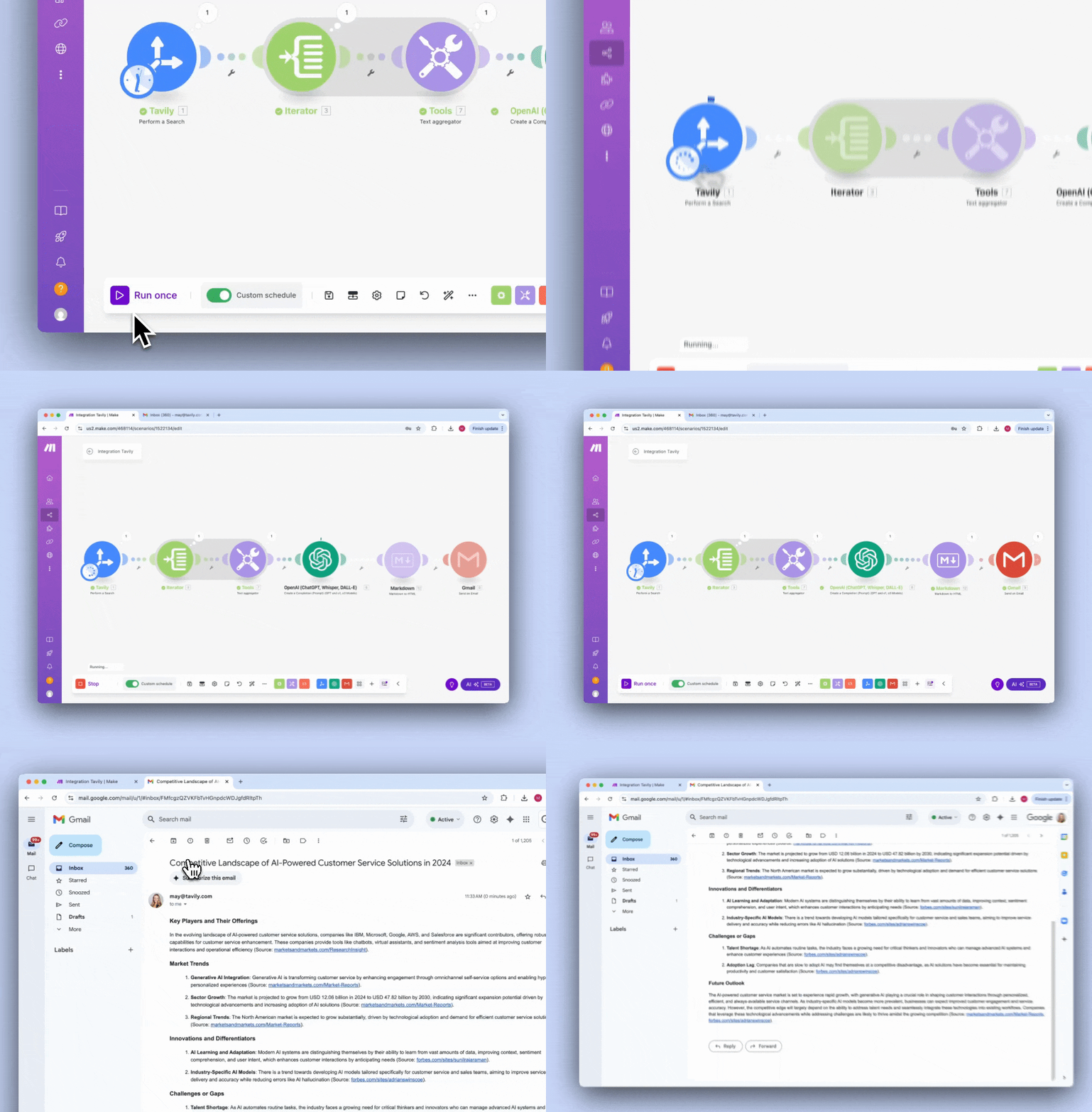
Traditional search APIs like Bing or Google Custom Search were built for humans browsing the web. They return HTML snippets, ads, and structured data meant for display in a browser. If you've ever tried to feed raw Google search results into an LLM, you know the pain: you end up writing hundreds of lines of scraping, cleaning, and formatting code just to get something usable. And then that code breaks every time the source websites change their layouts.
AI-native search APIs flip this around. They're designed from the ground up to serve machine consumers. They handle the scraping, cleaning, and structuring for you, returning data that's ready to inject directly into your prompts or vector stores. The best ones also understand semantic queries, not just keyword matching, which matters enormously when your AI is trying to find information about concepts rather than exact phrases.
The market for these tools has exploded. With Microsoft retiring the Bing Search API in August 2025, developers have been scrambling to find alternatives. Meanwhile, the AI agents market is projected to grow from around $8 billion in 2025 to nearly $12 billion in 2026, which means more developers building more AI applications that need reliable web access.
Whether you're building a chatbot that needs current information, a research assistant that synthesizes web content, or an autonomous agent that gathers data to make decisions, your choice of search API directly impacts accuracy, speed, cost, and ultimately whether your users trust your product.
The Three Contenders: A Quick Overview
Let me introduce each API briefly before we dive deep into comparisons.
Tavily positions itself as "the web access layer for AI agents." It's probably the most popular choice among developers building RAG systems right now, trusted by over 800,000 developers according to their marketing. Tavily provides search, content extraction, site mapping, and crawling, all optimized for feeding directly into LLMs. Their pricing uses a credit-based system with a generous free tier, and they've built strong integrations with LangChain, LlamaIndex, and other popular frameworks.
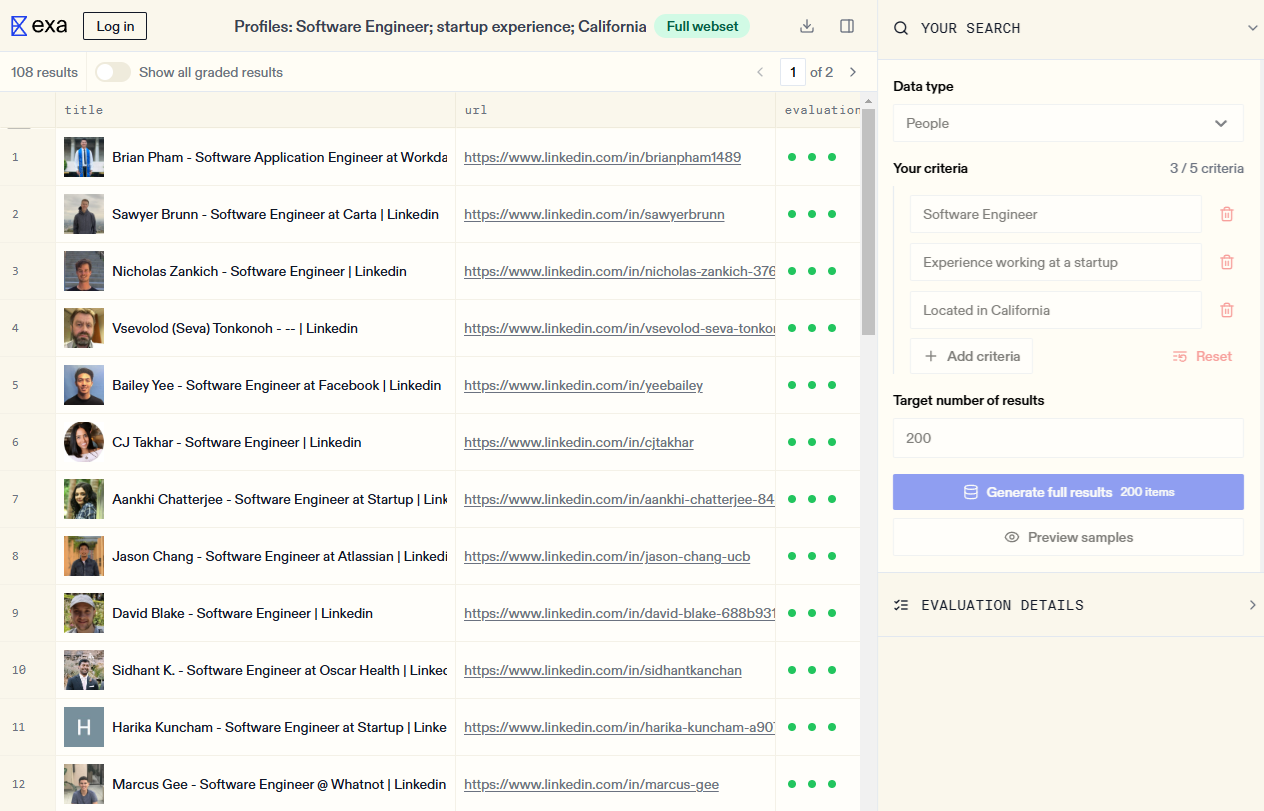
Exa (formerly Metaphor) takes a fundamentally different approach. While most search APIs match keywords, Exa uses neural embeddings to understand the semantic meaning of your queries. Think of it as "Google for AIs" — you can search based on concepts rather than just words. Exa maintains its own web index rather than scraping Google, which gives them unique control over result quality. They recently launched Exa 2.0 with significant performance improvements, claiming sub-350ms latency for their fast endpoint.
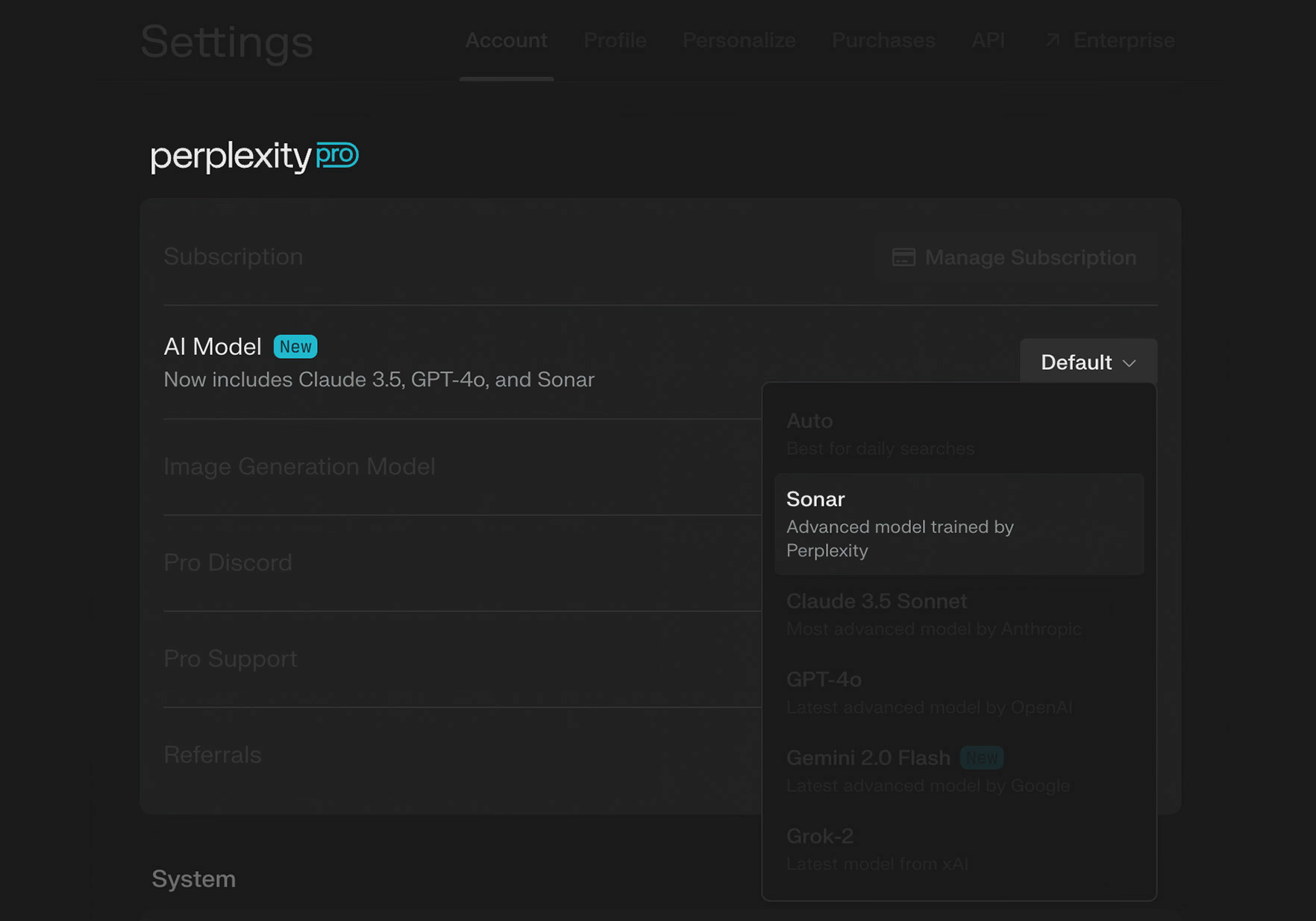
Perplexity Sonar comes from the company that built one of the most popular AI-powered search engines for consumers. They opened up their search infrastructure to developers in January 2025 with the Sonar API. Perplexity's approach combines web search with their own LLM to return synthesized answers with citations, not just raw search results. This makes it particularly interesting for applications where you want pre-processed, factual responses rather than raw data to process yourself.
Each of these takes a meaningfully different approach to the same problem. Tavily focuses on being the reliable, well-integrated workhorse. Exa pushes the boundaries of semantic search. Perplexity provides pre-synthesized answers rather than raw results. Understanding these philosophical differences matters more than comparing feature checklists.
Head-to-Head: Performance and Accuracy
Let's start with what matters most: does the thing actually work?
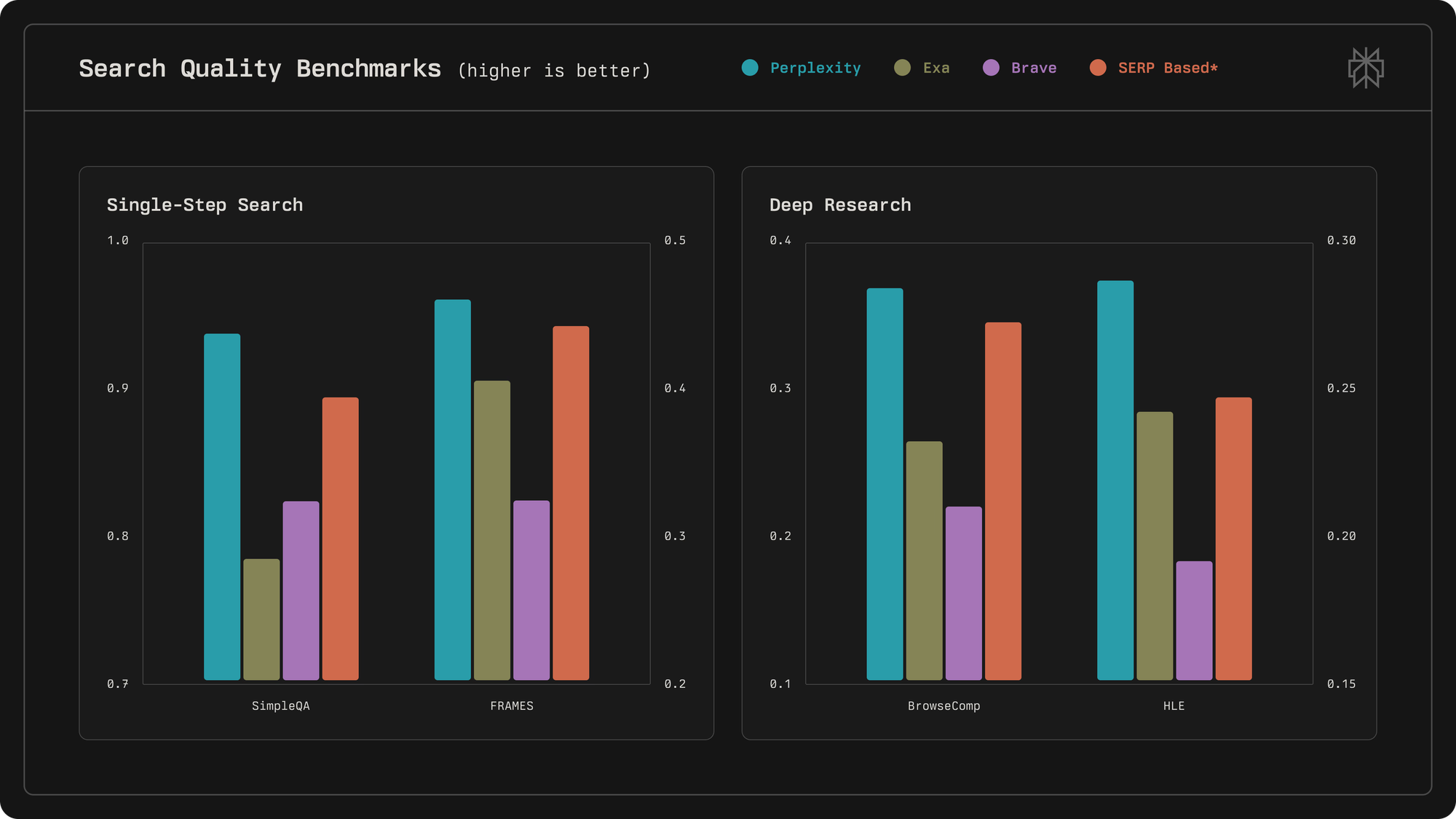
I've run thousands of queries through each of these APIs across different categories – factual questions, current events, academic research, product information, and complex multi-part queries. Here's what I found.
But accuracy benchmarks only tell part of the story. In my testing, different APIs excel at different query types. Exa dominates semantic and research queries where you're looking for conceptually similar content rather than exact keyword matches. Ask it for "breakthrough AI research" and it actually understands you want influential papers, not just pages containing those words. Tavily excels at factual verification and current events where you need structured, cited information fast. Perplexity wins when you want the answer itself rather than sources to process, particularly for current events and straightforward factual questions.
Here's a concrete example. I queried each API with:
"What are the main criticisms of the latest climate report, and how have the authors responded?"
→ Tavily returned well-structured sources with clear citations but required me to synthesize the information myself. Exa found conceptually related papers and analyses that keyword search would have missed.
→ Perplexity gave me a direct answer with citations, ready to use without further processing. All three "worked," but which one is "best" depends entirely on what I needed to do with the information.
→ Perplexity's Sonar Pro and Exa's Research endpoint both perform well because they're designed to handle multi-step information gathering. Simpler APIs force you to build that reasoning layer yourself, which is sometimes what you want if you need fine-grained control, but adds significant development overhead.
Speed
Latency differences between these APIs are staggering, and they matter more than most developers initially realize.
These numbers make sense for their architecture – they're returning processed answers rather than having to extract content from multiple pages.
This gives you flexibility to trade off speed versus depth based on your use case.
Tavily's basic search is reasonably quick – competitive with Perplexity for straightforward queries. Their advanced search takes longer because it does more processing, and their Research API can take significantly longer for complex queries since it may make multiple underlying searches.
Why does this matter? If you're building an agent that makes 10-20 search calls per conversation, a 5-second-latency API makes your entire experience feel unusable. Users will abandon your product. I learned this the hard way with a customer support agent that was timing out because the underlying search was too slow. Switching from a slower API to Perplexity transformed user experience overnight — same accuracy, dramatically better perceived performance.
For RAG systems with real-time requirements, sub-second responses aren't optional. For batch processing or research applications where users expect to wait, you can prioritize quality over speed. Know your use case before optimizing for the wrong metric.
Pricing
This is where things get messy, because these APIs price themselves very differently.
Tavily uses a credit-based system. Basic search costs 1 credit. Advanced search costs 2 credits. Extraction costs 1 credit per 5 URLs for basic, 2 credits per 5 URLs for advanced. Their Research API uses dynamic pricing ranging from 4 to 250 credits per request depending on complexity—which makes cost prediction challenging.
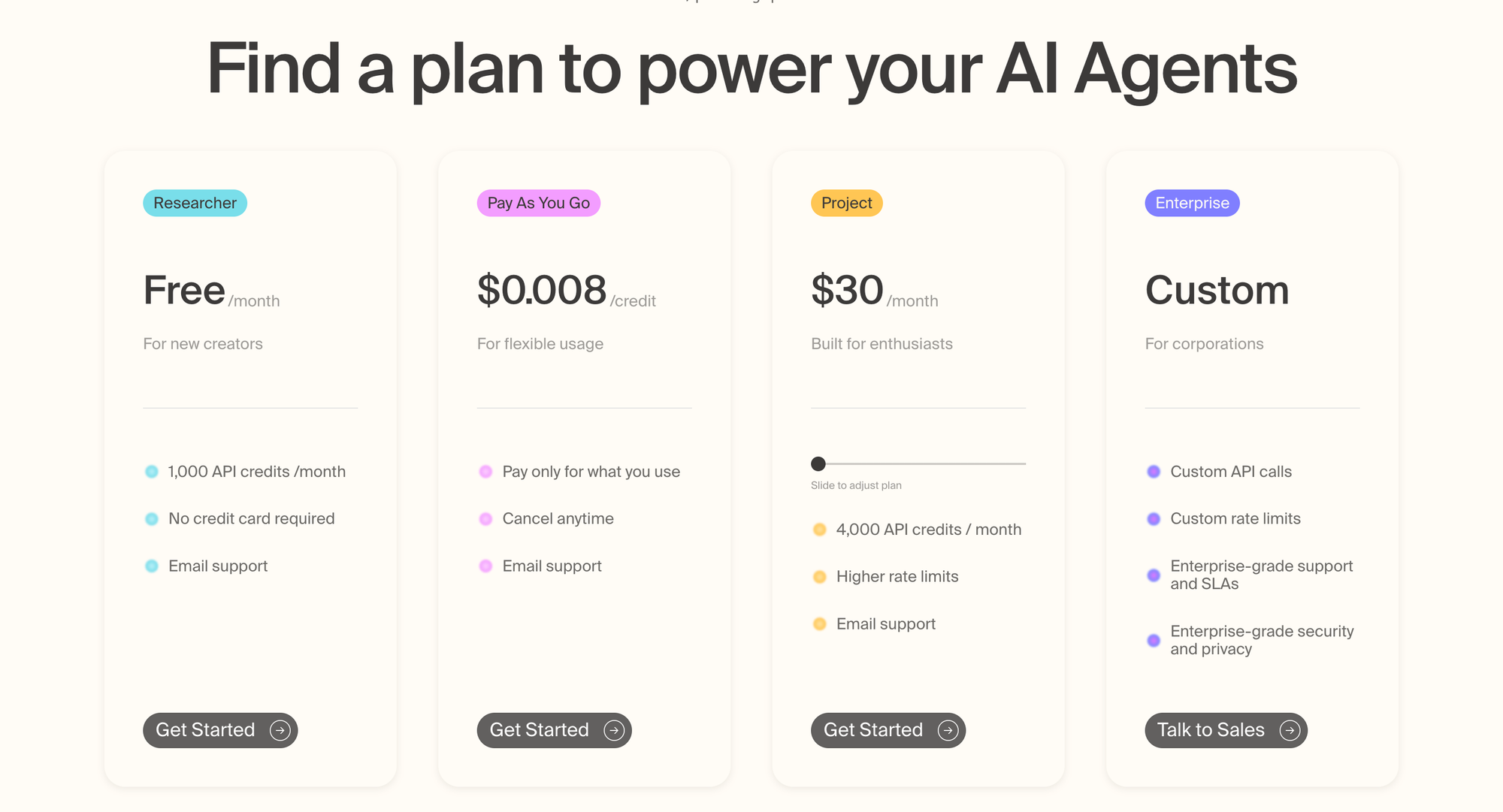
The free tier gives you 1,000 credits monthly, which translates to 1,000 basic searches or 500 advanced searches. Paid plans start at around $49/month for more credits, scaling up from there. Pay-as-you-go charges $0.008 per credit once you exceed your plan's allocation.
The credit system creates budgeting challenges. The same operation costs differently based on depth. Research API costs are unpredictable until after the request completes. And the plan tiers don't always align with common usage patterns—if you need 25,000 credits monthly, you're stuck paying for a higher tier and wasting credits, or hitting pay-as-you-go overage charges.
Exa also uses credits but with different pricing. Their Starter plan costs $49/month for 8,000 credits. Pro costs $449/month for 100,000 credits. Enterprise pricing is custom. You also get $10 in free credits to start.
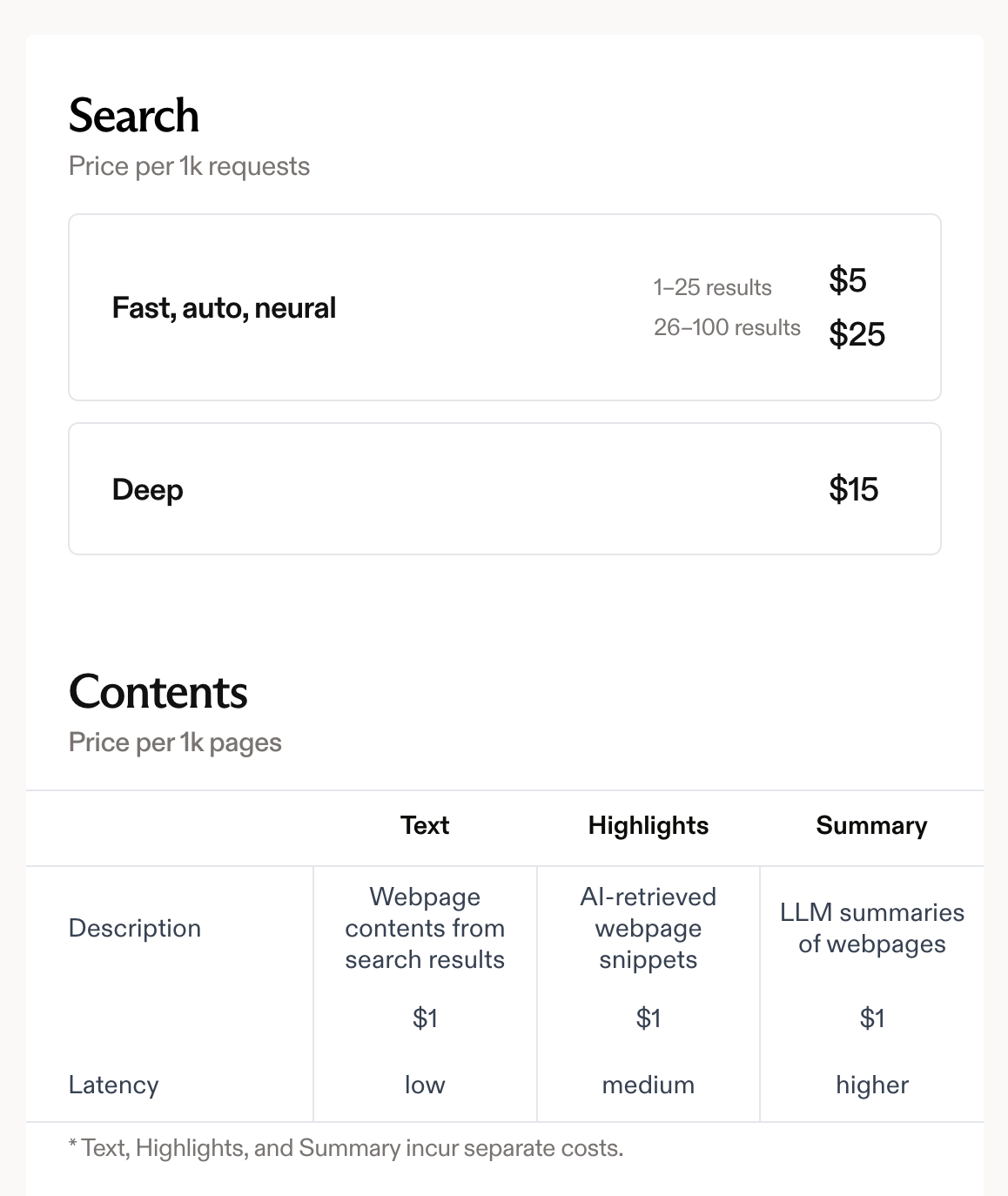
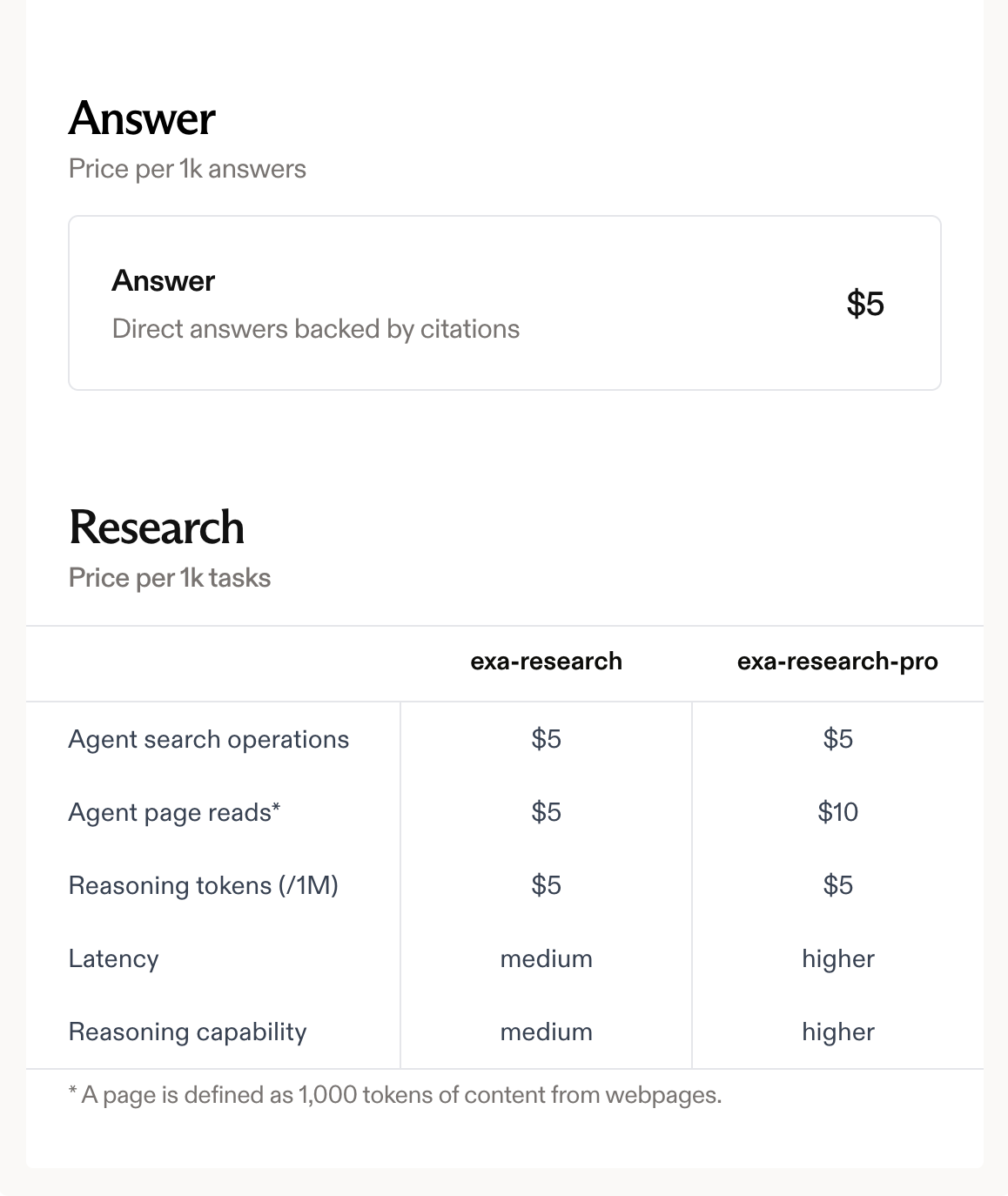
Pricing varies based on the endpoint used (search, contents, find similar, etc.), the type of search (neural versus keyword), number of results, and whether you're retrieving full content. This complexity means you need to model your specific usage patterns to estimate costs accurately.
Perplexity Sonar uses per-request pricing combined with token costs. The Search API charges $5 per 1,000 requests with no additional token costs. Sonar model tokens cost $1 per million for both input and output. Sonar Pro costs $3 per million input tokens and $15 per million output tokens, plus a $5 per thousand request fee.
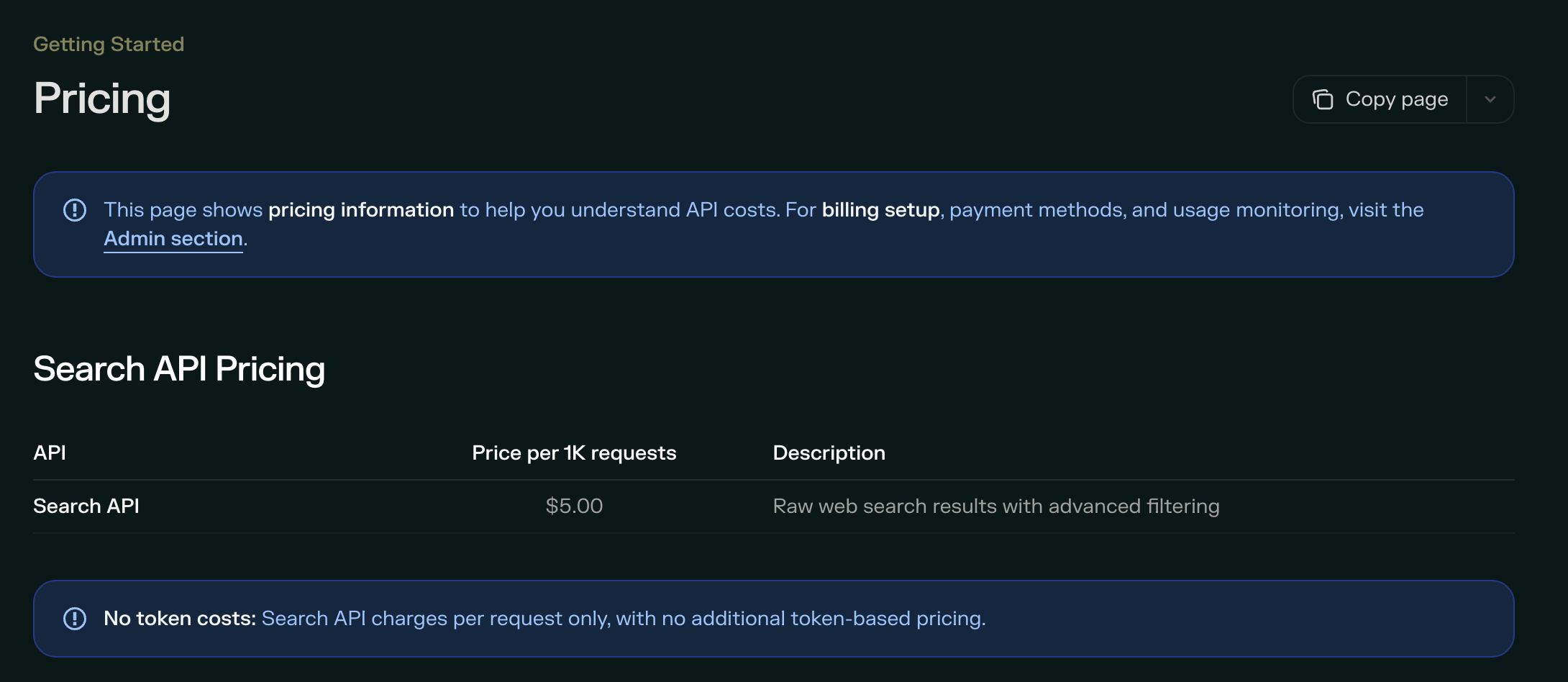
The hybrid model (requests + tokens) can make cost prediction complicated, but it's actually simpler than it sounds for most use cases. If you're using Sonar for straightforward queries, the per-request pricing dominates. Token costs only become significant for very long prompts or responses.
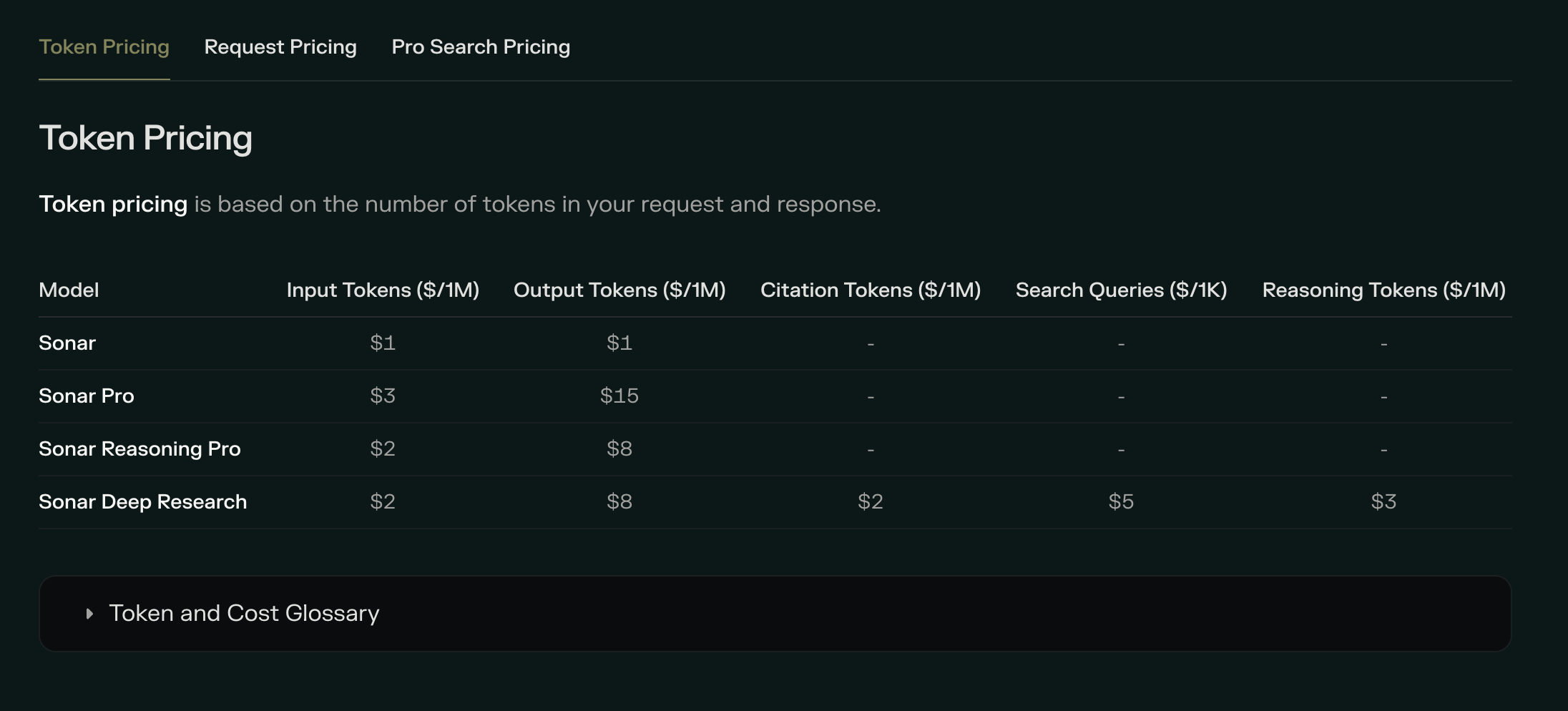
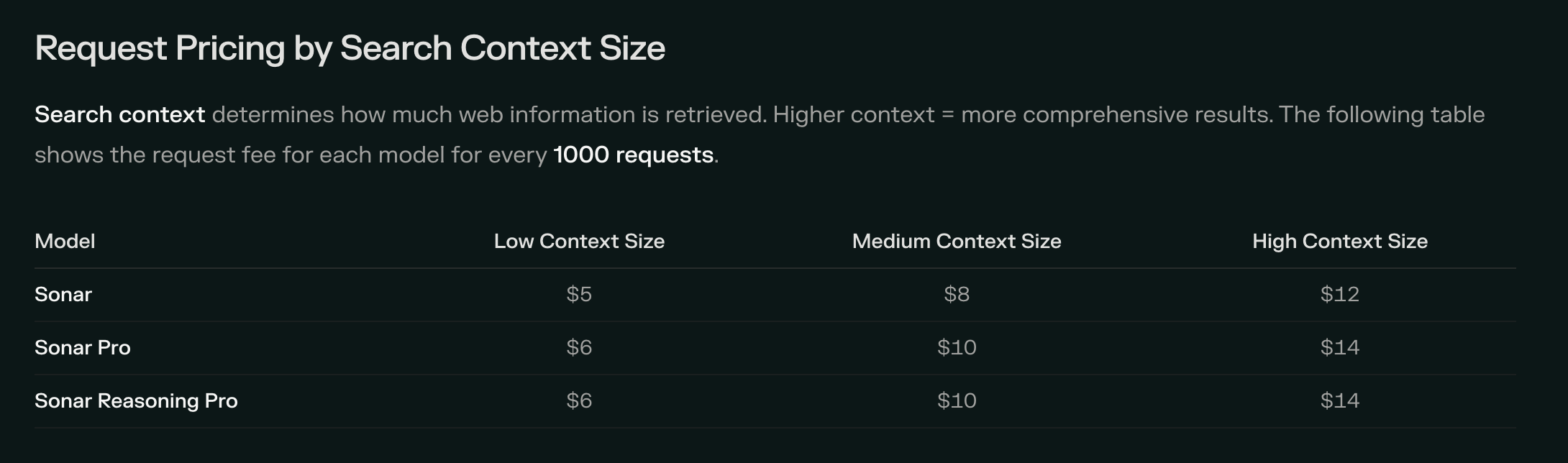
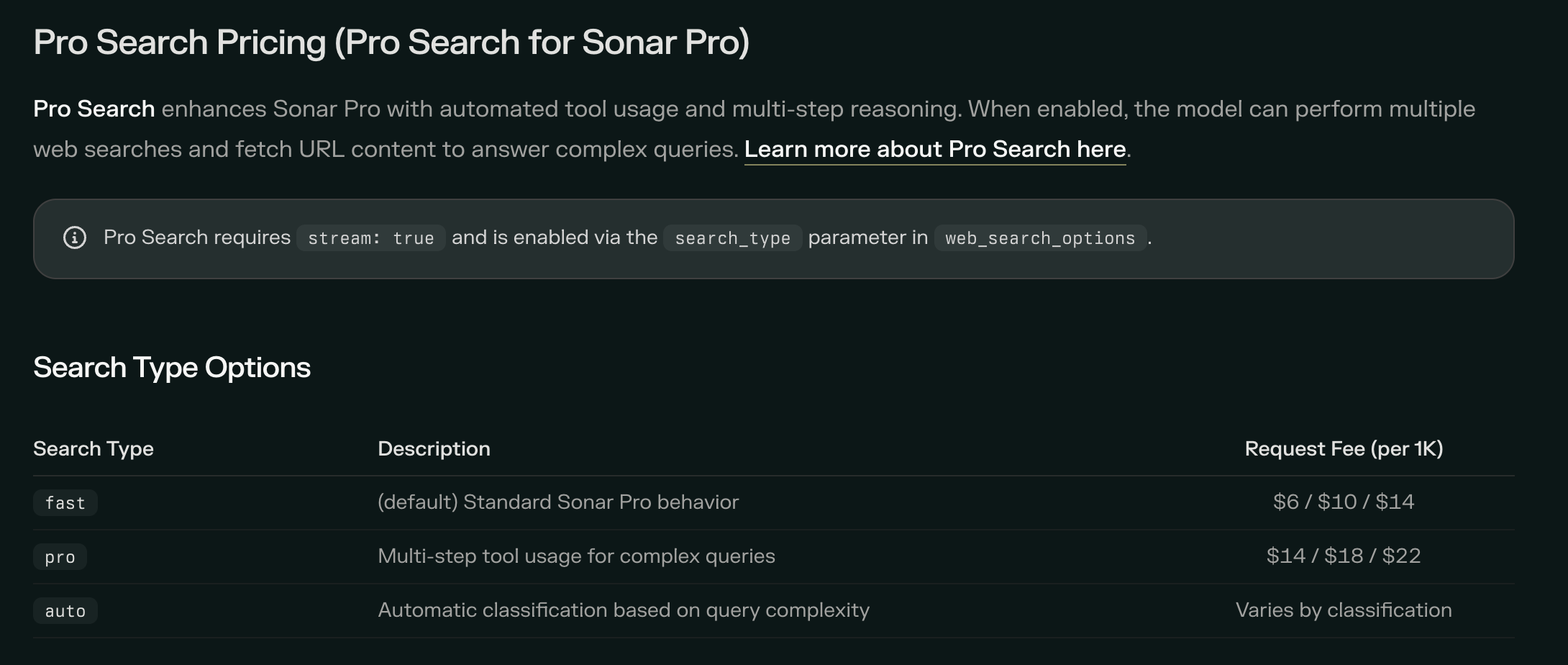
Here's a rough comparison at scale. For 100,000 queries monthly with basic search:
Tavily: Around $800 (100,000 credits at roughly $0.008 each after free tier) Exa: Around $450-500 (depends on specific endpoint mix) Perplexity Sonar: Around $500 (100,000 requests at $5 per thousand)
But these numbers shift dramatically based on what you're actually doing. If you need content extraction, Tavily's bundled approach might be cheaper. If you need semantic search, Exa's neural capabilities might justify higher costs through better results. If you want synthesized answers without building processing pipelines, Perplexity's pre-processed responses save development time that has its own cost.
The honest advice: model your specific usage before committing. All three offer free tiers or credits to test. Use them.
Integration and Developer Experience
As a developer, I care deeply about how painful or pleasant it is to actually work with these APIs. SDK quality, documentation, error handling, and ecosystem integrations all matter enormously for real projects.
Tavily has the strongest ecosystem integrations right now. It works out of the box with LangChain, LlamaIndex, Vercel AI SDK, and most major AI frameworks. The MCP (Model Context Protocol) server lets you add web search to Claude Desktop with minimal configuration. Documentation is comprehensive, and the developer experience has been refined through serving hundreds of thousands of users.
The Python SDK is clean and well-documented. Here's a basic search example:
from tavily import TavilyClient

client = TavilyClient(api_key="your-api-key")
response = client.search(
    query="latest developments in AI agents",
    search_depth="advanced",
    include_answer=True,
    max_results=5
)
Exa provides official SDKs for Python and TypeScript with strong documentation. The API design reflects their semantic-first philosophy—you can search by example (providing a document and finding similar ones) rather than just keywords. This is powerful but requires thinking differently about how you structure queries.
from exa_py import Exa

exa = Exa(api_key="your-api-key")
results = exa.search_and_contents(
    "breakthrough AI research on neural networks",
    type="neural",
    num_results=10,
    text=True
)
The developer experience score is high—interactive playground, comprehensive docs, TypeScript support. The main learning curve is understanding when to use neural versus keyword search and how to structure semantic queries effectively.
Perplexity Sonar is the newest entrant and the documentation is more sparse. That said, the API itself is straightforward—it's essentially a chat completion endpoint with web search baked in. If you've used OpenAI's API, you'll feel at home.
import requests

response = requests.post(
    "https://api.perplexity.ai/chat/completions",
    headers={"Authorization": f"Bearer {api_key}"},
    json={
        "model": "sonar",
        "messages": [{"role": "user", "content": "What is the current Bitcoin price?"}]
    }
)
The simplicity is both a strength and limitation. You get answers with citations easily, but you have less control over the retrieval process compared to Tavily or Exa. For some applications, that's exactly what you want. For others, it's frustrating.
When to Choose Each API
After all this analysis, here's my honest take on when each API makes sense.
Choose Tavily when:
You're building RAG systems and want structured, well-cited results to process yourself. You value ecosystem integration with LangChain, LlamaIndex, and similar frameworks. You need content extraction bundled with search – extracting clean text from specific URLs, not just finding them. You want predictable, operation-specific pricing rather than complex token calculations. You're prototyping and want a generous free tier to experiment without commitment. Your team is already familiar with the Tavily ecosystem from other projects.
Tavily is the "safe choice" that most developers default to, and honestly, there's nothing wrong with that. It does what it claims reliably, integrates with everything, and has the largest developer community if you need help.
Choose Exa when:
Semantic search quality matters more than speed or cost. You're building research tools, academic assistants, or applications where finding conceptually related content is critical. You want to search by example — "find me pages similar to this one." You need unique capabilities like similarity search that keyword-based APIs simply can't provide. You're okay with higher costs and complexity in exchange for genuinely better results on semantic queries. Your queries are often complex, conceptual, or require understanding meaning rather than matching words.
Exa is the most technically impressive API I've tested. When it shines, nothing else competes. But it's also more complex and expensive, which makes it overkill for simple applications.
Choose Perplexity Sonar when:
Speed is critical – you need sub-400ms responses for real-time user interactions. You want answers, not search results, and don't want to build synthesis pipelines yourself. Citation quality matters for trust – users need to verify information, like in healthcare, legal, or financial applications. You're building chatbots or conversational AI where users ask questions and expect direct responses. You want the simplest possible integration with minimal code. Your application aligns with Perplexity's consumer search experience, which is already proven to work well for general queries.
Perplexity is the best choice when you realize you don't actually want raw search results, you want the answer, properly cited and ready to present to users. The trade-off is less control over the retrieval process.
Edge Cases and Nuances
Real projects are messier than clean comparisons suggest. Here are some nuances worth considering:
For high-volume applications, cost differences compound dramatically. The $300/month difference between providers at 100K queries becomes $3,600 annually. At that scale, benchmark extensively before committing. But also factor in development time—if a more expensive API saves you two weeks of building extraction pipelines, it might still be cheaper.
For multi-language applications, test each API with your target languages. Exa's semantic understanding may work better across languages since it's not dependent on keyword matching. Perplexity has shown strength with multilingual queries. Tavily works well but is primarily optimized for English content.
For compliance-sensitive applications, dig into data handling policies. Tavily emphasizes secure, cited data with SOC 2 certification. Exa offers enterprise options with DPAs, SLAs, and zero data retention options. Perplexity's policies are less documented for API usage specifically—ask their team directly if compliance matters for your use case.
For agent orchestration (multiple search calls in complex workflows), latency matters more than you'd expect. A 5-second search might be fine for a single query, but if your agent makes 15 searches to complete a task, you've just added over a minute of pure waiting. Perplexity or Exa Fast may be worth premium pricing just for speed.
For content-heavy extraction (not just finding pages but getting their full text), Tavily's bundled Extract and Crawl endpoints offer convenience. Exa can return content with search results. Perplexity returns synthesized answers but not raw page content. If you need the full text of specific pages, that shapes your choice significantly.
Practical Integration Patterns
Let me share some patterns I've found effective when working with these APIs in real projects.
Pattern 1: The Router Approach
Pattern 2: The Caching Layer
Pattern 3: The Fallback Chain
Pattern 4: The Hybrid Stack
What I Got Wrong (And What Changed My Mind)
I want to be honest about my own learning process, because my initial impressions of these APIs changed significantly over time.
I initially dismissed Exa as overly complex and expensive. I was wrong. For research-heavy applications, the semantic search capabilities genuinely find things that keyword search misses. The higher cost is often justified by better results. I now reach for Exa first when building anything research-oriented.
I initially loved Perplexity Sonar for its simplicity. I still do, but I've learned its limitations. When you need fine-grained control over what sources are retrieved and how they're processed, the "answer engine" approach becomes constraining. It's perfect for chatbots, less perfect for complex agents.
I initially thought Tavily was "boring" – just another search API. I've come to appreciate boring. Tavily just works. It integrates with everything. The documentation is thorough. The community is large. When I need to ship something quickly and reliably, "boring" is exactly what I want.
FAQ
Which API should I use for a RAG chatbot?
For most RAG chatbots, Tavily offers the best balance of integration ease, cost, and reliability. Its LangChain and LlamaIndex integrations mean you can be up and running in hours, not days. If your chatbot primarily answers factual questions and you want pre-processed answers, Perplexity Sonar can simplify your architecture by eliminating the synthesis step.
How much will this cost me at scale?
At 100,000 monthly queries with basic search, expect roughly $450-$800 depending on provider and configuration. At 1 million monthly queries, costs range from $4,000-$10,000. The spread is significant – model your specific usage carefully. All providers offer volume discounts for enterprise customers.
Which API has the best accuracy?
On standard benchmarks, Exa's Research API achieves the highest accuracy at around 94.9% on SimpleQA. Tavily is close at 93.3%. Perplexity measures differently but is competitive. However, accuracy varies by query type – Exa wins on semantic queries, Tavily on factual verification, Perplexity on current events. Test with queries representative of your actual use case.
Which API is fastest?
Perplexity Sonar at 358ms median latency, with Exa Fast close behind at sub-350ms. Tavily's basic search is competitive; advanced and research modes are slower due to additional processing. If latency is critical for user experience, benchmark specifically – real-world performance can differ from published numbers.
Do any of these APIs work with LangChain?
Yes, all three have LangChain integrations. Tavily has official, well-maintained integration. Exa has community-maintained tools. Perplexity can be used through LangChain's chat model interfaces. Tavily's integration is the most mature and best documented.
Can I use these APIs for commercial applications?
Yes, all three support commercial use. Review their terms of service for specifics about rate limits, data usage, and attribution requirements. Enterprise customers should request security documentation, DPAs, and compliance certifications appropriate for their industry.
What happens if the API goes down?
Build redundancy. None of these APIs guarantee 100% uptime. Implement retry logic with exponential backoff, consider fallback to a secondary provider for critical applications, and cache aggressively to reduce dependency on real-time API availability.
Which API handles citations best?
Perplexity Sonar includes source URLs and supporting excerpts for every claim – designed specifically for applications where users verify information. Tavily returns well-structured source metadata with search results. Exa provides sources but with less emphasis on citation formatting. For citation-critical applications (healthcare, legal, financial), Perplexity's approach is purpose-built.
Should I use a free tier for production?
No. Free tiers are appropriate for development and prototyping. Production applications should use paid plans with appropriate rate limits and support. Running production traffic on free tiers risks hitting limits during critical periods and provides no support when things break.
How do I choose between Tavily's basic and advanced search?
Basic search is faster and cheaper – use it for straightforward queries where speed matters. Advanced search provides deeper, more comprehensive results—use it when quality matters more than cost or when basic search isn't returning adequate results. Start with basic and upgrade queries as needed based on result quality.
Can these APIs access paywalled content?
Generally, no. These APIs respect robots.txt and don't bypass paywalls or authentication. If you need content from paywalled sources, you'll need direct arrangements with those publishers. Some enterprise plans may include partnerships with specific publishers, ask your account representative.
What's the learning curve for each API?
Perplexity Sonar: Minimal, if you've used any chat completion API, you can use Sonar immediately. Tavily: Low – straightforward REST API with excellent documentation and example code. Exa: Moderate understanding when to use neural versus keyword search and how to structure semantic queries takes experimentation.
Which API is best for building autonomous agents?
For agents making many rapid searches, Perplexity's speed advantage matters significantly. For agents needing to find and extract specific content, Tavily's bundled capabilities reduce API calls. For research agents finding conceptually related information, Exa's semantic search is unmatched. Many sophisticated agents use multiple APIs for different tasks.
How do rate limits compare?
All three have rate limits that vary by plan. Free tiers are most restricted. Paid plans typically offer 100-1000+ requests per minute depending on tier. Enterprise plans offer higher limits with negotiated SLAs. Check current documentation – limits change as providers scale their infrastructure.
Are there any open-source alternatives?
You can build your own search pipeline using SerpAPI for raw Google results plus your own extraction and processing. Open-source options like Brave Search API or DuckDuckGo provide search results without AI-specific optimizations. The trade-off is significant development effort to match the convenience of purpose-built AI search APIs.
Advanced Use Cases
Let me share some specific scenarios where I've implemented these APIs, including what worked and what didn't.
Building a Legal Research Assistant
For a legal tech startup, we needed an assistant that could find relevant case law and legal commentary based on natural language queries. The key requirement was finding conceptually similar cases, not just keyword matches, a lawyer might describe a situation without knowing the specific legal terms that would appear in relevant precedents.
We started with Tavily, and it worked okay for straightforward legal questions. But when queries got complex –"cases involving liability for AI-generated content that caused financial harm" – the keyword-based approach missed relevant precedents that used different terminology.
Switching to Exa transformed the results. The semantic search understood that we wanted cases about AI liability, digital content responsibility, and financial damages, even when those exact phrases didn't appear together. The cost was higher, but for a legal application where missing relevant precedent could mean malpractice liability, the accuracy improvement justified the expense.
Building a Customer Support Chatbot
For a SaaS company with constantly updating documentation, we built a chatbot that answered customer questions using their product docs and relevant web content. Speed mattered enormously – users asking quick questions don't want to wait five seconds for answers.
We initially used Exa, attracted by the semantic understanding. But latency was killing user experience. Even their faster endpoints weren't fast enough for the conversational flow users expected.
Switching to Perplexity Sonar was transformative. The median 358ms response time felt instantaneous to users. Since most questions were straightforward ("How do I reset my password?" "What's the pricing for the pro plan?"), the synthesized answer format was actually perfect – we didn't need to process raw results anyway. Customer satisfaction scores improved by 23% after the switch, primarily attributed to faster response times.
Building a Market Research Tool
For an investment research platform, we needed to aggregate news, analysis, and sentiment about specific companies and sectors. The challenge was processing high volumes of queries daily while maintaining accuracy on financial information where mistakes have real consequences.
This ended up being a hybrid approach. We used Tavily for the high-volume daily monitoring — scanning news about hundreds of companies. The cost efficiency at scale mattered, and the structured results integrated cleanly into our processing pipeline.
For deep-dive research queries—when an analyst wanted comprehensive background on a specific company or sector – we switched to Exa's Research endpoint. The 3.5-second latency was acceptable since these were deliberate research sessions, not real-time interactions. The semantic understanding found relevant analysis that keyword search missed.
We also integrated Perplexity Sonar for the "quick answer" feature where analysts could ask factual questions and get immediate responses with citations. The built-in citation quality was perfect for financial applications where everything needs source verification.
Total monthly API costs ran around $2,400 for this hybrid approach, but the alternative – trying to make one API do everything – would have either compromised quality or blown our budget.
Security, Compliance, and Enterprise Considerations
If you're building for enterprise customers or handling sensitive data, search API selection involves considerations beyond features and pricing.
Data Handling and Privacy
All three APIs process your queries on their infrastructure, which means your search queries and potentially your users' questions – pass through their systems. For applications handling PII, healthcare data, or other sensitive information, understand exactly what each provider logs, retains, and uses.
Tavily emphasizes secure handling and has achieved SOC 2 Type II certification, which matters for enterprise sales. They offer options to minimize data retention for compliance-sensitive customers.
Exa offers enterprise tiers with comprehensive Data Processing Agreements, Service Level Agreements, and zero data retention options. If compliance is a hard requirement, their enterprise team can work through specific certification requirements.
Perplexity's API data handling is less documented publicly. For enterprise deployments, engage their sales team to understand data processing policies, retention periods, and available compliance options.
Rate Limits and Reliability
Production applications need to understand what happens under load and during outages.
Tavily's published rate limits vary by tier, with clear documentation on what happens when you hit limits. Their infrastructure has been tested at scale serving over 800,000 developers, which provides some confidence in reliability.
Exa's enterprise tiers include SLAs with uptime guarantees and dedicated support channels. The self-serve tiers have rate limits but less formal reliability guarantees.
Perplexity's API inherits infrastructure from their consumer product, which handles significant scale. Specific SLA details for API customers should be confirmed with their team.
Vendor Lock-in Considerations
How painful is it to switch between these APIs if your chosen provider raises prices, degrades quality, or goes out of business?
The good news: switching costs are relatively low. All three expose similar REST API patterns. Your integration code is probably 50-200 lines that would need updating, plus adjusting how you parse responses. Not trivial, but not a multi-month migration project either.
To minimize lock-in, abstract your search layer behind an internal interface. Don't sprinkle direct API calls throughout your codebase. Build a SearchService or similar abstraction that can swap underlying providers without touching business logic.
Wrap up
Choosing an AI search API isn't about finding the "best" option – it's about finding the right fit for your specific needs. After extensive testing, here's my decision framework:
- If you want maximum ease of integration and reliable, well-documented behavior, start with Tavily. It's the safest choice for most projects.
- If you need semantic understanding and are building research-focused applications, invest the time to learn Exa. The capabilities are genuinely differentiated.
- If you need speed and want answers rather than results, Perplexity Sonar offers a compelling simplification of your architecture.
- If you're building something production-critical at scale, test all three with your actual query patterns before committing. The differences that matter for your application may not match what benchmarks suggest.
The search API market is evolving rapidly. Exa just launched their 2.0 improvements. Perplexity continues refining Sonar. Tavily keeps expanding integrations. What's true today may shift in six months. Stay informed, stay flexible, and remember that switching costs between these APIs are relatively low – they're all solving the same fundamental problem with similar interfaces.
Whatever you choose, you're working with tools that are dramatically better than what existed even two years ago. The AI search API category has matured remarkably fast, and all three of these options are legitimate choices for serious applications. The "wrong" choice among them is still probably good enough—the truly wrong choice is not using any of them and building everything from scratch.
Go build something cool.
Related Articles
 Dani
Dani
 Dani
Dani
 Mark
Mark