Let's be honest—most of us are drowning in tasks. Between back-to-back meetings, endless to-do lists, and the constant ping of notifications, it feels like there aren't enough hours in the day. I've been there, staring at my calendar wondering how I'll fit everything in, only to end the day feeling like I accomplished nothing.
That's where AI planners come in. These aren't your typical digital calendars or simple to-do list apps. AI planners use machine learning to understand your work patterns, automatically schedule tasks, predict how long things will take, and adjust your day when plans inevitably change. After testing multiple AI planning tools throughout 2025, I can tell you: the right AI planner can genuinely transform how you work.
But here's the problem—there are dozens of options, each claiming to be the solution to your productivity woes. Which one actually delivers? In this comprehensive guide, I'll walk you through the best AI planners discussed in 2025, sharing honest insights about what works, what doesn't, and which tool might be right for you.
What Makes AI Planners Different?
Before diving into specific tools, let's talk about what sets AI planners apart from traditional productivity apps. A regular calendar or task manager is passive—you input information, and it sits there waiting for you to act. AI planners are active participants in your workday.
They analyze your working patterns to learn when you're most productive, automatically slot tasks into your calendar based on priorities and deadlines, reschedule incomplete work when meetings run long, and predict realistic time estimates based on similar tasks you've completed before. Think of them as having a personal assistant who knows your schedule intimately and is constantly optimizing it behind the scenes.
According to research on AI productivity tools, professionals using AI scheduling assistants report reclaiming between 5-10 hours per week. That's not just saved time—it's reduced stress, fewer missed deadlines, and more mental space for the work that actually matters.
The Top AI Planners of 2025
Let me walk you through the AI planners that dominated conversations in 2025. I've personally tested each of these, and I'll give you the unfiltered truth about their strengths and weaknesses.
1. Motion: The Aggressive Optimizer
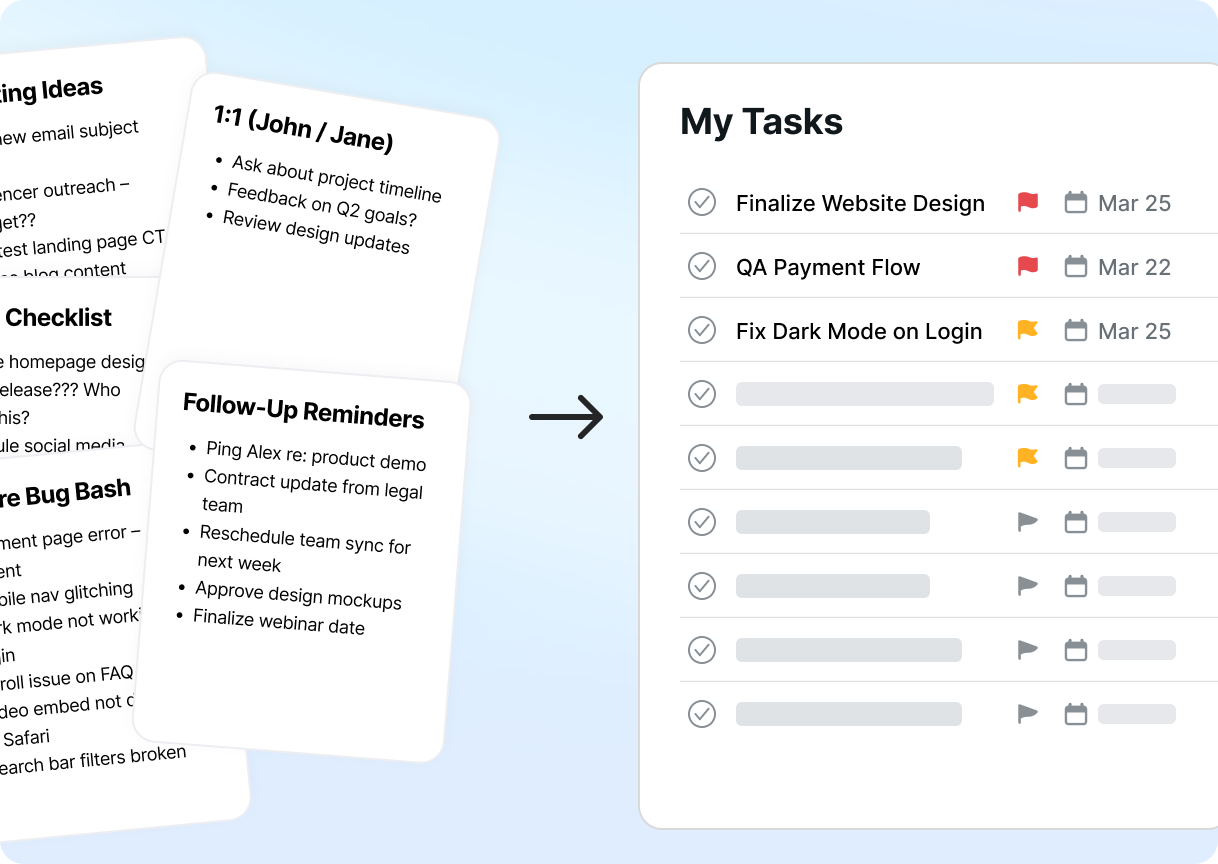
Motion has positioned itself as the heavyweight champion of AI planning. It's an all-in-one productivity powerhouse that combines calendar management, task scheduling, project management, meeting booking, and even AI-powered note-taking into a single platform.
The core premise is simple but powerful: tell Motion what you need to do, set your priorities and deadlines, and let the AI build your entire schedule automatically. When something changes—a meeting gets added, a task takes longer than expected, or you need to reschedule—Motion instantly reorganizes your entire day to accommodate the shift.
What makes Motion unique is its aggressive approach to automation. This isn't a gentle suggestion system; Motion takes control of your calendar and manages it for you. For some people, that's liberating. For others, it feels like giving up too much control.
What Was Great
- Motion's automatic scheduling is genuinely impressive. I tested it by throwing 30 tasks with various deadlines into the system, and within seconds, Motion had organized my entire week. It considered my working hours, meeting buffers, and task priorities to create a realistic schedule that actually felt achievable.
- The rescheduling capability is where Motion truly shines. During my testing, I had an unexpected two-hour meeting added to my Wednesday morning. Motion immediately reorganized 15 different tasks across three days to accommodate it, ensuring nothing with a hard deadline got pushed too far. This happened automatically—I didn't touch anything.
- The meeting scheduler is another standout feature. Motion's booking links work similarly to Calendly, but with the added intelligence of understanding your task schedule. It won't let someone book a meeting during time you've blocked for critical work, which prevents the dreaded double-booking problem that plagues so many calendars.
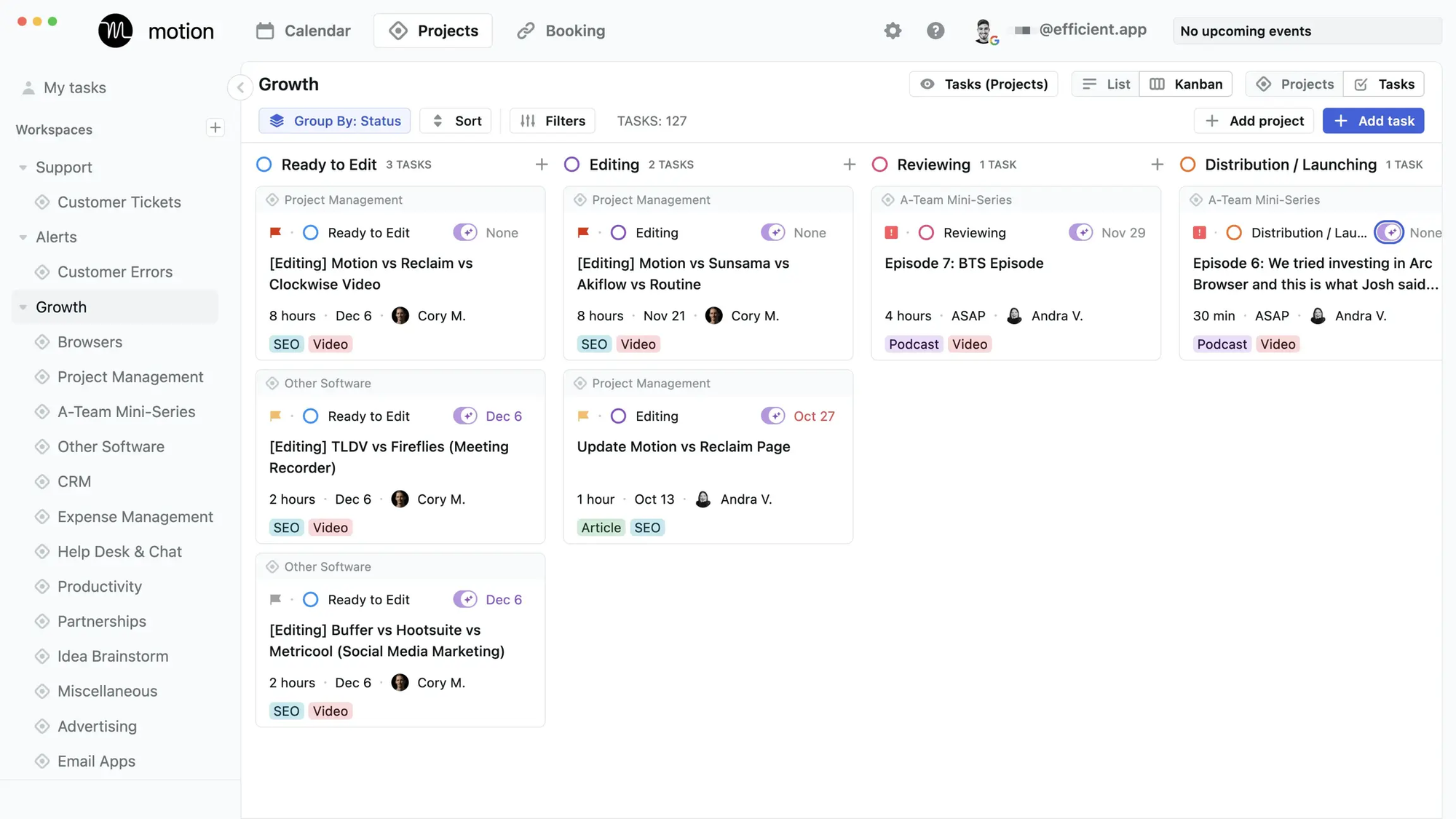
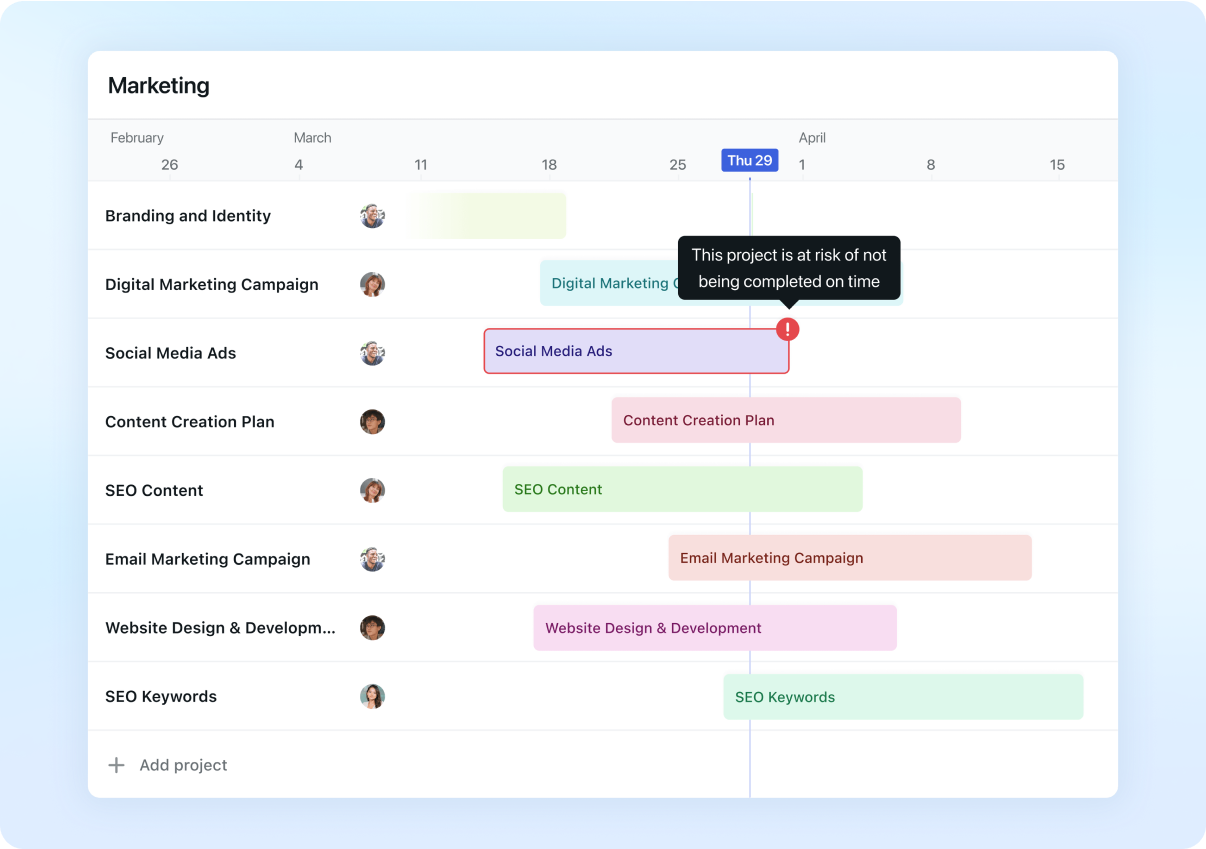
The project management features, while not as comprehensive as dedicated tools like Asana or Monday.com, are surprisingly capable. You can create projects, break them into tasks, assign priorities, and let Motion figure out when each piece needs to happen. For small teams or solo professionals managing multiple client projects, this integration of project planning with automatic scheduling is incredibly valuable.
Limitations
- Motion's biggest limitation is its learning curve. The first week with Motion felt overwhelming. There are schedules to set up, default work hours to configure, task templates to create, and a whole new way of thinking about your day to learn. The seven-day trial period barely scratches the surface of what Motion can do, which means you're essentially making a commitment before you've fully experienced the tool.
- The AI scheduling, while powerful, can feel rigid. Motion sometimes schedules tasks back-to-back without natural breaks, leading to calendar fatigue. Yes, there's a "breaks" feature you can enable, but it doesn't always work seamlessly. I found myself needing to manually adjust my schedule more often than I expected from a tool that promises automation.
- The interface is functional but not elegant. Compared to more design-focused tools like Sunsama, Motion feels utilitarian. The layout can feel cluttered when managing multiple projects, and the mobile app is notably limited compared to the desktop experience. If you do most of your planning on your phone, Motion probably isn't for you.
Motion also makes some assumptions about how you work that might not fit everyone. It assumes you want every minute of your day scheduled, that tasks should be broken down into specific time blocks, and that you're comfortable with AI making decisions about when you do things. If you prefer a more flexible, fluid approach to your day, Motion's rigidity might frustrate you.
Price
Motion operates on a premium pricing model with no free tier. Individual plans cost $34 per month when billed monthly or $19 per month when billed annually (totaling $228/year). Team plans start at $12 per user per month for annual billing (minimum 3 seats) or $20 per month for monthly billing.
The pricing is steep, especially compared to alternatives like Reclaim AI or Trevor AI. However, Motion argues that you're getting multiple tools in one—calendar, task manager, project manager, meeting scheduler, and note-taking app. If Motion genuinely saves you even an hour per week, the cost becomes justifiable for many professionals.
Motion offers a 7-day free trial, though as mentioned, this doesn't give you enough time to fully evaluate the tool. Some users report that the price discrepancy between monthly ($34) and annual ($19) feels manipulative, essentially forcing you into an annual commitment to get reasonable pricing.

My Take
Motion is the power user's AI planner. If you manage complex projects, juggle multiple clients, or have a schedule that changes constantly, Motion's aggressive automation can be genuinely transformative. I watched it handle scheduling complexity that would have taken me an hour to figure out manually.
However, Motion requires commitment—both financially and in terms of adapting your workflow. You can't just dip your toe in; you need to dive all the way in and trust the system. For people who like to maintain control over every detail of their schedule, Motion will feel suffocating.
I'd recommend Motion for: startup founders managing multiple projects simultaneously, freelancers juggling various client commitments, busy professionals who hate manual calendar management, and teams that need integrated project and time management.
I'd skip Motion if you prefer manual control over your schedule, work in a highly unpredictable environment where AI scheduling becomes more burden than help, or want a tool that emphasizes mindfulness and work-life balance over pure productivity optimization.
The bottom line: Motion is powerful but demanding. It can transform your productivity if you're willing to adapt to its way of working. Just be prepared for the learning curve and the premium price tag.
2. Reclaim AI: The Balanced Protector
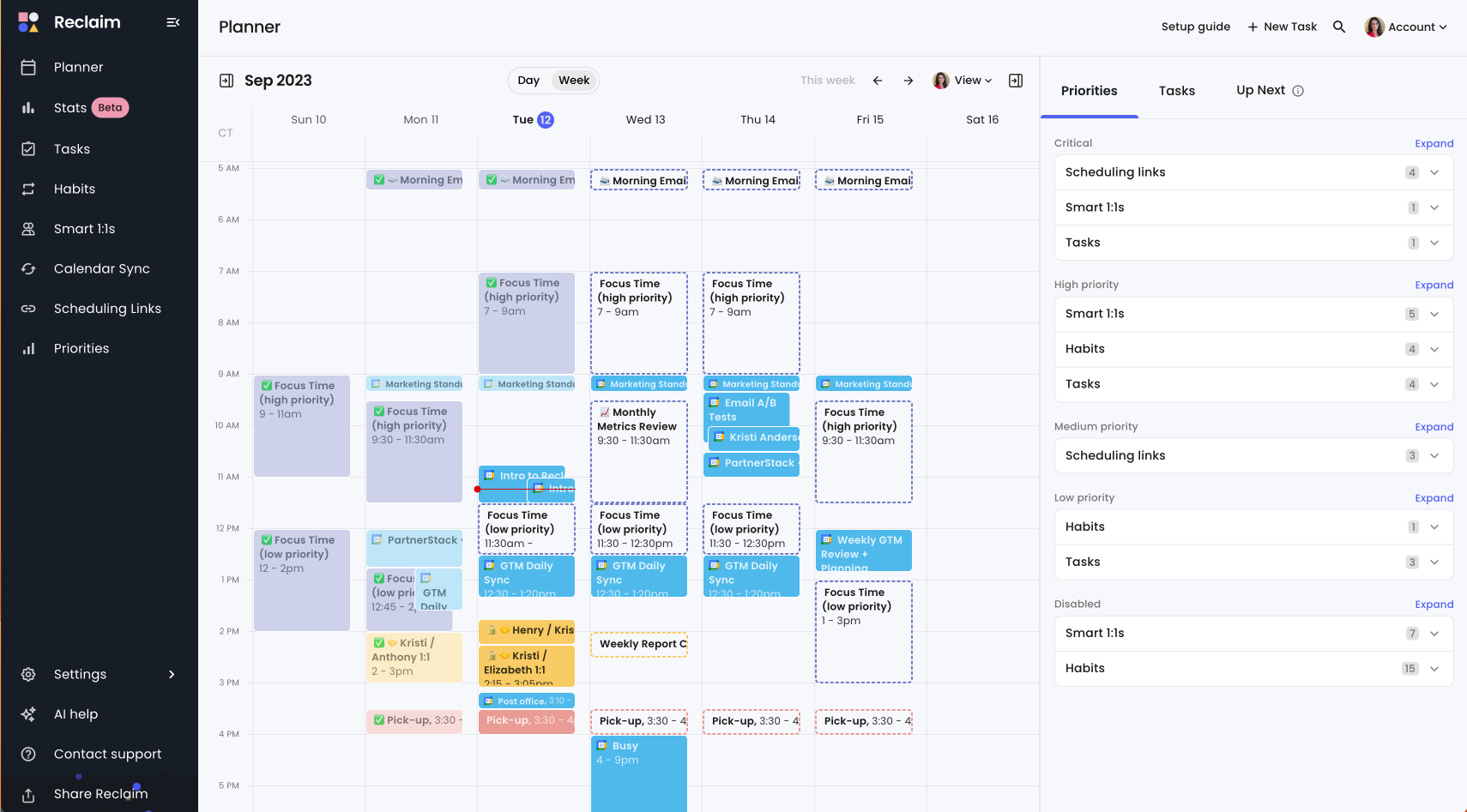
Reclaim AI takes a fundamentally different approach than Motion. Instead of aggressively scheduling every minute of your day, Reclaim focuses on protecting your time—specifically, defending blocks for focus work, habits, and personal activities while still maintaining flexibility for meetings and collaboration.
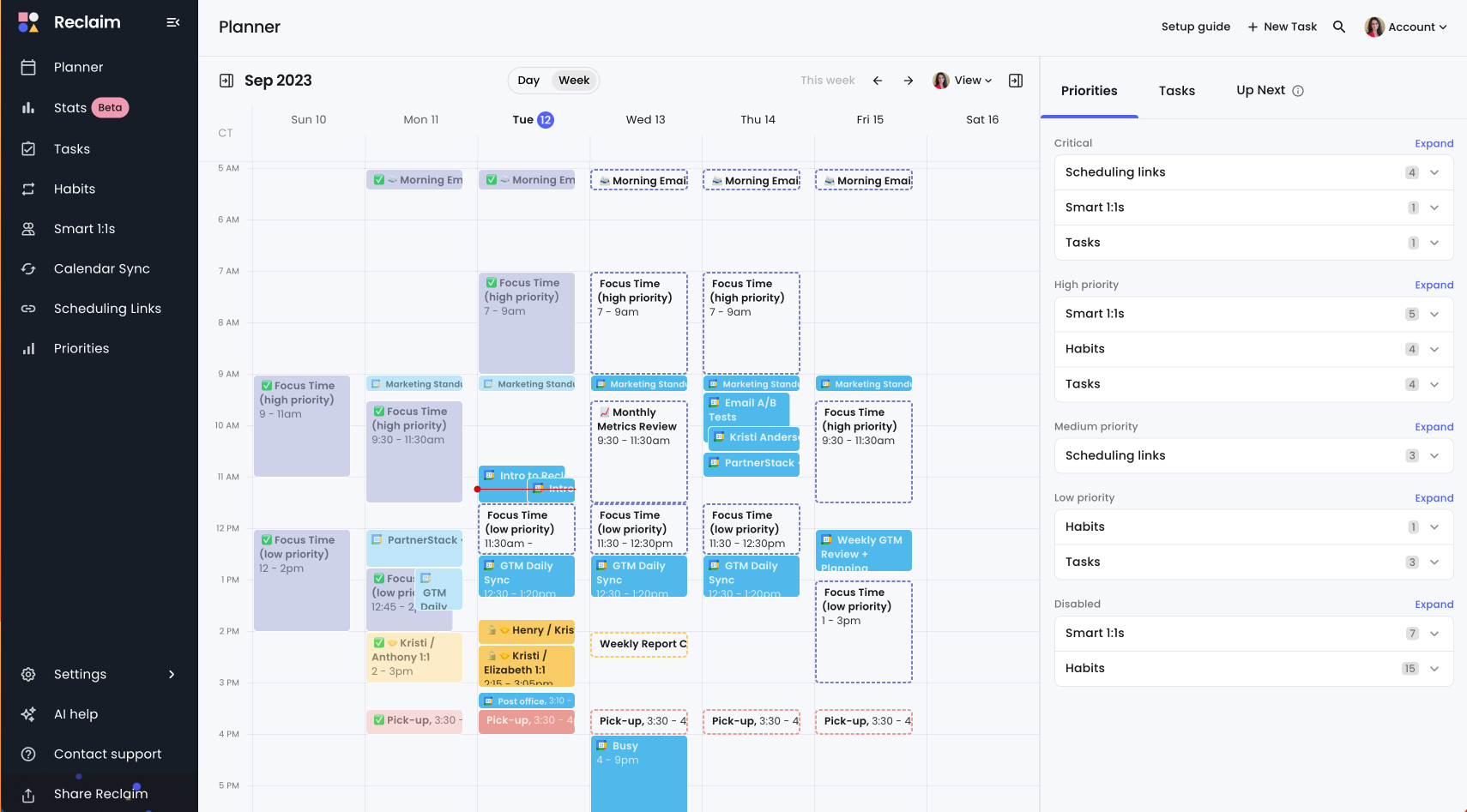
The core insight behind Reclaim is that most productivity problems aren't about doing more; they're about protecting time for what matters most. Reclaim integrates with Google Calendar and Outlook, analyzes your schedule, and automatically creates "flexible" time blocks for tasks, focus time, and recurring habits. These blocks are smart—they'll move around automatically when meetings need to be scheduled, but they ensure you always have time reserved for important work.
Reclaim also offers intelligent meeting scheduling, task integration with tools like Asana and Todoist, and team analytics that show where time is actually being spent. It's designed primarily for teams, with features that help ensure everyone has enough focus time and work-life balance is maintained.
What Was Great
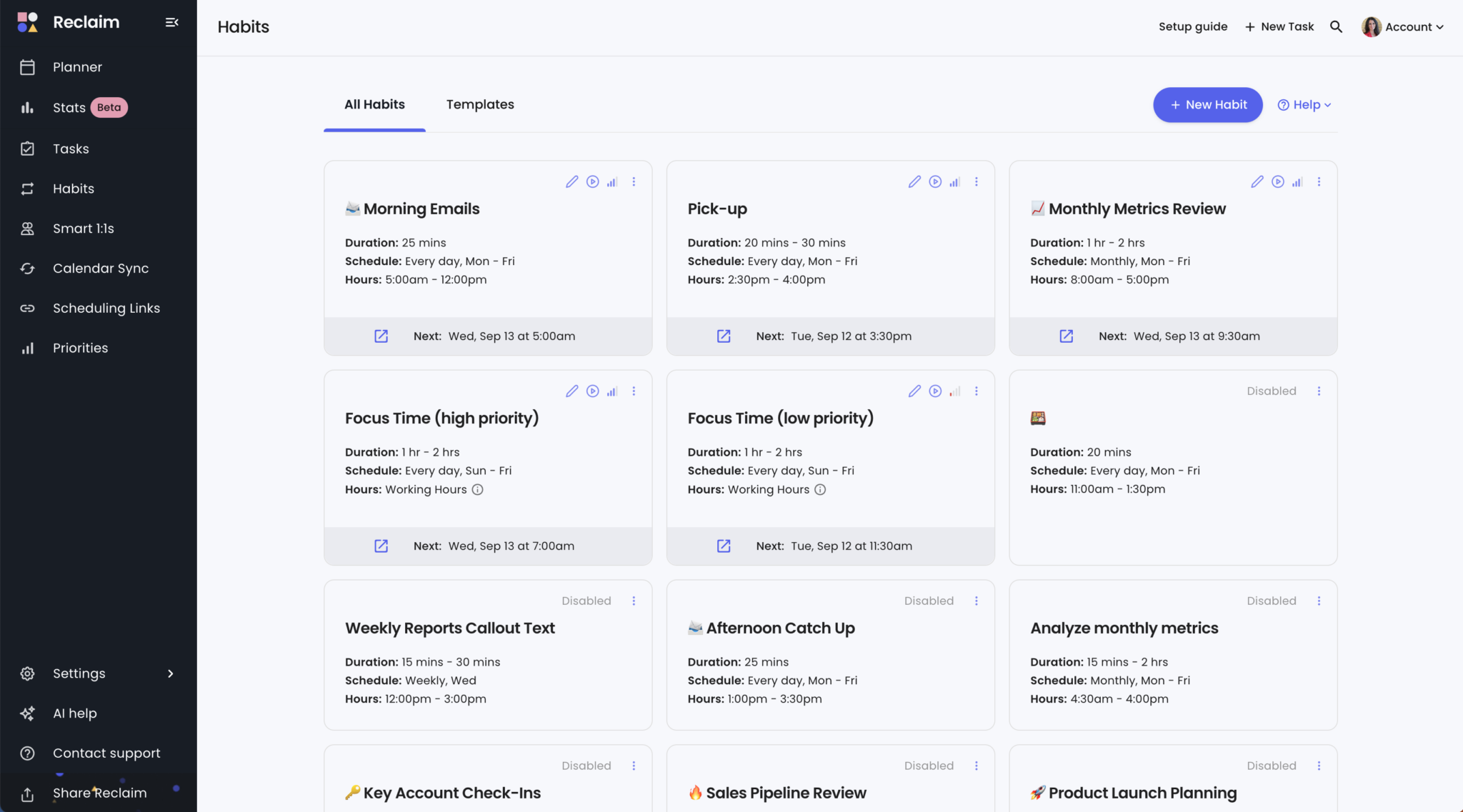
Reclaim's focus time protection is brilliant. You set a weekly goal—say, 15 hours of focus time—and Reclaim automatically finds and defends blocks in your calendar. What makes this special is the flexibility: these blocks aren't rigid. When someone needs to schedule a meeting, Reclaim will automatically move your focus time to another slot. You don't lift a finger; it just handles it.
The habits feature is unexpectedly powerful. I set up recurring "habits" for lunch (12-1pm daily), gym time (Tuesdays and Thursdays, 6-7pm), and my weekly planning session (Friday afternoons). Reclaim ensures these activities always have time in my schedule, automatically working around meetings and other commitments. This feature alone helped me maintain work-life boundaries that typically disappeared during busy weeks.
The integration with task management tools is seamless. I connected Reclaim to my Todoist account, and my tasks appeared automatically in my calendar with time blocks assigned based on due dates and priorities. When I completed tasks in Todoist, they disappeared from my calendar. When tasks took longer than expected, Reclaim automatically rescheduled the remaining items.
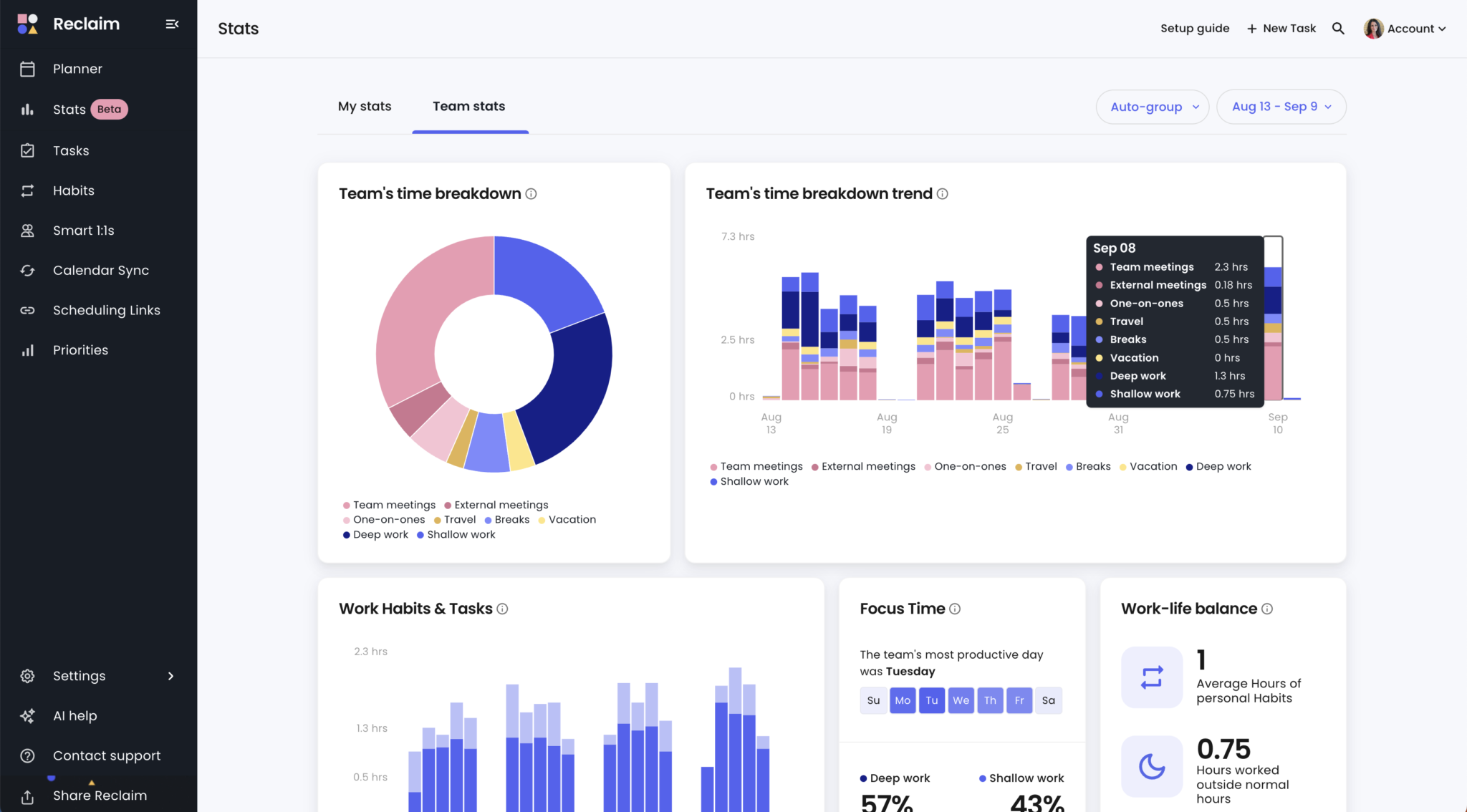
The team features set Reclaim apart. Managers can see aggregated data about how their team's time is distributed—how many hours in meetings versus focus work, who's at risk of burnout from over-scheduling, and where inefficiencies exist. This visibility is invaluable for improving team productivity without micromanaging individual schedules.
Limitations
Reclaim's biggest weakness is that it currently works primarily with Google Calendar, though Outlook support is improving. If you're deeply embedded in the Microsoft ecosystem, you might encounter occasional sync issues or feature limitations.
The rescheduling operates on a daily cycle, meaning changes don't happen instantly. If an urgent meeting gets added, Reclaim might not reorganize your schedule until its next daily refresh. This can feel slow compared to Motion's real-time adjustments, especially when you're dealing with rapidly changing priorities.
Reclaim doesn't handle tasks directly—it's primarily a calendar automation tool. You need another app (Todoist, Asana, ClickUp, etc.) for actual task management. This means an extra app in your workflow, which some people find cumbersome. It's a different philosophy than Motion's all-in-one approach.
The interface, while clean, isn't available as a native mobile app. Everything happens through web browsers and calendar integrations. For people who prefer dedicated mobile apps with rich features, this is a limitation. The mobile experience is functional but not as polished as desktop-first tools.
Some users report occasional notification quirks and sync delays, particularly when working with complex scheduling scenarios. While these issues are being addressed, they can be frustrating when they occur.
Price
Reclaim AI operates on a freemium model, which makes it accessible for testing and solo use. The pricing structure for 2025 is:
Lite Plan (Free): Includes basic smart scheduling, up to 2 connected calendars, 3 habits, 1 scheduling link, task scheduling with a 3-week planning range, and basic analytics. This is perfect for individuals wanting to test AI scheduling without commitment.
Starter Plan ($8/user/month annual): For small teams up to 10 users. Adds unlimited calendars, unlimited habits, 3 scheduling links, integration with project management tools, advanced analytics, and up to 12-week scheduling range.
Business Plan ($12/user/month annual): For teams up to 100 users. Includes everything in Starter plus unlimited scheduling links, team analytics, people analytics, and enhanced meeting controls.
Enterprise Plan ($18/user/month annual): For large organizations needing SSO, SCIM provisioning, dedicated support, and unlimited users.
The free tier is genuinely useful, not just a teaser. Many solo users stay on the free plan indefinitely. The paid tiers offer excellent value, especially compared to Motion's premium pricing.
My Take
Reclaim AI is the "smart but not pushy" option in the AI planner category. It enhances your existing workflow without demanding you completely overhaul how you work. The focus on protecting time rather than filling every minute represents a more balanced approach to productivity.
During my testing, Reclaim felt like it was working for me rather than making me work for it. The automatic habits scheduling alone justified using the tool—knowing that lunch, exercise, and planning time would always be protected gave me genuine peace of mind.
The free tier makes Reclaim a no-risk option to try. Even if you ultimately choose another tool, spending a few weeks with Reclaim will teach you a lot about where your time actually goes and how AI scheduling can benefit your workflow.
I'd recommend Reclaim AI for: teams wanting to improve collective productivity and work-life balance, individuals struggling with calendar clutter and overbooking, professionals who need focus time protection, anyone using Asana, Todoist, ClickUp, or Jira for task management, and people wanting to try AI scheduling without financial commitment.
I'd skip Reclaim if you want an all-in-one solution without additional task management apps, need real-time instant rescheduling for rapidly changing priorities, or prefer native mobile apps over web-based tools.
The bottom line: Reclaim AI offers the best balance of power and flexibility in the AI planner category. The generous free tier and reasonable paid pricing make it accessible, while the focus on time protection rather than aggressive scheduling creates a more sustainable productivity approach.
3. Trevor AI: The Visual Organizer
Trevor AI occupies an interesting middle ground in the AI planner landscape. It's less aggressive than Motion but more hands-on than Reclaim, offering a visual, time-blocking focused approach that gives you control while still leveraging AI for suggestions and optimization.
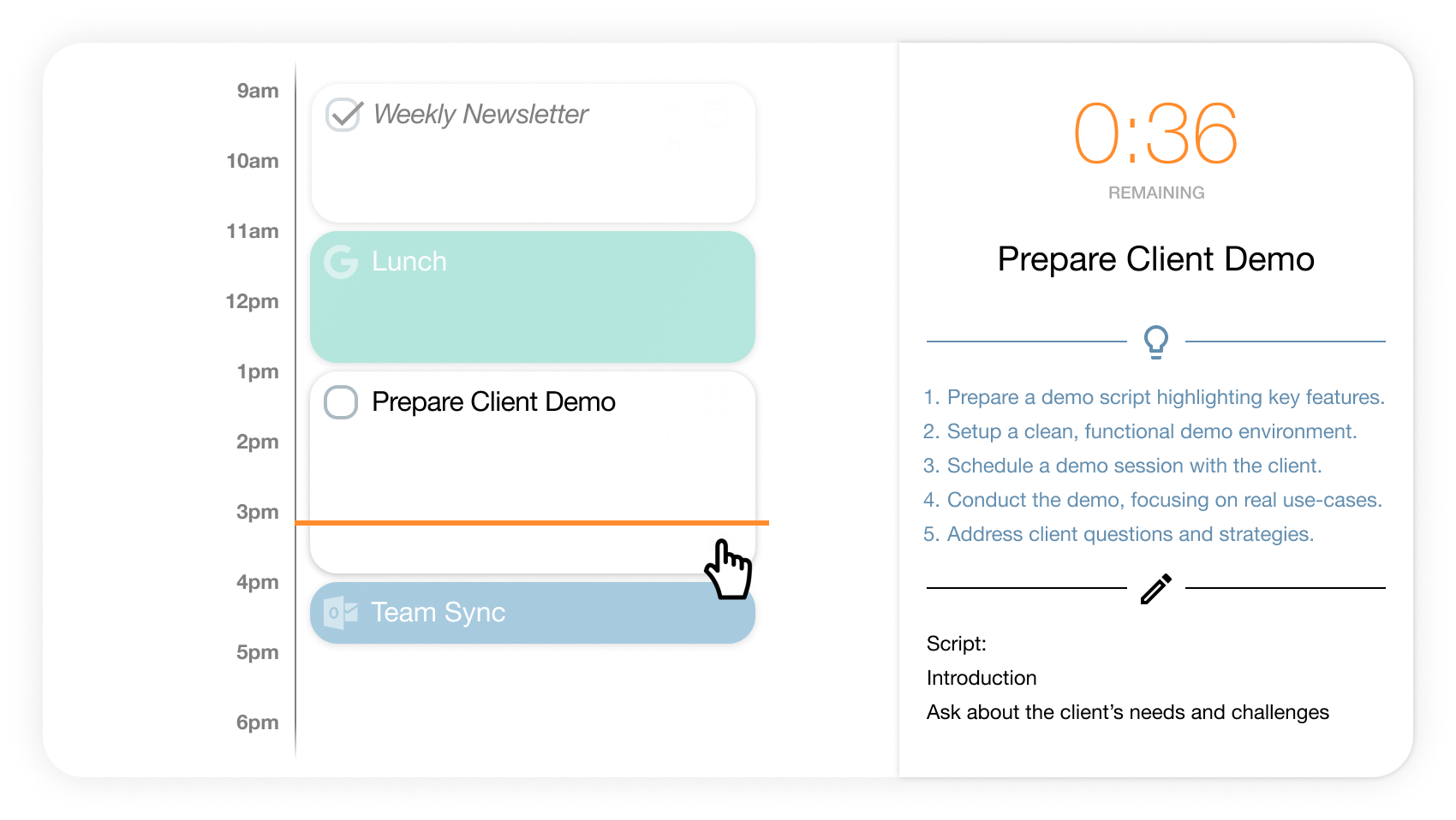
Trevor's philosophy centers on the "Task Hub"—a unified view of all your tasks from multiple sources (Google Calendar, Outlook, Todoist, Microsoft To Do) combined with Trevor's own task list. Each morning, you review your tasks, drag them into your calendar to create time blocks, and Trevor provides AI-powered suggestions for optimal scheduling based on your historical patterns.
The standout feature is Focus Mode, which breaks tasks into actionable steps and provides a distraction-free environment with built-in timers. It's designed for people who want AI assistance without giving up manual control.
What Was Great
- The visual time-blocking interface is intuitive and satisfying. Dragging tasks into your calendar creates a concrete plan that feels achievable. Unlike Motion, which does everything automatically, or Sunsama, which emphasizes ritual and reflection, Trevor gives you direct control while making it easy to visualize your day.
- The Task Hub successfully consolidates tasks from multiple sources. During testing, I had tasks from Todoist, Google Tasks, and Trevor's native list all visible in one place. This eliminated the mental overhead of checking multiple apps to know what needed doing.
- The AI scheduling suggestions are helpful without being pushy. Trevor analyzes your work patterns—when you typically complete certain types of tasks, how long they usually take—and suggests optimal time slots. But you're free to ignore these suggestions and schedule things your way. This balance of AI assistance and human control felt comfortable.
- Focus Mode creates genuine productivity improvements. Breaking a large task into steps (Trevor helps with this using AI) and then working through them with the built-in Pomodoro timer kept me on track during deep work sessions. The interface dims everything except the current task, reducing distractions effectively.
- The auto-scheduling feature (called "Smart Scheduling") is available for users who want more automation. It's not as comprehensive as Motion, but it handles the basics of fitting tasks into available time slots based on priorities and deadlines.
Limitations
Trevor AI suffers from an identity crisis. It's trying to be a visual planner like Sunsama, an AI scheduling tool like Motion, and a task manager like Todoist—all at once. This middle-ground approach means it doesn't excel at any single thing the way specialized tools do.
The AI coaching and suggestions, while present, aren't as sophisticated as Motion or Reclaim. Trevor learns from your patterns, but the suggestions often felt generic rather than genuinely personalized to my work style. After weeks of use, I expected more intelligent recommendations.
- There's no offline mode, which became frustrating during travel. If you're on a plane or in an area with spotty internet, Trevor is essentially unusable. This is a surprising limitation in 2025 for a productivity app.
- Occasional sync issues with external calendars and task apps disrupted my workflow. Most of the time, integration worked smoothly, but when it didn't—such as when tasks from Todoist took several minutes to appear in Trevor—it created uncertainty about whether my task list was complete.
- The pricing, which I'll detail below, puts Trevor in an awkward position. It's more expensive than Reclaim but less feature-rich than Motion, making the value proposition unclear.
- Team collaboration features are minimal. Trevor is designed primarily for individuals, so if you need shared calendars, task assignments, or team coordination, you'll need additional tools.
Price
Trevor AI uses a tiered pricing model:
Lite Plan (Free): For personal use with limited AI features. Includes basic task management, calendar integration, and simple time-blocking. Up to 3 habits, basic analytics, and connection to one calendar.
Pro Plan (approximately $3.99/month): For freelancers and individuals wanting more AI features. Includes unlimited calendars, unlimited habits, AI scheduling suggestions, Focus Mode with advanced features, and task templates.
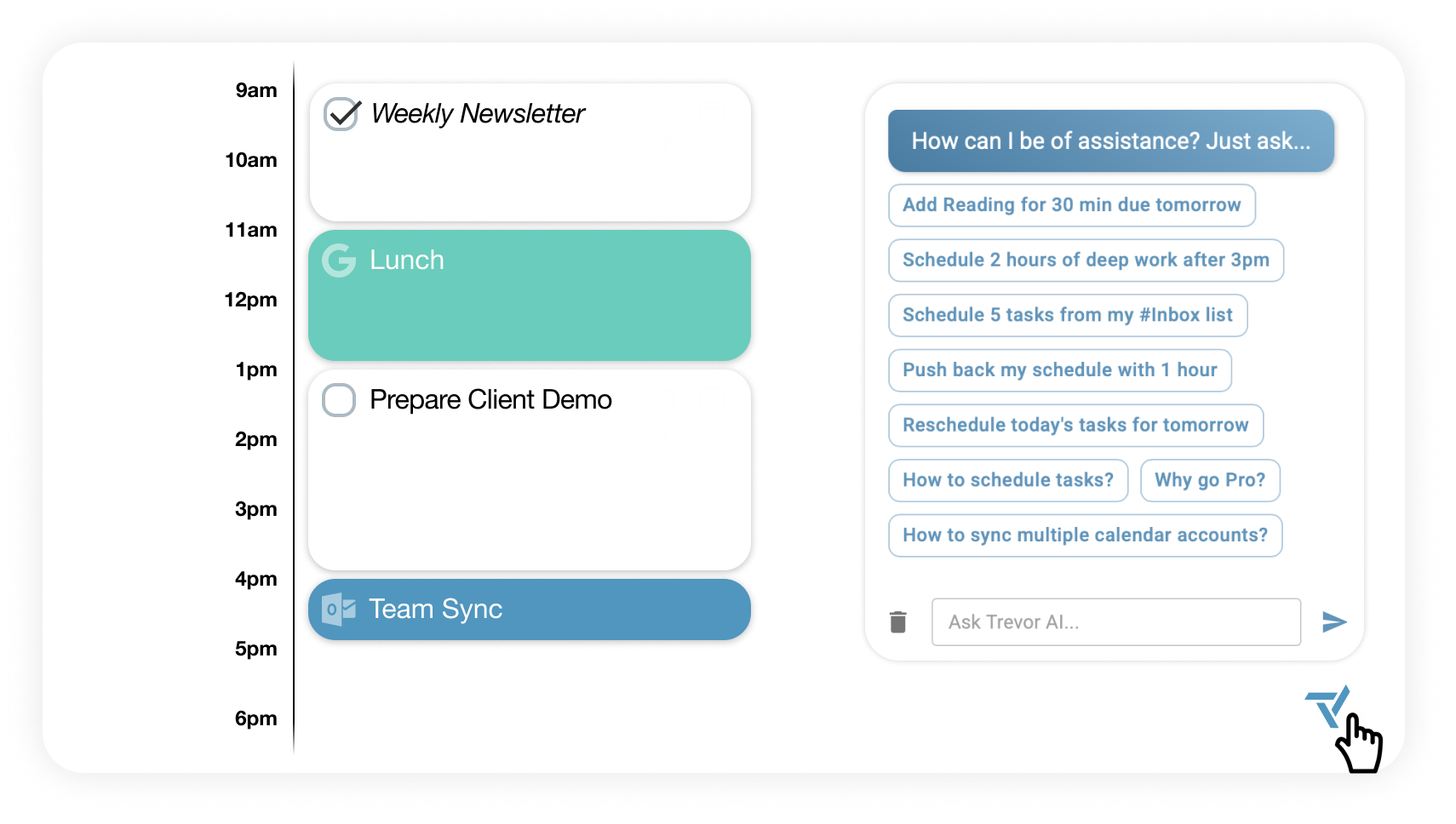
Executive Plan (approximately $7.99/month): For professionals needing full AI capabilities. Includes everything in Pro plus AI chat assistant for bulk scheduling, personalized scheduling advice, multiple project boards, and priority support.
Trevor offers significant discounts for annual billing—typically 25% off the monthly rate. The pricing is reasonable compared to Motion, but when compared to Reclaim's generous free tier, Trevor's limitations at the free level feel restrictive.
My Take
Trevor AI is the "Goldilocks" option—not too automated, not too manual, sitting somewhere in the middle. For people intimidated by Motion's aggressive control or frustrated by purely manual planners, Trevor offers a comfortable compromise.
During my testing, I appreciated Trevor most on days when my schedule was relatively stable. The visual time-blocking helped me see my day at a glance and make intentional decisions about how to spend my time. However, on chaotic days with constant changes, I found myself wishing for Motion's automatic rescheduling or just going back to manual calendar management.
Trevor is good at what it does—it just doesn't do anything exceptionally well. It's a jack-of-all-trades in a category where specialized masters (Motion for automation, Reclaim for habit protection, Sunsama for mindfulness) often provide more value.
I'd recommend Trevor AI for: individuals wanting to try time-blocking with AI assistance, people transitioning from manual planning to AI scheduling who want to maintain control, freelancers managing multiple small projects without complex dependencies, and anyone who finds Motion overwhelming and Reclaim too passive.
I'd skip Trevor if you want the most powerful AI automation available, need robust team collaboration features, work primarily offline or in low-connectivity environments, or prefer specialized tools that excel in specific areas.
The bottom line: Trevor AI is solid but unexceptional. It does many things reasonably well without doing anything remarkably well. The free tier is worth trying, but carefully evaluate whether the paid tiers offer enough value over alternatives before committing.
4. Sunsama: The Mindful Planner
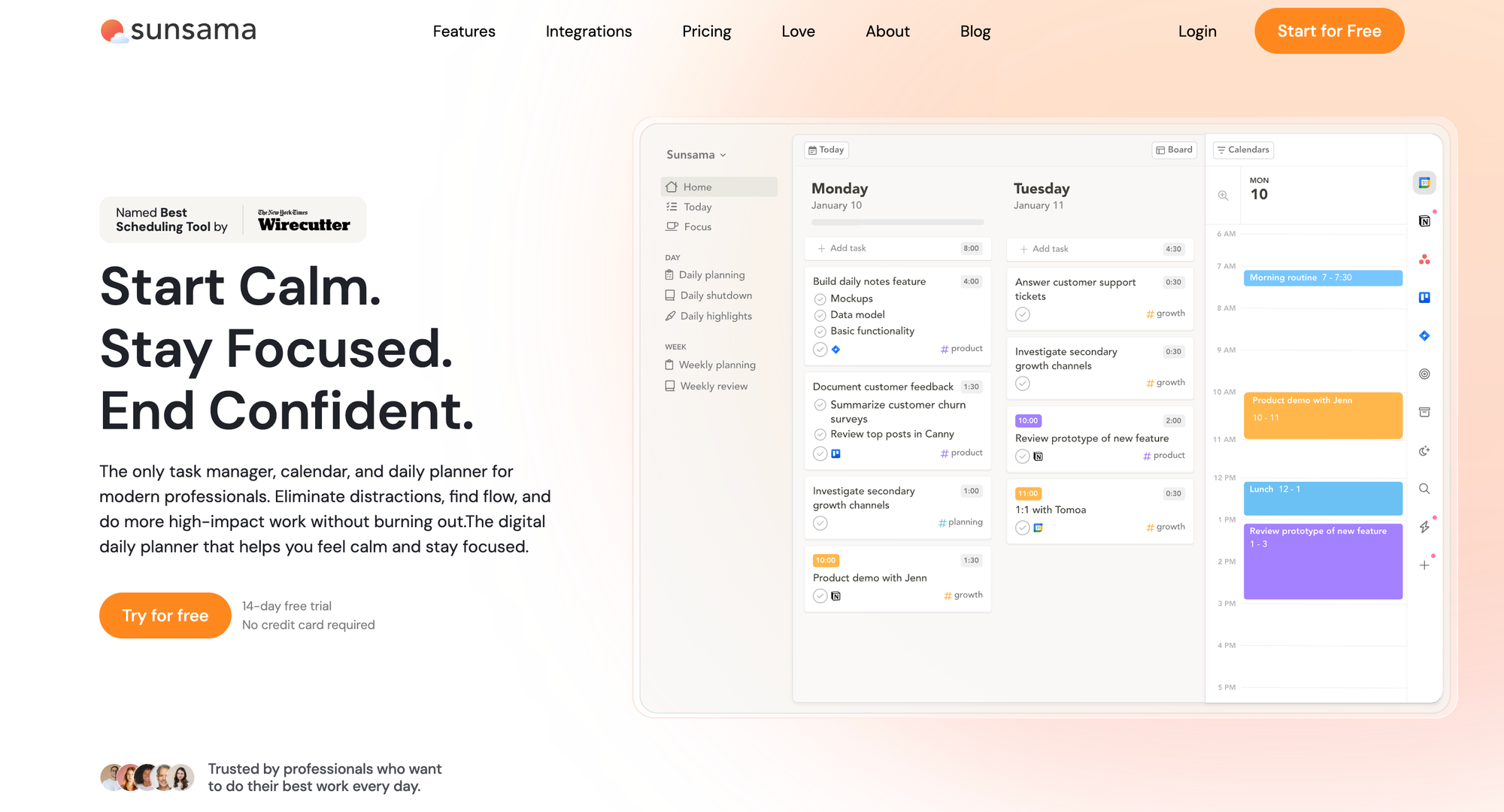
Sunsama represents a fundamentally different philosophy in the AI planner category. While Motion, Reclaim, and Trevor focus primarily on efficiency and getting more done, Sunsama emphasizes intentionality, sustainability, and work-life balance. It's not about maximizing every minute; it's about working on the right things without burning out.
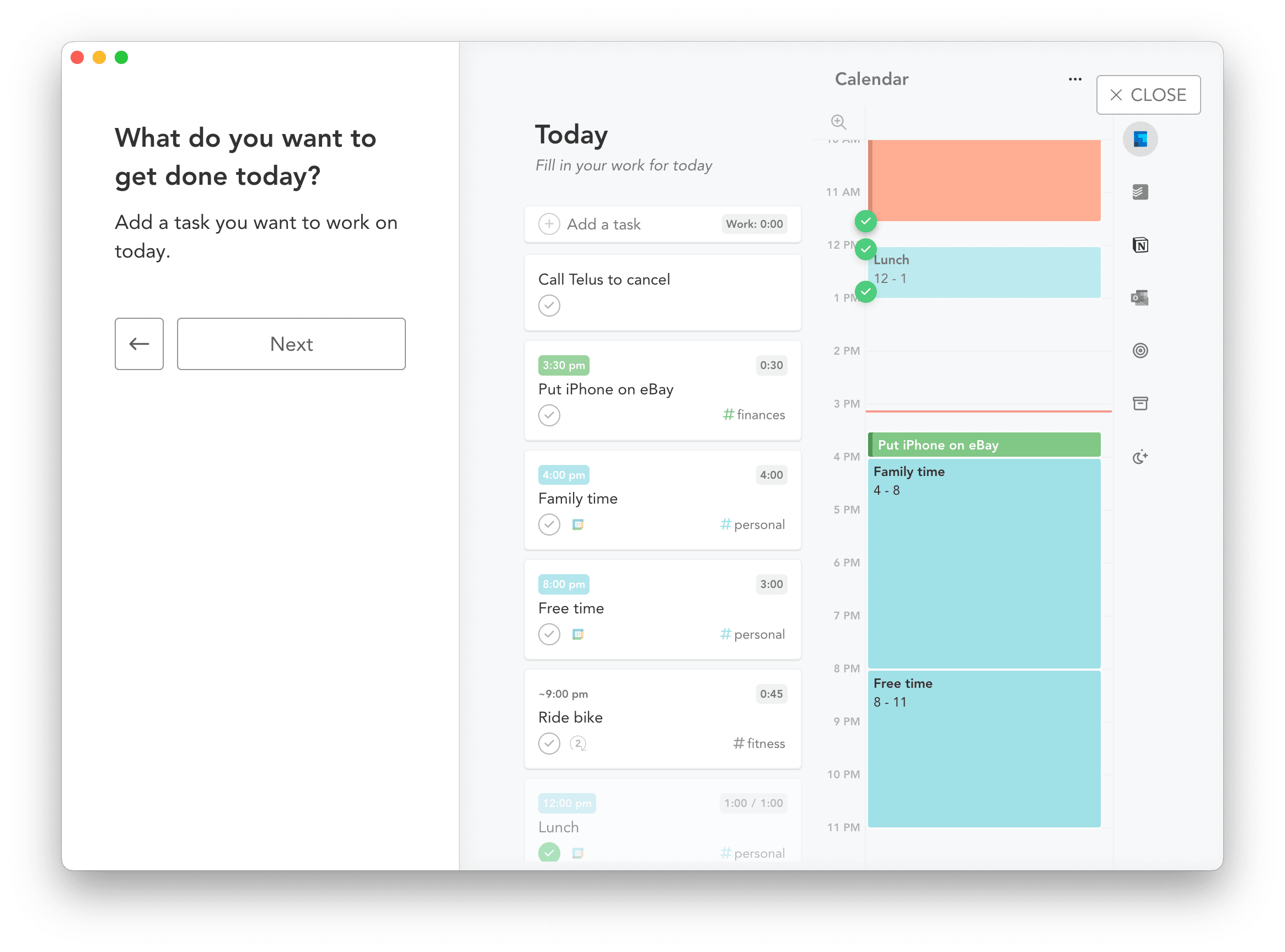
Sunsama describes itself as a daily planner for elite professionals, and the "elite" part isn't about working 80-hour weeks—it's about working deliberately. The app guides you through daily planning rituals, weekly reviews, and a daily "shutdown" routine that helps you close out your workday with intention.
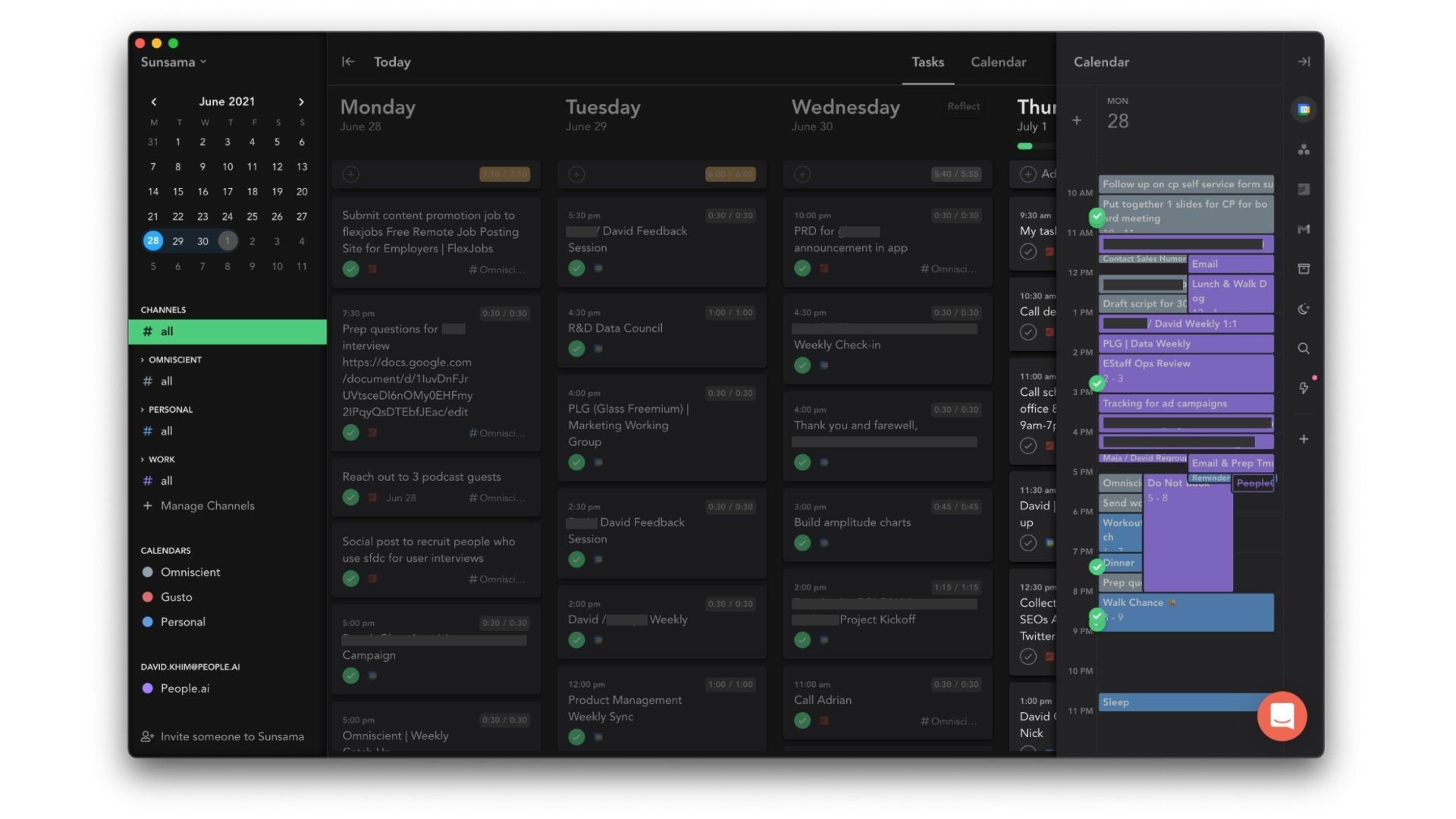
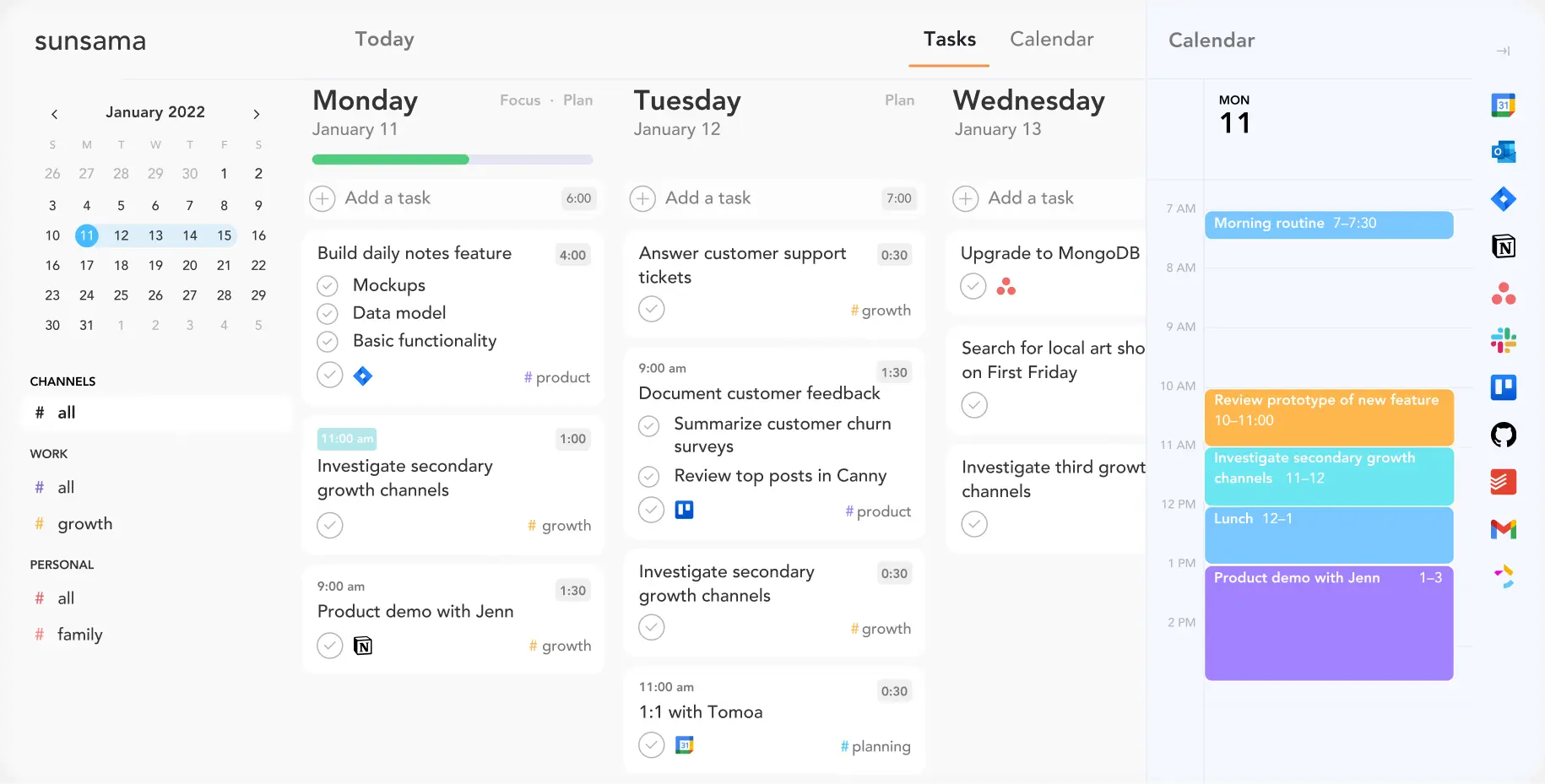
The workflow is simple: each morning, Sunsama prompts you to review your tasks, calendar, and objectives. You manually select what you'll focus on today (pulling tasks from Trello, Asana, Gmail, Todoist, etc.), time-box them in your calendar, and set realistic expectations. At day's end, you review what you accomplished and what carries over to tomorrow.
What Was Great
- The guided planning rituals are genuinely transformative. Every morning, Sunsama asks: "What's realistically possible today?" This simple question changed how I approached my workday. Instead of trying to cram 12 hours of work into 8 hours, I chose 5-6 meaningful tasks and actually completed them. The feeling of finishing my daily plan became more motivating than the old hamster wheel of endless to-dos.
- The integration ecosystem is impressive. Sunsama pulls tasks from Trello, Asana, ClickUp, Jira, Gmail, Slack, GitHub, and more. During testing, I dragged emails directly into my daily plan, converted Slack messages into tasks, and pulled Asana projects into my schedule—all seamlessly. This consolidation eliminated the mental overhead of checking multiple apps.
- Time-boxing with realistic estimates helps prevent over-scheduling. When adding tasks to your day, Sunsama asks how long each will take. If you try to schedule 14 hours of work into an 8-hour day, Sunsama gently warns you. This feature alone helped me develop more accurate intuition about time estimates.
- The daily shutdown ritual is brilliant. At day's end, Sunsama prompts you to review what you accomplished, reflect on how things went, and consciously close your workday. This creates a psychological boundary that prevents work from bleeding into personal time—a problem that plagues remote workers and entrepreneurs.
- Focus Mode with integrated Pomodoro timers creates distraction-free work sessions. The interface dims everything except your current task, and the timer keeps you accountable. I found this more effective than standalone Pomodoro apps because it's integrated directly into my planning system.
The interface is calm and beautiful. Unlike Motion's utilitarian design, Sunsama feels thoughtfully crafted. The aesthetic creates a sense of calm that reinforces the app's mindfulness philosophy.
Limitations
Sunsama's biggest limitation is the absence of powerful AI automation. While the app uses some AI for task suggestions and time estimates, it's fundamentally a manual planning tool. You drag tasks, set your own schedule, and make all the decisions. For people specifically wanting AI to automate their scheduling, Sunsama will feel disappointingly hands-on.
The price is the elephant in the room. At $20/month ($16/month annually), Sunsama costs more than Motion, Reclaim, Trevor, and many full-featured project management tools. There's no free tier—only a 14-day trial. For a daily planner that requires manual effort, this pricing feels steep.
Mobile apps, while functional, are limited. You can check your daily plan and mark tasks complete, but the full planning experience requires desktop or web. If you primarily work from your phone, Sunsama won't serve you well.
Team features are minimal. You can share your daily plan on Slack or Microsoft Teams, but there's no task assignment, project collaboration, or team analytics. Sunsama is designed for individual contributors, not team management.
The philosophical approach isn't for everyone. Sunsama wants you to slow down, plan intentionally, and work sustainably. If you thrive on the adrenaline of aggressive scheduling and maximizing output, Sunsama's mindfulness might feel frustrating rather than helpful.
The task rollover system has quirks. If you don't complete a task, it automatically moves to tomorrow. If a task rolls over four times, Sunsama archives it, assuming it's no longer important. This feature has caused users to forget about tasks that were still relevant but kept getting deprioritized.
Price
Sunsama operates on a premium single-tier model:
Monthly: $20 per user per month Annual: $16 per user per month (billed as $192 annually)
There's no free tier, only a 14-day free trial that doesn't require a credit card. All features are included—calendar integration, time tracking, focus mode, weekly reviews, analytics, and all integrations.
For teams, each additional user is billed separately at the same rate. There are no volume discounts for larger teams.
The pricing is high for a planner, especially one that requires significant manual effort. Sunsama justifies this cost by positioning itself as a premium tool for professionals serious about sustainable productivity. The value proposition is essentially: if preventing burnout and achieving work-life balance is worth $16-20/month to you, Sunsama delivers.
My Take
I genuinely love Sunsama's philosophy, even if I struggle with the pricing. After weeks of testing Motion's aggressive automation and dealing with the stress of hyper-scheduled days, Sunsama felt like a deep breath.
The mindful planning approach works, but it requires discipline. You must commit to the morning planning ritual, the daily shutdown, and the weekly review. If you skip these—which is easy to do during busy weeks—Sunsama becomes just an expensive calendar with task integration.
What surprised me most was how much the daily shutdown ritual improved my work-life boundaries. Having a formal "end of workday" routine created psychological closure that prevented 8pm "just checking email" sessions. For remote workers and entrepreneurs struggling with work-life balance, this feature alone might justify the cost.
However, I can't ignore that Sunsama costs $192-240 annually for a tool that doesn't use sophisticated AI automation. You're paying for philosophy, design, and guided workflows rather than cutting-edge technology. That value proposition works for some people but not others.
I'd recommend Sunsama for: professionals struggling with burnout and overwork, individuals who value mindful planning over pure efficiency, remote workers needing better work-life boundaries, people with ADHD who benefit from structured routines, and anyone pulling tasks from multiple tools (Asana, Trello, Todoist, Gmail) who wants one unified daily view.
I'd skip Sunsama if you want powerful AI automation for scheduling, need robust team collaboration features, prefer working primarily on mobile devices, aren't willing to commit to daily planning rituals, or find the pricing unjustifiable for a manual planning tool.
The bottom line: Sunsama is the premium, mindfulness-focused option in a category dominated by automation. It's excellent at what it does, but what it does is fundamentally different from Motion, Reclaim, or Trevor. The high price is either a complete deal-breaker or totally justified depending on how much you value intentional, sustainable productivity.
How to Choose the Right AI Planner
After testing all these tools, here's my honest framework for choosing:
Choose Motion if: You manage complex projects with many moving parts, want maximum automation with minimal manual work, can afford the premium price and are willing to commit annually, thrive on structure and don't mind giving up some control, and need an all-in-one solution replacing multiple tools.
Choose Reclaim AI if: You want to protect focus time and prevent over-scheduling, work within Google Calendar (or Outlook), use task managers like Todoist, Asana, or ClickUp, prefer AI assistance without aggressive control, want to try AI planning for free before committing, or manage a team and need time analytics.
Choose Trevor AI if: You're new to time-blocking and want visual planning, like having manual control with AI suggestions available, need something between Motion's automation and Sunsama's manual approach, work primarily as an individual contributor, and want a moderately priced option.
Choose Sunsama if: You struggle with burnout and overwork, value mindful planning over pure efficiency, pull tasks from multiple tools and want unified planning, benefit from structured daily rituals, can justify the premium price for work-life balance, and work primarily on desktop/web rather than mobile.
Comparison Table
| Category / Tool | Motion | Reclaim AI | Trevor AI | Sunsama |
|---|---|---|---|---|
| Overall Philosophy | Aggressive automation that fully controls your schedule | Protects and defends focus time while staying flexible | Visual time-blocking with light AI support | Mindful, intentional planning with emphasis on sustainability |
| Best For | Power users with complex projects and constant changes | Teams & individuals needing balance, time protection, and free entry point | Individuals wanting visual planning with optional AI | Professionals seeking calm, structure, boundaries, and burnout prevention |
| Automation Level | ⭐⭐⭐⭐⭐ Full automatic scheduling & rescheduling | ⭐⭐⭐⭐ Smart flexible time protection | ⭐⭐⭐ AI suggestions + manual planning | ⭐ Minimal automation, mostly manual planning |
| Control Level | Low (AI controls most of your calendar) | Medium (AI assists, you retain control) | High (you control schedule; AI suggests) | Very high (you manually choose tasks & schedule) |
| Learning Curve | Steep | Mild | Mild to moderate | Moderate (routines required) |
| Scheduling Style | Full AI-driven auto-scheduling | Flexible blocks that move around meetings | Drag-and-drop time-blocking with suggestions | Manual daily planning with time-boxing |
| Task Management | Built-in project/task system | Requires external task apps | Built-in + imports | Imports only (manual selection) |
| Strengths | Unmatched automation, real-time rescheduling, powerful all-in-one workspace | Protects focus time, habit scheduling, great team analytics, valuable free tier | Intuitive visual planning, unified task hub, solid focus mode | Best guided rituals, calming interface, strong for work-life balance |
| Weaknesses | Rigid, overwhelming, pricey, utilitarian UI, weak mobile | Slower rescheduling, relies on external task managers, limited mobile | Not exceptional at anything, limited team features, no offline mode | Expensive, manual heavy, no free tier, limited mobile, minimal AI |
| Integrations | Calendar, tasks, PM tools, booking links | Google Calendar, Outlook, Todoist, Asana, ClickUp, Jira | Google Calendar, Outlook, Todoist, MS To Do | Trello, Asana, ClickUp, Gmail, Slack, Github, Todoist |
| Real-time Adjustments | Instant | Delayed (daily refresh) | Partial (not automatic) | Manual |
| Mobile Experience | Limited | Moderate (calendar-based) | Decent but online-only | Limited; desktop-first |
| Team Features | Good (projects + scheduling) | Excellent (team analytics, habit protection) | Minimal | Minimal |
| Pricing | $34/mo monthly or $19/mo annual; premium only | Free tier; paid $8–$18/user/mo | Free; $3.99–$7.99/mo | $20/mo or $16/mo annually; no free tier |
| Best For You If… | You want maximum automation, handle complex workloads, and prefer an all-in-one tool | You want balance, flexibility, focus protection, and excellent value | You want manual time-blocking with light AI help | You want mindful planning, sustainable workflow, and burnout prevention |
| Avoid If… | You want flexibility or dislike losing control | You want full automation or native task management | You need strong team features or offline access | You want AI automation or find manual planning tedious |
| Bottom Line | The most powerful but demanding AI planner | The best balance of automation and flexibility; best value | A “middle path” tool—not too automated, not too manual | The premium mindfulness option for sustainable work habits |
The Honest Truth About AI Planners
After months of testing, here's what I've learned: AI planners work, but they're not magic. They won't fix poor time estimation, unclear priorities, or saying yes to too many commitments. What they will do is handle the logistical overhead of scheduling, give you visibility into where your time goes, and create structure that helps you work more intentionally.
The best AI planner isn't the one with the most features—it's the one that matches how you naturally work. If you're a control-focused person, Motion's aggressive automation will drive you crazy. If you're disorganized and overwhelmed, Reclaim's gentle suggestions won't be enough. If you don't commit to rituals, Sunsama is just an expensive calendar.
My recommendation for most people? Start with Reclaim AI's free tier. It provides enough AI assistance to understand whether this category of tools benefits your workflow without requiring financial commitment. Use it for two weeks, genuinely engaging with the features. If you love the concept but need more automation, try Motion. If you prefer more mindfulness and manual control, try Sunsama's 14-day trial. If you want visual time-blocking, try Trevor.
The tools have matured significantly in 2025, but they're still evolving. Features change, pricing shifts, and new capabilities emerge regularly. Any AI planner you choose today should be viewed as a tool you'll adapt to your needs, not a perfect solution that solves everything immediately.
FAQ
What is an AI planner and how does it work?
An AI planner is a productivity tool that uses artificial intelligence to automatically organize your schedule, tasks, and time. Unlike traditional calendars, AI planners analyze your work patterns, predict how long tasks will take, automatically schedule activities based on priorities and deadlines, and dynamically adjust your calendar when plans change. They learn from your behavior to optimize when you should work on specific tasks based on your energy levels and historical productivity patterns.
Which AI planner is best for automatic scheduling?
Motion is the best AI planner for automatic scheduling in 2025. It aggressively manages your entire calendar, automatically scheduling all tasks based on priorities, deadlines, and available time. When something changes (meetings added, tasks delayed), Motion instantly reorganizes your schedule. It costs $19-34/month and is ideal for professionals who want maximum automation with minimal manual planning.
Is there a free AI planner available?
Yes, Reclaim AI offers the best free AI planner option. The free Lite plan includes smart scheduling for tasks, up to 3 habits, 2 connected calendars, 1 scheduling link, and basic analytics. It's genuinely useful for individuals wanting to try AI scheduling without financial commitment. Trevor AI also offers a limited free tier, though with fewer features.
How much do AI planners cost?
AI planner pricing varies significantly:
- Reclaim AI: Free tier available, paid plans from $8-18/user/month
- Trevor AI: $3.99-7.99/month
- Motion: $19/month (annual) or $34/month (monthly)
- Sunsama: $16/month (annual) or $20/month (monthly)
Most offer free trials ranging from 7-14 days to test before committing.
Can AI planners help with work-life balance?
Yes, several AI planners specifically address work-life balance. Reclaim AI protects time for personal habits, lunch breaks, and focus time while preventing over-scheduling. Sunsama emphasizes mindful planning with daily shutdown rituals that create psychological boundaries between work and personal time. These tools help prevent burnout by encouraging realistic daily planning and sustainable work habits.
What's the difference between Motion and Reclaim AI?
Motion and Reclaim AI take different approaches:
Motion aggressively schedules every task automatically and handles project management, making all decisions about when you work on what. Best for people wanting maximum automation. Costs $19-34/month.
Reclaim AI focuses on protecting focus time and habits while maintaining flexibility, working alongside your existing task manager. Best for people wanting AI assistance without giving up control. Has a free tier and lower paid pricing ($8-18/month).
Do AI planners work with Google Calendar and Outlook?
Yes, all major AI planners integrate with Google Calendar and Outlook. Reclaim AI works primarily with Google Calendar but has improving Outlook support. Motion, Trevor AI, and Sunsama all support both Google Calendar and Outlook. Integration allows AI planners to sync your events, meetings, and scheduled tasks across platforms in real-time.
Which AI planner is best for ADHD?
Sunsama and Trevor AI are frequently recommended for ADHD. Sunsama provides structured daily rituals, visual time-boxing, and focus mode that create external structure and prevent overwhelm. Trevor AI offers visual planning with drag-and-drop task organization and Focus Mode that breaks large tasks into manageable steps. Both help with executive function challenges common in ADHD by providing clear structure and reducing decision fatigue.
Can AI planners integrate with project management tools?
Yes, most AI planners integrate with popular project management tools:
- Reclaim AI: Asana, Todoist, ClickUp, Jira, Linear
- Sunsama: Trello, Asana, ClickUp, Jira, GitHub, Todoist
- Motion: Built-in project management features
- Trevor AI: Todoist, Microsoft To Do
These integrations allow you to pull tasks directly into your AI-managed calendar.
Are AI planners worth the money?
AI planners are worth the investment if they save you significant time or prevent burnout. Users typically report reclaiming 5-10 hours per week through better scheduling and focus time protection. If an AI planner saves you even one hour per week, the cost ($8-34/month) becomes justifiable for most professionals.
Start with free options like Reclaim AI to test whether AI scheduling benefits your workflow before committing to paid tools. The value depends heavily on your work complexity—freelancers, entrepreneurs, and professionals with packed schedules see the most benefit.
What's the best AI planner for teams?
Reclaim AI and Motion are the best AI planners for teams:
Reclaim AI offers team analytics showing how time is distributed, helps coordinate meeting schedules, and ensures everyone has adequate focus time. More affordable at $8-12/user/month.
Motion provides team project management with task assignments and shared calendars. More comprehensive project features at $12-20/user/month for teams.
Can I use AI planners on mobile devices?
Mobile support varies by AI planner:
- Trevor AI and Sunsama offer dedicated iOS and Android apps, though desktop versions provide fuller functionality
- Motion has mobile apps but they're more limited than desktop
- Reclaim AI works primarily through web browsers and calendar integrations
For primarily mobile-based planning, Trevor AI or Sunsama provide the best mobile experiences.
Wrap up
The rise of AI planners represents a genuine shift in how we manage work. These tools aren't just incremental improvements over traditional calendars—they're fundamentally different ways of thinking about time, tasks, and productivity.
But here's what nobody tells you: the tool matters less than your commitment to using it consistently. I've seen people achieve amazing results with simple to-do lists because they used them religiously. I've also seen people fail with sophisticated AI planners because they never fully committed to the system.
If you're serious about improving your productivity in 2025, choose one tool, commit to it for at least a month, and genuinely engage with its philosophy and features. Don't tool-hop every week searching for the perfect solution. The perfect solution is the one you actually use.
For me, after all this testing, I've settled on Reclaim AI for daily calendar management combined with occasional use of Sunsama during particularly overwhelming periods when I need the mindful planning approach. That combination gives me automation when I need it and intentionality when I'm at risk of burnout.
Your ideal setup might be completely different. The beauty of 2025's AI planner landscape is that legitimate options exist for every work style and budget. The hard part isn't finding a good tool—it's being honest with yourself about what you actually need and will consistently use.
Start with the free trials. Test the workflows. Pay attention not just to features, but to how each tool makes you feel about your work. The right AI planner should reduce stress, not create new anxiety about whether you're using it "correctly."
And remember: the goal isn't to schedule every minute of every day. It's to create space for the work that matters, maintain boundaries that protect your wellbeing, and build a sustainable approach to productivity that you can maintain long-term. Any AI planner that helps you achieve those goals is worth considering, regardless of which one the internet says is "best."
The future of work isn't about doing more—it's about doing what matters with less friction. AI planners, when chosen and used wisely, can genuinely help us get there. Just don't expect them to solve problems that technology alone can't fix: unclear priorities, poor boundaries, and the fundamental human tendency to overcommit.
Choose your tool, commit to the system, and give yourself permission to work sustainably rather than maximally. That's the real productivity revolution, with or without AI.
Related Articles
 Dani
Dani
 Dani
Dani
 Mark
Mark