I'll be honest with you: I was skeptical about AI agents for a long time.
For years, I watched the hype cycle spin up around "autonomous AI" that would supposedly revolutionize everything. And for years, I was disappointed. The agents crashed. They hallucinated. They got stuck in loops. They cost a fortune and delivered frustration.
But something changed in 2025. And by early 2026, I found myself genuinely impressed, even a little amaze by what AI agents could actually accomplish without constant hand-holding.
The AI agent market hit $7.6 billion in 2025 and is projected to exceed $50 billion by 2030. About 85% of enterprises have now integrated AI agents into at least one workflow. This isn't hype anymore. This is happening.
But here's the problem: with hundreds of AI agent tools flooding the market, most people have no idea which ones actually work and which ones will waste their time and money. I've spent the last several months testing over 30 different AI agents across coding, automation, research, and general productivity. Some were remarkable. Many were mediocre. A few were downright terrible.
In this guide, I'm going to share everything I learned. Not the marketing fluff you'll find on product pages, but the real-world experience of using these tools day after day. I'll tell you which agents delivered genuine value, which ones fell short of their promises, and how to think about AI agents in a way that sets realistic expectations.
Let's get into it.
What Makes an AI Agent Different from a Chatbot?
Before we dive into specific tools, I want to make sure we're on the same page about what an AI agent actually is. This distinction matters because a lot of companies slap the "agent" label on glorified chatbots, and understanding the difference will save you from disappointment.
A chatbot responds to your prompts. You ask a question, it gives an answer. You ask another question, it gives another answer. The interaction is fundamentally reactive—the chatbot waits for you to tell it what to do at every step.
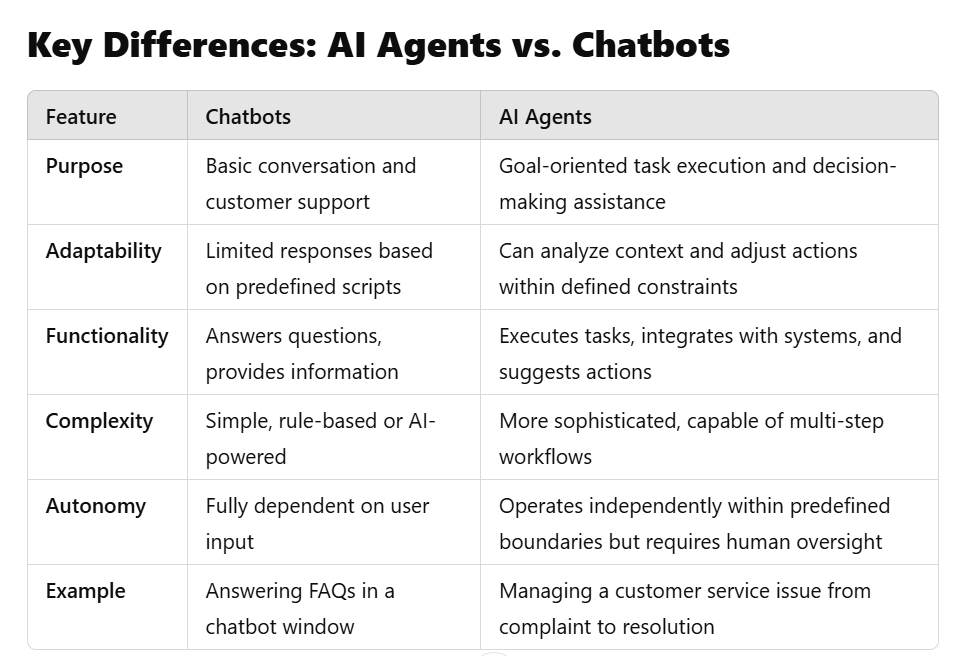
An AI agent, on the other hand, can pursue goals independently. You give it an objective, and it figures out how to accomplish that objective through a series of actions. It can browse websites, execute code, read files, call APIs, and make decisions about what to do next without asking you for permission at every turn.
Think of it this way: asking ChatGPT to help you research competitors is like having a conversation with a knowledgeable friend. Using an AI agent for the same task is like handing the project to an intern who goes away, does the work, and comes back with a finished report.
The key capabilities that separate true agents from chatbots include autonomous planning (breaking complex goals into actionable steps), tool use (interacting with external systems and applications), memory (maintaining context across sessions and tasks), and self-correction (recognizing errors and adjusting approach).
When I evaluate AI agents, I look for all four of these capabilities. Tools that only have one or two usually feel incomplete in practice.
The AI Agents That Actually Deliver Results
After extensive testing, I've identified several categories of AI agents that consistently perform well enough to recommend. Let me walk you through each category and the standout tools within them.
Coding Agents
If there's one area where AI agents have truly arrived, it's software development. By the end of 2025, roughly 85% of developers were regularly using AI tools for coding. The difference in 2026 is that these tools now plan, write, test, and debug entire features with minimal human input.
Claude Code has become my go-to for complex coding tasks that require understanding an entire codebase. It's Anthropic's terminal-based coding agent that runs locally on your machine, and the best way I can describe it is like having a senior developer who lives in your command line.
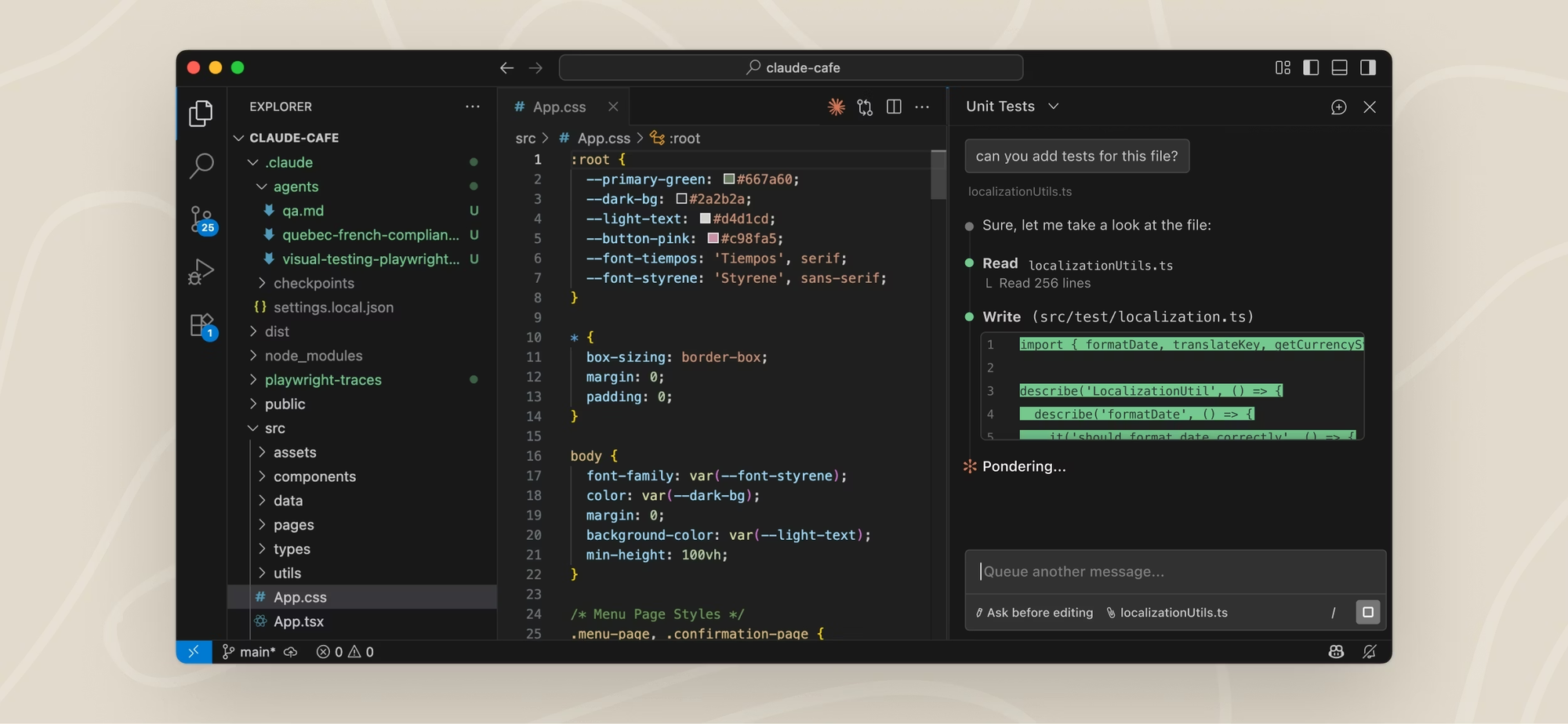
What sets Claude Code apart is its accuracy. Using Claude Opus 4.5, it achieves about 80.9% accuracy on the SWE-bench Verified benchmark, which is the highest of any model I've tested. When you need code that works on the first pass, Claude Code delivers. It generates correct code more consistently than competitors, which means fewer debugging cycles and less wasted time.
I've used Claude Code for large refactoring projects, writing test suites, generating documentation, and fixing bugs across multiple files. The workflow feels natural: you describe what you want in plain English, and the agent figures out which files to modify, what changes to make, and how to verify the results.
The pricing works out to roughly $20-100 per month depending on your usage tier. For professional developers, this is an easy investment to justify.
Cursor remains the most popular choice for developers who prefer working inside an IDE. It's built on VS Code, so it feels immediately familiar, but with AI capabilities deeply integrated into every aspect of the editing experience.
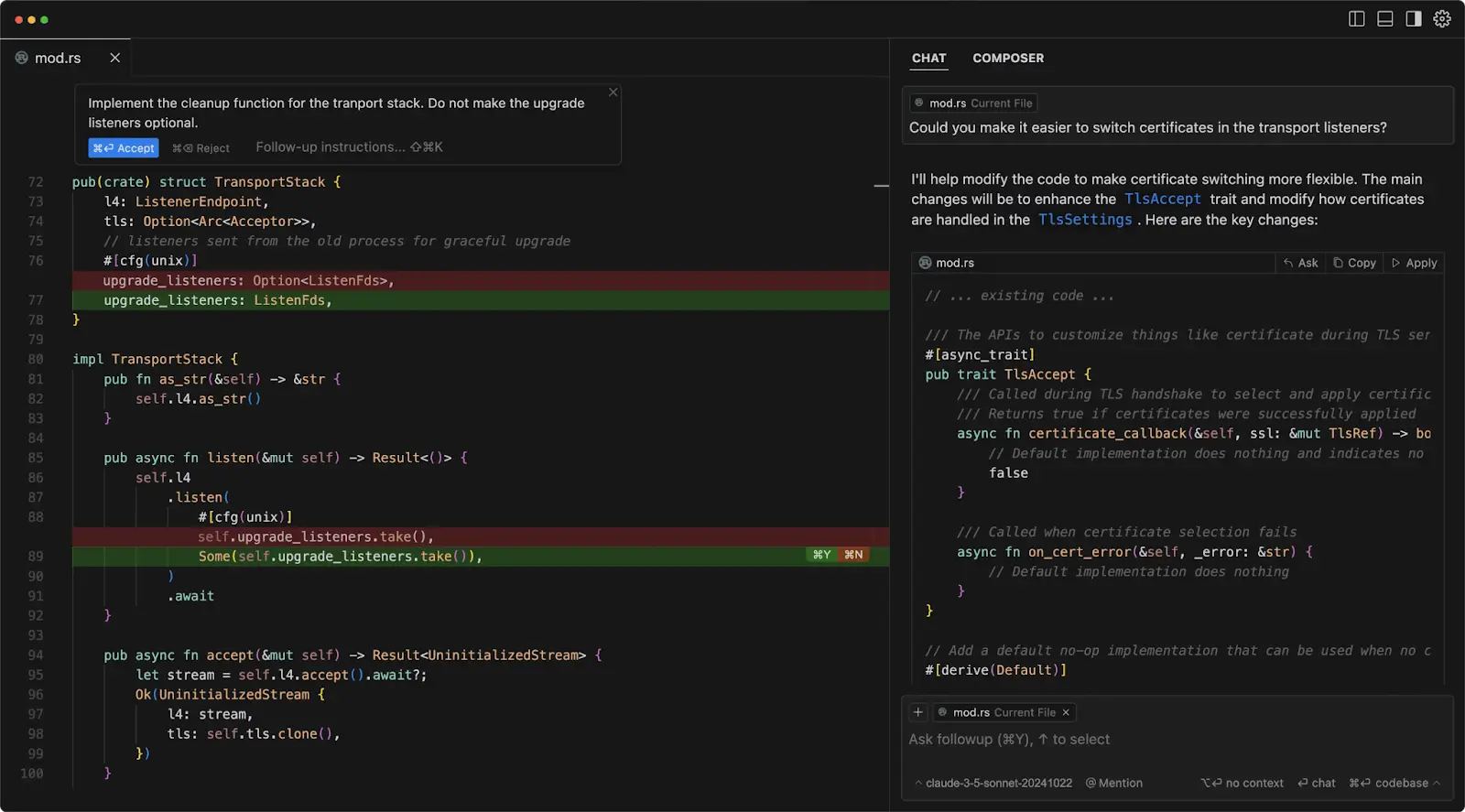
Cursor's main strength is flow. The autocomplete feels fast and responsive, chat lives directly inside the editor, and small-to-medium tasks like feature tweaks, refactors, tests, and bug fixes are handled with minimal friction. Many developers describe Cursor as the tool that just stays out of the way while quietly making them faster.
Where Cursor draws criticism is on larger, more complex changes. I've experienced issues with long-running refactors where the agent loses context or starts looping. The company also made a controversial switch to credit-based pricing that caught some users off guard with unexpected bills.
At $20 per month for the Pro plan, Cursor offers excellent value for individual developers. The free tier is generous enough to let you evaluate whether it fits your workflow.
GitHub Copilot has matured significantly and now includes an Agent Mode that can handle multi-file changes and complete features autonomously. For teams already embedded in the GitHub ecosystem, Copilot Pro+ at $39 per month offers remarkable value with access to multiple AI models including Claude Opus 4.5, GPT-5, and Gemini 3 Pro.
The integration with GitHub is seamless—you can go from an issue to a pull request without leaving the platform. For enterprise teams with security and compliance requirements, Copilot's Microsoft backing provides reassurance that smaller startups can't match.
I should mention Devin as well, though with some caveats. Marketed as the first fully autonomous AI software engineer, Devin operates in its own sandboxed environment with a shell, code editor, and browser. You assign tasks via Slack or their web app, and Devin works independently.
In practice, Devin works best for well-defined, repetitive tasks like migrations, bulk refactoring, or codebase cleanup. The $20 per month starting price is reasonable (down from $500 per month when it launched), but I'd skip it unless you have specific use cases that match its strengths. For general-purpose coding assistance, Claude Code or Cursor will serve you better.
Browser and Computer Use Agents
The ability for AI to control computers and browsers represents one of the most exciting developments in 2025-2026. These agents can navigate websites, fill out forms, extract information, and complete multi-step tasks that previously required human attention.
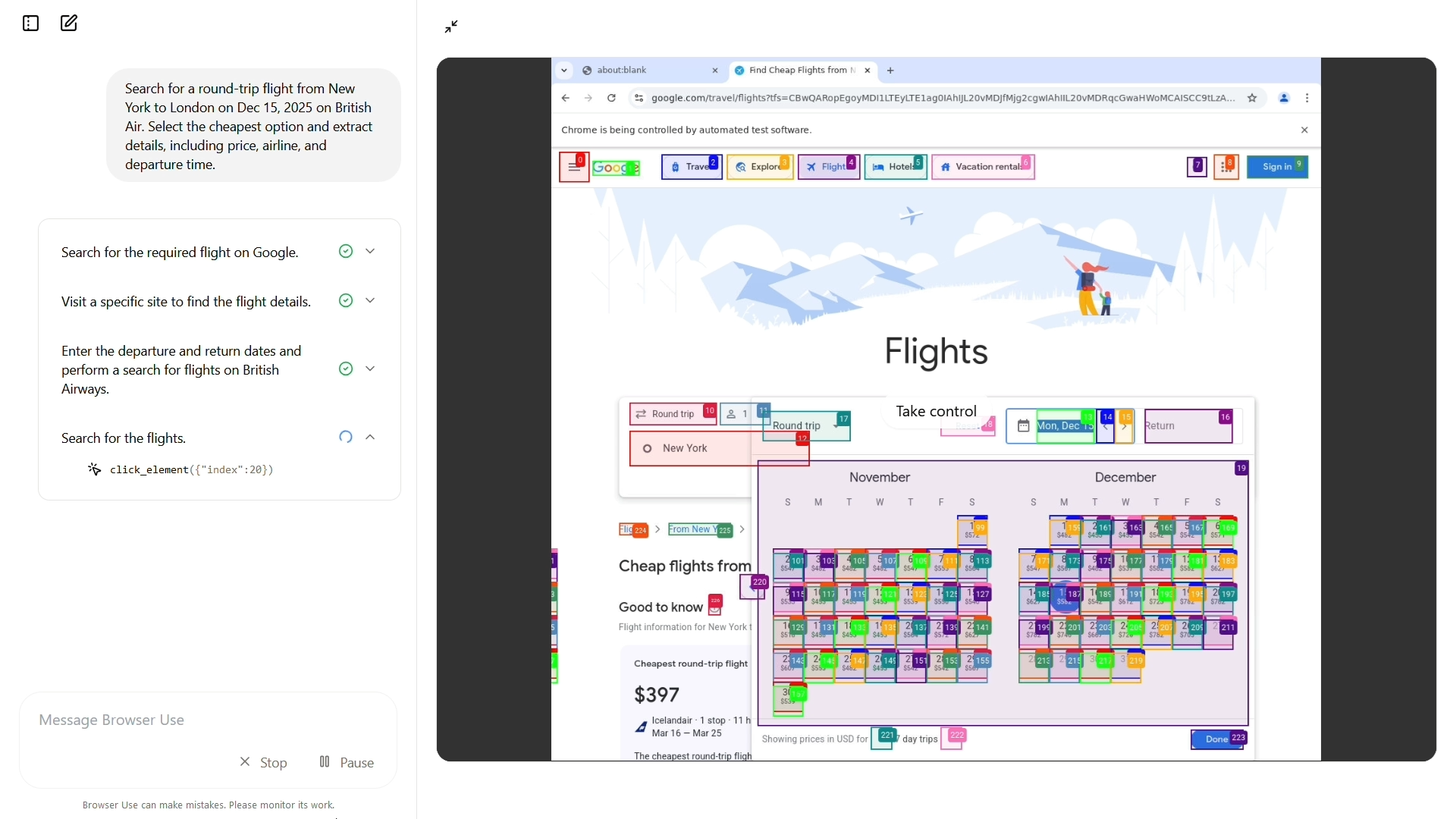
OpenAI's Operator launched as a research preview for ChatGPT Pro subscribers and immediately became the benchmark for browser automation. Powered by their Computer-Using Agent (CUA) model, Operator can handle tasks like booking flights, ordering groceries, comparing prices, and filling out online forms.
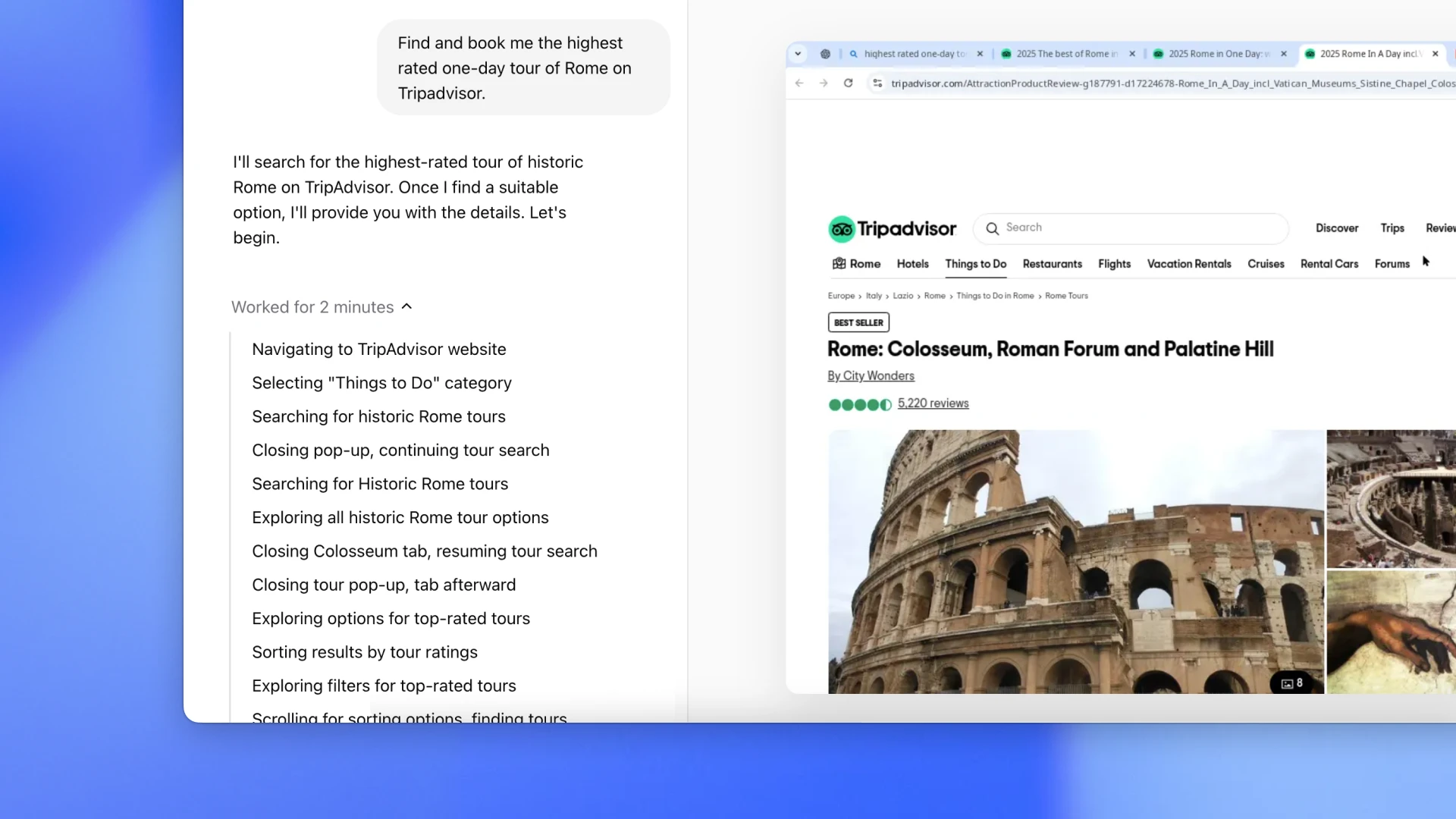
In my testing, Operator achieved strong results on web navigation benchmarks and handled straightforward browser tasks reliably. The interface is polished, with a chat panel on the left and a visible browser window on the right where you can watch the agent work. When it encounters challenges like CAPTCHAs or needs to enter sensitive information, it hands control back to you.
The main limitation is the $200 per month price tag attached to ChatGPT Pro, though this includes access to OpenAI's entire suite of tools. Operator is also limited to browser-based tasks and can't yet interact with desktop applications.
Claude's Computer Use takes a different approach by giving AI control over your entire desktop, not just a browser. Running in a Docker container for security, Claude can interact with any application, navigate file systems, run terminal commands, and complete tasks across multiple programs.
I've used Computer Use to fill forms from spreadsheet data, download reports from dashboards, and automate repetitive tasks that span several applications. The capability feels genuinely magical when it works—you describe a task and watch as the cursor moves, windows open, and work gets done.
However, Computer Use requires more technical setup than Operator and tends to be slower and more error-prone on complex tasks. The technology is clearly still maturing. At roughly $20 per month through Claude Pro, it's more accessible than Operator, but I'd recommend treating it as an experimental capability rather than a production tool.
Browser Use deserves mention as an open-source alternative that supports multiple AI models. If you're a developer who wants maximum flexibility and control, Browser Use lets you integrate browser automation into your own applications without depending on a specific vendor.
Workflow Automation Agents
For non-developers, the most practical AI agents are those that automate repetitive workflows across business applications. This is where I've seen some of the most dramatic time savings.
Lindy AI has impressed me with its ability to create AI "employees" that handle specific tasks autonomously. Unlike traditional automation tools that rely on rigid if-then rules, Lindy's agents can understand context, make decisions, and adapt to changing situations.
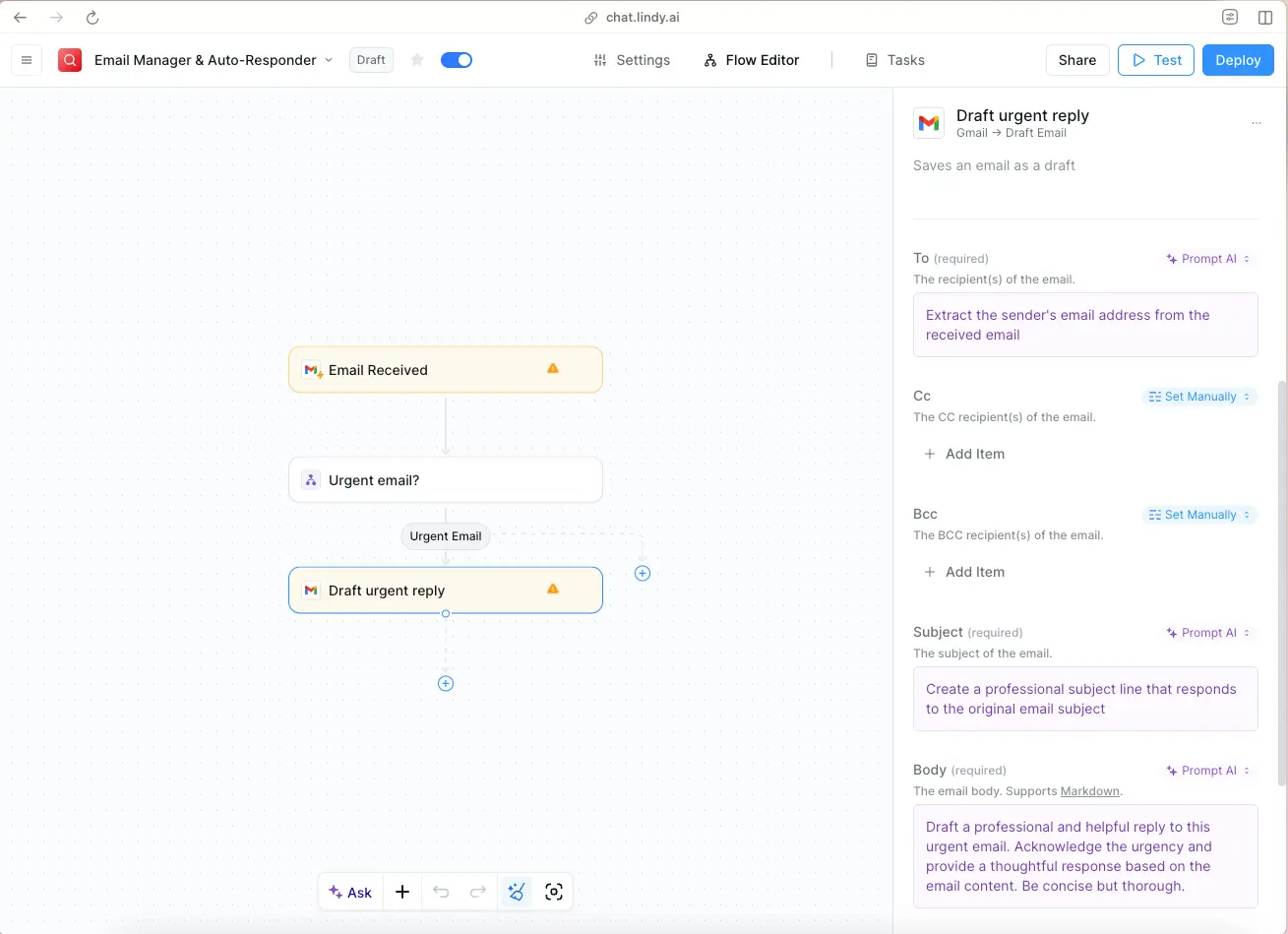
Setting up a Lindy agent is surprisingly straightforward. You describe what you want the agent to do in natural language, choose from over 5,000 integrations (Gmail, Slack, Salesforce, Notion, and many more), and the platform generates a working automation in minutes. I created an email triage agent that categorizes incoming messages, drafts responses, and escalates important items—all without writing a single line of code.
Users report saving significant time on tasks like lead qualification, customer support triage, meeting scheduling, and data entry. One testimonial mentioned handling 36% of all support tickets with AI after processing over 6,000 emails.
The pricing starts at $49.99 per month, which is premium compared to traditional automation tools but justified if you're automating tasks that currently require human judgment.
n8n appeals to more technical users who want fine-grained control over their automation workflows. It's an open-source, self-hostable platform that combines visual workflow building with the ability to write custom code when needed.
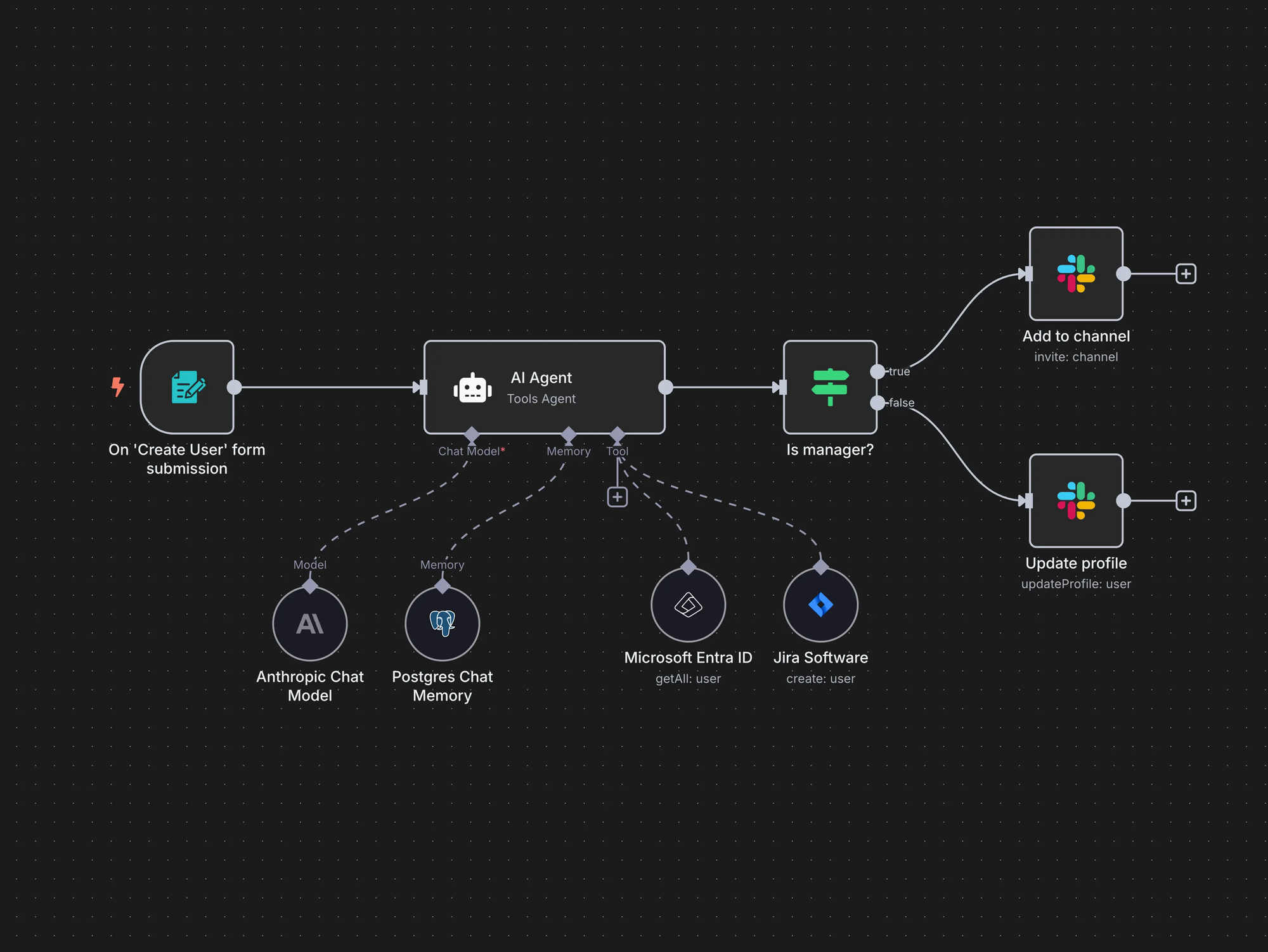
What makes n8n special for AI workflows is its LangChain integration, which lets you build multi-step AI agent systems with memory, tools, and guardrails. You can create workflows where AI makes decisions, but humans approve critical actions before they execute. This human-in-the-loop approach is essential for high-stakes business processes.
The learning curve is steeper than Lindy, but the flexibility is unmatched. Technical teams can prototype AI automations in hours and deploy them with confidence. The self-hosted option is particularly valuable for companies with strict data privacy requirements.
n8n offers a free self-hosted option and cloud plans starting at $20 per month.
General-Purpose Autonomous Agents
Several AI agents position themselves as general-purpose autonomous systems that can handle virtually any task. The reality is more nuanced than the marketing suggests.
Manus AI generated enormous buzz when it launched in March 2025, with some calling it China's answer to autonomous AI. The platform claims to be the first truly autonomous general agent, capable of handling everything from travel planning to data analysis to content creation with minimal human guidance.
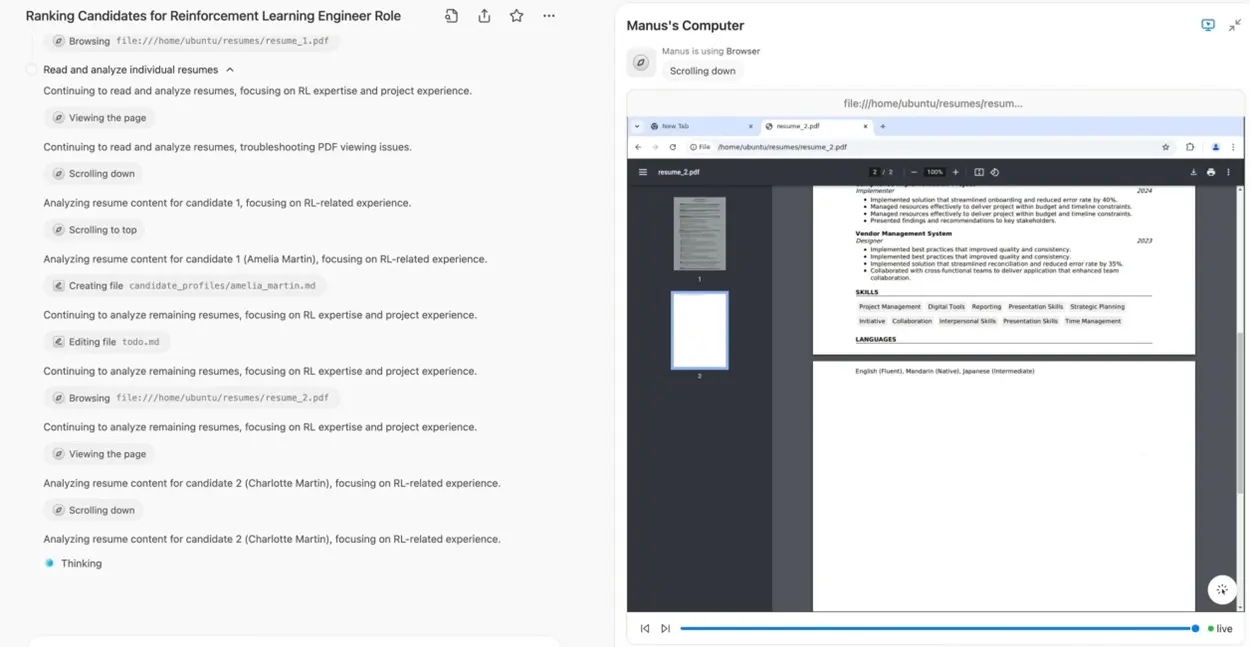
In testing, Manus performed impressively on structured tasks like compiling research lists, analyzing spreadsheets, and planning itineraries. The "Manus's Computer" window lets you observe what the agent is doing and intervene at any point, which provides useful transparency.
Where Manus struggles is with tasks requiring nuanced judgment or domain expertise. It occasionally takes shortcuts (the agent literally told one tester it "got lazy" when cutting corners on a research task) and can miss important details. The platform also raises data privacy questions given its Chinese origins, which may concern some business users.
Meta announced plans to acquire Manus in December 2025 for a reported $2-3 billion, so the platform's future direction remains uncertain. I'd recommend trying it for specific use cases but wouldn't bet my business on it yet.
Sintra AI offers a different approach with a team of specialized AI agents, each assigned to specific business functions like marketing, customer support, sales, or data analysis. These agents work under a central "Brain AI" that maintains brand context, files, tone, and preferences across interactions.
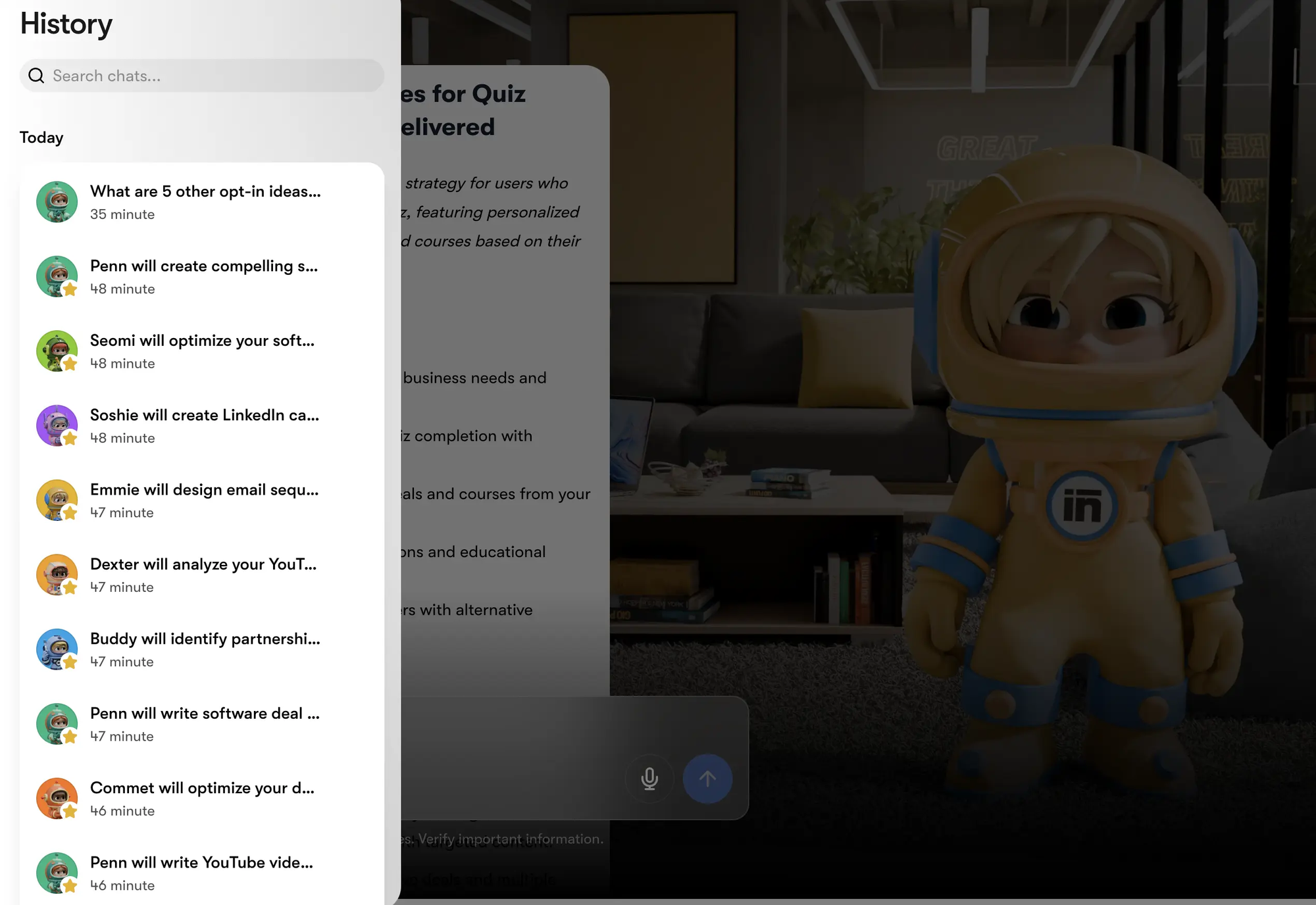
For entrepreneurs and small business owners who need AI assistance across multiple functions, Sintra's team-based approach makes sense. You're not relying on a single generalist agent to do everything—you have specialists that understand their domains.
The platform moves beyond simple prompt-and-response by providing agents that can anticipate tasks, suggest improvements, and automate routine work. Pricing varies based on team size and usage.
What AI Agents Still Can't Do Well
I want to be honest about the limitations I've encountered, because setting realistic expectations will save you frustration.
- Complex multi-step reasoning under uncertainty remains challenging for even the best agents. When a task requires making judgment calls with incomplete information, agents often struggle or request human guidance. This is appropriate – you probably don't want AI making high-stakes decisions without oversight, but it means agents work best for well-defined tasks with clear success criteria.
- Learning from mistakes within a session is inconsistent. Some agents repeat the same errors multiple times before adjusting their approach, while others give up too quickly when encountering obstacles. The self-correction capabilities vary significantly across tools and use cases.
- Maintaining coherent long-term context becomes problematic as sessions extend or complexity increases. I've had agents lose track of project requirements halfway through a task, requiring me to re-explain context that was already established.
- Handling novel or creative tasks often produces disappointing results. Agents excel at tasks where patterns can be recognized and replicated, but struggle when genuine creativity or innovation is required. If you're hoping an agent will generate breakthrough ideas, you'll likely be disappointed.
- Security and privacy remain legitimate concerns. These agents need access to your data, accounts, and systems to function. A misconfigured agent could expose sensitive information or take unintended actions. The 62% of practitioners who identified security as a top challenge in deploying AI agents aren't being paranoid, they're being prudent.
How to Choose the Right AI Agent for Your Needs
After all this testing, I've developed a framework for matching AI agents to specific use cases.
The Real Cost of AI Agents
Let me break down what you'll actually spend to use these tools effectively.
For coding agents, expect to pay $20-40 per month for individual subscriptions (Cursor Pro, Claude Code via Claude Pro, GitHub Copilot). Teams will pay more, typically $30-50 per seat. API usage for power users can add $50-200 per month depending on volume.
For browser and computer use agents, the entry point is Operator at $200 per month through ChatGPT Pro. Claude's Computer Use comes with the $20 Claude Pro subscription but has usage limits. Browser Use is free if you self-host with your own API keys.
For workflow automation, Lindy starts at $49.99 per month. n8n offers free self-hosting or cloud plans from $20 per month. Traditional automation tools like Zapier ($19.99 per month) can be combined with AI through integrations.
The total cost for a power user running multiple AI agents across different use cases could easily reach $300-500 per month. For businesses, the calculation should compare this cost against the time saved and productivity gained. Many users report breaking even within the first month by automating tasks that previously required hours of manual work.
What's Coming Next
The AI agent landscape is evolving rapidly, and several trends will shape 2026 and beyond.
- Multi-agent systems are becoming more sophisticated. Instead of relying on a single powerful agent, the most advanced systems now coordinate teams of specialized agents that collaborate on complex workflows. Google's Antigravity platform and various open-source frameworks are pushing this direction.
- Better governance and observability tools are emerging to address enterprise concerns. Companies like Kore.ai are building platforms that manage fleets of AI agents with proper oversight, auditing, and control mechanisms.
- Industry-specific agents are gaining traction over general-purpose tools. Healthcare, finance, legal, and other regulated industries are seeing specialized agents designed for their unique requirements and compliance frameworks.
- Pricing competition is intensifying. Devin's price drop from $500 to $20 per month signals that AI agent capabilities will become increasingly affordable. Google is offering Claude Opus 4.5 completely free through Antigravity during its preview period.
- Open-source alternatives continue to mature. Tools like Browser Use, CrewAI, and various LangChain-based frameworks offer capable agent capabilities without vendor lock-in.
My Honest Recommendation
If you've made it this far, you're probably wondering what I actually use day to day. Here's my current setup:
For coding, I use Claude Code for large refactoring projects and complex multi-file changes. I keep Cursor open for daily editing and quick iterations. I've found this combination gives me the best of both worlds – Claude Code's intelligence for heavy lifting and Cursor's speed for everything else.
For workflow automation, I've built several Lindy agents for email processing and research tasks. The time saved pays for the subscription many times over.
For browser automation, I experiment with Operator and Claude's Computer Use for specific tasks, but I don't rely on them for anything critical yet. The technology is impressive but not quite production-ready for my use cases.
I've deliberately avoided investing heavily in general-purpose autonomous agents. The specialized tools consistently outperform the generalists, and I'd rather assemble a toolkit of best-in-class options than depend on one agent to do everything.
My advice is to start with one tool that addresses your most painful repetitive task. Get comfortable with how AI agents work, understand their limitations, and gradually expand your usage as you develop intuition for what they can and can't handle.
The AI agents that actually work in 2026 aren't magic—they're powerful tools that require thoughtful application. Used well, they can genuinely transform your productivity. Used carelessly, they'll generate frustration and disappointment.
FAQ
What exactly is an AI agent, and how is it different from ChatGPT?
An AI agent is software that can pursue goals independently by taking actions, not just responding to prompts. While ChatGPT waits for you to ask questions and provides answers, an AI agent can browse websites, execute code, interact with applications, and complete multi-step tasks without requiring your input at every stage. Think of the difference between having a conversation with an expert versus delegating a task to an assistant who goes away and delivers results.
How much do AI agents cost in 2026?
Costs vary widely depending on the type of agent. Coding agents like Cursor and Claude Code run $20-40 per month for individual users. Browser automation through OpenAI's Operator requires the $200 per month ChatGPT Pro subscription. Workflow automation tools like Lindy start around $50 per month. A power user running multiple agents might spend $300-500 monthly, though many report the productivity gains justify the investment within weeks.
Are AI agents secure enough for business use?
Security remains a legitimate concern. About 62% of practitioners identify security as a top challenge in deploying AI agents. These tools require access to your data, accounts, and systems to function effectively. Best practices include using agents with enterprise-grade security certifications, enabling privacy modes where available, limiting agent access to only necessary data, and maintaining human oversight for sensitive operations. Self-hosted options like n8n provide more control for organizations with strict compliance requirements.
Can AI agents replace developers or other workers?
Not anytime soon. Even the best AI coding agents achieve only 60-80% accuracy on standardized benchmarks, meaning human review remains essential. AI agents are best understood as productivity multipliers that handle routine work while humans focus on complex judgment, creativity, and oversight. The 85% of developers using AI tools are becoming more productive, not being replaced.
Which AI coding agent is best for beginners?
For developers new to AI-assisted coding, Cursor offers the gentlest learning curve because it looks and feels like VS Code with added AI capabilities. The visual interface and immediate feedback make it more approachable than terminal-based tools like Claude Code. Start with Cursor's free tier to get comfortable, then explore other options as your needs evolve.
What can browser automation agents actually do?
Browser agents like OpenAI's Operator can navigate websites, fill out forms, compare products across sites, book reservations, extract information from web pages, and complete multi-step online tasks. Current limitations include difficulty with CAPTCHAs, complex login flows, and sites with unusual interfaces. They work best for straightforward, repetitive browser tasks and require human intervention for security-sensitive actions like entering payment information.
How do I know if an AI agent is right for a specific task?
AI agents work best for tasks that are repetitive, have clear success criteria, involve multiple steps across different systems, and don't require novel creative solutions. They struggle with tasks requiring nuanced judgment, handling unexpected edge cases, or making high-stakes decisions with incomplete information. A good rule of thumb: if you could write clear instructions for a human assistant to complete the task, an AI agent can probably handle it.
What's the difference between Cursor and Claude Code?
Cursor is an AI-powered IDE that integrates AI assistance directly into your editing experience—autocomplete, chat, and code generation all happen within a visual editor. Claude Code is a terminal-based agent that operates from the command line and excels at larger, more autonomous tasks. Many developers use both: Cursor for daily editing and quick iterations, Claude Code for complex refactoring and multi-file changes.
Are there free AI agents worth using?
Several capable options exist at no cost. Google's Antigravity offers Claude Opus 4.5 completely free during its preview period, though rate limits apply. Browser Use is open-source and free to self-host with your own API keys. n8n can be self-hosted for free. GitHub Copilot offers limited free access for individual developers. These free options are excellent for learning and evaluation, though production use typically requires paid tiers.
How do workflow automation agents like Lindy compare to Zapier?
Traditional automation tools like Zapier use rigid if-then rules to connect applications. When conditions change or edge cases appear, these workflows break. AI-powered agents like Lindy can understand context, make decisions, and adapt to variations without requiring you to anticipate every scenario. Lindy costs more ($50 per month versus Zapier's $20), but handles ambiguity that would require constant manual intervention with traditional tools.
What should I watch out for when using AI agents?
Common pitfalls include expecting agents to handle novel creative tasks, trusting agent outputs without review for sensitive operations, underestimating setup time for complex workflows, giving agents more access than necessary, and treating agent failures as complete blockers rather than learning opportunities. Start with low-stakes tasks, verify outputs carefully, and gradually expand scope as you develop intuition for each agent's capabilities.
Will AI agents get significantly better in the next year?
Almost certainly. The trajectory from 2024 to 2026 showed dramatic improvements in reliability, capability, and accessibility. Multi-agent systems, better reasoning capabilities, and improved tool use are all active research areas. Expect agents to handle more complex tasks with less human oversight, though truly autonomous general-purpose AI remains further out. The practical advice is to adopt current tools where they add value while staying informed about emerging capabilities.
How do enterprises govern AI agents at scale?
Large organizations are adopting platforms like Kore.ai and Agentforce that provide orchestration, observability, and governance layers for managing multiple AI agents. Key capabilities include role-based access controls, audit trails for agent actions, human approval workflows for sensitive operations, and monitoring dashboards for performance and cost. By 2026, Gartner projects that 40% of enterprise applications will embed task-specific AI agents, making governance essential.
What's the best way to get started with AI agents?
Identify one repetitive task that consumes significant time, choose a tool specifically designed for that use case, start with a limited scope, and expand gradually. For coding, try Cursor's free tier. For workflow automation, explore Lindy's templates. For research tasks, experiment with Claude or ChatGPT's built-in browsing capabilities. The key is building intuition through hands-on experience rather than trying to adopt everything at once.
Related Articles
 Dani
Dani
 Mark
Mark
 Dani
Dani